Webpack and Vite Interview Questions: Frontend Build Tools Explained
12 webpack, Vite and frontend build tool interview questions with config examples: why we bundle, entry/output/loaders/plugins, tree shaking, code splitting and lazy loading, content hashing, HMR, source maps, Babel vs esbuild vs SWC, Vite vs webpack and bundle analysis.
Modern frontend code goes through a build step before it reaches the browser. Interviewers ask about webpack and Vite to see whether you understand what that step does and how it affects performance. Here are 12 build tool interview questions with answers and config examples.
Bundling basics#
Q1. Why do we need a bundler or build tool?#
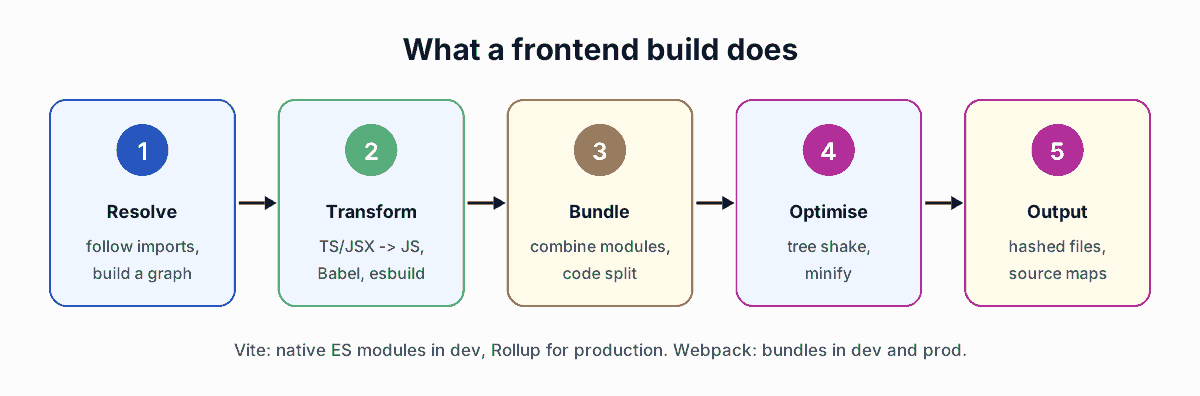
Answer: browsers can load ES modules natively, but production apps still use a build step to:
- Transform code browsers don't understand: TypeScript, JSX, Vue/Svelte single-file components, Sass and newer syntax for older targets.
- Bundle hundreds of modules and
node_modulespackages into fewer files, reducing request waterfalls. - Optimise: tree shaking, minification, code splitting, image and CSS processing.
- Add cache-friendly names with content hashes, plus source maps for debugging.
- Provide a dev server with hot module replacement and environment variables.
Q2. Explain webpack's core concepts#
// webpack.config.js
const HtmlWebpackPlugin = require("html-webpack-plugin");
const MiniCssExtractPlugin = require("mini-css-extract-plugin");

module.exports = {
  mode: "production",
  entry: "./src/index.tsx",
  output: {
    path: __dirname + "/dist",
    filename: "[name].[contenthash].js",
    clean: true,
  },
  resolve: { extensions: [".tsx", ".ts", ".js"] },
  module: {
    rules: [
      { test: /\.tsx?$/, use: "babel-loader", exclude: /node_modules/ },
      { test: /\.css$/, use: [MiniCssExtractPlugin.loader, "css-loader"] },
      { test: /\.(png|svg|jpg)$/, type: "asset" },
    ],
  },
  plugins: [new HtmlWebpackPlugin({ template: "./public/index.html" }), new MiniCssExtractPlugin()],
  optimization: { splitChunks: { chunks: "all" } },
};| Concept | Meaning |
|---|---|
| Entry | Where webpack starts building the dependency graph |
| Output | Where and how bundles are written |
| Loaders | Transform individual files into modules (TS, CSS, images) |
| Plugins | Hook into the whole build: generate HTML, extract CSS, define env vars, analyse |
| Mode | development or production defaults (minification, optimisations) |
Q3. What's the difference between a loader and a plugin?#
Answer: a loader works on one file at a time, transforming its source as it's imported (for example sass-loader turns .scss into CSS, babel-loader transpiles JS). Loaders in a use array run right to left (bottom to top). A plugin taps into the compiler's lifecycle hooks and can act on the whole compilation: emitting files, optimising chunks, injecting variables. In Vite and Rollup, plugins handle both roles through hooks like transform and generateBundle.
Optimisation#
Q4. What is tree shaking? Why doesn't it always work?#
// utils.js
export const formatDate = (d) => d.toISOString();
export const heavyChart = () => { /* 50KB of code */ };

// app.js
import { formatDate } from "./utils";   // heavyChart is dropped from the bundle
Answer: tree shaking is dead-code elimination based on static import/export analysis: unused exports are left out of the bundle. It can fail when:
- Code uses CommonJS (
require/module.exports), which is dynamic and hard to analyse. - Modules have side effects at import time, so the bundler must keep them. Libraries declare
"sideEffects": false(or a list of files such as CSS) inpackage.jsonto allow safe removal. - You import a whole namespace or barrel file in a way the tool can't trace, or the transpiler converts ES modules to CommonJS before bundling.
Prefer ES module builds of libraries (lodash-es over lodash) and named imports.
Q5. What is code splitting, and how do you implement it?#
import { lazy, Suspense } from "react";

// Route-level split: the dashboard chunk loads only when visited
const Dashboard = lazy(() => import("./pages/Dashboard"));

// On-demand split: load a heavy library only when needed
async function exportPdf(data) {
  const { jsPDF } = await import("jspdf");
  new jsPDF().text(JSON.stringify(data), 10, 10).save("report.pdf");
}
Answer: code splitting breaks the bundle into chunks that load on demand, so the initial download only contains what the first screen needs. The dynamic import() creates a split point. Common strategies: split by route, by heavy feature (editors, charts, PDF), and a separate vendor chunk for rarely changing dependencies (webpack's splitChunks, Rollup's manualChunks). Don't over-split: too many tiny chunks create request overhead. See React performance interview questions.
Q6. Why do build tools add hashes to file names?#
Answer: with [contenthash], a file's name changes only when its content changes (main.3f9a1c.js). That lets you serve assets with Cache-Control: max-age=31536000, immutable: browsers and CDNs cache them forever, and a deploy produces new names for changed files only, so unchanged vendor chunks stay cached. index.html is served with no-cache so it always points to the latest names. Details in HTTP caching interview questions.
Q7. What do minification and other production optimisations do?#
- Minification (Terser, esbuild, SWC): removes whitespace and comments, shortens local variable names, and simplifies expressions.
- Dead-code removal:
if (process.env.NODE_ENV !== "production")blocks are replaced with constants and dropped. - Scope hoisting (module concatenation): puts modules into one scope to reduce wrapper code.
- CSS: extraction into files, minification, removing unused CSS.
- Assets: small images inlined as data URIs, others emitted with hashes; images compressed.
- Servers or CDNs then apply Brotli or gzip compression.
Dev experience and tools#
Q8. What is Hot Module Replacement (HMR)?#
Answer: HMR swaps updated modules into the running app without a full page reload, keeping application state (form inputs, open modals). The dev server watches files, rebuilds the changed module and sends an update over a WebSocket; the HMR runtime replaces the module and re-runs affected code. Frameworks add integrations such as React Fast Refresh to preserve component state. If a module can't accept the update, the page falls back to a full reload.
Q9. Why is Vite so fast in development? How does it differ from webpack?#
| webpack | Vite | |
|---|---|---|
| Dev server | Bundles the whole app before serving; rebuilds affected parts on change | Serves source as native ES modules; transforms files on demand as the browser requests them |
| Dependencies | Bundled with app code | Pre-bundled once with esbuild (very fast, written in Go) and cached |
| Startup on large apps | Grows with app size | Near-instant; only the current page's modules are processed |
| HMR | Re-bundles affected chunks | Invalidates only the changed module; stays fast as the app grows |
| Production build | webpack itself | Rollup (moving to the Rust-based Rolldown) for optimised bundles |
| Config | Powerful but verbose; huge plugin ecosystem | Sensible defaults, smaller config, Rollup-compatible plugins |
webpack remains common in large existing codebases and when you need Module Federation or very custom pipelines; Vite is the default choice for most new projects. Turbopack and Rspack are other Rust-based alternatives.
Q10. What are Babel, esbuild and SWC?#
Answer: they are transpilers that convert modern JavaScript, TypeScript and JSX into code target browsers can run. Babel (JavaScript) is the most configurable, with a huge plugin ecosystem. esbuild (Go) and SWC (Rust) are 10 to 100 times faster and power tools like Vite and Next.js. Note that esbuild and SWC strip TypeScript types without type-checking, so run tsc --noEmit separately in CI. Syntax transforms don't add missing APIs; polyfills (core-js) do that, based on a browserslist target.
Q11. What are source maps? Should you ship them to production?#
// vite.config.js
export default {
  build: { sourcemap: "hidden" },   // generate .map files without a sourceMappingURL comment
};
// webpack: devtool: "eval-cheap-module-source-map" (dev), "source-map" or "hidden-source-map" (prod)
Answer: a source map maps minified, bundled code back to the original files and lines, so DevTools and error trackers show readable stack traces. In development, use fast options (eval-based). In production, many teams generate hidden source maps and upload them privately to an error tracker such as Sentry, so stack traces are readable without exposing source code publicly.
Q12. How do you analyse and reduce bundle size?#
- Measure:
webpack-bundle-analyzer,rollup-plugin-visualizerorsource-map-explorershow what's in each chunk; set size budgets in CI. - Replace heavy dependencies:
date-fnsordayjsinstead of moment, native APIs instead of utility libraries. - Import precisely: named imports from ES module builds so tree shaking works.
- Split routes and heavy features with dynamic
import(). - Avoid duplicates: dedupe multiple versions of the same package.
- Target modern browsers with an up-to-date
browserslistto avoid unnecessary transpilation and polyfills.
Smaller JavaScript improves load time and INP; see Core Web Vitals interview questions.
Quick revision#
| Term | One-liner |
|---|---|
| Loader vs plugin | Per-file transform vs whole-build hook |
| Tree shaking | Drop unused ES module exports; mind side effects |
| Code splitting | Dynamic import() creates on-demand chunks |
[contenthash] | Long-term caching with safe updates |
| HMR | Swap modules without reload, keep state |
| Vite | Native ESM dev server + esbuild; Rollup for production |
Related: ES6 features interview questions and frontend testing interview questions.
Key takeaways#
- Build tools transform, bundle and optimise code, and add hashed names and source maps.
- Loaders transform individual files; plugins hook into the whole build.
- Tree shaking needs ES modules and side-effect-free code; code splitting uses dynamic
import(). - Vite is fast in development because it serves native ES modules and pre-bundles dependencies with esbuild.
- Measure bundles with an analyser before optimising.