HTTP Caching, Service Workers and PWA Interview Questions
12 HTTP caching, service worker and PWA interview questions with code: Cache-Control directives, ETag and 304 revalidation, cache busting, the service worker lifecycle, cache-first vs network-first vs stale-while-revalidate, offline support and the web app manifest.
The fastest request is the one you never make. Caching questions show up in frontend interviews because they connect performance, deployment and offline support. Here are 12 HTTP caching, service worker and PWA interview questions, from fresher to mid level.
HTTP caching#
Q1. How does browser HTTP caching work?#
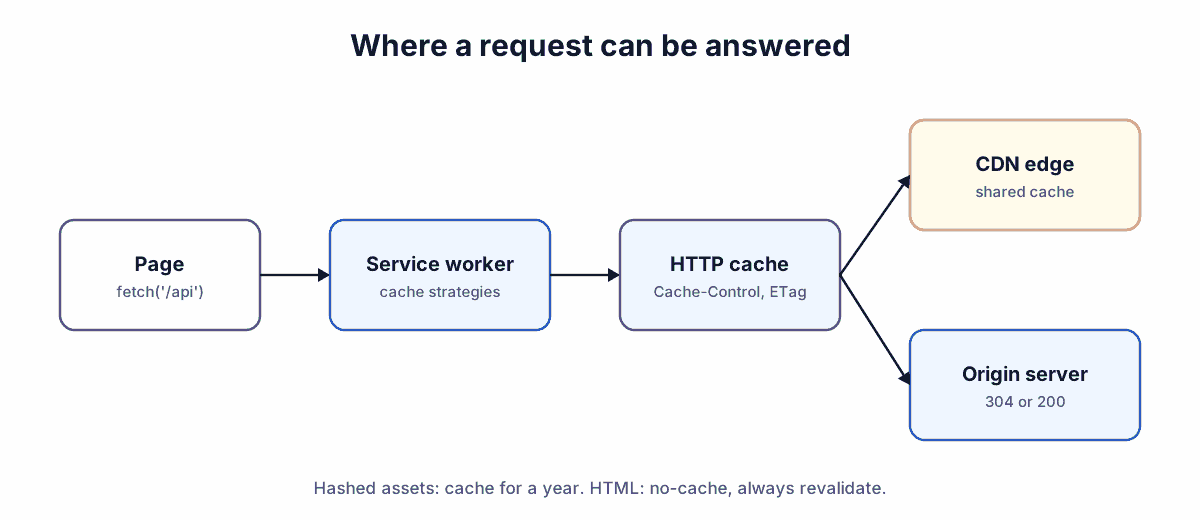
Answer: when a response arrives, the browser stores it according to its headers. For the next request to the same URL it checks:
- Fresh? If the response is still within its
max-age, it's used directly with no network request ("from disk cache" / "from memory cache" in DevTools). - Stale? The browser revalidates: it sends a conditional request (
If-None-Match/If-Modified-Since). If unchanged, the server replies304 Not Modifiedwith no body and the cached copy is reused. - Not cacheable or changed? A full
200response is downloaded.
Shared caches such as CDNs and proxies follow the same headers.
Q2. Explain the main Cache-Control directives#
| Directive | Meaning |
|---|---|
max-age=N | Fresh for N seconds |
s-maxage=N | Freshness for shared caches (CDN) only |
no-cache | May be stored, but must be revalidated before every use |
no-store | Never store at all (sensitive data) |
public / private | May be stored by shared caches / only by the user's browser |
immutable | Will never change, so don't revalidate even on reload |
stale-while-revalidate=N | Serve a stale copy for N seconds while refreshing in the background |
must-revalidate | Once stale, must not be used without successful revalidation |
no-cache does not mean "don't cache". It means "always check with the server first". Use no-store to prevent storage.
Q3. What are ETag and Last-Modified?#
# First response
HTTP/1.1 200 OK
Cache-Control: no-cache
ETag: "a1b2c3"

# Later request
GET /api/profile
If-None-Match: "a1b2c3"

# Unchanged
HTTP/1.1 304 Not Modified
Answer: they are validators. An ETag is a fingerprint of the content; Last-Modified is a timestamp. The browser sends them back as If-None-Match or If-Modified-Since, and the server returns 304 if nothing changed, saving the body download. ETags are more precise because timestamps have one-second resolution.
Q4. What caching strategy would you use for a typical SPA?#
| Resource | Header | Why |
|---|---|---|
index.html | Cache-Control: no-cache | Always revalidate so users get the latest asset references |
app.3f9a1c.js, styles.8b2e.css (hashed) | Cache-Control: public, max-age=31536000, immutable | The name changes when content changes, so cache forever |
| API responses with user data | private, no-cache or no-store | Personal and changing data |
| Images and fonts without hashes | Moderate max-age plus an ETag | Balance freshness and speed |
This pattern is called cache busting with content hashes: build tools put a hash of the file contents in the file name, so a deploy produces new URLs while unchanged files remain cached. See build tools interview questions.
Q5. What's the difference between memory cache, disk cache, CDN cache and the bfcache?#
- Memory cache: very fast, for resources used in the current page or tab; cleared when the tab closes.
- Disk (HTTP) cache: persists across sessions and follows
Cache-Control. - CDN / edge cache: a shared cache near the user, controlled by
s-maxage,publicand CDN rules, and purged on deploy. - Back/forward cache (bfcache): keeps an entire page snapshot in memory so Back and Forward are instant.
unloadlisteners andCache-Control: no-storeon the document can prevent it.
Service workers#
Q6. What is a service worker?#
Answer: a service worker is a JavaScript file that runs in the background, separate from the page, and acts as a programmable network proxy between your app and the network. It can intercept requests, serve cached responses, work offline, receive push messages and do background sync. It has no DOM access, is event-driven (the browser stops it when idle), works only on HTTPS (or localhost), and controls pages within its scope.
// main.js
if ("serviceWorker" in navigator) {
  window.addEventListener("load", () => {
    navigator.serviceWorker.register("/sw.js", { scope: "/" });
  });
}
Q7. Explain the service worker lifecycle#
// sw.js
const CACHE = "app-v2";
const PRECACHE = ["/", "/offline.html", "/app.3f9a1c.js", "/styles.8b2e.css"];

self.addEventListener("install", (event) => {
  // Pre-cache the app shell; install fails if any file fails
  event.waitUntil(caches.open(CACHE).then((c) => c.addAll(PRECACHE)));
});

self.addEventListener("activate", (event) => {
  // Delete caches from old versions
  event.waitUntil(
    caches.keys().then((keys) =>
      Promise.all(keys.filter((k) => k !== CACHE).map((k) => caches.delete(k)))
    )
  );
});- Register: the page calls
register(). - Install: fires once per new version; typically pre-caches files.
- Waiting: a new version waits while pages controlled by the old version are still open.
- Activate: the new version takes over; clean up old caches here.
- Fetch / message / push: the active worker handles events for pages in scope.
The browser checks for an updated sw.js on navigation; a byte-different file starts the cycle again.
Q8. What are skipWaiting and clients.claim?#
Answer: self.skipWaiting() (called during install) makes the new worker activate immediately instead of waiting for old tabs to close. self.clients.claim() (called during activate) makes it control already-open pages without a reload. Together they speed up updates, but they can mix an old page with a new worker and new caches. A safer UX is to show an "Update available, reload" prompt and call skipWaiting when the user accepts.
Q9. Explain the common service worker caching strategies#
self.addEventListener("fetch", (event) => {
  const { request } = event;
  if (request.method !== "GET") return;          // let the network handle it

  if (request.mode === "navigate") {
    // Network first for HTML: fresh when online, cached or offline page when not
    event.respondWith(
      fetch(request).catch(async () =>
        (await caches.match(request)) ?? caches.match("/offline.html"))
    );
    return;
  }

  // Cache first for static assets
  event.respondWith(
    caches.match(request).then((cached) => cached ?? fetch(request))
  );
});| Strategy | How it works | Use for |
|---|---|---|
| Cache first | Cache, then network on a miss | Hashed JS/CSS, fonts, images |
| Network first | Network, falling back to cache when offline | HTML, frequently updated API data |
| Stale-while-revalidate | Return the cache immediately, update it from the network in the background | Avatars, non-critical API data |
| Network only / cache only | One source only | Payments, analytics / pre-cached shell |
Libraries like Workbox implement these strategies, pre-caching and expiry rules so you don't hand-write them.
Q10. What are common service worker pitfalls?#
- Caching
index.htmlwith cache-first, so users are stuck on an old version. - Never deleting old caches, which wastes storage.
- Caching responses with errors or opaque cross-origin responses without checking.
- Serving
sw.jsitself with a longmax-age(browsers now cap this, but useno-cache). - Caching authenticated or personal API data on shared devices.
- Forgetting that you need a plan to unregister a broken worker (a "kill switch" version).
Progressive Web Apps#
Q11. What is a PWA, and what makes it installable?#
// manifest.webmanifest (linked with <link rel="manifest" href="/manifest.webmanifest">)
{
  "name": "JioCoder Notes",
  "short_name": "Notes",
  "start_url": "/?source=pwa",
  "display": "standalone",
  "background_color": "#ffffff",
  "theme_color": "#2563eb",
  "icons": [
    { "src": "/icons/192.png", "sizes": "192x192", "type": "image/png" },
    { "src": "/icons/512.png", "sizes": "512x512", "type": "image/png", "purpose": "any maskable" }
  ]
}
Answer: a Progressive Web App is a website that uses modern APIs to feel like an app: reliable offline (service worker), installable (manifest) and engaging (push, app-like display). Installability generally requires HTTPS, a web app manifest with a name, icons, start_url and display, and in some browsers a service worker. Chromium browsers fire beforeinstallprompt, which lets you show a custom install button.
Q12. How would you add offline support to an existing app?#
- Serve over HTTPS and fix your HTTP caching headers first.
- Register a service worker that pre-caches the app shell (HTML, JS, CSS, icons) and an offline fallback page.
- Choose a strategy per request type (Q9).
- Store user data in IndexedDB and queue writes while offline, syncing when back online (Background Sync where supported, or on the
onlineevent). - Show connection state in the UI and handle conflicts when syncing.
- Version caches, show an update prompt, and test offline in DevTools (Application panel and "Offline" throttling).
Storage details are in browser storage interview questions.
Quick revision#
| Concept | One-liner |
|---|---|
no-cache vs no-store | Revalidate every time vs never store |
| ETag + 304 | Reuse the cached body if unchanged |
| Hashed assets | Cache for a year with immutable |
| Service worker | Programmable proxy: install, waiting, activate, fetch |
| Strategies | Cache first, network first, stale-while-revalidate |
| PWA | HTTPS + manifest + service worker |
Related: Core Web Vitals interview questions and critical rendering path interview questions.
Key takeaways#
- Fresh responses skip the network; stale ones revalidate with ETag or Last-Modified and may get a 304.
- Use
no-cachefor HTML and long-livedimmutablecaching for content-hashed assets. - Service workers are background proxies with an install, waiting and activate lifecycle.
- Pick a caching strategy per resource type, and always version and clean up caches.
- A PWA needs HTTPS and a manifest, with a service worker for offline support.