Frontend Testing Interview Questions: Jest, React Testing Library and Playwright
12 frontend testing interview questions with code: the testing pyramid and trophy, unit vs integration vs E2E tests, Jest and Vitest, React Testing Library queries and userEvent, mocking APIs with MSW, async tests, snapshots, Playwright and code coverage.
Testing questions tell an interviewer whether you can ship changes with confidence. Expect conceptual questions about what to test and practical ones about Jest, React Testing Library and end-to-end tools. Here are 12 frontend testing interview questions with answers and code.
Testing fundamentals#
Q1. What are unit, integration and end-to-end tests?#
| Type | What it tests | Tools | Speed / cost |
|---|---|---|---|
| Unit | One function, hook or small component in isolation | Jest, Vitest | Milliseconds; cheap |
| Integration / component | Several units together, e.g. a form with validation and an API call (mocked) | React Testing Library + Jest/Vitest, MSW | Fast; moderate |
| End-to-end (E2E) | The real app in a real browser, from the user's perspective | Playwright, Cypress | Seconds; expensive and can be flaky |
Static checks (TypeScript, ESLint) catch a whole class of bugs before any test runs.
Q2. What is the testing pyramid, and what is the testing trophy?#
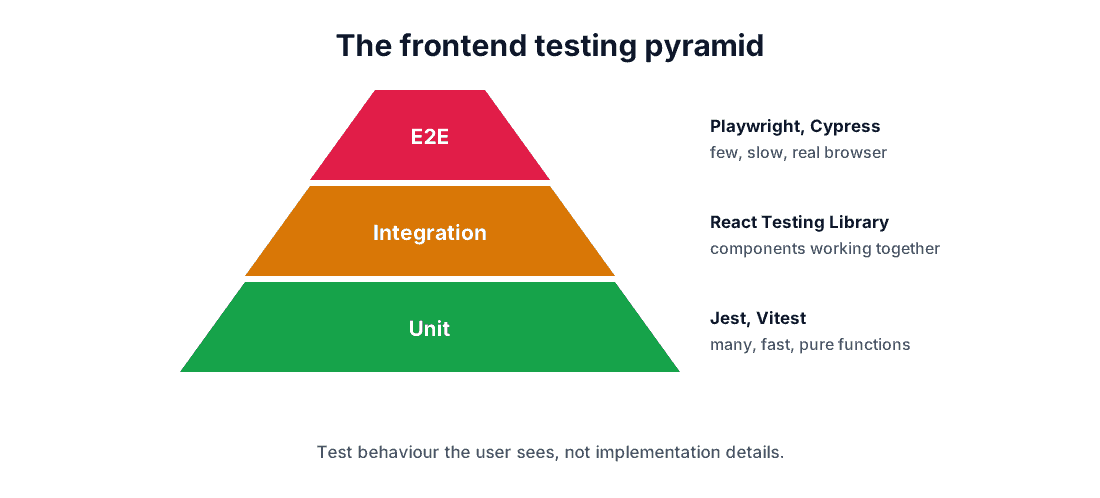
Answer: the pyramid recommends many unit tests, fewer integration tests and very few E2E tests, because lower layers are faster and cheaper. The testing trophy (popularised by Kent C. Dodds) puts static analysis at the base and gives the largest share to integration tests, arguing that they give the most confidence per unit of effort for UI code. In both, E2E tests cover only the critical user journeys like sign-up and checkout.
"The more your tests resemble the way your software is used, the more confidence they can give you." Test behaviour, not implementation details.
Q3. Write a basic unit test with Jest or Vitest#
// price.js
export function applyDiscount(price, percent) {
  if (percent < 0 || percent > 100) throw new RangeError("Invalid percent");
  return Math.round(price * (1 - percent / 100) * 100) / 100;
}

// price.test.js
import { describe, it, expect } from "vitest";   // Jest provides these as globals
import { applyDiscount } from "./price";

describe("applyDiscount", () => {
  it("applies a percentage discount", () => {
    expect(applyDiscount(200, 10)).toBe(180);
  });

  it.each([[99.99, 15, 84.99], [50, 0, 50]])("applyDiscount(%d, %d) = %d", (p, d, out) => {
    expect(applyDiscount(p, d)).toBe(out);
  });

  it("rejects invalid percentages", () => {
    expect(() => applyDiscount(100, 120)).toThrow(RangeError);
  });
});
Use Arrange, Act, Assert, one behaviour per test, and descriptive names. Useful matchers: toBe (same value), toEqual (deep equality), toContain, toHaveBeenCalledWith, toThrow. Vitest has a Jest-compatible API and is a natural choice in Vite projects.
React Testing Library#
Q4. How do you test a React component with React Testing Library?#
import { render, screen } from "@testing-library/react";
import userEvent from "@testing-library/user-event";
import Counter from "./Counter";

test("increments the count when the button is clicked", async () => {
  const user = userEvent.setup();
  render(<Counter initial={2} />);

  await user.click(screen.getByRole("button", { name: /increment/i }));

  expect(screen.getByText("Count: 3")).toBeInTheDocument();
});
Answer: RTL renders the component into a DOM (jsdom) and lets you interact with it the way a user would: find elements by role, label or text, fire realistic events with user-event, and assert on what's visible. It deliberately avoids testing internal state or component instances, so refactors don't break tests. toBeInTheDocument comes from @testing-library/jest-dom.
Q5. What's the difference between getBy, queryBy and findBy? Which query should you prefer?#
| Variant | No match | Use for |
|---|---|---|
getBy... | Throws | Elements that should be present now |
queryBy... | Returns null | Asserting something is absent |
findBy... | Rejects after a timeout | Elements that appear asynchronously (returns a promise) |
Each also has an All form. Query priority: getByRole (with name) > getByLabelText > getByPlaceholderText > getByText > getByDisplayValue > getByAltText/getByTitle > getByTestId as a last resort. Role-based queries also check that your UI is accessible; see web accessibility interview questions.
Q6. How do you test asynchronous UI, such as data fetching?#
import { http, HttpResponse } from "msw";
import { setupServer } from "msw/node";

const server = setupServer(
  http.get("/api/users", () => HttpResponse.json([{ id: 1, name: "Asha" }]))
);
beforeAll(() => server.listen());
afterEach(() => server.resetHandlers());
afterAll(() => server.close());

test("shows users after loading", async () => {
  render(<UserList />);
  expect(screen.getByText(/loading/i)).toBeInTheDocument();
  expect(await screen.findByText("Asha")).toBeInTheDocument();
  expect(screen.queryByText(/loading/i)).not.toBeInTheDocument();
});

test("shows an error when the request fails", async () => {
  server.use(http.get("/api/users", () => new HttpResponse(null, { status: 500 })));
  render(<UserList />);
  expect(await screen.findByRole("alert")).toHaveTextContent(/something went wrong/i);
});
Answer: use findBy queries or waitFor to wait for the UI, never fixed setTimeout delays. Mock Service Worker (MSW) intercepts requests at the network level, so components use their real fetch code and you can test loading, success and error states. The "not wrapped in act(...)" warning usually means a state update happened after the test stopped waiting.
Mocks and advanced topics#
Q7. What are mocks, stubs and spies?#
import { vi } from "vitest";              // Jest: jest.fn, jest.spyOn, jest.mock

// Mock function
const onSave = vi.fn();
render(<Form onSave={onSave} />);
await user.click(screen.getByRole("button", { name: /save/i }));
expect(onSave).toHaveBeenCalledWith({ title: "" });

// Spy on an existing method, with a stubbed implementation
const spy = vi.spyOn(console, "error").mockImplementation(() => {});
spy.mockRestore();

// Mock a module
vi.mock("./analytics", () => ({ track: vi.fn() }));

// Fake timers for debounce / setTimeout
vi.useFakeTimers();
vi.advanceTimersByTime(300);
vi.useRealTimers();
Answer: a mock is a fake that records calls; a stub returns canned responses; a spy wraps a real function to observe (and optionally replace) it. Mock what you don't control or what's slow or non-deterministic (network, time, randomness, analytics), but don't over-mock your own components, or the test stops proving anything.
Q8. How do you test a custom hook?#
import { renderHook, act } from "@testing-library/react";
import useToggle from "./useToggle";

test("toggles the value", () => {
  const { result } = renderHook(() => useToggle(false));
  act(() => result.current.toggle());
  expect(result.current.on).toBe(true);
});
Use renderHook for reusable hooks with their own logic. If a hook only exists to serve one component, it's usually better to test it through that component. Wrap updates triggered outside RTL's helpers in act(). For providers, pass a wrapper option.
Q9. What are snapshot tests? Are they useful?#
Answer: a snapshot test serialises output (rendered markup or a data structure) and compares it with a stored file. They're cheap to write and catch unexpected changes, but large snapshots get approved without review ("just press u"), break on harmless markup changes and don't express intent. Use small, focused or inline snapshots (toMatchInlineSnapshot) for stable outputs like serialisers or error messages, and prefer explicit assertions for behaviour. Visual regression tools (Playwright screenshots, Chromatic) are better for checking appearance.
Q10. Write a simple end-to-end test with Playwright#
import { test, expect } from "@playwright/test";

test("user can log in and see the dashboard", async ({ page }) => {
  await page.goto("/login");
  await page.getByLabel("Email").fill("asha@example.com");
  await page.getByLabel("Password").fill("correct-horse");
  await page.getByRole("button", { name: "Log in" }).click();

  await expect(page).toHaveURL(/\/dashboard/);
  await expect(page.getByRole("heading", { name: "Welcome, Asha" })).toBeVisible();
});
Answer: Playwright drives real Chromium, Firefox and WebKit browsers, with auto-waiting locators and web-first assertions that retry until they pass. It supports parallel runs, network mocking, traces and screenshots for debugging. Cypress is a popular alternative that runs inside the browser with an interactive runner. Keep E2E tests for critical journeys, seed test data through APIs and log in programmatically to save time.
Q11. What causes flaky tests, and how do you fix them?#
- Timing: fixed sleeps or assertions before data arrives; use
findBy,waitForor auto-waiting locators. - Shared state: tests that depend on order or leak mocks, storage or a database; reset in
afterEachand make tests independent. - Real network or time: mock APIs (MSW), use fake timers and fix dates and random seeds.
- Fragile selectors: CSS classes or DOM structure; use roles, labels or
data-testid. - Animations and environment differences: disable animations in tests and pin browser versions in CI.
Quarantine a flaky test and fix the cause; automatic retries hide real bugs.
Q12. What is code coverage, and is 100% the goal?#
Answer: coverage measures which lines, statements, branches and functions ran during tests (vitest --coverage or jest --coverage). It's useful for finding untested areas, but high coverage doesn't mean good tests: a test can run code without asserting anything meaningful. Teams usually set a reasonable threshold (for example 70 to 80% for critical modules), focus on branch coverage of business logic, and add a regression test for every bug fix. Run tests in CI on every pull request.
Quick revision#
| Topic | Remember |
|---|---|
| Test types | Unit, integration, E2E; most value from integration for UI |
| RTL | Test like a user; prefer getByRole |
| Queries | getBy present, queryBy absent, findBy async |
| Async | findBy/waitFor, mock the network with MSW |
| Mocks | Mock boundaries (network, time), not your own components |
| E2E | Playwright/Cypress for critical journeys only |
Related: React hooks interview questions and build tools interview questions.
Key takeaways#
- Balance unit, integration and E2E tests; integration tests give UI code the most confidence per effort.
- Test behaviour the user can see, using accessible queries, not implementation details.
- Wait for async UI with
findByorwaitFor, and mock the network with MSW. - Mock only slow or uncontrollable boundaries such as network, timers and randomness.
- Coverage finds gaps but is not a quality score; fix flaky tests at the root.