React Performance Optimization Interview Questions (With Examples)
12 React performance interview questions with code: why components re-render, React.memo, useMemo and useCallback, keys, state colocation, code splitting with lazy and Suspense, list virtualization, the Profiler, useTransition, debouncing and bundle size.

Performance questions separate candidates who can build a React app from those who can keep it fast as it grows. Interviewers want to see that you measure first, understand why components re-render, and choose the right fix. Here are 12 React performance interview questions with answers and examples.
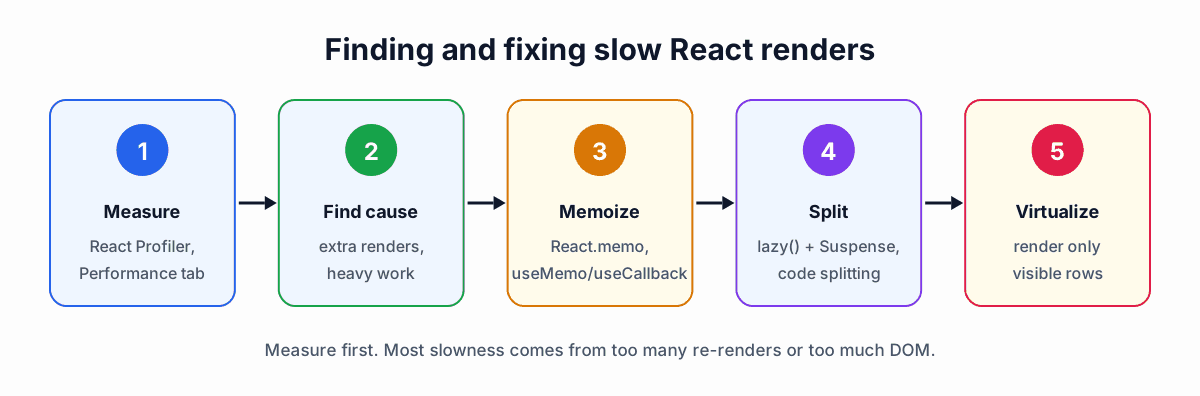
Understanding re-renders#
Q1. When does a React component re-render?#
Answer: a component re-renders when:
- Its own state changes.
- Its parent re-renders (by default, all children re-render too, even if props didn't change).
- A context it uses changes.
- A hook it uses (such as a store subscription) triggers an update.
A common misconception is "a component re-renders when its props change". Props changing is a consequence of the parent re-rendering, which already re-renders the child. A re-render is also not the same as a DOM update: React only updates the DOM where the output actually changed.
Q2. How do you find what is slow before optimizing?#
Answer: measure, don't guess.
- React DevTools Profiler: record an interaction to see which components rendered, how long each took, and "why did this render?".
- Enable "Highlight updates when components render" to spot unnecessary re-renders.
- Chrome Performance panel for long tasks and layout work.
- Lighthouse and Core Web Vitals for load performance (see Core Web Vitals interview questions).
Always profile a production build; development mode is much slower and adds extra checks.
Memoization#
Q3. What does React.memo do? When does it fail?#
Answer: React.memo wraps a component so it skips re-rendering when its props are shallowly equal to the previous props.
const ProductCard = React.memo(function ProductCard({ product, onAdd }) {
  console.log("render", product.id);
  return (
    <div>
      <h3>{product.name}</h3>
      <button onClick={() => onAdd(product.id)}>Add</button>
    </div>
  );
});

function ProductList({ products }) {
  const [cart, setCart] = useState([]);

  // New function on every render: breaks React.memo
  const handleAdd = (id) => setCart((c) => [...c, id]);

  return products.map((p) => (
    <ProductCard key={p.id} product={p} onAdd={handleAdd} />
  ));
}
It fails when a prop is a new reference each render: inline functions, object literals (style={{ }}) or arrays created during render. The fix is the next question.
Q4. How do useCallback and useMemo help React.memo?#
const handleAdd = useCallback((id) => {
  setCart((c) => [...c, id]);
}, []);                                   // stable function reference

const filters = useMemo(() => ({ inStock: true, sort: "price" }), []);
// stable object reference

<ProductCard product={p} onAdd={handleAdd} />
Explanation: useCallback and useMemo return the same reference until their dependencies change, so the shallow comparison in React.memo passes. On their own, without a memoized child or a dependency array that needs stability, they rarely help.
Memoization has a cost: memory and comparison work on every render. Use it where the Profiler shows expensive or frequent re-renders. The React Compiler can add this memoization automatically in projects that adopt it.
Q5. When is useMemo worth using for calculations?#
function Dashboard({ orders, filterText }) {
  const [theme, setTheme] = useState("light");

  // Without useMemo, this runs again when only theme changes
  const filteredOrders = useMemo(
    () => orders.filter((o) => o.customer.includes(filterText)),
    [orders, filterText]
  );

  return <OrdersTable data={filteredOrders} />;
}
Answer: when the calculation is noticeably expensive (filtering or sorting thousands of items, heavy formatting) and the component re-renders for unrelated reasons. For cheap calculations, plain code is faster to read and run.
Structure and state#
Q6. How can you avoid re-renders without memoization?#
Answer: often the best fix is structural:
- Move state down (colocation): keep state in the smallest component that needs it, so typing in an input doesn't re-render the whole page.
- Lift content up / pass children: elements passed as
childrenare created by the parent, so they don't re-render when the wrapper's state changes.
// Before: every mouse move re-renders ExpensiveTree
function Page() {
  const [pos, setPos] = useState({ x: 0, y: 0 });
  return (
    <div onMouseMove={(e) => setPos({ x: e.clientX, y: e.clientY })}>
      <Cursor pos={pos} />
      <ExpensiveTree />
    </div>
  );
}

// After: state lives in a wrapper; ExpensiveTree is passed as children
function MouseTracker({ children }) {
  const [pos, setPos] = useState({ x: 0, y: 0 });
  return (
    <div onMouseMove={(e) => setPos({ x: e.clientX, y: e.clientY })}>
      <Cursor pos={pos} />
      {children}
    </div>
  );
}

function Page() {
  return <MouseTracker><ExpensiveTree /></MouseTracker>;
}
Q7. Why are keys important for performance? Why not use the index?#
Answer: keys tell React which list item is which between renders, so it can reuse DOM nodes and component state. With index keys, inserting or removing an item at the start shifts every key, so React re-renders (and may mix up the state of) every item after it.
// Bad when the list can be reordered, filtered or prepended
{todos.map((todo, index) => <TodoItem key={index} todo={todo} />)}

// Good: stable, unique ID from the data
{todos.map((todo) => <TodoItem key={todo.id} todo={todo} />)}
Index keys are fine for static lists that never change order. Never use Math.random() as a key: it forces every item to remount on every render.
Q8. How do you stop context from re-rendering the whole app?#
- Memoize the provider value with
useMemo. - Split contexts by how often they change (for example, a rarely changing
UserContextand a frequently changingCartContext). - Separate state and dispatch into two contexts, so components that only dispatch don't re-render.
- For high-frequency global state, use a store with selectors (Zustand, Redux) so components subscribe only to the slice they need.
See React state management interview questions.
Loading and large data#
Q9. What is code splitting? How do you lazy load a component?#
Answer: code splitting breaks the JavaScript bundle into chunks that load on demand, reducing the initial download. In React, use lazy with dynamic import() and wrap it in Suspense.
import { lazy, Suspense } from "react";

const AdminPanel = lazy(() => import("./AdminPanel"));
const Chart = lazy(() => import("./Chart"));

function App() {
  return (
    <Suspense fallback={<Spinner />}>
      <Routes>
        <Route path="/admin" element={<AdminPanel />} />
      </Routes>
    </Suspense>
  );
}
Good candidates: routes, modals, heavy charts and editors, and anything below the fold. Next.js does route-level splitting automatically.
Q10. How do you render a list of 10,000 items efficiently?#
Answer: use virtualization (windowing): render only the rows visible in the viewport (plus a small buffer) and reuse them as the user scrolls. Libraries: react-window, react-virtuoso, TanStack Virtual.
import { FixedSizeList } from "react-window";

function BigList({ items }) {
  return (
    <FixedSizeList height={600} width="100%" itemCount={items.length} itemSize={48}>
      {({ index, style }) => (
        <div style={style}>{items[index].name}</div>
      )}
    </FixedSizeList>
  );
}
Instead of 10,000 DOM nodes, only about 15 to 20 exist at a time. Alternatives are pagination and infinite scroll with loading more data as needed.
Q11. What are useTransition and useDeferredValue?#
Answer: they are React 18 concurrent features that mark some updates as non-urgent, so urgent updates like typing stay responsive.
function SearchPage({ allItems }) {
  const [query, setQuery] = useState("");
  const [results, setResults] = useState(allItems);
  const [isPending, startTransition] = useTransition();

  const handleChange = (e) => {
    setQuery(e.target.value);                 // urgent: update the input
    startTransition(() => {
      setResults(filterItems(allItems, e.target.value)); // can be interrupted
    });
  };

  return (
    <>
      <input value={query} onChange={handleChange} />
      {isPending && <Spinner />}
      <ResultList items={results} />
    </>
  );
}
useDeferredValue(value) does the same thing when you don't control the state update: it gives you a lagging copy of a value to render the slow part with. Unlike debouncing, there's no fixed delay; React renders the deferred work as soon as the browser is free.
Q12. What other techniques improve React app performance?#
| Problem | Technique |
|---|---|
| Large bundle | Analyse with a bundle analyzer; tree-shake; replace heavy libraries; import only what you use |
| Too many API calls on input | Debounce or throttle handlers |
| Repeated fetching | Cache server data with React Query or SWR |
| Large images | Responsive images, modern formats (WebP/AVIF), lazy loading, fixed dimensions |
| Slow first paint | Server-side rendering or static generation (Next.js), streaming |
| Expensive work on the main thread | Move it to a Web Worker |
Quick revision#
| Tool | Solves |
|---|---|
| Profiler | Finding what's slow |
React.memo | Child re-rendering with the same props |
useCallback / useMemo | Unstable references, expensive calculations |
| State colocation / children | Re-renders spreading through the tree |
| Stable keys | Inefficient list updates |
lazy + Suspense | Large initial bundle |
| Virtualization | Very long lists |
useTransition | Laggy input during heavy updates |
Related: React hooks interview questions and React rendering and reconciliation interview questions.
Key takeaways#
- Measure with the Profiler on a production build before optimizing.
- Components re-render when their state, parent or context changes; a re-render isn't always a DOM update.
React.memoonly works with stable props, which is whereuseCallbackanduseMemocome in.- Structural fixes (moving state down, passing children) often beat memoization.
- Use stable keys, code splitting, virtualization and
useTransitionfor large apps and lists.