Frontend Security Interview Questions: XSS, CSRF, CORS, CSP and Clickjacking
12 frontend web security interview questions with defences: XSS types and prevention, sanitising HTML, Content Security Policy, CSRF and SameSite cookies, CORS and preflight, the same-origin policy, clickjacking, storing tokens safely, HTTPS and HSTS, security headers and dependency risks.

Frontend developers are the first line of defence for many attacks: a single unescaped string can let someone run code in your users' browsers. Interviewers want to see that you know the common threats and the standard defences. These 12 frontend security interview questions focus on prevention, with practical code.
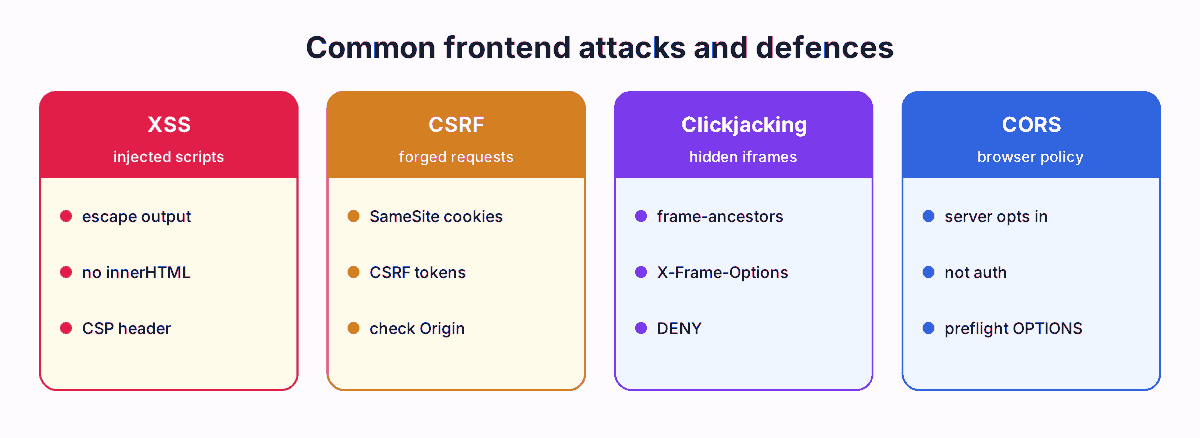
Cross-site scripting (XSS)#
Q1. What is XSS, and what are its types?#
Answer: cross-site scripting happens when untrusted data is placed into a page in a way that the browser treats as code rather than text. The injected script runs with the victim's session, so it can read page data, make requests as the user or change the UI.
| Type | Where the payload comes from |
|---|---|
| Stored | Saved on the server (a comment, profile name) and shown to other users |
| Reflected | Comes from the request (URL parameter) and is echoed back in the response |
| DOM-based | Client-side JavaScript writes untrusted data (from location.hash, postMessage, etc.) into a dangerous sink |
Q2. How do you prevent XSS in frontend code?#
const name = new URLSearchParams(location.search).get("name");

// Unsafe: parses the string as HTML
greeting.innerHTML = `Hello, ${name}`;

// Safe: treated as plain text
greeting.textContent = `Hello, ${name}`;

// Unsafe URL schemes in links
link.href = userProvidedUrl;   // "javascript:..." would run code
// Safe: allow only http(s)
const url = new URL(userProvidedUrl, location.origin);
if (url.protocol === "https:" || url.protocol === "http:") link.href = url.href;- Escape output by context: use
textContent,setAttributeand framework templating, which escape automatically. - Avoid dangerous sinks:
innerHTML,outerHTML,document.write,eval,new Function,setTimeoutwith strings. - Validate URLs before using them in
hreforsrc. - Sanitise when you genuinely need to render user HTML (next question).
- Add a Content Security Policy as a second layer (Q4).
Q3. Does React prevent XSS? When is it still possible?#
import DOMPurify from "dompurify";

function Comment({ text, html, website }) {
  return (
    <article>
      <p>{text}</p>                                   {/* escaped: safe */}

      <div dangerouslySetInnerHTML={{
        __html: DOMPurify.sanitize(html)              // sanitise first
      }} />

      <a href={isSafeHttpUrl(website) ? website : "#"}>Website</a>
    </article>
  );
}
Answer: React escapes values rendered in JSX, which prevents most XSS. It's still possible through dangerouslySetInnerHTML with unsanitised input, javascript: URLs in href, direct DOM manipulation via refs, server-rendered state embedded in a script tag without escaping, and vulnerable third-party libraries. Sanitise with a well-maintained library like DOMPurify, and consider the browser's Trusted Types API to block unsafe sinks entirely.
Q4. What is a Content Security Policy?#
Content-Security-Policy:
  default-src 'self';
  script-src 'self' 'nonce-r4nd0m123' 'strict-dynamic';
  style-src 'self';
  img-src 'self' https://images.example-cdn.com data:;
  connect-src 'self' https://api.example.com;
  object-src 'none';
  base-uri 'self';
  frame-ancestors 'none';
Answer: CSP is an HTTP response header that tells the browser which sources of scripts, styles, images, connections and frames are allowed. Even if an attacker injects markup, an inline script without the correct nonce won't execute. Avoid 'unsafe-inline' and 'unsafe-eval' in script-src. Roll out with Content-Security-Policy-Report-Only first to find violations without breaking the site.
Cross-site request forgery (CSRF)#
Q5. What is CSRF, and how do you prevent it?#
Answer: CSRF tricks a logged-in user's browser into sending an unwanted state-changing request to your site, for example from a hidden form on another website. It works because browsers automatically attach cookies to requests to your domain. Defences:
SameSitecookies:Lax(the default in modern browsers) orStrictstops cookies being sent on most cross-site requests.- CSRF tokens: a random, per-session token included in forms or a custom header and verified by the server.
- Check
Origin/Refererheaders on state-changing requests. - Never change state on
GETrequests.
Set-Cookie: session=abc123; HttpOnly; Secure; SameSite=Lax; Path=/// Sending a CSRF token in a custom header
await fetch("/api/transfer", {
method: "POST",
credentials: "include",
headers: {
"Content-Type": "application/json",
"X-CSRF-Token": document.querySelector('meta[name="csrf-token"]').content,
},
body: JSON.stringify({ to: "acc_42", amount: 500 }),
});Q6. What is the difference between XSS and CSRF?#
| XSS | CSRF | |
|---|---|---|
| Attack | Injects and runs script in your site | Makes the browser send a request to your site from elsewhere |
| Exploits | The site's trust in user input | The site's trust in the user's browser and cookies |
| Can read responses? | Yes | No, it's "blind" |
| Main defences | Output escaping, sanitisation, CSP | SameSite cookies, CSRF tokens, origin checks |
Note: an XSS vulnerability defeats CSRF tokens, because injected script can read the token from the page.
Origins and CORS#
Q7. What is the same-origin policy?#
Answer: an origin is the combination of scheme + host + port. https://app.example.com and https://api.example.com are different origins; so are http and https versions of the same host. The same-origin policy stops scripts on one origin from reading responses or DOM data from another origin. It doesn't stop sending requests (which is why CSRF exists); it stops reading the results.
Q8. What is CORS, and what is a preflight request?#
// Browser preflight (sent automatically)
OPTIONS /api/orders HTTP/1.1
Origin: https://app.example.com
Access-Control-Request-Method: PUT
Access-Control-Request-Headers: content-type, authorization

// Server response allowing it
HTTP/1.1 204 No Content
Access-Control-Allow-Origin: https://app.example.com
Access-Control-Allow-Methods: GET, POST, PUT
Access-Control-Allow-Headers: content-type, authorization
Access-Control-Allow-Credentials: true
Access-Control-Max-Age: 600
Answer: Cross-Origin Resource Sharing is a way for a server to relax the same-origin policy for specific origins. For "non-simple" requests (methods like PUT or DELETE, JSON content type, custom headers such as Authorization), the browser first sends an OPTIONS preflight to ask permission. Key points interviewers look for:
- CORS is enforced by the browser and configured on the server; you can't fix a CORS error from frontend code alone.
- With credentials (cookies),
Access-Control-Allow-Origincan't be*; it must name the origin. - CORS is not a security feature for your server: it doesn't stop non-browser clients like curl.
- In development, a dev-server proxy avoids cross-origin calls altogether.
Other threats and practices#
Q9. What is clickjacking, and how do you prevent it?#
Answer: clickjacking loads your site in an invisible iframe on another page and tricks users into clicking buttons they can't see, like "Delete account". Prevent it by telling browsers not to allow framing:
Content-Security-Policy: frame-ancestors 'none';   // or 'self' to allow only your own site
X-Frame-Options: DENY                               // older header, still widely used
Q10. Where should you store authentication tokens in the browser?#
| Storage | XSS can read it? | Sent automatically (CSRF risk)? | Notes |
|---|---|---|---|
localStorage | Yes | No | Any XSS can steal long-lived tokens |
| In-memory variable | Harder | No | Lost on refresh; pair with a refresh mechanism |
HttpOnly cookie | No | Yes | Add Secure, SameSite and CSRF protection |
Answer: a common recommendation is a short-lived session or refresh token in an HttpOnly; Secure; SameSite cookie, with any access token kept in memory. Avoid long-lived tokens in localStorage. Whatever you choose, XSS prevention remains essential, because an attacker running script in your page can act as the user even without stealing the token. See browser storage interview questions.
Q11. Which security headers and HTTPS settings should a site have?#
Strict-Transport-Security: max-age=31536000; includeSubDomains; preload
Content-Security-Policy: default-src 'self'; frame-ancestors 'none'; ...
X-Content-Type-Options: nosniff
Referrer-Policy: strict-origin-when-cross-origin
Permissions-Policy: camera=(), microphone=(), geolocation=()
Cross-Origin-Opener-Policy: same-origin- HTTPS everywhere, with HSTS so browsers never downgrade to HTTP.
nosniffstops browsers guessing content types (which can turn uploads into scripts).Referrer-Policyavoids leaking full URLs (with tokens or IDs) to other sites.Permissions-Policydisables powerful features you don't use.- Use
rel="noopener"on links opened withtarget="_blank"(modern browsers imply it).
Q12. What other frontend security risks should you consider?#
- Supply chain: npm packages can be compromised. Use lockfiles,
npm auditor Dependabot, review new dependencies, and limit install scripts. - Third-party scripts: analytics and chat widgets run with full page access. Load as few as possible and use Subresource Integrity for CDN files:
<script src="..." integrity="sha384-..." crossorigin="anonymous">. - Secrets in the bundle: anything in frontend JavaScript is public. Never ship private API keys; proxy through your backend.
postMessage: always checkevent.originbefore trusting a message.- Client-side validation is for UX only: the server must validate and authorise every request.
- Open redirects: validate redirect URLs against an allow-list.
window.addEventListener("message", (event) => {
  if (event.origin !== "https://payments.example.com") return; // ignore others
  handlePaymentResult(event.data);
});
Quick revision#
| Threat | Core defence |
|---|---|
| XSS | Escape output, avoid innerHTML, sanitise with DOMPurify, CSP with nonces |
| CSRF | SameSite cookies, CSRF tokens, origin checks |
| Clickjacking | frame-ancestors 'none' / X-Frame-Options: DENY |
| CORS errors | Configure allowed origins on the server |
| Token theft | HttpOnly; Secure; SameSite cookies, short-lived tokens |
| Downgrade attacks | HTTPS + HSTS |
| Compromised scripts | Dependency audits, SRI, fewer third parties |
Related: DOM and events interview questions and JavaScript interview questions.
Key takeaways#
- XSS happens when untrusted data becomes code; escape by default, sanitise when you must render HTML, and add CSP.
- CSRF abuses automatically sent cookies; use SameSite cookies, tokens and origin checks.
- The same-origin policy blocks reading cross-origin responses; CORS lets servers allow specific origins.
- Prevent clickjacking with
frame-ancestors, and keep tokens out oflocalStoragewhere possible. - Use HTTPS with HSTS, security headers, SRI and dependency audits; never trust client-side validation alone.