Frontend System Design Interview Questions: Autocomplete, News Feed and More
12 frontend system design interview questions with answers: a 5-step framework, CSR vs SSR vs SSG, designing autocomplete, a news feed with infinite scroll, virtualization, client-side caching, real-time updates, offline support, image galleries, micro-frontends and design systems.
Mid-level and senior frontend interviews usually include a system design round: "design an autocomplete", "design a news feed". There's no single right answer; interviewers look for structured thinking and trade-offs. Here are 12 frontend system design interview questions with a framework you can reuse.
Approach#
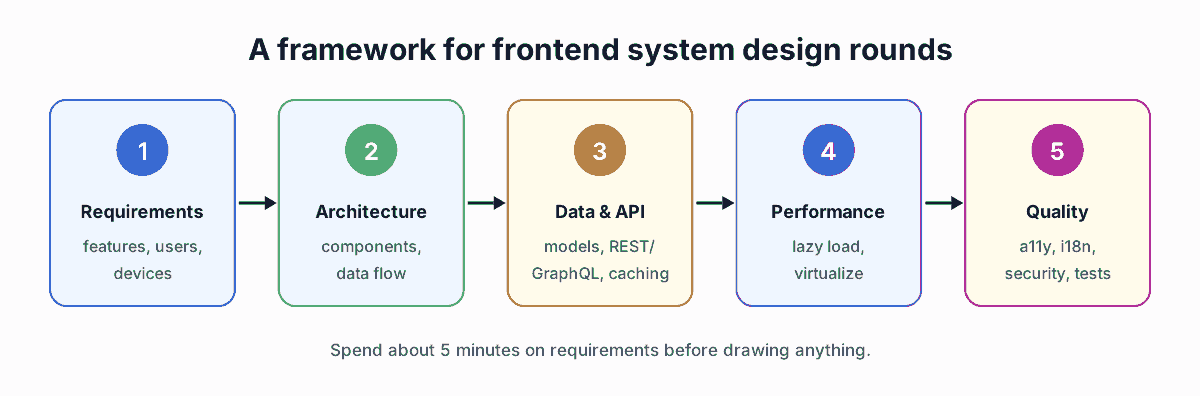
Q1. How should you structure a frontend system design answer?#
- Requirements (about 5 minutes): clarify functional features, users, devices and scale; agree what's out of scope. Ask about non-functional needs: performance targets, offline, accessibility, internationalisation, SEO.
- Architecture: draw the component tree and data flow: which components own state, where data is fetched, what is server-rendered.
- Data and API: define client-side data models, store shape and API contracts (REST or GraphQL, pagination, real-time), plus caching.
- Performance: loading strategy, code splitting, lazy loading, virtualization, debouncing, image optimisation.
- Quality: accessibility, i18n, security, error handling, testing and monitoring.
A similar popular acronym is RADIO: Requirements, Architecture, Data model, Interface (API), Optimisations. Keep talking about trade-offs and check in with the interviewer as you go.
Q2. CSR vs SSR vs SSG vs ISR: how do you choose a rendering strategy?#
| Strategy | How it works | Good for | Trade-offs |
|---|---|---|---|
| CSR (client-side rendering) | Empty HTML shell; JS renders in the browser | Dashboards and apps behind login | Slower first paint, weaker SEO |
| SSR (server-side rendering) | HTML rendered per request, then hydrated | Personalised, SEO-relevant pages | Server cost, TTFB, hydration cost |
| SSG (static generation) | HTML built at build time, served from a CDN | Blogs, docs, marketing | Rebuild needed for changes |
| ISR / revalidation | Static pages regenerated in the background | Large catalogues, news | Briefly stale content |
| Streaming and server components | Send HTML in chunks; keep some components server-only | Complex pages with slow data | Framework complexity |
Many real apps mix strategies per route. More in critical rendering path interview questions.
Classic design problems#
Q3. Design an autocomplete / typeahead search component#
function useAutocomplete(query) {
  const [results, setResults] = useState([]);
  const cache = useRef(new Map());

  useEffect(() => {
    const q = query.trim().toLowerCase();
    if (q.length < 2) return setResults([]);
    if (cache.current.has(q)) return setResults(cache.current.get(q));

    const controller = new AbortController();
    const timer = setTimeout(async () => {
      try {
        const res = await fetch(`/api/search?q=${encodeURIComponent(q)}&limit=8`,
                                { signal: controller.signal });
        const data = await res.json();
        cache.current.set(q, data);
        setResults(data);
      } catch (e) {
        if (e.name !== "AbortError") setResults([]);
      }
    }, 250);                                   // debounce

    return () => { clearTimeout(timer); controller.abort(); };  // cancel stale requests
  }, [query]);

  return results;
}- Network: debounce input, minimum query length, cancel outdated requests with
AbortControllerto avoid race conditions, cache results per query (with a size limit, e.g. LRU). - UI: loading, empty and error states; highlight the matching text; limit results.
- Accessibility: the
comboboxpattern witharia-expanded,aria-controls,aria-activedescendant, and Up/Down/Enter/Escape keys. - Extras: recent searches stored locally, prefetching popular queries, server ranking.
Q4. Design a news feed with infinite scroll#
// Load the next page when a sentinel element near the bottom becomes visible
const sentinel = useRef(null);
useEffect(() => {
  const observer = new IntersectionObserver(([entry]) => {
    if (entry.isIntersecting && hasMore && !loading) loadMore();
  }, { rootMargin: "800px" });           // start loading before the user reaches the end
  if (sentinel.current) observer.observe(sentinel.current);
  return () => observer.disconnect();
}, [hasMore, loading, loadMore]);

// API: GET /feed?cursor=abc123&limit=20 → { items: [...], nextCursor: "def456" }- Pagination: use cursor-based pagination rather than offsets, so new posts don't cause duplicates or skipped items.
- Data: normalise posts and users by ID in the store; apply optimistic updates for likes and comments.
- Performance: virtualise long lists (Q5), lazy-load images with fixed aspect ratios to avoid layout shift, skeleton placeholders.
- Freshness: show a "New posts" banner instead of pushing content under the reader.
- Accessibility:
role="feed"witharticleitems, and an alternative "Load more" button. - Restore scroll position when the user returns from a post.
Q5. How do you render a list of 10,000 items efficiently?#
Answer: use virtualization (windowing): render only the rows visible in the viewport plus a small buffer, and use spacer height so the scrollbar stays correct. Libraries: react-window, react-virtuoso, TanStack Virtual. Variable row heights need measurement. Alternatives: pagination, or CSS content-visibility: auto for long static content. Also memoise rows, use stable keys and avoid expensive work during scroll. Covered further in React performance interview questions.
Q6. Design a real-time chat or notifications UI#
| Transport | When to use |
|---|---|
| Short polling | Simple, low-frequency updates |
| Long polling | Fallback when other options are blocked |
| Server-Sent Events (SSE) | One-way server-to-client streams: notifications, live scores |
| WebSockets | Two-way, low-latency: chat, collaboration, games |
Key points: reconnect with exponential backoff; send messages optimistically with a temporary ID and "sending / sent / failed" status; deduplicate by message ID; order by server timestamp; paginate history upwards; queue outgoing messages while offline; keep unread counts in sync across tabs (BroadcastChannel); and announce new messages to screen readers with a polite live region.
Data, state and offline#
Q7. How do you manage and cache server data on the client?#
Answer: treat server state (cached copies of backend data) separately from client state (UI state like open modals). Use a data-fetching library such as TanStack Query, SWR, RTK Query or Apollo for caching by key, request deduplication, stale-while-revalidate, background refetching, retries, pagination and optimistic updates with rollback. Normalise entities by ID when the same data appears in many places. Keep global client state small. See React state management interview questions.
Q8. How would you design an app that works offline?#
- Cache the app shell with a service worker so the UI loads offline.
- Store data locally in IndexedDB; read from the local store first (offline-first).
- Queue mutations in an outbox while offline, and sync when connectivity returns.
- Resolve conflicts: last-write-wins, server wins, field-level merge, or CRDTs for collaborative editing.
- Show sync status and allow retry; handle storage limits and eviction.
Details in service worker and PWA interview questions and browser storage interview questions.
Q9. How do you design the API contract between frontend and backend?#
- REST vs GraphQL: REST is simple and cacheable over HTTP; GraphQL lets the client request exactly the fields it needs and combine resources, which helps complex UIs but needs its own caching. A BFF (backend for frontend) can shape data for each client.
- Pagination: cursors for feeds, offsets for numbered pages.
- Payload size: only the fields the UI needs; compress responses.
- Errors: consistent error shapes and status codes; partial failures for batch requests.
- Typing: share types via OpenAPI or GraphQL code generation; validate at the boundary.
- Idempotency keys for retried mutations such as payments.
Scale and quality#
Q10. Design an image gallery or e-commerce product page for performance#
- Responsive images with
srcset/sizes, modern formats (AVIF, WebP) and an image CDN. - Preload the hero (LCP) image with
fetchpriority="high"; lazy-load images below the fold. - Reserve space with
width/heightoraspect-ratioto avoid CLS; use blur-up placeholders. - SSR or SSG for SEO, with structured data; split heavy widgets such as reviews and zoom.
- Prefetch likely next pages on hover; cache product data at the CDN.
Tie each decision to a metric; see Core Web Vitals interview questions.
Q11. What are micro-frontends? When are they worth it?#
Answer: micro-frontends split a large frontend into independently built and deployed pieces owned by separate teams (for example checkout, search, account), composed at build time, on the server, or at runtime (Module Federation, import maps, iframes, web components). Benefits: team autonomy, independent deploys, incremental migration from legacy stacks. Costs: duplicated dependencies and larger bundles, inconsistent UX, shared-state and routing complexity, and harder testing. They're worth it for large organisations with many teams; a well-structured monorepo is usually better for small ones.
Q12. How do you build a design system or shared component library?#
- Design tokens for colour, spacing, typography and themes (including dark mode), shared between design and code.
- Accessible primitives (buttons, dialogs, menus, comboboxes) with keyboard support built in; headless libraries such as Radix or React Aria help.
- Composable APIs: compound components and sensible defaults; see React design patterns interview questions.
- Documentation with Storybook, plus visual regression and accessibility tests.
- Versioning: semantic versioning, changelogs and codemods for breaking changes; tree-shakeable package output.
Quick revision#
| Problem | Key ideas |
|---|---|
| Any design round | Requirements, architecture, data/API, performance, quality |
| Autocomplete | Debounce, abort stale requests, cache, combobox accessibility |
| News feed | Cursor pagination, IntersectionObserver, virtualization, optimistic updates |
| Chat | WebSockets, reconnect with backoff, message IDs, offline queue |
| Offline app | Service worker, IndexedDB, outbox sync, conflict resolution |
| Rendering | CSR, SSR, SSG, ISR chosen per route |
Key takeaways#
- Use a structured framework and spend the first minutes clarifying requirements.
- Explain trade-offs (rendering strategy, transport, pagination, caching) rather than naming tools.
- Handle race conditions, loading, empty and error states explicitly.
- Virtualise long lists, lazy-load and measure performance with real metrics.
- Accessibility, security, testing and monitoring are part of the design, not afterthoughts.