React State Management Interview Questions: Context, Redux, Zustand and React Query
12 React state management interview questions with code: local vs global state, lifting state up, prop drilling, Context API limits, Redux and Redux Toolkit, Zustand, server state with React Query, derived state, URL state and forms.
"How do you manage state in React?" has no single right answer, which is why interviewers like it. They want to hear that you know the different kinds of state and pick the simplest tool for each. These 12 React state management interview questions cover the concepts and libraries you're most likely to be asked about.
Core concepts#
Q1. What types of state exist in a React app?#
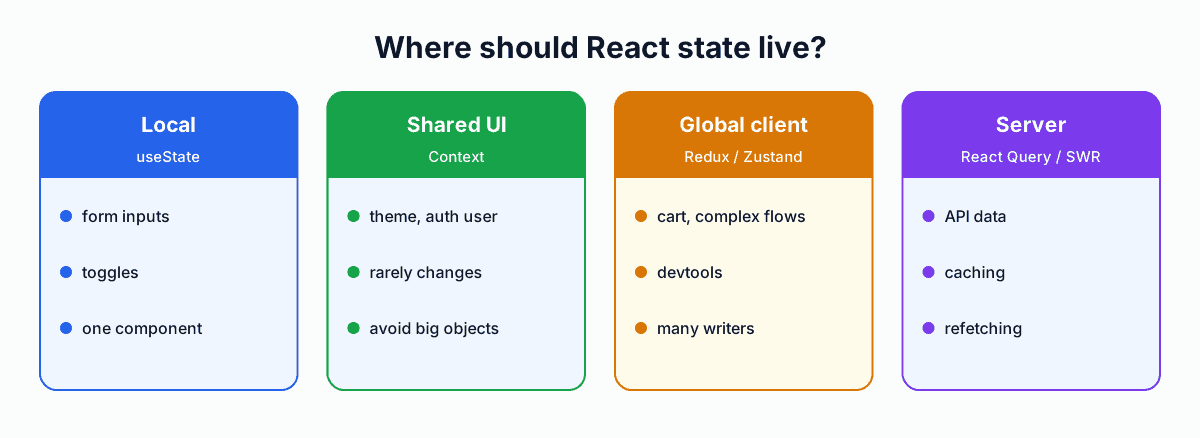
| Type | Example | Typical tool |
|---|---|---|
| Local UI state | Input value, open/closed dropdown | useState, useReducer |
| Shared UI state | Theme, logged-in user, locale | Context |
| Global client state | Shopping cart, multi-step wizard, editor | Redux Toolkit, Zustand |
| Server state | Products, orders, profile from an API | React Query (TanStack Query), SWR, RTK Query |
| URL state | Filters, page number, selected tab | Router search params |
| Form state | Field values, errors, touched | React Hook Form, Formik |
Key insight: most "global state" in real apps is actually server state. Once a data-fetching library handles it, very little true global state remains.
Q2. What is lifting state up?#
Answer: when two sibling components need the same state, move it to their closest common parent and pass it down as props, along with functions to update it.
function TemperatureConverter() {
  const [celsius, setCelsius] = useState(0);   // lifted to the parent

  return (
    <>
      <CelsiusInput value={celsius} onChange={setCelsius} />
      <FahrenheitDisplay celsius={celsius} />
    </>
  );
}

function FahrenheitDisplay({ celsius }) {
  return <p>{(celsius * 9) / 5 + 32} °F</p>;
}
This keeps a single source of truth. The opposite principle, colocation, says to keep state as close as possible to where it's used.
Q3. What is prop drilling and how do you avoid it?#
Answer: prop drilling is passing props through several intermediate components that don't use them, just to reach a deep child. It makes refactoring painful. Solutions, in order of preference:
- Component composition: pass components as
childrenor props, so the data goes straight to where it's needed. - Context for values many components need.
- A state library for complex, frequently updated global state.
// Composition: Layout no longer needs to know about user
function App() {
  const user = useUser();
  return <Layout header={<Header user={user} />}><Dashboard /></Layout>;
}
Q4. What is derived state, and why shouldn't you store it?#
// Bad: duplicated state that can get out of sync
const [items, setItems] = useState([]);
const [total, setTotal] = useState(0);
useEffect(() => {
  setTotal(items.reduce((sum, i) => sum + i.price, 0));
}, [items]);

// Good: compute it during render
const [items, setItems] = useState([]);
const total = items.reduce((sum, i) => sum + i.price, 0);
Answer: derived state is anything you can calculate from existing state or props. Storing it creates two sources of truth and an extra render. Compute it during render, and wrap it in useMemo only if it's expensive.
Context#
Q5. Is the Context API a state management solution?#
Answer: not exactly. Context is a dependency injection mechanism: it makes a value available to a subtree. The state itself still lives in useState or useReducer. Context plus useReducer works well for small to medium apps.
const CartContext = createContext(null);

function CartProvider({ children }) {
  const [cart, dispatch] = useReducer(cartReducer, []);
  const value = useMemo(() => ({ cart, dispatch }), [cart]);
  return <CartContext.Provider value={value}>{children}</CartContext.Provider>;
}

function useCart() {
  const ctx = useContext(CartContext);
  if (!ctx) throw new Error("useCart must be used inside CartProvider");
  return ctx;
}
Q6. What are the limitations of Context?#
- No selectors: every consumer re-renders when any part of the value changes, even if it only uses one field.
- Frequent updates (typing, mouse position, timers) through context can make large trees slow.
- Many providers lead to deeply nested "provider hell".
- No built-in devtools, middleware or persistence.
Mitigations are splitting contexts and memoizing values (see React performance interview questions), or moving to a store with selectors.
Libraries#
Q7. Explain the Redux data flow#
Answer: Redux keeps global state in a single store. The flow is one-directional:
- The UI dispatches an action:
{ type: "cart/addItem", payload: item }. - A reducer, a pure function
(state, action) => newState, calculates the next state. - The store saves the new state and notifies subscribers.
- Components reading that slice with
useSelectorre-render.
Three principles: single source of truth, state is read-only (change it only by dispatching actions), and changes are made with pure functions. This makes state changes predictable, traceable in devtools, and easy to test.
Q8. What does Redux Toolkit improve? Show a slice#
import { createSlice, configureStore } from "@reduxjs/toolkit";

const cartSlice = createSlice({
  name: "cart",
  initialState: { items: [] },
  reducers: {
    addItem(state, action) {
      state.items.push(action.payload);   // looks mutable, Immer makes it immutable
    },
    removeItem(state, action) {
      state.items = state.items.filter((i) => i.id !== action.payload);
    },
  },
});

export const { addItem, removeItem } = cartSlice.actions;
export const store = configureStore({ reducer: { cart: cartSlice.reducer } });

// In a component
const count = useSelector((state) => state.cart.items.length);
const dispatch = useDispatch();
dispatch(addItem({ id: 1, name: "Shoes" }));
Answer: Redux Toolkit (RTK) is the official, recommended way to write Redux. It removes boilerplate: createSlice generates action creators and types, Immer allows "mutating" syntax safely, configureStore sets up devtools and middleware, and createAsyncThunk / RTK Query handle async logic.
Q9. How does Zustand compare with Redux?#
import { create } from "zustand";

const useCartStore = create((set) => ({
  items: [],
  addItem: (item) => set((state) => ({ items: [...state.items, item] })),
  clear: () => set({ items: [] }),
}));

function CartBadge() {
  const count = useCartStore((state) => state.items.length); // selector
  return <span>{count}</span>;
}| Redux Toolkit | Zustand | |
|---|---|---|
| Setup | Store, slices, Provider | One create call, no Provider |
| Boilerplate | Moderate | Minimal |
| Structure | Opinionated (actions, reducers) | Flexible |
| Devtools / middleware | Excellent, built in | Available via middleware |
| Good for | Large teams, complex flows, strict patterns | Small to medium apps, quick setup |
Both use selectors, so a component re-renders only when the slice it reads changes.
Q10. What is server state, and why use React Query for it?#
Answer: server state is data owned by the backend that you cache on the client. It has problems client state doesn't: it can become stale, needs loading and error states, deduplication, background refetching, pagination and cache invalidation after mutations. React Query handles all of that.
import { useQuery, useMutation, useQueryClient } from "@tanstack/react-query";

function Products() {
  const { data, isLoading, error } = useQuery({
    queryKey: ["products"],
    queryFn: () => fetch("/api/products").then((r) => r.json()),
    staleTime: 60_000,
  });

  const queryClient = useQueryClient();
  const addProduct = useMutation({
    mutationFn: (p) => fetch("/api/products", { method: "POST", body: JSON.stringify(p) }),
    onSuccess: () => queryClient.invalidateQueries({ queryKey: ["products"] }),
  });

  if (isLoading) return <Spinner />;
  if (error) return <p>Something went wrong</p>;
  return data.map((p) => <ProductRow key={p.id} product={p} />);
}
Putting API data into Redux by hand means rewriting caching logic. Using a server-state library usually shrinks the global store dramatically.
Practical choices#
Q11. When should state live in the URL?#
Answer: when the state should survive a refresh, be shareable as a link, or work with the back button: search queries, filters, sort order, pagination and active tabs.
import { useSearchParams } from "react-router-dom";

function ProductFilters() {
  const [params, setParams] = useSearchParams();
  const category = params.get("category") ?? "all";

  return (
    <select
      value={category}
      onChange={(e) => setParams({ category: e.target.value, page: "1" })}
    >
      <option value="all">All</option>
      <option value="shoes">Shoes</option>
    </select>
  );
}
Q12. How do you decide which state tool to use?#
- Can it be derived? Compute it; don't store it.
- Is it from the server? Use React Query, SWR or RTK Query.
- Should it be in the URL? Use search params.
- Used by one component?
useStateoruseReducer. - Shared by a few nearby components? Lift it up.
- Needed widely but rarely changes? Context.
- Complex, frequently updated and shared across the app? Redux Toolkit or Zustand.
Say "it depends" and then walk through this checklist with a concrete example from a project. Interviewers care more about your reasoning than your favourite library.
Quick revision#
| Term | One-line meaning |
|---|---|
| Lifting state up | Move shared state to the closest common parent |
| Colocation | Keep state as close as possible to where it's used |
| Prop drilling | Passing props through components that don't use them |
| Derived state | Values computed from other state; don't store them |
| Selector | Function that reads part of a store so components re-render less |
| Server state | Cached backend data; needs refetching and invalidation |
Related reading: React hooks interview questions and React interview questions.
Key takeaways#
- Classify state first: local, shared, global client, server, URL or form.
- Prefer colocation, lifting state up and composition before reaching for libraries.
- Context shares values but has no selectors; split and memoize it.
- Redux Toolkit suits large, structured apps; Zustand is a lightweight alternative with selectors.
- Server data belongs in React Query or SWR, which handle caching, refetching and invalidation.