How Browsers Render a Page: Critical Rendering Path Interview Questions
12 browser rendering interview questions explained: what happens when you type a URL, DOM and CSSOM, the render tree, layout, paint and compositing, render-blocking CSS and JS, async vs defer, reflow vs repaint, layout thrashing, GPU-friendly animations and resource hints.

Knowing how the browser turns HTML, CSS and JavaScript into pixels helps you write faster pages and answer some of the most common frontend interview questions. This post explains the critical rendering path through 12 interview questions, from typing a URL to compositing layers on the GPU.
From URL to pixels#
Q1. What happens when you type a URL and press Enter?#
- URL parsing and checks (is it a search term? HSTS upgrade to HTTPS?).
- Cache check: service worker, then HTTP cache.
- DNS lookup to resolve the domain to an IP address (browser, OS, router and resolver caches first).
- TCP connection (three-way handshake) and TLS handshake for HTTPS. HTTP/3 uses QUIC over UDP and combines these.
- HTTP request sent; the server (often via a CDN) returns a response with status, headers and HTML.
- Parsing and rendering: the browser parses HTML, discovers CSS, JS, fonts and images, fetches them and runs the critical rendering path below.
- JavaScript execution, then the page becomes interactive and
DOMContentLoadedandloadfire.
In interviews, give this overview first, then go deeper wherever the interviewer steers.
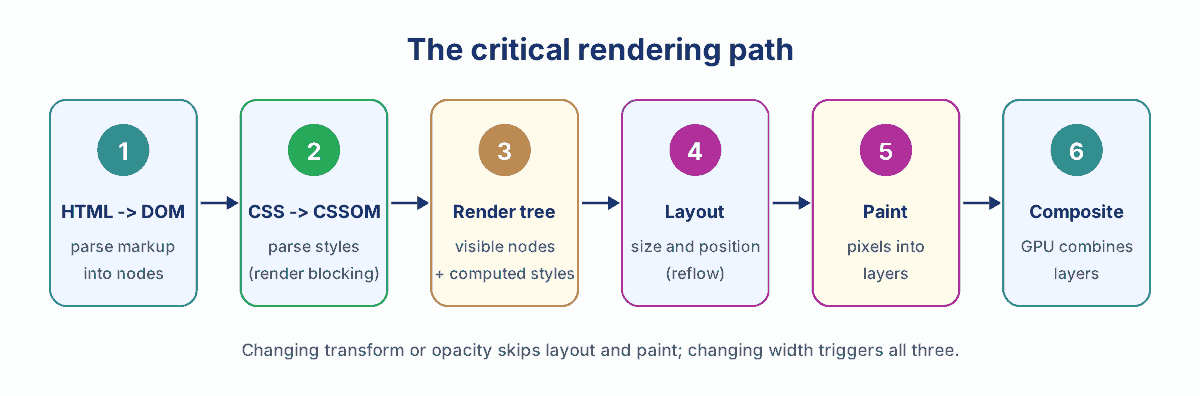
Q2. What is the critical rendering path?#
Answer: the sequence of steps the browser takes to turn code into pixels for the first render:
| Step | What happens |
|---|---|
| 1. DOM | HTML bytes → tokens → nodes → Document Object Model tree |
| 2. CSSOM | CSS is parsed into the CSS Object Model (all styles with cascade resolved) |
| 3. Render tree | DOM + CSSOM combined, only visible nodes with their computed styles |
| 4. Layout (reflow) | Calculate the exact size and position of every box |
| 5. Paint | Fill in pixels: text, colours, borders, shadows, images, into layers |
| 6. Composite | Combine layers in the correct order, often on the GPU, and show them |
Optimising the critical rendering path means minimising the number of critical resources, their bytes, and the number of round trips needed before first render.
Q3. What is the difference between the DOM and the render tree?#
<head><title>Shop</title></head>
<body>
  <div class="banner" style="display: none">Sale!</div>
  <p class="ghost" style="visibility: hidden">Hidden but takes space</p>
  <p>Welcome</p>
</body>
Answer: the DOM contains every node. The render tree contains only what will be drawn: <head>, <script> and elements with display: none are excluded. An element with visibility: hidden is in the render tree because it still takes up space; it's just not painted. Pseudo-elements like ::before appear in the render tree even though they're not in the DOM.
Render-blocking resources#
Q4. Why is CSS render-blocking?#
Answer: the browser won't render the page until it has built the CSSOM, because rendering without styles would show a flash of unstyled content and then re-layout everything. CSS is also parser-blocking for scripts: a script that follows a stylesheet waits for the CSS, since the script might read computed styles.
<!-- Critical CSS inlined; non-critical stylesheet loaded without blocking -->
<style>/* above-the-fold styles */</style>
<link rel="preload" href="/styles/full.css" as="style"
      onload="this.onload=null;this.rel='stylesheet'">

<!-- Media queries make stylesheets non-blocking when they don't match -->
<link rel="stylesheet" href="print.css" media="print">
Optimisations: keep CSS small, inline the critical CSS for above-the-fold content, load the rest asynchronously, and remove unused CSS.
Q5. How does JavaScript block parsing? What's the difference between async and defer?#
<script src="app.js"></script>           <!-- blocks parsing while downloading and running -->
<script src="analytics.js" async></script> <!-- runs as soon as downloaded, any order -->
<script src="main.js" defer></script>      <!-- runs after parsing, in document order -->
<script type="module" src="ui.js"></script> <!-- modules are deferred by default -->| Normal | async | defer | |
|---|---|---|---|
| Downloads | Blocking | In parallel | In parallel |
| Executes | Immediately, pausing the parser | As soon as ready (may interrupt parsing) | After HTML parsing, before DOMContentLoaded |
| Order kept | Yes | No | Yes |
| Use for | Rarely needed | Independent scripts (analytics, ads) | App scripts that need the DOM or each other |
The browser's preload scanner looks ahead in the HTML to start downloading resources early even while the parser is blocked.
Q6. What are DOMContentLoaded and load?#
Answer: DOMContentLoaded fires when the HTML is fully parsed and deferred scripts have run; stylesheets, images and iframes may still be loading. load fires on window after all resources, including images and stylesheets, have loaded. Most app initialisation should run on DOMContentLoaded (or just use defer), not wait for load.
Layout, paint and composite#
Q7. What is the difference between reflow and repaint?#
| Reflow (layout) | Repaint | Composite only | |
|---|---|---|---|
| Triggered by | Changes to geometry: width, height, margin, top, font size, adding or removing elements, resizing the window | Visual-only changes: color, background, visibility, box-shadow | transform, opacity (on their own layer) |
| Cost | Highest; can affect parents, siblings and children, then requires paint | Medium | Lowest; can run on the GPU and compositor thread |
Q8. What is layout thrashing? How do you avoid it?#
// Bad: read, write, read, write... forces a synchronous layout every iteration
const boxes = document.querySelectorAll(".box");
boxes.forEach((box) => {
  const width = box.offsetWidth;           // READ forces layout
  box.style.height = width / 2 + "px";     // WRITE invalidates layout
});

// Good: batch all reads, then all writes
const widths = [...boxes].map((box) => box.offsetWidth);   // reads
boxes.forEach((box, i) => {
  box.style.height = widths[i] / 2 + "px";                  // writes
});
Answer: reading layout properties (offsetWidth, getBoundingClientRect(), scrollTop, getComputedStyle) after a style change forces the browser to calculate layout immediately (forced synchronous layout). Doing that in a loop causes repeated layouts: layout thrashing. Batch reads before writes, use requestAnimationFrame for writes, or use libraries like FastDOM.
Q9. Why should you animate transform and opacity?#
/* Janky: animating left triggers layout and paint every frame */
.slide-bad { position: relative; transition: left 300ms; }
.slide-bad.open { left: 300px; }

/* Smooth: transform is composite-only */
.slide-good { transition: transform 300ms ease-out; }
.slide-good.open { transform: translateX(300px); }

/* Hint for elements that will animate (use sparingly) */
.drawer { will-change: transform; }
Answer: at 60fps the browser has about 16ms per frame. transform and opacity can be handled by the compositor without layout or paint, even while the main thread is busy with JavaScript. will-change promotes an element to its own layer ahead of time, but every layer uses GPU memory, so apply it only where needed.
Q10. How does requestAnimationFrame fit into rendering?#
function animate(timestamp) {
  progressBar.style.transform = `scaleX(${getProgress(timestamp)})`;
  if (!done) requestAnimationFrame(animate);
}
requestAnimationFrame(animate);
Answer: the browser's frame loop is roughly: handle input → run timers and tasks → requestAnimationFrame callbacks → style → layout → paint → composite. requestAnimationFrame runs your visual updates right before the next render, synchronised with the display refresh rate, and it pauses in background tabs. setTimeout-based animation can fire at the wrong moment in the frame and cause dropped frames. See event loop interview questions for where this sits relative to microtasks.
Optimisation#
Q11. What are resource hints like preload, preconnect and prefetch?#
<!-- Set up the connection early to a critical third-party origin -->
<link rel="preconnect" href="https://cdn.example.com" crossorigin>
<link rel="dns-prefetch" href="https://analytics.example.com">

<!-- Fetch a critical resource for THIS page early, at high priority -->
<link rel="preload" href="/fonts/inter.woff2" as="font" type="font/woff2" crossorigin>
<link rel="preload" href="/hero.webp" as="image" fetchpriority="high">

<!-- Fetch a resource likely needed for the NEXT navigation, at low priority -->
<link rel="prefetch" href="/checkout.js">
Answer: hints let you tell the browser about resources it would otherwise discover late (fonts referenced in CSS, LCP images set as CSS backgrounds). Overusing preload backfires by competing with genuinely critical resources. fetchpriority="high" on the hero <img> is a simple way to improve LCP.
Q12. How would you optimise the critical rendering path of a slow page?#
- Measure: Lighthouse, WebPageTest waterfall and the Chrome Performance panel to find render-blocking requests and long tasks.
- Reduce critical bytes: minify and compress (Brotli), remove unused CSS and JS, code-split.
- Unblock rendering: inline critical CSS,
deferscripts, load third partiesasyncor later. - Shorten round trips: CDN, HTTP/2 or HTTP/3,
preconnect, server-side rendering or static HTML so content arrives in the first response. - Prioritise the LCP element: preload or
fetchpriority="high", responsive images, avoid lazy-loading above the fold. - Fonts:
font-display: swap, preload key fonts, subset them. - Avoid layout shifts: set image dimensions and reserve space for ads and embeds.
These map directly to Core Web Vitals; see Core Web Vitals interview questions.
Quick revision#
| Term | Remember |
|---|---|
| CRP | DOM → CSSOM → render tree → layout → paint → composite |
| Render tree | Visible nodes only; no display: none |
| CSS | Render-blocking; inline critical CSS |
defer | Parallel download, runs after parsing, in order |
async | Parallel download, runs when ready, no order |
| Reflow | Geometry change; most expensive |
| Cheap animations | transform and opacity |
| Layout thrashing | Interleaved reads and writes; batch them |
Related: DOM and events interview questions and HTTP caching and service worker interview questions.
Key takeaways#
- Pixels appear after DOM, CSSOM, render tree, layout, paint and composite.
- CSS blocks rendering and plain scripts block parsing; use critical CSS,
deferandasync. - Reflow is the most expensive step; avoid layout thrashing by batching reads and writes.
- Animate
transformandopacitywithrequestAnimationFramefor smooth 60fps. - Use resource hints and server rendering to get critical content and the LCP image to the browser sooner.