JavaScript Event Loop Interview Questions: Microtasks, Macrotasks and Output Puzzles
11 JavaScript event loop interview questions with answers: call stack, Web APIs, microtask vs macrotask queues, setTimeout(0), async/await ordering, requestAnimationFrame, Node.js process.nextTick and setImmediate, and step-by-step output puzzles.
JavaScript runs your code on a single thread, yet it handles timers, network requests and clicks without freezing. The event loop makes that possible, and interviewers test it with "predict the output" puzzles. This post explains the model and walks through 11 interview questions, step by step.
The model#
Q1. JavaScript is single-threaded. How does it handle asynchronous work?#
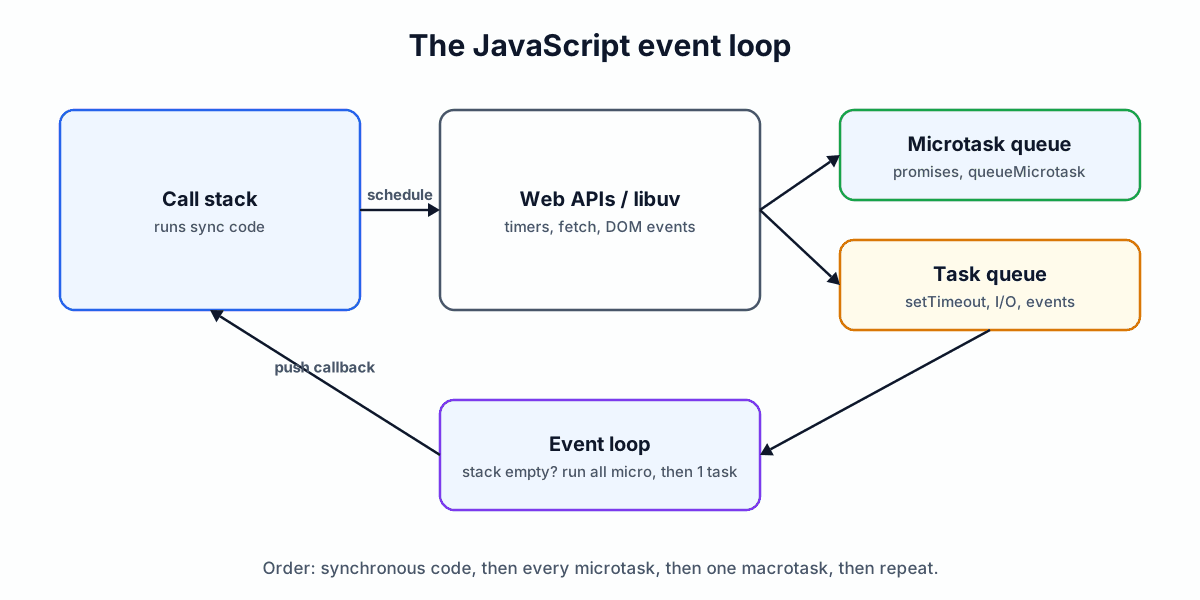
Answer: The JavaScript engine has one call stack, so it runs one piece of code at a time. Slow work (timers, network, file I/O) is handed to the host environment: Web APIs in the browser, libuv in Node.js. Those run in the background. When they finish, their callbacks are put into a queue, and the event loop moves them onto the call stack once it is empty.
| Part | Role |
|---|---|
| Call stack | Runs synchronous code, one frame at a time |
| Web APIs / libuv | Timers, fetch, DOM events, I/O, outside the JS thread |
| Microtask queue | Promise callbacks, queueMicrotask, MutationObserver |
| Task (macrotask) queue | setTimeout, setInterval, I/O, UI events, MessageChannel |
| Event loop | When the stack is empty: run all microtasks, then one task, render if needed, repeat |
Q2. What is the difference between microtasks and macrotasks?#
Answer: After each task (and after the initial script), the event loop drains the entire microtask queue, including microtasks added while draining, before it takes the next macrotask or lets the browser render. So promise callbacks always run before a setTimeout callback scheduled at the same time.
console.log("1: script start");

setTimeout(() => console.log("5: timeout"), 0);

Promise.resolve()
  .then(() => console.log("3: promise 1"))
  .then(() => console.log("4: promise 2"));

console.log("2: script end");

// 1: script start
// 2: script end
// 3: promise 1
// 4: promise 2
// 5: timeout
Q3. Does setTimeout(fn, 0) run immediately?#
Answer: No. The delay is a minimum, not a guarantee. The callback joins the task queue after at least 0 ms and only runs when the stack is empty and all microtasks are done. Browsers also clamp nested timers to at least 4 ms after five levels of nesting, and background tabs throttle timers further.
const start = Date.now();
setTimeout(() => console.log("ran after", Date.now() - start, "ms"), 0);
while (Date.now() - start < 200) {}   // blocks the stack for 200ms
// "ran after 200 ms" (or slightly more)
Q4. What happens if a long synchronous task runs on the main thread?#
Answer: Nothing else can run: no clicks, no rendering, no timers. The page freezes. Tasks over 50 ms are called long tasks and hurt the INP Core Web Vital.
Fixes: split the work into chunks and yield between them, move it to a Web Worker, or use scheduler.yield() where supported.
async function processInChunks(items, chunkSize = 500) {
  for (let i = 0; i < items.length; i += chunkSize) {
    items.slice(i, i + chunkSize).forEach(heavyWork);
    await new Promise((r) => setTimeout(r, 0));  // yield so the browser can paint and handle input
  }
}A promise chain that keeps queuing new microtasks will starve rendering forever, because the loop drains microtasks completely before painting. Yielding with setTimeout creates a real break; yielding with await Promise.resolve() does not.
async/await and rendering#
Q5. Where does code after await run?#
Answer: Everything before the first await runs synchronously. The rest of the function is scheduled as a microtask when the awaited value settles.
async function run() {
  console.log("B");
  await null;
  console.log("D");
}

console.log("A");
run();
console.log("C");

// A, B, C, D
Q6. Where does requestAnimationFrame fit in?#
Answer: requestAnimationFrame callbacks run once per frame, just before the browser paints (typically 60 times a second), after microtasks. They are neither ordinary tasks nor microtasks. Use rAF for visual updates and animations; it pauses in background tabs.
setTimeout(() => console.log("timeout"), 0);
requestAnimationFrame(() => console.log("rAF"));
Promise.resolve().then(() => console.log("microtask"));
// "microtask" first; then "timeout" and "rAF" in an order that depends on
// where the browser is in its frame (often timeout first, but not guaranteed)
Q7. How is the Node.js event loop different?#
Answer: Node.js (via libuv) runs the loop in phases: timers, pending callbacks, poll (I/O), check (setImmediate), close callbacks. Between each callback, Node drains two queues: first the process.nextTick queue, then promise microtasks.
// Node.js
setTimeout(() => console.log("timeout"), 0);
setImmediate(() => console.log("immediate"));
Promise.resolve().then(() => console.log("promise"));
process.nextTick(() => console.log("nextTick"));

// nextTick
// promise
// timeout / immediate   (order of these two can vary in the main module)

require("fs").readFile(__filename, () => {
  setTimeout(() => console.log("timeout in I/O"), 0);
  setImmediate(() => console.log("immediate in I/O"));
});
// inside an I/O callback, setImmediate always runs first
Read more in Node.js interview questions.
Output puzzles#
Q8. Predict the output.#
console.log(1);
setTimeout(() => console.log(2));
Promise.resolve().then(() => console.log(3));
Promise.resolve().then(() => setTimeout(() => console.log(4)));
Promise.resolve().then(() => console.log(5));
setTimeout(() => console.log(6));
console.log(7);
Answer: 1 7 3 5 2 6 4
- Synchronous: 1, 7. Timers 2 and 6 are queued as tasks; three promise callbacks are queued as microtasks.
- Microtasks: 3, then the second one schedules timer 4 (queued after 2 and 6), then 5.
- Tasks in order: 2, 6, 4.
Q9. Predict the output.#
async function a1() {
  console.log("a1 start");
  await a2();
  console.log("a1 end");
}
async function a2() {
  console.log("a2");
}

console.log("script start");
setTimeout(() => console.log("setTimeout"), 0);
a1();
new Promise((resolve) => {
  console.log("promise executor");
  resolve();
}).then(() => console.log("then"));
console.log("script end");
Answer:
script start
a1 start
a2
promise executor
script end
a1 end
then
setTimeout- The promise executor runs synchronously; only
.thencallbacks are async. a2()runs synchronously insidea1; the code afterawaitbecomes a microtask queued beforethen.
Q10. Predict the output.#
Promise.resolve()
  .then(() => {
    console.log("A");
    Promise.resolve().then(() => console.log("B"));
  })
  .then(() => console.log("C"));

queueMicrotask(() => console.log("D"));
Answer: A D B C
- Microtask queue starts as [A-callback, D].
- A runs, logs "A", queues B. Its returned promise resolves, which queues C. Queue: [D, B, C].
- D, then B, then C.
Q11. Why does this click handler update the text only once?#
button.addEventListener("click", () => {
  status.textContent = "Loading...";
  heavySyncCalculation();          // 2 seconds of blocking work
  status.textContent = "Done!";
});
Answer: The browser can only paint between tasks. Both text changes happen inside one task, so the user never sees "Loading...". Yield before the heavy work so a frame can render:
button.addEventListener("click", async () => {
  status.textContent = "Loading...";
  await new Promise((r) => requestAnimationFrame(() => setTimeout(r, 0))); // let it paint
  heavySyncCalculation();
  status.textContent = "Done!";
});
Quick revision#
| Runs… | Examples |
|---|---|
| Immediately (synchronously) | Script code, promise executor, code before the first await |
| Next, as microtasks (all of them) | .then/.catch/.finally, code after await, queueMicrotask |
| Before paint | requestAnimationFrame |
| Later, one per loop turn | setTimeout, setInterval, events, MessageChannel |
| Node.js extras | process.nextTick (before promises), setImmediate (check phase) |
Revise promises themselves in promises and async/await interview questions.
Key takeaways#
- One call stack runs JavaScript; async work is handed to Web APIs or libuv and comes back through queues.
- When the stack empties, the loop drains all microtasks, then runs one macrotask, then may render.
- Promise callbacks and code after
awaitare microtasks;setTimeoutcallbacks are macrotasks. - Long synchronous tasks block input and rendering; split them up or move them to a Web Worker.
- For output puzzles: write down the sync logs, then the microtask queue, then the task queue, step by step.