What Is SEO and Why It Matters: Organic vs Paid Search Explained
Learn what SEO is, how search engines crawl, index and rank pages, why SEO matters for developers and businesses, and the real difference between organic and paid search traffic.
SEO (search engine optimization) is the work of making your pages easy for search engines to find, understand and trust, so they show up when people search for what you offer. You can build the best tool or write the best tutorial on the web, but if it never appears in search results, almost nobody will see it.
This guide explains how search engines work, why SEO matters, what organic and paid search really mean, and how to choose between them.
What is SEO?#
When someone types a query into Google or Bing, the search engine picks a handful of pages out of billions and puts them in order. SEO is everything you do to make your page one of those picks, as high up as possible.
That includes technical work (can a search engine read the page at all?), content work (does the page answer the question well?) and reputation work (do other sites trust and link to it?). None of it involves paying the search engine. That is what makes SEO different from advertising.
How search engines work#
Before a page can rank, it has to get through four steps. If any step fails, the page is invisible, no matter how good it is.
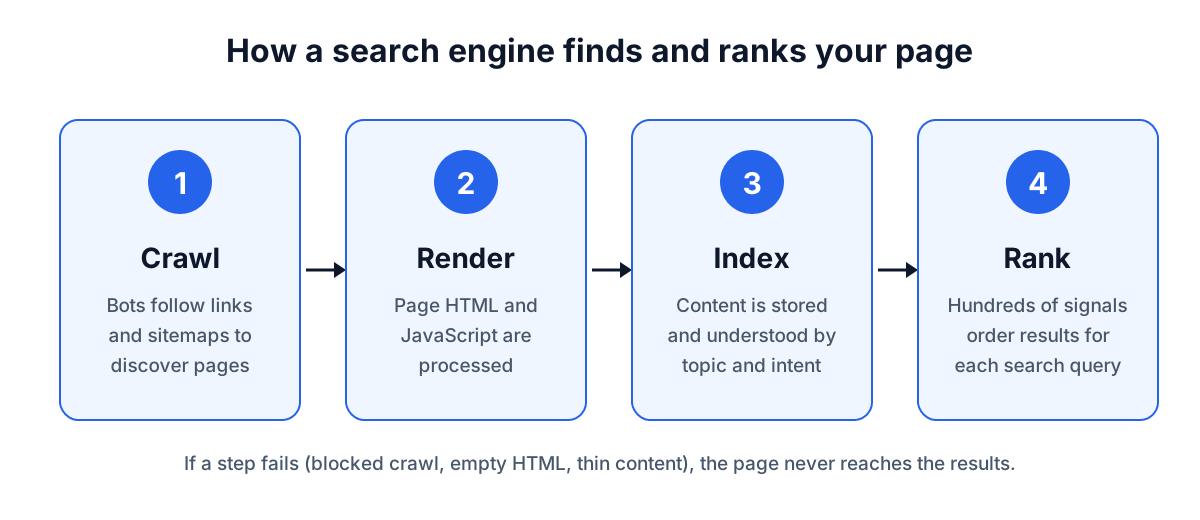
- Crawl: bots like Googlebot follow links and read your
sitemap.xmlto discover URLs. A page with no links pointing to it and no sitemap entry may never be found. - Render: the crawler loads the HTML and, sometimes later, runs the JavaScript. Content that only appears after client-side JavaScript runs is seen later, less reliably, and often not at all by AI search crawlers.
- Index: the search engine stores the page and works out what it is about: its topic, the questions it answers and how it relates to other pages.
- Rank: when someone searches, hundreds of signals decide the order: relevance to the query, content quality, page experience, links from other sites and more.
Single-page apps that render the article body only in the browser often send search engines an almost empty HTML page. Use server-side rendering or static generation for any page you want to rank. Our Next.js complete guide shows how Server Components make this the default.
Why SEO matters#
- Search is how people start. Whether someone needs a laptop, a dentist or a fix for a React error, they usually search first. If you are not in those results, a competitor is.
- The traffic is free per click. You invest time in content and fixes, but you don't pay every time someone visits.
- It compounds. A page that ranks well can bring visitors every day for years. Each good page also helps the rest of your site build authority.
- It brings high-intent visitors. Someone searching "how to fix CORS error in Express" has the exact problem your article solves. That makes them far more likely to read, sign up or buy.
- It builds trust. Many people skip ads and trust organic results more, because those positions can't be bought.
- Good SEO is good engineering. Fast pages, clean HTML, accessible images and clear structure help users and search engines equally.
Organic vs paid search#
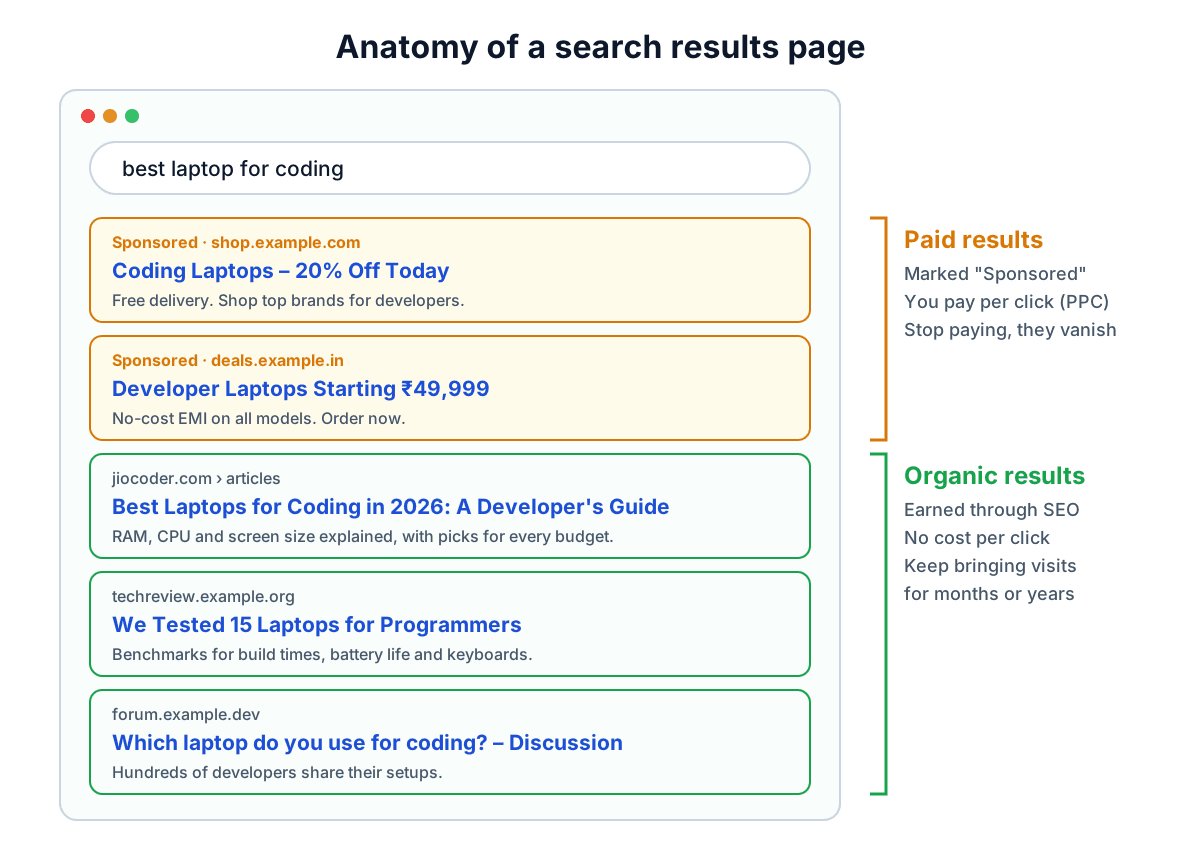
A search results page usually has two kinds of results. They look similar, but they work in completely different ways.
Organic search#
Organic results are the regular listings the search engine ranks on its own, based on how relevant and useful it thinks each page is. You can't pay for these positions. You earn them through SEO.
- Cost: no fee per click, but it takes time, content and technical work.
- Speed: slow. New pages often take weeks or months to rank for competitive terms.
- Durability: long-lasting. Rankings don't disappear the day you stop working on them.
- Trust: high, because users know the position wasn't bought.
Paid search (PPC)#
Paid results are ads, labelled "Sponsored". Advertisers bid on keywords in platforms like Google Ads or Microsoft Advertising, and usually pay each time someone clicks. That is why it's called pay-per-click (PPC) or search engine marketing (SEM).
- Cost: you pay for every click. Prices depend on how many advertisers compete for the keyword.
- Speed: instant. An approved ad can show within hours.
- Control: high. You choose the keywords, locations, budget, schedule and exact ad text.
- Durability: none. When the budget stops, the traffic stops.
The key difference: what happens over time#
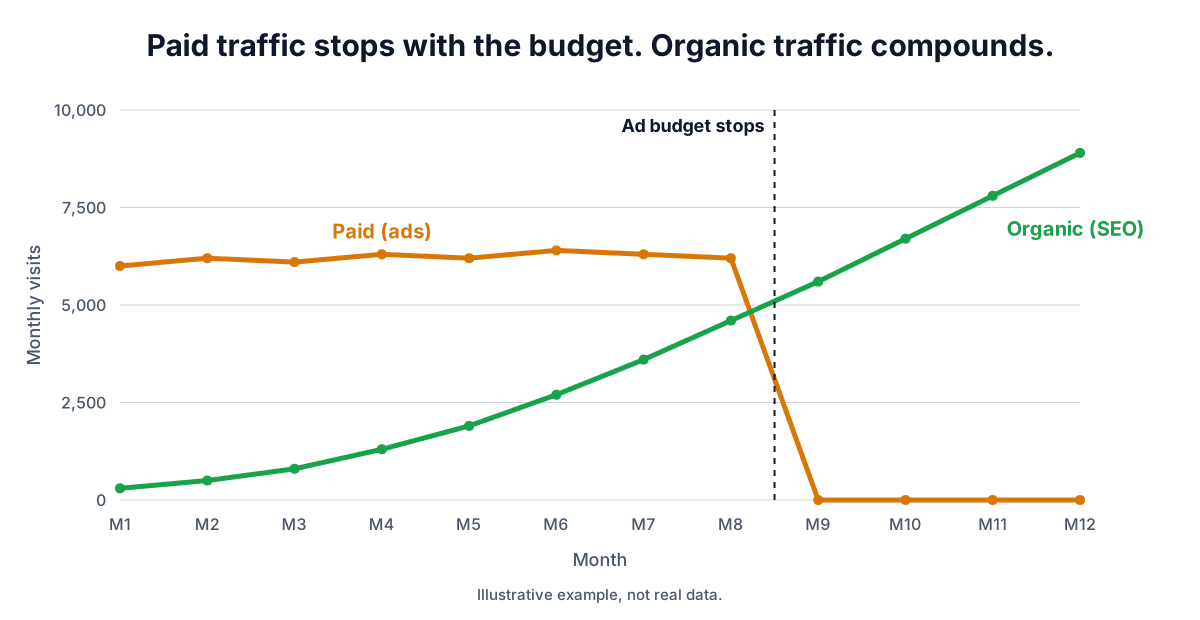
Paid traffic is like renting: steady while you pay, gone the moment you stop. Organic traffic is like owning: slow to build, but it keeps growing and keeps working after the effort is done. The chart is an illustration, but the shape is what most sites see.
Side-by-side comparison#
| Factor | Organic (SEO) | Paid (PPC) |
|---|---|---|
| Cost per click | Free | Paid for every click |
| Time to results | Weeks to months | Hours to days |
| When you stop | Traffic continues and slowly fades | Traffic stops immediately |
| Control over placement | Low: the algorithm decides | High: you choose keywords and budget |
| User trust | Higher | Lower; many users skip ads |
| Best for | Long-term growth, tutorials, guides, evergreen pages | Launches, offers, testing keywords, time-limited campaigns |
Which one should you use?#
Most businesses use both. Paid search fills the gap while SEO builds up, and it is useful for testing which keywords actually convert before you invest months of content in them. For a developer blog, a learning platform or a product with a long-term audience, SEO should be the foundation. Ads are a boost, not the base.
Run a small paid campaign on keywords you plan to target organically. The search terms report shows what people actually type and which queries lead to sign-ups. Then write content for the queries that work.
The three pillars of SEO#
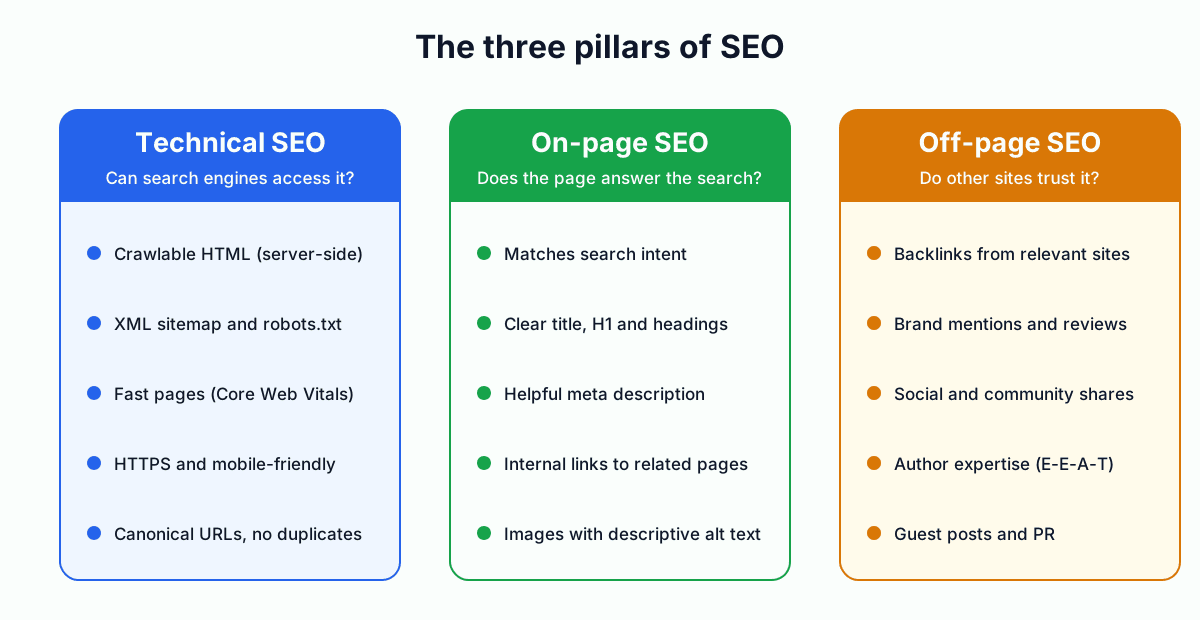
SEO work falls into three groups. You need all three: great content can't rank if search engines can't read it, and a perfect technical setup won't rank thin content.
1. Technical SEO#
Technical SEO makes sure search engines can crawl, render and index your site.
- Serve real content in the HTML (server-side rendering or static generation).
- Keep an up-to-date
sitemap.xmlwith reallastmoddates, and arobots.txtthat doesn't block important pages. - Make pages fast. Google uses Core Web Vitals (LCP, INP and CLS) as page experience signals.
- Use HTTPS and a mobile-friendly layout.
- Set a
<link rel="canonical">on every page so duplicate URLs don't compete with each other.
2. On-page SEO#
On-page SEO makes each page clearly answer what people search for.
- Match search intent: someone searching "React useEffect example" wants code, not a history of React.
- Write a clear
<title>under about 60 characters, one<h1>, and logical<h2>and<h3>headings. - Add a meta description that tells searchers what they'll get. It doesn't change rankings directly, but a good one gets more clicks.
- Link to related pages on your own site. Internal links help search engines discover pages and understand how topics connect.
- Give images descriptive
alttext, and use semantic HTML. Our HTML complete guide covers this in detail.
<head>
  <title>What Is SEO? Organic vs Paid Search Explained</title>
  <meta name="description" content="Learn what SEO is, how search engines rank pages, and the difference between organic and paid search.">
  <link rel="canonical" href="https://example.com/articles/what-is-seo">
</head>
3. Off-page SEO#
Off-page SEO is about your reputation across the web.
- Backlinks: links from relevant, trusted sites are one of the strongest ranking signals. One link from a respected developer blog is worth more than hundreds from spammy directories.
- Mentions and shares: being discussed on forums, social media and communities brings visitors and signals that people value your content.
- E-E-A-T: Google's quality guidelines look for Experience, Expertise, Authoritativeness and Trust. Show real authors with real experience, and keep facts accurate and up to date.
Avoid shortcuts like buying links, stuffing keywords or mass-producing near-identical pages. Search engines detect these patterns and can demote the whole site, not just one page.
How to get started with SEO#
- Set up Google Search Console and Bing Webmaster Tools. They're free and show which pages are indexed, which queries bring impressions, and what errors crawlers hit.
- Check that crawlers can see your content. Use the URL Inspection tool in Search Console and look at the crawled HTML, not the page in your browser.
- Submit your sitemap and make sure every page you care about is in it.
- Pick one topic per page and write the most useful answer to that search. Don't create several thin pages for the same query.
- Link your pages together so related articles point to each other.
- Measure and repeat. Watch impressions, clicks and average position in Search Console. Improve pages that get impressions but few clicks.
Key takeaways#
- SEO is making your pages easy for search engines to find, understand and trust, without paying for placement.
- A page must be crawled, rendered, indexed and ranked. If it fails any step, it won't appear in results.
- Organic results are earned and keep working over time. Paid results are bought per click and stop when the budget stops.
- Use paid search for speed and testing, and SEO as the long-term foundation.
- Good SEO needs all three pillars: technical, on-page and off-page.