DOM and Event Handling Interview Questions: Bubbling, Capturing and Delegation
12 DOM and event interview questions with answers and code: event bubbling and capturing, event delegation, target vs currentTarget, stopPropagation vs preventDefault, passive listeners, custom events, DOM performance and observers.
Frameworks hide much of the DOM, but interviewers still expect you to know how events travel, how to attach listeners efficiently and how DOM changes affect performance. Here are 12 DOM and event questions with answers and code.
Event propagation#
Q1. What are the phases of event propagation?#
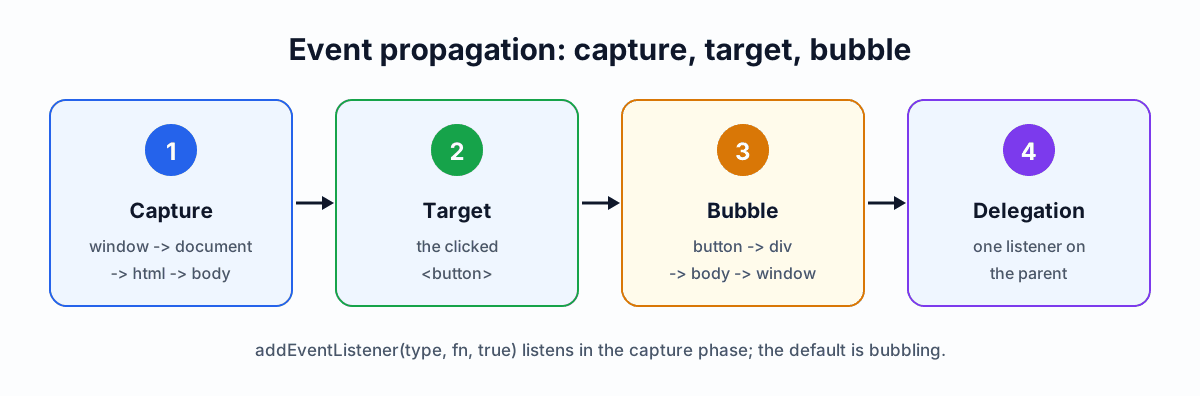
Answer: When you click a button, the event travels in three phases:
- Capture: from
windowdown throughdocument,html,bodyand each ancestor to the target. - Target: listeners on the element itself run.
- Bubble: the event travels back up through the ancestors to
window.
// <div id="outer"><button id="btn">Click</button></div>
outer.addEventListener("click", () => console.log("outer capture"), true);
outer.addEventListener("click", () => console.log("outer bubble"));
btn.addEventListener("click", () => console.log("button"));

// Click the button:
// outer capture
// button
// outer bubble
Listeners use the bubble phase by default; pass true or { capture: true } to listen during capture. Some events (focus, blur, mouseenter, load) don't bubble; use focusin/focusout if you need bubbling versions.
Q2. What is event delegation, and why use it?#
Answer: Instead of adding a listener to every child, add one listener to a common parent and use event.target to find which child was clicked. It works because events bubble.
// <ul id="todo-list"> ... many <li data-id="..."><button class="delete"> ... </ul>
document.getElementById("todo-list").addEventListener("click", (e) => {
  const deleteBtn = e.target.closest("button.delete");
  if (!deleteBtn) return;                       // click wasn't on a delete button
  const item = deleteBtn.closest("li");
  removeTodo(item.dataset.id);
  item.remove();
});
Benefits: fewer listeners and less memory, and items added later work automatically. React itself attaches its event listeners at the root container rather than on each element.
Q3. What is the difference between event.target and event.currentTarget?#
event.target | event.currentTarget | |
|---|---|---|
| Is | The element where the event originated (deepest clicked node) | The element whose listener is running right now |
| Changes during propagation? | No | Yes, at each step |
| In delegation | The child that was clicked | The parent with the listener |
list.addEventListener("click", (e) => {
  console.log(e.target.tagName);         // "SPAN" (clicked inside an li)
  console.log(e.currentTarget.id);       // "todo-list"
});
Q4. What is the difference between stopPropagation, stopImmediatePropagation and preventDefault?#
| Method | Effect | Example use |
|---|---|---|
preventDefault() | Cancels the browser's default action; propagation continues | Stop a form submit or link navigation |
stopPropagation() | Stops the event moving to other elements; default action still happens | Click inside a modal shouldn't close it via the backdrop listener |
stopImmediatePropagation() | Also prevents other listeners on the same element | A guard listener that must win |
form.addEventListener("submit", (e) => {
  e.preventDefault();                 // no page reload
  submitWithFetch(new FormData(form));
});Stopping propagation breaks delegated listeners higher up, such as analytics or "click outside to close" handlers. Prefer checking e.target in the parent listener.
Listeners and performance#
Q5. What options can you pass to addEventListener?#
const controller = new AbortController();

window.addEventListener("scroll", onScroll, {
  passive: true,               // promise not to call preventDefault → smoother scrolling
  capture: false,
  signal: controller.signal,   // remove the listener by aborting
});

button.addEventListener("click", showWelcome, { once: true }); // auto-removed after first call

controller.abort();            // removes every listener registered with this signal
Passive listeners let the browser start scrolling immediately instead of waiting to see whether your touch or wheel handler calls preventDefault.
Q6. How do you remove an event listener correctly?#
// Wrong: a new anonymous function is never the same reference
el.addEventListener("click", () => doThing());
el.removeEventListener("click", () => doThing());   // does nothing

// Right: keep a reference (and match the capture flag)
function handleClick() { doThing(); }
el.addEventListener("click", handleClick, true);
el.removeEventListener("click", handleClick, true);
Forgotten listeners on long-lived objects like window are a common memory leak in single-page apps. In React, return a cleanup function from useEffect. See memory leaks and garbage collection.
Q7. How do you create and dispatch a custom event?#
const event = new CustomEvent("cart:updated", {
  detail: { count: 3 },        // your payload
  bubbles: true,               // let parents hear it
});
cartIcon.dispatchEvent(event);

document.addEventListener("cart:updated", (e) => {
  badge.textContent = e.detail.count;
});
Custom events are a lightweight way for independent widgets or Web Components to communicate without a shared framework.
Q8. How do you handle high-frequency events like scroll, resize and input?#
Answer: These can fire dozens of times per second. Use debounce (wait for a pause, good for search input) or throttle (run at most every N ms, good for scroll position), use passive listeners, and do visual updates inside requestAnimationFrame. Even better, replace scroll-based logic with observers (Q11).
let ticking = false;
window.addEventListener("scroll", () => {
  if (!ticking) {
    requestAnimationFrame(() => {
      header.classList.toggle("shrink", window.scrollY > 80);
      ticking = false;
    });
    ticking = true;
  }
}, { passive: true });
Full explanation in debounce vs throttle.
DOM manipulation#
Q9. What is the difference between innerHTML, textContent and innerText?#
| Property | Reads/writes | Notes |
|---|---|---|
innerHTML | HTML markup | Parses HTML; dangerous with user input (XSS) |
textContent | Raw text of all nodes, including hidden ones | Fast, safe, no layout |
innerText | Rendered, visible text | Respects CSS; triggers layout (slower) |
comment.innerHTML = userInput;    // XSS risk: <img src=x onerror=alert(1)>
comment.textContent = userInput;  // safe: shown as plain text
Q10. What causes reflow (layout) and how do you avoid layout thrashing?#
Answer: Changing geometry (width, height, adding nodes, fonts) forces the browser to recalculate layout. Reading layout values like offsetHeight or getBoundingClientRect() right after a write forces a synchronous layout. Alternating reads and writes in a loop causes layout thrashing.
// Bad: read-write-read-write → a forced layout on every iteration
items.forEach((el) => {
  el.style.height = el.offsetWidth + "px";
});

// Good: batch reads, then batch writes
const widths = items.map((el) => el.offsetWidth);
items.forEach((el, i) => { el.style.height = widths[i] + "px"; });

// Insert many nodes with one DOM update
const frag = document.createDocumentFragment();
data.forEach((d) => {
  const li = document.createElement("li");
  li.textContent = d.name;
  frag.appendChild(li);
});
list.appendChild(frag);
Animate with transform and opacity, which skip layout. More in browser rendering interview questions.
Q11. What are IntersectionObserver, MutationObserver and ResizeObserver?#
| Observer | Watches | Typical use |
|---|---|---|
IntersectionObserver | When an element enters or leaves the viewport | Lazy loading, infinite scroll, analytics impressions |
ResizeObserver | Changes to an element's size | Responsive components, charts |
MutationObserver | Changes to the DOM tree or attributes | Reacting to third-party DOM changes |
const io = new IntersectionObserver((entries) => {
  entries.forEach((entry) => {
    if (entry.isIntersecting) {
      entry.target.src = entry.target.dataset.src;   // lazy load
      io.unobserve(entry.target);
    }
  });
}, { rootMargin: "200px" });

document.querySelectorAll("img[data-src]").forEach((img) => io.observe(img));
Observers are asynchronous and batched, so they're far cheaper than scroll listeners that call getBoundingClientRect.
Q12. Predict the output.#
// <div id="a"><div id="b"><button id="c">Go</button></div></div>
a.addEventListener("click", () => console.log("A bubble"));
a.addEventListener("click", () => console.log("A capture"), true);
b.addEventListener("click", (e) => { console.log("B bubble"); e.stopPropagation(); });
b.addEventListener("click", () => console.log("B capture"), true);
c.addEventListener("click", () => console.log("C"));

c.click();
Answer:
A capture
B capture
C
B bubble
Capture listeners run top-down (A, then B), then the target (C), then bubbling starts at B. B's handler calls stopPropagation, so "A bubble" never runs.
Quick revision#
| Question | Short answer |
|---|---|
| Default listener phase | Bubble |
| Delegation relies on | Bubbling + e.target.closest() |
| Stop default browser action | preventDefault() |
| Smoother scroll listeners | { passive: true } |
| Safe way to insert user text | textContent |
| Lazy loading without scroll events | IntersectionObserver |
Also see the HTML interview questions for freshers.
Key takeaways#
- Events travel in three phases: capture down, target, then bubble up.
- Event delegation uses one parent listener and
e.target, so dynamic children work automatically. preventDefaultstops the browser action;stopPropagationstops the event's journey.- Use passive listeners,
once,AbortSignaland proper cleanup to keep pages fast and leak-free. - Batch DOM reads and writes, use fragments, and prefer observers over scroll handlers.