Next.js Complete Guide: App Router, Server Components, Data Fetching and Caching
Learn Next.js in depth: App Router file-based routing, layouts, Server and Client Components, data fetching, Server Actions, caching, proxy.ts, SEO metadata and deployment, updated for Next.js 16.

Next.js is a React framework for building full websites and web apps. React gives you components; Next.js adds file-based routing, server rendering, data fetching, caching, image and font optimisation, and an easy path to production. This guide explains how the App Router works and covers the changes in Next.js 16.
Next.js is React plus a server. Make sure you are comfortable with components, props, state and hooks first. Our React complete guide covers everything you need.
Why use Next.js?#
- SEO and speed: pages are rendered on the server, so search engines and users get real HTML immediately.
- File-based routing: folders become URLs; no router setup needed.
- Full stack in one project: build API endpoints and run server code next to your UI.
- Built-in optimisation:
next/image,next/font, code splitting and caching.
Creating a project#
npx create-next-app@latest my-app
cd my-app
npm run dev
The setup asks about TypeScript, ESLint, Tailwind CSS and the App Router; the defaults are a good start. Next.js 16 needs Node.js 20.9 or later and uses Turbopack as the default bundler for both development and production builds.
File-based routing with the App Router#
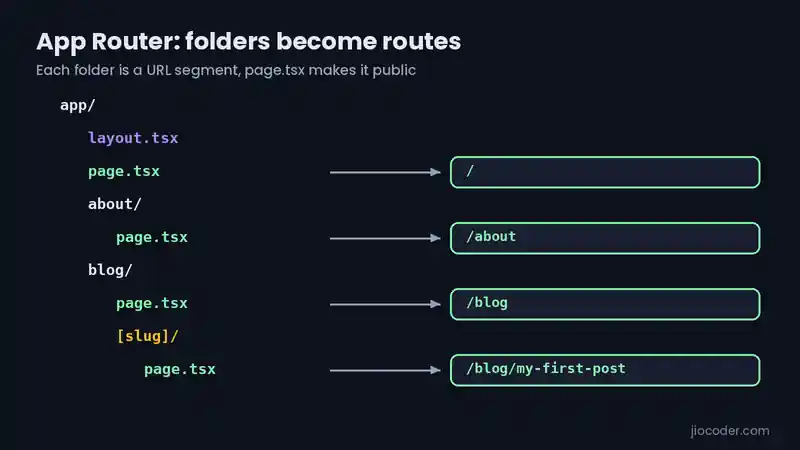
Inside the app folder, each folder is a URL segment and a page.tsx file makes that segment a public page.
app/
  page.tsx              →  /
  about/page.tsx        →  /about
  blog/page.tsx         →  /blog
  blog/[slug]/page.tsx  →  /blog/my-first-post
  (marketing)/pricing/page.tsx  →  /pricing  (route group, not in the URL)
Dynamic routes#
Square brackets create a dynamic segment. In Next.js 15 and 16, params is a Promise, so you await it.
// app/blog/[slug]/page.tsx
export default async function BlogPost({
  params,
}: {
  params: Promise<{ slug: string }>;
}) {
  const { slug } = await params;
  const post = await getPost(slug);
  return <article><h1>{post.title}</h1></article>;
}
[...slug] catches all remaining segments, and [[...slug]] makes the catch-all optional.
Navigation#
import Link from "next/link";

<Link href="/blog/hello-world">Read post</Link>
Link navigates without a full page reload and prefetches routes as they come into view. For navigation in code, use useRouter from next/navigation in a Client Component, or redirect() on the server.
Special files#
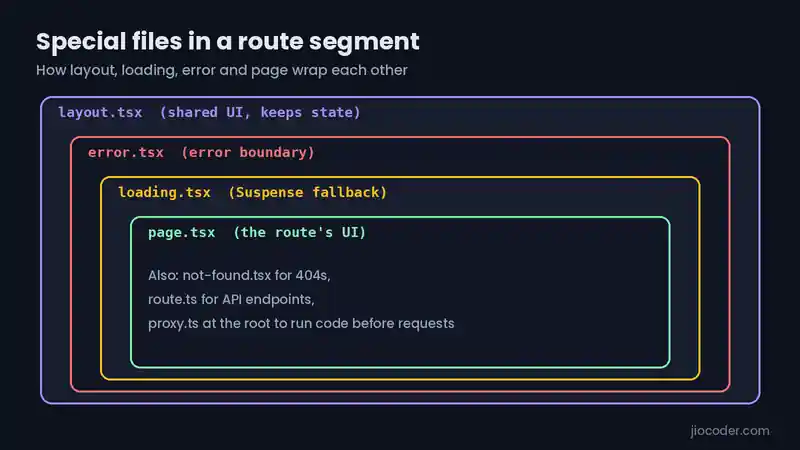
| File | Purpose |
|---|---|
layout.tsx | Shared UI that wraps a segment and its children. It stays mounted between navigations, so its state is kept. |
page.tsx | The unique UI of a route; makes the route public. |
loading.tsx | Instant loading UI, built on React Suspense. |
error.tsx | Error boundary for the segment. Must be a Client Component. |
not-found.tsx | UI shown when notFound() is called or no route matches. |
route.ts | An API endpoint (Route Handler) using GET, POST and other HTTP methods. |
proxy.ts | Runs before a request reaches a route, for redirects, rewrites and auth checks. It replaces middleware.ts in Next.js 16. |
The root app/layout.tsx is required and must include the <html> and <body> tags.
// app/layout.tsx
export default function RootLayout({ children }: { children: React.ReactNode }) {
  return (
    <html lang="en">
      <body>
        <header>My Site</header>
        <main>{children}</main>
      </body>
    </html>
  );
}
Server Components and Client Components#
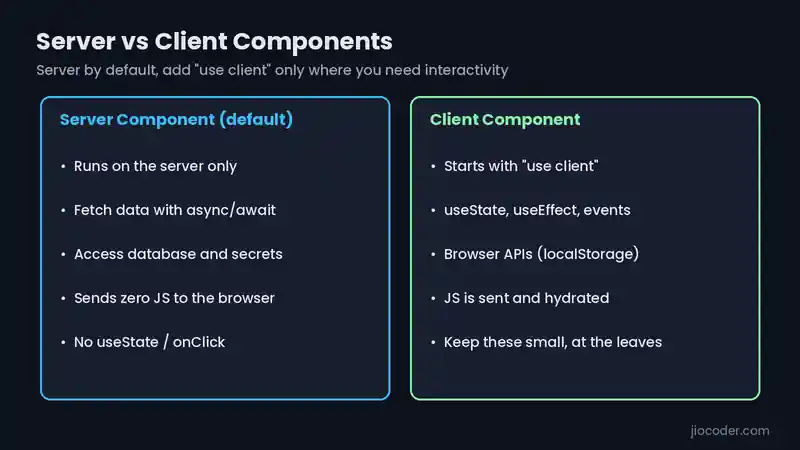
In the App Router, every component is a Server Component by default. It runs only on the server, can be async, can read a database or secret keys directly, and sends no JavaScript for itself to the browser.
Add "use client" at the top of a file to make a Client Component. You need one when you use state, effects, event handlers or browser APIs.
// app/components/LikeButton.tsx
"use client";
import { useState } from "react";

export default function LikeButton() {
  const [likes, setLikes] = useState(0);
  return <button onClick={() => setLikes(likes + 1)}>Like {likes}</button>;
}Keep pages and layouts as Server Components and make only the small interactive pieces, like a button or a search box, Client Components. A Server Component can render a Client Component and pass it serialisable props or other Server Components as children.
Data fetching#
In a Server Component, fetch data directly with async/await. No useEffect, no loading state boilerplate.
// app/products/page.tsx
export default async function ProductsPage() {
  const res = await fetch("https://api.example.com/products");
  const products = await res.json();
  return (
    <ul>
      {products.map((p) => <li key={p.id}>{p.name}</li>)}
    </ul>
  );
}- Run independent requests in parallel with
Promise.allto avoid waterfalls. - Wrap slow parts in
<Suspense>(or addloading.tsx) so the rest of the page streams to the browser first. - Request data such as
cookies(),headers()andsearchParamsare async and must be awaited.
Rendering and caching#
Next.js decides when HTML is generated:
- Static: rendered at build time and reused for every visitor. Fastest; ideal for marketing pages and blog posts.
- Dynamic: rendered on each request, for personalised or always-fresh data.
- Incremental Static Regeneration (ISR): static pages that refresh in the background after a set time or on demand.
- Partial Prerendering: a static shell is sent instantly and dynamic holes stream in.
Cache Components in Next.js 16#
Next.js 16 makes caching explicit. With Cache Components enabled, code runs dynamically at request time unless you opt in with the "use cache" directive on a page, component or function.
// next.config.ts
const nextConfig = { cacheComponents: true };
export default nextConfig;import { cacheLife, cacheTag } from "next/cache";
async function getProducts() {
"use cache";
cacheLife("hours");
cacheTag("products");
return db.product.findMany();
}Revalidating data#
| API | Use it when |
|---|---|
revalidateTag("products", "max") | Mark tagged data stale; visitors get cached content while it refreshes in the background. |
updateTag("products") | Inside a Server Action, expire and refresh immediately so the user sees their own change (read-your-writes). |
revalidatePath("/products") | Refresh everything rendered for a path. |
refresh() | Inside a Server Action, refresh uncached data on the current page. |
Server Actions and forms#
A Server Action is an async function marked with "use server" that runs on the server but can be called from a form or a Client Component. It replaces many hand-written API routes.
// app/todos/actions.ts
"use server";
import { updateTag } from "next/cache";

export async function addTodo(formData: FormData) {
  const text = String(formData.get("text") ?? "").trim();
  if (!text) return;
  await db.todo.create({ data: { text } });
  updateTag("todos");
}

// app/todos/page.tsx
import { addTodo } from "./actions";

export default function TodosPage() {
  return (
    <form action={addTodo}>
      <input name="text" required />
      <button type="submit">Add</button>
    </form>
  );
}Anyone can call a Server Action with any input. Always validate the data (for example with Zod) and check that the user is logged in and allowed to perform the action.
Route Handlers#
// app/api/health/route.ts
export async function GET() {
  return Response.json({ status: "ok" });
}
Use Route Handlers for webhooks, public APIs consumed by other apps, and file downloads. For mutations from your own UI, prefer Server Actions.
proxy.ts#
// proxy.ts (project root)
import { NextResponse, type NextRequest } from "next/server";

export function proxy(request: NextRequest) {
  const token = request.cookies.get("session");
  if (!token) {
    return NextResponse.redirect(new URL("/login", request.url));
  }
  return NextResponse.next();
}

export const config = { matcher: ["/dashboard/:path*"] };
Keep proxy logic light, such as redirects and quick checks, and do full authorisation inside your pages and Server Actions too.
SEO and metadata#
// Static metadata
export const metadata = {
  title: "Pricing | My Site",
  description: "Simple plans for every team.",
};

// Dynamic metadata
export async function generateMetadata({ params }) {
  const { slug } = await params;
  const post = await getPost(slug);
  return {
    title: post.title,
    description: post.excerpt,
    openGraph: { images: [post.image] },
  };
}
Add app/sitemap.ts and app/robots.ts to generate a sitemap and robots file, and opengraph-image files for social previews.
Images and fonts#
import Image from "next/image";
import { Inter } from "next/font/google";

const inter = Inter({ subsets: ["latin"] });

<Image src="/hero.jpg" alt="Team at work" width={1200} height={630} priority />
next/image serves resized, modern-format images and lazy-loads them; next/font self-hosts fonts with no layout shift.
Environment variables#
Put secrets in .env.local. Variables are server-only by default; only names starting with NEXT_PUBLIC_ are exposed to the browser, so never prefix secrets that way.
Deployment#
- Vercel: connect your Git repository for automatic builds and previews.
- Node.js server:
next buildthennext start, oroutput: "standalone"for Docker. - Static export:
output: "export"for fully static sites without server features.
Best practices#
- Default to Server Components; use
"use client"only where you need interactivity. - Fetch data on the server, in parallel, and stream slow parts with
Suspense. - Be explicit about caching with
"use cache"and tags, and revalidate after writes. - Validate input and check permissions in every Server Action.
- Add metadata to every page, use
next/image, and keep secrets server-side.
Test yourself with our Next.js interview questions for freshers. Want to revise the basics? Start again from the HTML complete guide.
Key takeaways#
- In the App Router, folders are routes and
page.tsxmakes them public; layouts wrap and persist. - Components are Server Components by default; add
"use client"for interactivity. - Fetch data directly in async Server Components;
params,cookies()andheaders()are async. - Next.js 16 uses explicit caching with
"use cache",revalidateTagandupdateTag. - Server Actions handle mutations; always validate and authorise.
proxy.tsreplacesmiddleware.ts, and Turbopack is the default bundler.