Web Workers in JavaScript: Run Heavy Code Without Freezing the UI
Learn Web Workers in JavaScript: why the main thread freezes, creating dedicated and module workers, postMessage, transferable objects, SharedArrayBuffer, worker pools, Comlink and when to use workers.
JavaScript in the browser runs on a single main thread. That thread handles your code, rendering, layout and user input. If you run a 2-second calculation on it, the page can't scroll, buttons don't respond and animations freeze. Web Workers let you run JavaScript on background threads so the main thread stays free for the UI.
Why the page freezes#
button.addEventListener("click", () => {
  const primes = findPrimes(50_000_000);   // takes ~3 seconds
  output.textContent = primes.length;      // UI is frozen until this line
});
The browser aims to paint a frame every ~16 ms (60 fps). Any task longer than 50 ms counts as a "long task" and makes the page feel sluggish. Async code like setTimeout or promises doesn't help with CPU work: it still runs on the same thread, just later.
How Web Workers work#
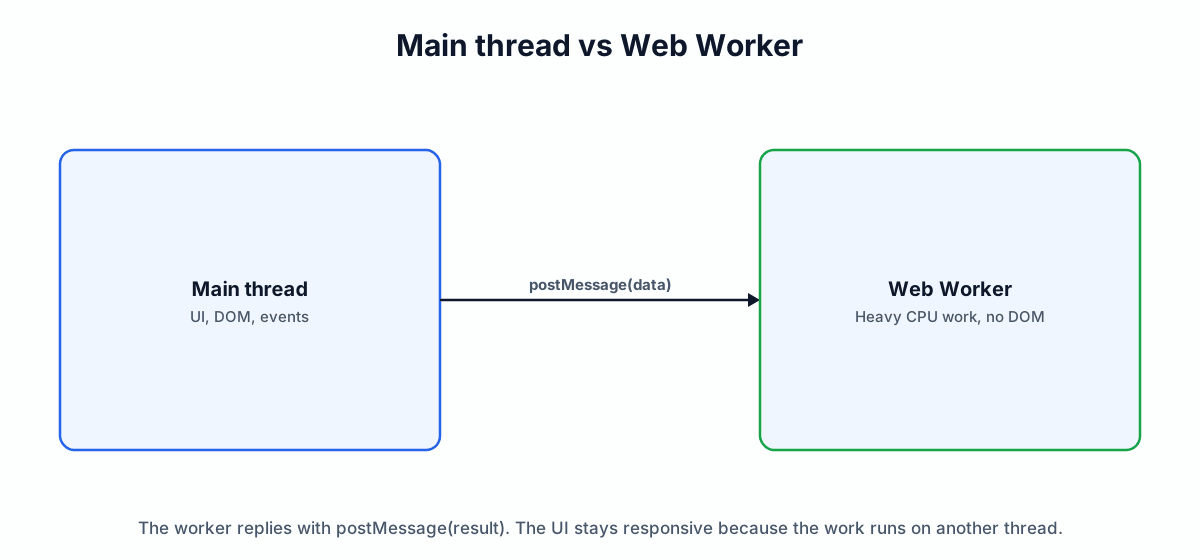
- A worker runs a separate script on its own thread with its own event loop.
- Workers and the main thread don't share variables. They communicate by sending messages.
- Messages are copied using the structured clone algorithm, which handles objects, arrays, Maps, Dates and more (but not functions or DOM nodes).
Your first worker#
// prime-worker.js
function findPrimes(limit) {
  const sieve = new Uint8Array(limit + 1);
  const primes = [];
  for (let i = 2; i <= limit; i++) {
    if (!sieve[i]) {
      primes.push(i);
      for (let j = i * i; j <= limit; j += i) sieve[j] = 1;
    }
  }
  return primes;
}

self.onmessage = (event) => {
  const { limit } = event.data;
  const primes = findPrimes(limit);
  self.postMessage({ count: primes.length, last: primes.at(-1) });
};// main.js
const worker = new Worker(new URL("./prime-worker.js", import.meta.url), { type: "module" });
button.addEventListener("click", () => {
output.textContent = "Calculating…";
worker.postMessage({ limit: 50_000_000 });
});
worker.onmessage = (event) => {
output.textContent = `Found ${event.data.count} primes`;
};
worker.onerror = (err) => {
output.textContent = `Worker error: ${err.message}`;
};The UI stays smooth while the worker crunches numbers. The new URL(..., import.meta.url) pattern lets bundlers like Vite and webpack find and bundle the worker file.
What workers can and can't do#
| Available in workers | Not available |
|---|---|
fetch, WebSocket, IndexedDB | The DOM (document, window) |
setTimeout, setInterval, Promises | localStorage, sessionStorage |
crypto, TextEncoder, OffscreenCanvas | alert, confirm |
importScripts() or ES module imports | Direct access to main-thread variables |
Promise-based messaging#
Raw onmessage handlers get messy when you send many requests. Wrap them in promises with request IDs:
function createWorkerClient(url) {
  const worker = new Worker(url, { type: "module" });
  const pending = new Map();
  let nextId = 0;

  worker.onmessage = ({ data }) => {
    const { id, result, error } = data;
    const { resolve, reject } = pending.get(id);
    pending.delete(id);
    error ? reject(new Error(error)) : resolve(result);
  };

  return {
    call(method, ...args) {
      const id = nextId++;
      return new Promise((resolve, reject) => {
        pending.set(id, { resolve, reject });
        worker.postMessage({ id, method, args });
      });
    },
    terminate: () => worker.terminate(),
  };
}

// worker side
const api = { findPrimes, resizeImage, parseCsv };
self.onmessage = async ({ data: { id, method, args } }) => {
  try {
    self.postMessage({ id, result: await api[method](...args) });
  } catch (e) {
    self.postMessage({ id, error: e.message });
  }
};

const client = createWorkerClient(new URL("./worker.js", import.meta.url));
const rows = await client.call("parseCsv", csvText);Google's tiny Comlink library does exactly this for you: const api = Comlink.wrap(worker); await api.findPrimes(1e7); makes worker functions feel like normal async functions.
Transferable objects: zero-copy messages#
Copying a 200 MB ArrayBuffer on every message is slow. Transferring moves ownership to the other thread instantly, without copying:
const pixels = new Uint8ClampedArray(width * height * 4);

worker.postMessage({ pixels }, [pixels.buffer]);   // second argument = transfer list
console.log(pixels.byteLength);                     // 0: the main thread no longer owns it
Transferable types include ArrayBuffer, MessagePort, ImageBitmap and OffscreenCanvas.
SharedArrayBuffer and Atomics#
For true shared memory between threads, use SharedArrayBuffer with Atomics for safe updates. It requires the page to be cross-origin isolated with these headers:
Cross-Origin-Opener-Policy: same-origin
Cross-Origin-Embedder-Policy: require-corpconst shared = new SharedArrayBuffer(4);
const counter = new Int32Array(shared);
worker.postMessage(shared);
// in any thread
Atomics.add(counter, 0, 1); // thread-safe incrementShared memory brings back classic race conditions, the same ones covered in our Java multithreading guide. Use message passing unless you really need shared state.
Worker pools#
Each worker is a real OS thread with startup cost and memory. For many tasks, create a fixed pool sized to the CPU:
const size = navigator.hardwareConcurrency || 4;
const pool = Array.from({ length: size }, () =>
  createWorkerClient(new URL("./worker.js", import.meta.url))
);

let next = 0;
function run(method, ...args) {
  const client = pool[next++ % pool.length];   // round-robin
  return client.call(method, ...args);
}

const results = await Promise.all(chunks.map((c) => run("process", c)));
Other kinds of workers#
| Type | Purpose |
|---|---|
| Dedicated Worker | Background thread owned by one page (this guide) |
| Shared Worker | One worker shared by several tabs of the same origin |
| Service Worker | Network proxy for offline support, caching and push notifications |
| Worklets | Tiny scripts hooked into rendering or audio (Paint, Audio Worklets) |
Node.js worker_threads | The same idea on the server for CPU-heavy work |
When to use a worker#
- Parsing or transforming large files (CSV, JSON, Excel) in the browser.
- Image and video processing, filters, compression.
- Search indexing and fuzzy search over large lists.
- Syntax highlighting and linting in code editors.
- Encryption, hashing and compression.
- Running WebAssembly modules for heavy computation.
Workers add messaging overhead and complexity. For small tasks (under ~16 ms), the cost of copying data can outweigh the benefit. Measure with the DevTools Performance tab first, and remember to call worker.terminate() when you're done so it doesn't stay in memory.
Workers solve CPU blocking; leaks are a different problem, covered in JavaScript memory leaks. Workers can also make network calls; see Fetch API error handling.
Key takeaways#
- Long CPU tasks on the main thread freeze the UI; async code alone doesn't fix that.
- Web Workers run scripts on background threads and talk to the page with
postMessage. - Workers have no DOM access, and messages are copied with structured clone.
- Transfer
ArrayBuffers for zero-copy messaging; useSharedArrayBuffer+Atomicsonly when you need shared state. - Wrap workers in promises (or Comlink), pool them by CPU count, and terminate them when finished.