Fetch API Error Handling, Timeouts and AbortController: The Complete Guide
Master the JavaScript Fetch API: why fetch doesn't reject on 404, handling network and HTTP errors, parsing JSON safely, timeouts with AbortSignal, cancelling requests with AbortController, retries and a reusable wrapper.

The Fetch API is the modern way to make HTTP requests in the browser and in Node.js 18+. It's simple to start with, but it has a few surprises that cause real bugs in production: it doesn't throw on HTTP errors, it has no built-in timeout, and requests keep running after the user has moved on. This guide covers all of them.
A basic request#
const res = await fetch("https://api.example.com/users/1");
const user = await res.json();
console.log(user.name);// POST with JSON
const res = await fetch("/api/users", {
method: "POST",
headers: { "Content-Type": "application/json" },
body: JSON.stringify({ name: "Asha", email: "asha@example.com" }),
});The request lifecycle and its failure points#
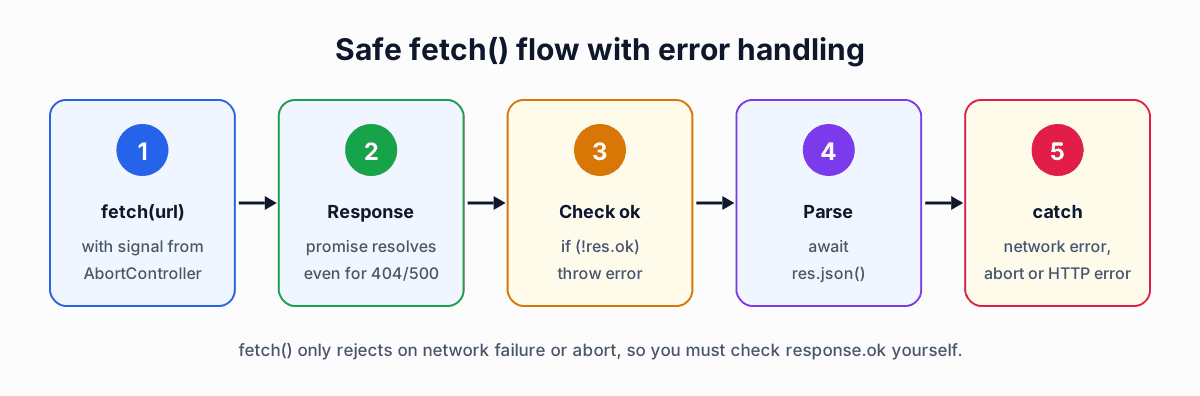
| What goes wrong | What fetch does |
|---|---|
| No internet, DNS failure, CORS blocked | Promise rejects with TypeError |
| Server returns 404, 401, 500… | Promise resolves; res.ok is false |
| Response body isn't valid JSON | res.json() rejects with SyntaxError |
| Server never responds | Waits (almost) forever: no default timeout |
| Request cancelled | Rejects with AbortError |
Gotcha #1: fetch doesn't throw on 404 or 500#
try {
  const res = await fetch("/api/users/999");   // 404
  const user = await res.json();               // runs anyway: parses the error body
  render(user.name);                           // undefined → silent bug
} catch (err) {
  // never reached for HTTP errors
}
Always check res.ok (true for statuses 200–299) yourself:
const res = await fetch("/api/users/999");
if (!res.ok) {
  throw new Error(`Request failed: ${res.status} ${res.statusText}`);
}
const user = await res.json();
A custom HTTP error class#
Callers often need the status code and the server's error message, not just a string:
class HttpError extends Error {
  constructor(response, body) {
    super(body?.message || `HTTP ${response.status} ${response.statusText}`);
    this.name = "HttpError";
    this.status = response.status;
    this.body = body;
  }
}

async function parseBody(res) {
  const type = res.headers.get("content-type") || "";
  if (res.status === 204) return null;
  if (type.includes("application/json")) return res.json();
  return res.text();
}
Gotcha #2: there is no timeout#
Use AbortSignal.timeout(), supported in all modern browsers and Node.js:
try {
  const res = await fetch("/api/report", { signal: AbortSignal.timeout(5000) });
  // ...
} catch (err) {
  if (err.name === "TimeoutError") {
    showMessage("The server is taking too long. Please try again.");
  }
}
Cancelling requests with AbortController#
An AbortController gives you a signal to pass to fetch and an abort() method to cancel it.
const controller = new AbortController();

fetch("/api/big-export", { signal: controller.signal })
  .then((res) => res.blob())
  .catch((err) => {
    if (err.name === "AbortError") console.log("Download cancelled");
  });

cancelButton.onclick = () => controller.abort();
Fixing race conditions in search#
When a user types fast, responses can arrive out of order and an old result can overwrite a newer one. Abort the previous request each time:
let current;

async function search(query) {
  current?.abort();                        // cancel the previous search
  current = new AbortController();
  try {
    const res = await fetch(`/api/search?q=${encodeURIComponent(query)}`, {
      signal: current.signal,
    });
    if (!res.ok) throw new Error(`HTTP ${res.status}`);
    renderResults(await res.json());
  } catch (err) {
    if (err.name !== "AbortError") showError(err);
  }
}
Combine this with debouncing to also cut the number of requests.
Combining timeout and manual cancel#
const controller = new AbortController();
const signal = AbortSignal.any([controller.signal, AbortSignal.timeout(8000)]);
await fetch(url, { signal });
In React#
useEffect(() => {
  const controller = new AbortController();
  fetch(`/api/users/${id}`, { signal: controller.signal })
    .then((r) => r.json())
    .then(setUser)
    .catch((e) => e.name !== "AbortError" && setError(e));
  return () => controller.abort();   // cancel when id changes or component unmounts
}, [id]);
Retrying with exponential backoff#
Some failures are temporary: network blips, 502/503/504 or 429 (rate limited). Retry those, but not 400 or 404, which will fail every time.
const RETRYABLE = new Set([408, 429, 500, 502, 503, 504]);
const sleep = (ms) => new Promise((r) => setTimeout(r, ms));

async function fetchWithRetry(url, options = {}, retries = 3) {
  for (let attempt = 0; ; attempt++) {
    try {
      const res = await fetch(url, options);
      if (!RETRYABLE.has(res.status) || attempt === retries) return res;
    } catch (err) {
      if (err.name === "AbortError" || attempt === retries) throw err;
    }
    const delay = 2 ** attempt * 300 + Math.random() * 100;   // 300, 600, 1200ms + jitter
    await sleep(delay);
  }
}Retrying a POST that creates an order could charge a customer twice. Only retry idempotent methods (GET, PUT, DELETE), or send an idempotency key so the server can ignore duplicates.
Putting it together: a reusable client#
export async function http(url, { method = "GET", body, headers, timeout = 10_000, signal } = {}) {
  const signals = [AbortSignal.timeout(timeout)];
  if (signal) signals.push(signal);

  let res;
  try {
    res = await fetch(url, {
      method,
      headers: { Accept: "application/json", ...(body && { "Content-Type": "application/json" }), ...headers },
      body: body ? JSON.stringify(body) : undefined,
      signal: AbortSignal.any(signals),
    });
  } catch (err) {
    if (err.name === "TimeoutError") throw new Error(`Request timed out after ${timeout}ms`);
    if (err.name === "AbortError") throw err;
    throw new Error("Network error: check your connection");   // TypeError from fetch
  }

  const data = await parseBody(res).catch(() => null);
  if (!res.ok) throw new HttpError(res, data);
  return data;
}

// Usage
try {
  const user = await http("/api/users/1");
  const created = await http("/api/users", { method: "POST", body: { name: "Asha" } });
} catch (err) {
  if (err instanceof HttpError && err.status === 401) redirectToLogin();
  else showToast(err.message);
}
Add generics to this wrapper to get typed responses; see TypeScript generics explained.
Other useful tips#
- Cookies: add
credentials: "include"to send cookies on cross-origin requests. - Query strings: build them with
new URLSearchParams({ q, page })to avoid encoding bugs. - Uploads: pass a
FormDatabody and let the browser set the multipartContent-Type. - Body can be read once: use
res.clone()if you need to read it twice. - CORS errors look like network errors in JavaScript; check the browser console for the real reason.
Key takeaways#
fetchonly rejects on network failures; always checkres.okfor HTTP errors.- Parse bodies carefully: handle 204 responses, non-JSON bodies and invalid JSON.
- Add timeouts with
AbortSignal.timeout(); there is no default. - Use
AbortControllerto cancel stale requests and clean up in React effects. - Retry only temporary failures with exponential backoff, and wrap everything in one reusable client.