Java Multithreading and Concurrency Basics: Threads, Synchronization and Executors
Learn Java multithreading from scratch: creating threads, the thread lifecycle, race conditions, synchronized, volatile, ExecutorService, CompletableFuture, concurrent collections and virtual threads.
A thread is an independent path of execution inside a program. Multithreading lets a Java application download files, serve web requests and update a UI at the same time. It's also one of the easiest places to write subtle bugs, so this guide covers both how to use threads and how to use them safely.
Process vs thread#
A process is a running program with its own memory. A thread lives inside a process and shares that process's heap with other threads, while having its own stack. Sharing memory makes threads cheap to communicate, and it's also the source of every concurrency bug.
Creating threads#
// 1. Pass a Runnable (preferred)
Thread worker = new Thread(() -> {
    System.out.println("Running in " + Thread.currentThread().getName());
});
worker.start();   // start(), not run()!

// 2. Extend Thread (less flexible: uses up your single inheritance)
class Downloader extends Thread {
    @Override
    public void run() {
        System.out.println("Downloading...");
    }
}
new Downloader().start();

worker.join(); // wait for the thread to finishCalling run() directly just executes the method on the current thread. Only start() creates a new thread.
The thread lifecycle#
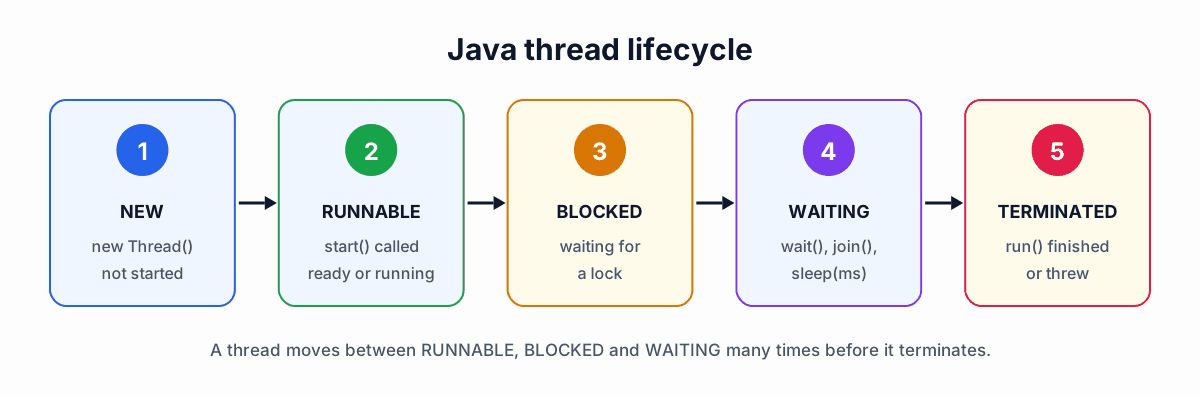
| State | Meaning | How it gets there |
|---|---|---|
| NEW | Created but not started | new Thread(...) |
| RUNNABLE | Running or ready to run | start() |
| BLOCKED | Waiting to enter a synchronized block | Another thread holds the lock |
| WAITING | Waiting indefinitely for another thread | join(), wait(), LockSupport.park() |
| TIMED_WAITING | Waiting with a timeout | sleep(ms), join(ms), wait(ms) |
| TERMINATED | Finished | run() returned or threw |
Race conditions#
When two threads read and write the same data without coordination, the result depends on timing. Here's the classic example:
class Counter {
    private int count = 0;
    void increment() { count++; }   // read, add, write: NOT atomic
    int get() { return count; }
}

Counter counter = new Counter();
Runnable task = () -> { for (int i = 0; i < 100_000; i++) counter.increment(); };
Thread a = new Thread(task), b = new Thread(task);
a.start(); b.start();
a.join();  b.join();
System.out.println(counter.get());   // expected 200000, often prints less
count++ is three steps. If both threads read 41 at the same moment, both write 42, and one increment is lost.
Fix 1: synchronized#
synchronized void increment() { count++; }Only one thread at a time can hold an object's lock, so only one thread can be inside the method.
Fix 2: atomic classes#
private final AtomicInteger count = new AtomicInteger();
void increment() { count.incrementAndGet(); }   // lock-free and thread-safe
Fix 3: explicit locks#
private final ReentrantLock lock = new ReentrantLock();
void increment() {
    lock.lock();
    try {
        count++;
    } finally {
        lock.unlock();   // always unlock in finally
    }
}
ReentrantLock adds features synchronized lacks: tryLock() with a timeout, fairness and multiple conditions.
Visibility and volatile#
Each CPU core can cache values, so one thread may never see another thread's write. volatile guarantees that reads and writes go to main memory:
private volatile boolean running = true;

void stop() { running = false; }

void loop() {
    while (running) {   // without volatile, this could loop forever
        doWork();
    }
}
volatile fixes visibility, not atomicity. volatile int count; count++ is still a race.
Deadlock#
A deadlock happens when two threads each hold a lock the other needs:
// Thread 1: lock(A) then lock(B)
// Thread 2: lock(B) then lock(A)   → both wait forever
Prevent it by always acquiring locks in the same global order, keeping locked sections small, or using tryLock with a timeout. jstack <pid> detects deadlocks in a running JVM.
ExecutorService: don't create threads by hand#
Creating a new thread per task is expensive and unbounded. A thread pool reuses a fixed number of threads:
try (ExecutorService pool = Executors.newFixedThreadPool(4)) {
    List<Future<Integer>> results = new ArrayList<>();
    for (int i = 1; i <= 10; i++) {
        int n = i;
        results.add(pool.submit(() -> n * n));   // Callable returns a value
    }
    for (Future<Integer> f : results) {
        System.out.println(f.get());              // blocks until ready
    }
}   // Java 19+: close() waits for tasks and shuts the pool down
CompletableFuture: async pipelines#
CompletableFuture<User> userF   = CompletableFuture.supplyAsync(() -> userService.load(id));
CompletableFuture<List<Order>> ordersF = CompletableFuture.supplyAsync(() -> orderService.forUser(id));

CompletableFuture<Dashboard> dashboard = userF
        .thenCombine(ordersF, Dashboard::new)       // run both in parallel, then combine
        .exceptionally(ex -> Dashboard.empty());     // fallback on failure

System.out.println(dashboard.join());
Thread-safe collections#
| Instead of | Use |
|---|---|
HashMap | ConcurrentHashMap |
ArrayList (mostly reads) | CopyOnWriteArrayList |
| Hand-made producer/consumer queue | ArrayBlockingQueue, LinkedBlockingQueue |
Map<String, Integer> wordCount = new ConcurrentHashMap<>();
wordCount.merge("java", 1, Integer::sum);   // atomic update
Virtual threads (Java 21)#
Traditional platform threads map one-to-one to OS threads and cost about 1 MB of stack each, so you can only run a few thousand. Virtual threads are managed by the JVM and are so cheap you can create millions. When a virtual thread blocks on I/O, the JVM parks it and runs another one on the same OS thread.
try (var executor = Executors.newVirtualThreadPerTaskExecutor()) {
    for (int i = 0; i < 100_000; i++) {
        executor.submit(() -> {
            Thread.sleep(Duration.ofSeconds(1));   // blocking is fine
            return fetchFromApi();
        });
    }
}Virtual threads shine for I/O-heavy work like web servers and API calls. For CPU-heavy work, a fixed pool sized to your core count is still the right tool. In Spring Boot 3.2+, set spring.threads.virtual.enabled=true.
Uncaught exceptions in pool threads are captured inside the Future, so always call get() or attach a handler. See Java exception handling for more, and JVM internals for how stacks and the heap are shared.
Key takeaways#
- Threads share the heap but each has its own stack; shared mutable state causes race conditions.
- Use
synchronized, atomic classes or locks for atomicity, andvolatilefor visibility. - Avoid deadlocks by acquiring locks in a consistent order.
- Use
ExecutorServiceandCompletableFutureinstead of creating raw threads. - Prefer concurrent collections, and use Java 21 virtual threads for high-volume I/O work.