JavaScript Testing with Jest and Vitest: A Practical Beginner's Guide
Learn JavaScript testing with Jest and Vitest: the testing pyramid, writing unit tests, matchers, testing async code, mocking modules and timers, React component tests and code coverage.

Automated tests are code that checks your code. They catch bugs before your users do, document how functions are supposed to behave, and let you refactor without worrying that you broke something. Jest and Vitest are the two most popular JavaScript test runners, and their APIs are almost identical, so everything in this guide works in both.
The testing pyramid#
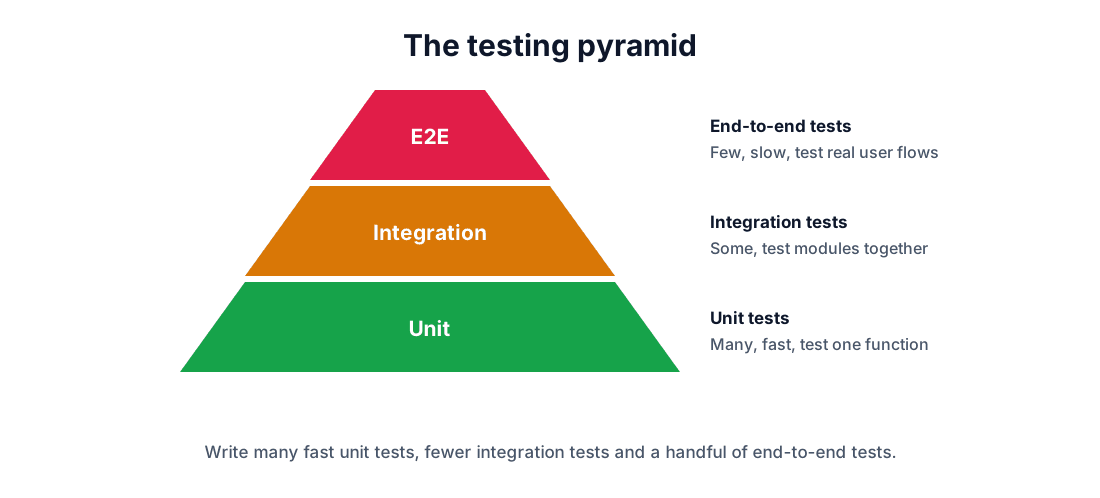
| Level | What it tests | Speed | Tools |
|---|---|---|---|
| Unit | One function or component in isolation | Milliseconds | Jest, Vitest |
| Integration | Several pieces working together (API + DB, component + store) | Seconds | Jest/Vitest, Supertest, Testing Library |
| End-to-end | The whole app in a real browser | Slow | Playwright, Cypress |
Write lots of fast unit tests, a good number of integration tests, and a few E2E tests for critical flows like login and checkout.
Setting up#
# Vitest (great for Vite, ESM and TypeScript projects)
npm install -D vitest

# or Jest
npm install -D jest{
"scripts": {
"test": "vitest",
"coverage": "vitest run --coverage"
}
}Test files are usually named *.test.js and live next to the code they test.
Your first test#
// price.js
export function applyDiscount(price, percent) {
  if (percent < 0 || percent > 100) throw new RangeError("Invalid discount");
  return Math.round(price * (1 - percent / 100) * 100) / 100;
}// price.test.js
import { describe, it, expect } from "vitest"; // Jest provides these as globals
import { applyDiscount } from "./price.js";
describe("applyDiscount", () => {
it("applies a percentage discount", () => {
expect(applyDiscount(200, 10)).toBe(180);
});
it("returns the same price for 0%", () => {
expect(applyDiscount(99.99, 0)).toBe(99.99);
});
it("rejects invalid percentages", () => {
expect(() => applyDiscount(100, 150)).toThrow(RangeError);
});
});Each test follows the Arrange, Act, Assert pattern: set up inputs, call the code, check the result.
Common matchers#
| Matcher | Use for |
|---|---|
toBe(x) | Primitives and same reference (Object.is) |
toEqual(obj) | Deep equality of objects and arrays |
toStrictEqual(obj) | Deep equality, also checks undefined props and class types |
toBeCloseTo(0.3) | Floating-point numbers |
toContain(item) | Arrays and strings |
toMatchObject(partial) | Object contains these properties |
toThrow(Error) | Function throws |
toHaveBeenCalledWith(...) | Mock was called with arguments |
expect(0.1 + 0.2).toBe(0.3);          // fails!
expect(0.1 + 0.2).toBeCloseTo(0.3);   // passes
expect({ a: 1, b: { c: 2 } }).toEqual({ a: 1, b: { c: 2 } });
Testing async code#
// user-service.js
export async function getUserName(id, api) {
  const user = await api.fetchUser(id);
  if (!user) throw new Error("User not found");
  return `${user.first} ${user.last}`;
}it("returns the full name", async () => {
const api = { fetchUser: async () => ({ first: "Asha", last: "Rao" }) };
await expect(getUserName(1, api)).resolves.toBe("Asha Rao");
});
it("throws when the user is missing", async () => {
const api = { fetchUser: async () => null };
await expect(getUserName(1, api)).rejects.toThrow("User not found");
});If you forget await (or return) on an async assertion, the test finishes before the promise settles and passes even when the code is broken.
Mocking#
Mocks replace real dependencies (APIs, databases, the clock) with fakes you control, so unit tests stay fast and predictable.
Mock functions#
import { vi } from "vitest";   // in Jest: jest.fn()

it("notifies every subscriber", () => {
  const listener = vi.fn();
  const store = new Store({ count: 0 });
  store.subscribe(listener);
  store.setState({ count: 1 });

  expect(listener).toHaveBeenCalledTimes(1);
  expect(listener).toHaveBeenCalledWith({ count: 1 });
});
Mocking a module#
import { vi, it, expect } from "vitest";
import { sendWelcome } from "./onboarding.js";
import { sendEmail } from "./email.js";

vi.mock("./email.js", () => ({ sendEmail: vi.fn().mockResolvedValue({ ok: true }) }));

it("sends a welcome email", async () => {
  await sendWelcome({ email: "asha@example.com" });
  expect(sendEmail).toHaveBeenCalledWith(
    expect.objectContaining({ to: "asha@example.com" })
  );
});
Mocking fetch#
beforeEach(() => {
  globalThis.fetch = vi.fn().mockResolvedValue({
    ok: true,
    json: async () => [{ id: 1, title: "Learn testing" }],
  });
});
Fake timers#
Testing a debounced function would normally mean waiting for real time to pass. Fake timers let you fast-forward:
it("debounces calls", () => {
  vi.useFakeTimers();
  const fn = vi.fn();
  const debounced = debounce(fn, 300);

  debounced(); debounced(); debounced();
  expect(fn).not.toHaveBeenCalled();

  vi.advanceTimersByTime(300);
  expect(fn).toHaveBeenCalledTimes(1);
  vi.useRealTimers();
});
See debounce vs throttle for the function under test.
Setup and teardown#
let db;
beforeAll(async () => { db = await connectTestDb(); });
beforeEach(async () => { await db.clear(); });    // fresh state for each test
afterAll(async () => { await db.close(); });
Testing React components#
React Testing Library encourages testing what the user sees, not implementation details:
import { render, screen } from "@testing-library/react";
import userEvent from "@testing-library/user-event";
import Counter from "./Counter";

it("increments when clicked", async () => {
  render(<Counter />);
  await userEvent.click(screen.getByRole("button", { name: /increment/i }));
  expect(screen.getByText("Count: 1")).toBeInTheDocument();
});Prefer getByRole and getByLabelText over getByTestId. If a test can find an element by its accessible role, so can screen-reader users.
Code coverage#
npx vitest run --coverage # or: npx jest --coverageCoverage shows which lines ran during tests. Aim for meaningful coverage of business logic rather than a magic 100%: a line that ran isn't necessarily a line that was checked.
Jest vs Vitest#
| Jest | Vitest | |
|---|---|---|
| Best with | Existing CRA/Node projects | Vite, ESM, TypeScript out of the box |
| Speed | Good | Very fast, with watch mode built on Vite |
| API | jest.fn(), jest.mock() | vi.fn(), vi.mock() (Jest-compatible) |
| Config | jest.config.js, needs Babel/ts-jest for TS | Reuses vite.config |
Good tests make every other guide safer to apply. Try writing tests for the observer pattern or for the fetch error-handling wrapper.
Key takeaways#
- Follow the testing pyramid: many unit tests, some integration tests, few E2E tests.
- Structure tests as Arrange, Act, Assert and pick the right matcher (
toBevstoEqual). - Always
awaitasync assertions withresolves/rejects. - Mock modules, fetch and timers to keep unit tests fast and deterministic.
- Test React components through the UI with Testing Library, and use coverage as a guide, not a goal.