TypeScript End to End: How the Compiler Works and How One Type Travels from Database to UI
Learn TypeScript end to end: how tsc turns .ts into .js, why types vanish at runtime, and how to share one Zod schema across the database, API, client and React UI for full-stack type safety.
Most TypeScript tutorials stop at let name: string. That is the easy part. The real value shows up when a single type follows your data end to end: from the database, through the API, into the client and onto the screen, so that one change in one place is checked everywhere else before you ship.
This guide covers three things: what the compiler actually does with your code, why types disappear at runtime and what that means for you, and how to wire up full-stack type safety with one shared schema.
1. What the TypeScript compiler actually does#
TypeScript is JavaScript plus a type system that only exists at compile time. When you run tsc, your code goes through a pipeline:
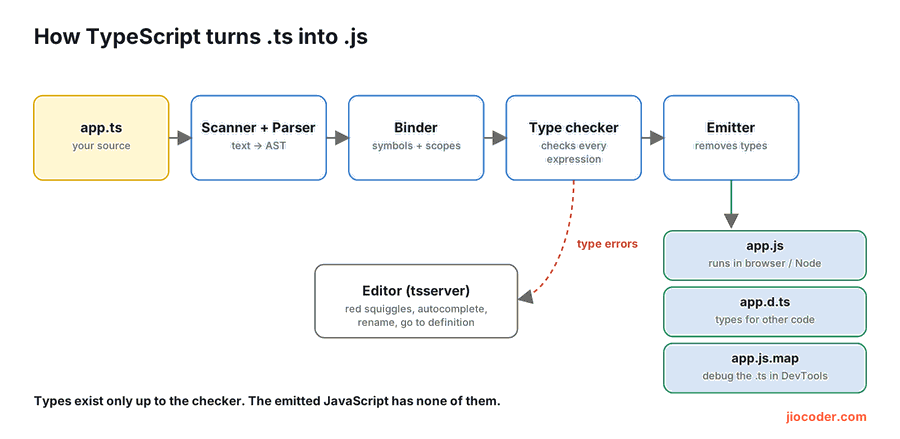
- Scanner and parser turn your text into an AST (abstract syntax tree).
- Binder connects every name to its declaration and works out scopes.
- Type checker checks every expression against its type. This is where errors come from.
- Emitter removes the types and writes plain JavaScript, plus
.d.tsfiles and source maps if you ask for them.
Your editor runs the same checker through tsserver. That is why you see red squiggles, autocomplete and safe renames before you ever run a build.
function total(prices: number[]): number {
  return prices.reduce((sum, p) => sum + p, 0);
}

total([199, 299]); // ok
total(["199"]);    // error TS2322: Type 'string' is not assignable to type 'number'.
TypeScript 7.0, released in 2026, is a port of the compiler to Go. It is often around 10 times faster than TypeScript 6 on full builds and type checks, and it ships in the normal typescript package with the same tsc command. Your code and types do not change; your CI and editor just get quicker.
Type checking and building are two different jobs#
Modern tools like Vite, esbuild, SWC and Next.js strip types without checking them, because that is fast. That means a project can build and run with type errors in it. Always run the checker separately:
# in CI and before you push
npx tsc --noEmit
2. Types are erased at runtime#
Look at the emitter step again: it removes every type. At runtime there is no User interface and no string check. That is fine for data you created yourself, but anything that comes from outside your code is just unknown data wearing a type you hoped it had.
// Compiles without a single error. Nothing checks the JSON.
const user: User = await fetch("/api/users/1").then((r) => r.json());
// r.json() returns any, and any switches the type checker off.
If the API sends { "mail": "..." } instead of email, TypeScript will not save you. The crash happens later, somewhere else, and is hard to trace.
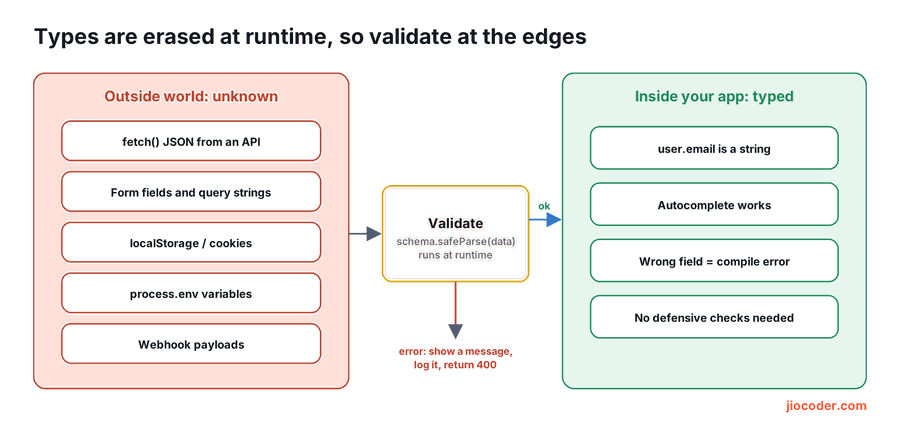
The fix is to validate at the edges. Every place where data enters your app (API responses, request bodies, form fields, query strings, localStorage, environment variables, webhooks) should go through a runtime check. After that check, the data really is the type it claims to be.
any silently turns the checker off, and it spreads. Prefer unknown: it forces you to check the value before you use it. Turn on strict so that missing types become errors instead of hidden anys.
3. End-to-end type safety: one type, database to UI#
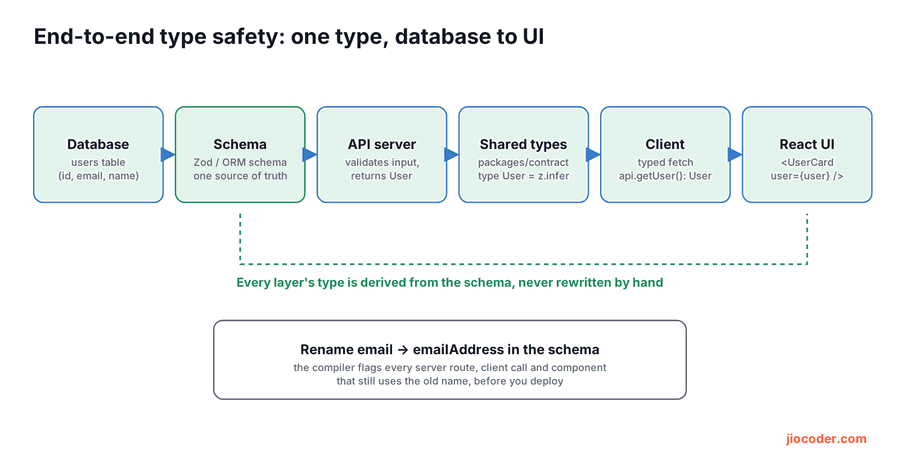
The goal is simple: write the shape of your data once, and derive every other type from it. A schema library like Zod is perfect for this, because one schema gives you both a runtime validator and a TypeScript type.
Step 1: one schema as the source of truth#
Put it in a place both the server and the client can import, for example packages/contract in a monorepo, or a shared/ folder in a Next.js app.
// contract/user.ts
import { z } from "zod";

export const UserSchema = z.object({
  id: z.string(),
  email: z.string().email(),
  name: z.string().min(1),
  role: z.enum(["student", "admin"]),
});

// The TypeScript type is derived, never written by hand
export type User = z.infer<typeof UserSchema>;

// Input for creating a user: same fields, minus the id
export const CreateUserInput = UserSchema.omit({ id: true });
export type CreateUserInput = z.infer<typeof CreateUserInput>;
Step 2: validate on the server#
The request body is untrusted. Parse it before you touch the database. safeParse returns a result instead of throwing, so you can send a clean 400 error.
// server/app.ts
import express from "express";
import { CreateUserInput, type User } from "../contract/user";
import { db } from "./db";

const app = express();
app.use(express.json());

app.post("/api/users", async (req, res) => {
  const parsed = CreateUserInput.safeParse(req.body);
  if (!parsed.success) {
    res.status(400).json({ error: parsed.error.flatten() });
    return;
  }
  // parsed.data is fully typed as CreateUserInput here
  const user: User = await db.users.create(parsed.data);
  res.status(201).json(user);
});
Step 3: a typed client#
The client validates the response with the same schema. Now the API contract is checked in both directions, and the rest of your frontend only ever sees a real User.
// client/api.ts
import { UserSchema, type CreateUserInput, type User } from "../contract/user";

async function request(path: string, init?: RequestInit): Promise<unknown> {
  const res = await fetch(path, {
    ...init,
    headers: { "Content-Type": "application/json", ...init?.headers },
  });
  if (!res.ok) throw new Error(`Request failed: ${res.status}`);
  return res.json();
}

export const api = {
  async getUser(id: string): Promise<User> {
    return UserSchema.parse(await request(`/api/users/${id}`));
  },
  async createUser(input: CreateUserInput): Promise<User> {
    return UserSchema.parse(
      await request("/api/users", { method: "POST", body: JSON.stringify(input) }),
    );
  },
};
Notice that request returns Promise<unknown>, not any. You cannot use the result until a schema has checked it.
Step 4: the React component#
// client/UserCard.tsx
import type { User } from "../contract/user";

type UserCardProps = { user: User };

export function UserCard({ user }: UserCardProps) {
  return (
    <article>
      <h3>{user.name}</h3>
      <p>{user.email}</p>
      {user.role === "admin" && <span>Admin</span>}
    </article>
  );
}
What you get: refactors the compiler checks for you#
Rename email to emailAddress in UserSchema and run tsc. Every file that still reads the old name, on the server or the client, turns red. In this example it is the React component:
client/UserCard.tsx(9,16): error TS2339: Property 'email' does not exist on type
'{ id: string; emailAddress: string; name: string; role: "admin" | "student"; }'.
No grep, no "did I miss one?", and no bug reports a week later. That is end-to-end type safety.
4. Model UI state so impossible states cannot compile#
The data is safe; now make the screen safe. Instead of separate isLoading, error and user fields that can contradict each other, use a discriminated union:
type UserState =
  | { status: "loading" }
  | { status: "error"; message: string }
  | { status: "ready"; user: User };

function label(state: UserState): string {
  switch (state.status) {
    case "loading":
      return "Loading...";
    case "error":
      return state.message;
    case "ready":
      return state.user.name;
    default: {
      // If someone adds a new status and forgets to handle it, this line fails to compile
      const unreachable: never = state;
      return unreachable;
    }
  }
}
Want the full story? Read TypeScript Discriminated Unions: Model State So Bugs Can't Compile.
5. Do not forget the other edges#
Environment variables#
process.env.PORT is string | undefined, and a typo in a variable name only shows up in production. Validate env once at startup and fail fast:
// server/env.ts
import { z } from "zod";

const EnvSchema = z.object({
  DATABASE_URL: z.string().url(),
  PORT: z.coerce.number().int().default(3000),
  NODE_ENV: z.enum(["development", "production", "test"]).default("development"),
});

export const env = EnvSchema.parse(process.env);
// env.PORT is a number now, not string | undefined
Errors in catch blocks#
Anything can be thrown in JavaScript, so a caught value is unknown. Narrow it before you use it:
try {
  JSON.parse(input);
} catch (err: unknown) {
  if (err instanceof Error) console.error(err.message);
}
Config objects with satisfies#
satisfies checks a value against a type without widening it, so you keep the exact keys and literal values:
const routes = {
  home: "/",
  hackathon: "/hackathon",
} satisfies Record<string, `/${string}`>;

routes.hackathon; // autocompletes, and a value without a leading "/" is an error
6. A tsconfig that catches real bugs#
Every example in this post was compiled with this config. strict is non-negotiable; noUncheckedIndexedAccess is the one most teams forget, and it catches a whole class of "undefined is not an object" crashes.
{
  "compilerOptions": {
    "target": "ES2022",
    "module": "ESNext",
    "moduleResolution": "Bundler",
    "jsx": "react-jsx",
    "strict": true,
    "noUncheckedIndexedAccess": true,
    "noImplicitOverride": true,
    "isolatedModules": true,
    "verbatimModuleSyntax": true,
    "skipLibCheck": true,
    "noEmit": true
  }
}| Option | What it catches |
|---|---|
strict | Implicit any, unchecked null and undefined, unsafe this, and more |
noUncheckedIndexedAccess | arr[0] and obj[key] become T | undefined, so you must handle the missing case |
isolatedModules | Code that fast transpilers like esbuild and SWC cannot compile file by file |
verbatimModuleSyntax | Forces import type for type-only imports, so they are always removed from the output |
noEmit | Lets tsc only check types while your bundler builds the JavaScript |
7. The full picture#
| Layer | What TypeScript does there | What you add |
|---|---|---|
| Editor | Live errors, autocomplete, safe rename | Nothing, it is built in |
| Schema | Derives types with z.infer | One shared schema per entity |
| Server | Types the parsed data | safeParse on every request body |
| Client | Types the API functions | parse on every response |
| UI | Types props and state | Discriminated unions for state |
| CI | Fails the build on type errors | tsc --noEmit as a required step |
Practise it#
- Brush up on the building blocks in TypeScript Generics Explained.
- Getting ready for interviews? Work through Advanced TypeScript Interview Questions.
- Then take one small project of yours, add a shared schema for a single entity, and rename a field. Watch the compiler find every place for you.
Key takeaways#
- The TypeScript compiler parses, binds, type-checks and then erases your types. Run
tsc --noEmitin CI, because most bundlers do not type-check. - Types do not exist at runtime. Treat everything from outside your code as
unknownand validate at the edges. - Write the shape of your data once as a schema, and derive every type from it with
z.infer. - Validate request bodies on the server and responses on the client with the same schema, so the contract is checked both ways.
- Use discriminated unions for UI state,
unknowninstead ofany, andstrictplusnoUncheckedIndexedAccessin your tsconfig.