TypeScript Generics Explained: From Basics to Real-World Patterns
Learn TypeScript generics step by step: generic functions, interfaces and classes, constraints with extends, keyof, default types, conditional types, infer and real-world patterns like typed API clients.

Generics let you write a function, class or type once and reuse it with many different types, while TypeScript still knows exactly what goes in and what comes out. They're the reason Array<string>, Promise<User> and React's useState<number> work so well.
The problem generics solve#
// Option 1: specific types → must duplicate for every type
function firstString(items: string[]): string { return items[0]; }
function firstNumber(items: number[]): number { return items[0]; }

// Option 2: any → reusable, but type safety is gone
function firstAny(items: any[]): any { return items[0]; }
const x = firstAny(["a", "b"]);   // x is any: no autocomplete, no errors
x.toFixed(2);                      // compiles, crashes at runtime
Generics give you the reusability of any with the safety of specific types.
Your first generic function#
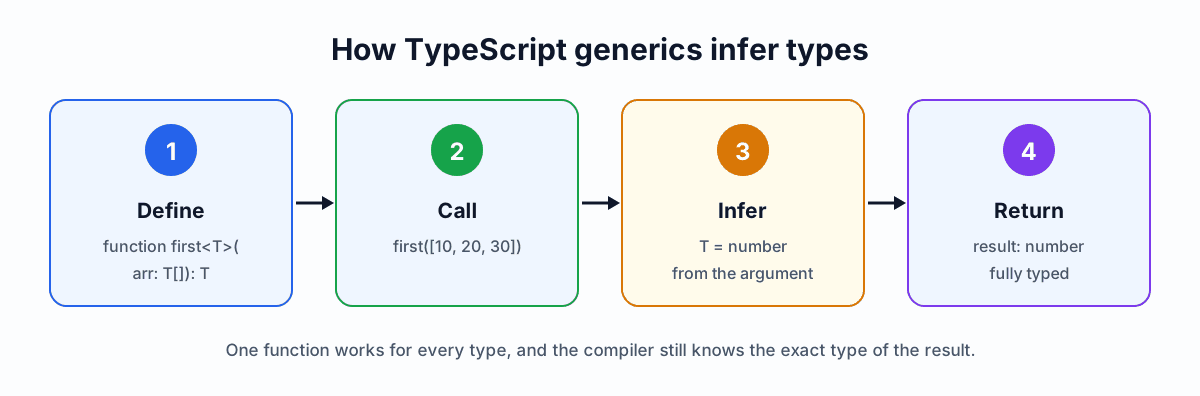
function first<T>(items: T[]): T | undefined {
  return items[0];
}

const a = first(["apple", "mango"]);   // a: string | undefined
const b = first([10, 20, 30]);          // b: number | undefined
const c = first<boolean>([true]);       // explicit type argument
T is a type parameter: a placeholder that TypeScript fills in from the arguments you pass. This is called type inference, and it means you rarely need to write the type argument yourself.
Multiple type parameters#
function pair<K, V>(key: K, value: V): [K, V] {
  return [key, value];
}

const p = pair("age", 25);   // [string, number]

function mapArray<T, U>(items: T[], fn: (item: T) => U): U[] {
  return items.map(fn);
}

const lengths = mapArray(["hi", "hello"], (s) => s.length);   // number[]
Generic interfaces and types#
interface ApiResponse<T> {
  data: T;
  status: number;
  error?: string;
}

interface User { id: number; name: string; }
interface Product { sku: string; price: number; }

const userRes: ApiResponse<User> = { data: { id: 1, name: "Asha" }, status: 200 };
const listRes: ApiResponse<Product[]> = { data: [], status: 200 };

type Result<T, E = Error> =
  | { ok: true; value: T }
  | { ok: false; error: E };
Generic classes#
class TypedStack<T> {
  #items: T[] = [];

  push(item: T): void { this.#items.push(item); }
  pop(): T | undefined { return this.#items.pop(); }
  peek(): T | undefined { return this.#items.at(-1); }
  get size(): number { return this.#items.length; }
}

const history = new TypedStack<string>();
history.push("/home");
history.push(42);   // ❌ Argument of type 'number' is not assignable to 'string'
Constraints with extends#
Sometimes T can't be just anything. A constraint says "T must at least have these properties":
function longest<T extends { length: number }>(a: T, b: T): T {
  return a.length >= b.length ? a : b;
}

longest("hello", "hi");        // ok: strings have length
longest([1, 2, 3], [1]);       // ok: arrays have length
longest(10, 20);               // ❌ number has no 'length'
keyof constraints#
A classic pattern: get a property from an object in a fully type-safe way.
function getProp<T, K extends keyof T>(obj: T, key: K): T[K] {
  return obj[key];
}

const user = { id: 1, name: "Asha", active: true };

getProp(user, "name");     // string
getProp(user, "active");   // boolean
getProp(user, "email");    // ❌ "email" is not a key of user
T[K] is an indexed access type: "the type of property K on T".
Default type parameters#
interface Paginated<T, Meta = { page: number; total: number }> {
  items: T[];
  meta: Meta;
}

const page: Paginated<User> = { items: [], meta: { page: 1, total: 0 } };
Generics in built-in utility types#
TypeScript's utility types are just generics. Knowing how they work makes them easy to use and extend.
| Utility | What it does | Example |
|---|---|---|
Partial<T> | All properties optional | Update payloads |
Required<T> | All properties required | Validated config |
Readonly<T> | All properties read-only | Immutable state |
Pick<T, K> | Keep only keys K | Pick<User, "id" | "name"> |
Omit<T, K> | Remove keys K | Omit<User, "password"> |
Record<K, V> | Object with keys K and values V | Record<string, number> |
ReturnType<F> | Return type of a function | Derive types from code |
Awaited<T> | Unwraps a Promise | Awaited<Promise<User>> → User |
Here's how Partial is built, using a mapped type:
type MyPartial<T> = { [K in keyof T]?: T[K] };
type MyReadonly<T> = { readonly [K in keyof T]: T[K] };
Conditional types and infer#
Conditional types choose a type based on a condition, like a ternary for types:
type IsString<T> = T extends string ? "yes" : "no";
type A = IsString<"hi">;   // "yes"
type B = IsString<42>;     // "no"

// infer pulls a type out of another type
type ElementType<T> = T extends (infer U)[] ? U : never;
type C = ElementType<string[]>;   // string

type UnwrapPromise<T> = T extends Promise<infer V> ? V : T;
type D = UnwrapPromise<Promise<number>>;   // number
Real-world example: a typed fetch helper#
async function request<T>(url: string, init?: RequestInit): Promise<T> {
  const res = await fetch(url, init);
  if (!res.ok) throw new Error(`HTTP ${res.status}`);
  return res.json() as Promise<T>;
}

const user = await request<User>("/api/users/1");
user.name.toUpperCase(); // fully typedrequest<User> tells TypeScript to trust the response. It doesn't check it at runtime. For data from outside your app, validate with a schema library such as Zod and infer the type from the schema.
For the full error-handling version of this helper, see Fetch API error handling and AbortController.
Generics in React#
const [items, setItems] = useState<string[]>([]);

interface ListProps<T> {
  items: T[];
  renderItem: (item: T) => React.ReactNode;
}

function List<T>({ items, renderItem }: ListProps<T>) {
  return <ul>{items.map((item, i) => <li key={i}>{renderItem(item)}</li>)}</ul>;
}

<List items={users} renderItem={(u) => u.name} /> // u is inferred as UserT, U, K, V are fine for short utilities. In bigger code, descriptive names like TItem, TResponse or TKey make signatures much easier to read.
Java developers will find these ideas familiar from List<T> in the Java Collections Framework.
Key takeaways#
- Generics give you reusable code without giving up type safety the way
anydoes. - TypeScript usually infers type arguments from the values you pass.
- Use
extendsto constrain type parameters andkeyof/T[K]for type-safe property access. - Utility types like
Partial,PickandOmitare generics built with mapped types. - Conditional types with
inferextract types; validate external data at runtime because types are erased.