TypeScript Discriminated Unions: Model State So Bugs Can't Compile
Learn discriminated unions, narrowing, exhaustive checks with never, and the satisfies operator to model loading states, API results and events so impossible states become type errors.
Many bugs come from data that is in a state it should never be in: loading is true and there is an error, or the data is missing even though the request succeeded. TypeScript's discriminated unions let you describe only the states that can really happen, so the impossible ones become compile errors.
The problem: a bag of optional fields#
type RequestState = {
  loading: boolean;
  data?: User;
  error?: string;
};
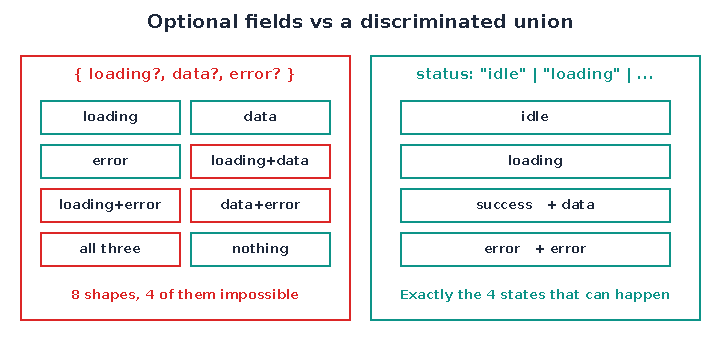
This type allows 8 combinations of these three fields, and most of them make no sense: loading with data and an error at the same time, or not loading with neither data nor error. Every component that reads it has to guess.
The fix: one type per state#
type RequestState =
  | { status: "idle" }
  | { status: "loading" }
  | { status: "success"; data: User }
  | { status: "error"; error: string };
Each member has a shared field with a literal value, here status. That field is the discriminant. Now only four states exist, and data only exists when status is "success".
Narrowing: TypeScript follows your checks#
function render(state: RequestState) {
  switch (state.status) {
    case "idle":
      return "Click to load";
    case "loading":
      return "Loading...";
    case "success":
      return `Hello, ${state.data.name}`; // data is known here
    case "error":
      return `Failed: ${state.error}`;    // error is known here
  }
}
Inside each case, TypeScript narrows the type. You can read state.data in the success branch without ?. or !, and trying to read it in the error branch is a compile error.

Exhaustive checks with never#
What happens when someone adds a new state later, like "cancelled"? You want the compiler to point at every place that needs updating. Add a default branch that assigns to never:
function assertNever(x: never): never {
  throw new Error(`Unhandled case: ${JSON.stringify(x)}`);
}

function label(state: RequestState): string {
  switch (state.status) {
    case "idle": return "Idle";
    case "loading": return "Loading";
    case "success": return "Done";
    case "error": return "Error";
    default: return assertNever(state);
  }
}
If a new member is added and not handled, state is no longer never in the default branch, and the build fails with a clear error. Bugs that used to show up in production now show up in your editor.
Real-world use: API results#
type Result<T> =
  | { ok: true; value: T }
  | { ok: false; error: { code: string; message: string } };

async function getUser(id: string): Promise<Result<User>> {
  const res = await fetch(`/api/users/${id}`);
  if (!res.ok) {
    return { ok: false, error: { code: String(res.status), message: res.statusText } };
  }
  return { ok: true, value: await res.json() };
}

const result = await getUser("7");
if (result.ok) {
  console.log(result.value.email);
} else {
  console.error(result.error.message);
}
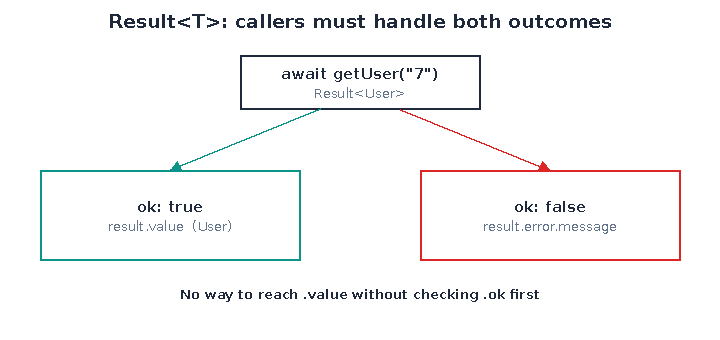
Callers can't forget to handle failure, because they can't reach value without checking ok first. A boolean works as a discriminant too.
Real-world use: React reducers and events#
type Action =
  | { type: "add"; item: CartItem }
  | { type: "remove"; id: string }
  | { type: "clear" };

function cartReducer(items: CartItem[], action: Action): CartItem[] {
  switch (action.type) {
    case "add":
      return [...items, action.item];
    case "remove":
      return items.filter((i) => i.id !== action.id);
    case "clear":
      return [];
  }
}

// dispatch({ type: "remove" }) → error: 'id' is missing
Bonus: satisfies keeps literal types#
The satisfies operator (TypeScript 4.9+) checks a value against a type without widening it. It is handy for config maps keyed by your union:
type Status = RequestState["status"];

const statusColor = {
  idle: "gray",
  loading: "blue",
  success: "green",
  error: "red",
} satisfies Record<Status, string>;
// Missing or misspelled keys are errors,
// and each value keeps its exact literal type.
Tips for good unions#
- Use one discriminant name consistently across your codebase, such as
type,kindorstatus. - Use string literals, not plain
string, for the discriminant; otherwise narrowing can't work. - Put data only on the states that have it.
- Add an
assertNeverdefault anywhere you switch on a union that may grow.
Key takeaways#
- A discriminated union is a union of object types that share a literal field.
- Checking that field narrows the type, so each branch sees only the right properties.
assertNevermakes the compiler flag every unhandled case.- Use unions for request states, API results, reducer actions and events.