React Hooks Interview Questions: useState, useEffect, useRef, useMemo and Custom Hooks
12 React hooks interview questions with code and explanations: rules of hooks, useState batching and functional updates, useEffect dependencies and cleanup, useLayoutEffect, useRef, useContext, useReducer, useMemo, useCallback, custom hooks and stale closures.
Almost every React interview spends time on hooks, because they reveal whether you understand how components render and re-render. Here are 12 React hooks interview questions for fresher-to-mid roles, with answers, code and the explanation interviewers want to hear.
New to React? Start with React interview questions for freshers.
Basics and rules#
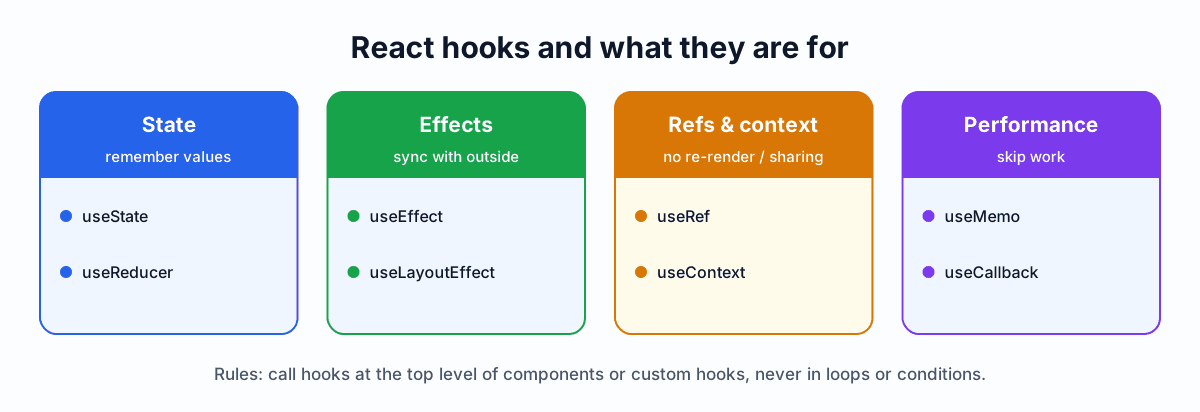
Q1. What are hooks and what are the rules of hooks?#
Answer: hooks are functions starting with use that let function components use state, effects, context and other React features. There are two rules:
- Only call hooks at the top level: not inside loops, conditions or nested functions.
- Only call hooks from React functions: function components or custom hooks.
Why: React stores hook state in a list per component and matches each call by its order. If a hook is skipped on one render, every later hook reads the wrong state.
// Wrong: the hook order changes when isLoggedIn changes
if (isLoggedIn) {
  const [name, setName] = useState("");
}

// Right: always call the hook, put the condition inside
const [name, setName] = useState("");
if (isLoggedIn) { /* use name */ }
Q2. Why does this counter only increase by 1?#
function Counter() {
  const [count, setCount] = useState(0);
  const handleClick = () => {
    setCount(count + 1);
    setCount(count + 1);
    setCount(count + 1);
  };
  return <button onClick={handleClick}>{count}</button>;
}
Answer: state is a snapshot for each render. All three calls read the same count (0) and set it to 1. React also batches the updates into one re-render. Use the functional update form when the new state depends on the previous one:
setCount((c) => c + 1);
setCount((c) => c + 1);
setCount((c) => c + 1); // now increases by 3
Since React 18, batching also applies inside promises, timeouts and native event handlers (automatic batching).
Q3. Why must state be updated immutably?#
Answer: React compares the old and new state with Object.is. If you mutate an object and pass the same reference, React thinks nothing changed and may skip the re-render.
// Wrong: same array reference
todos.push(newTodo);
setTodos(todos);

// Right: new array and new object
setTodos([...todos, newTodo]);
setUser({ ...user, name: "Asha" });
setTodos(todos.map((t) => (t.id === id ? { ...t, done: !t.done } : t)));Effects#
Q4. How does the useEffect dependency array work?#
| Dependency array | Effect runs |
|---|---|
| Omitted | After every render |
[] | Once after the first render (mount) |
[a, b] | After mount and whenever a or b changes |
Every value from the component that the effect uses (props, state, functions) should be in the array. Leaving one out causes bugs with stale values. The eslint-plugin-react-hooks rule exhaustive-deps warns about this.
Q5. What is the cleanup function in useEffect? Give an example#
Answer: the function returned from an effect runs before the effect runs again and when the component unmounts. Use it to undo side effects: remove listeners, clear timers, cancel requests and close sockets.
function UserProfile({ userId }) {
  const [user, setUser] = useState(null);

  useEffect(() => {
    const controller = new AbortController();

    fetch(`/api/users/${userId}`, { signal: controller.signal })
      .then((res) => res.json())
      .then(setUser)
      .catch((err) => {
        if (err.name !== "AbortError") console.error(err);
      });

    return () => controller.abort(); // cancel the old request
  }, [userId]);

  return <p>{user?.name}</p>;
}
Without the cleanup, a slow response for an old userId could overwrite a newer one (a race condition).
In development, React 18 Strict Mode mounts, unmounts and remounts components once to expose missing cleanups. If your effect runs twice in dev, that's expected, not a bug in React.
Q6. What is the difference between useEffect and useLayoutEffect?#
useEffect | useLayoutEffect | |
|---|---|---|
| Runs | After the browser paints | After DOM updates, before paint |
| Blocks paint? | No | Yes |
| Use for | Data fetching, subscriptions, logging | Measuring layout and adjusting it without flicker (tooltips, scroll position) |
Default to useEffect. Reach for useLayoutEffect only when you see a visual flicker.
Refs, context and reducers#
Q7. What is useRef used for? How is it different from state?#
Answer: useRef returns a mutable object { current } that persists across renders. Changing ref.current does not cause a re-render. Two common uses:
function SearchBox() {
  const inputRef = useRef(null);          // 1. access a DOM node
  const renderCount = useRef(0);          // 2. keep a mutable value

  useEffect(() => {
    inputRef.current.focus();
  }, []);

  renderCount.current += 1;               // no re-render triggered

  return <input ref={inputRef} placeholder="Search" />;
}
Use state for values shown in the UI; use refs for values the UI doesn't depend on (timer IDs, previous values, DOM nodes).
Q8. When would you use useReducer instead of useState?#
Answer: use useReducer when state has several related fields, the next state depends on the previous one in complex ways, or many event handlers update the same state. The update logic moves into a pure, testable function.
function reducer(state, action) {
  switch (action.type) {
    case "fetch_start":   return { ...state, loading: true, error: null };
    case "fetch_success": return { loading: false, error: null, data: action.data };
    case "fetch_error":   return { ...state, loading: false, error: action.error };
    default: return state;
  }
}

const [state, dispatch] = useReducer(reducer, { loading: false, data: null, error: null });
dispatch({ type: "fetch_start" });
Q9. How does useContext work, and what is its performance catch?#
Answer: context passes a value through the tree without prop drilling. A component reads it with useContext.
const ThemeContext = createContext("light");

function App() {
  const [theme, setTheme] = useState("dark");
  const value = useMemo(() => ({ theme, setTheme }), [theme]);
  return (
    <ThemeContext.Provider value={value}>
      <Toolbar />
    </ThemeContext.Provider>
  );
}

function ThemedButton() {
  const { theme } = useContext(ThemeContext);
  return <button className={theme}>Save</button>;
}
The catch: every component using the context re-renders when the value changes. Passing a new object literal on each render (value={{ theme }}) re-renders all consumers every time, so memoize the value and split large contexts into smaller ones.
Performance and custom hooks#
Q10. What is the difference between useMemo and useCallback?#
// useMemo caches a computed VALUE
const sortedProducts = useMemo(
  () => [...products].sort((a, b) => a.price - b.price),
  [products]
);

// useCallback caches a FUNCTION reference
const handleSelect = useCallback((id) => {
  setSelectedId(id);
}, []);

// useCallback(fn, deps) is the same as useMemo(() => fn, deps)
Use them when a computation is genuinely expensive, or when a stable reference matters: passing a callback to a component wrapped in React.memo, or using a value in another hook's dependency array. Wrapping everything adds overhead and complexity without benefit. More in React performance interview questions.
Q11. Write a custom hook. Why are custom hooks useful?#
Answer: a custom hook is a function starting with use that calls other hooks. It lets components share stateful logic (not state itself: each component calling the hook gets its own state).
function useDebounce(value, delay = 300) {
  const [debounced, setDebounced] = useState(value);

  useEffect(() => {
    const id = setTimeout(() => setDebounced(value), delay);
    return () => clearTimeout(id);
  }, [value, delay]);

  return debounced;
}

function Search() {
  const [query, setQuery] = useState("");
  const debouncedQuery = useDebounce(query, 400);

  useEffect(() => {
    if (debouncedQuery) fetchResults(debouncedQuery);
  }, [debouncedQuery]);

  return <input value={query} onChange={(e) => setQuery(e.target.value)} />;
}
Other common custom hooks in interviews: useFetch, useLocalStorage, usePrevious, useOnClickOutside and useWindowSize.
Q12. What is a stale closure in hooks? How do you fix it?#
function Timer() {
  const [count, setCount] = useState(0);

  useEffect(() => {
    const id = setInterval(() => {
      setCount(count + 1);   // always reads count = 0
    }, 1000);
    return () => clearInterval(id);
  }, []);                    // effect created once

  return <p>{count}</p>;   // stuck at 1
}
Answer: the interval callback was created during the first render, so it closes over count = 0 forever. Fixes:
- Use a functional update:
setCount((c) => c + 1)(best here). - Add
countto the dependencies, so the interval is recreated each time. - Store the latest value in a ref and read
ref.currentin the callback.
Closures themselves are covered in closures and scope interview questions.
Quick revision#
| Hook | Purpose | Re-renders when it changes? |
|---|---|---|
useState | Local state | Yes |
useReducer | Complex state logic | Yes |
useEffect | Side effects after paint | - |
useLayoutEffect | DOM measurement before paint | - |
useRef | DOM access, mutable values | No |
useContext | Read shared values | Yes, when the value changes |
useMemo / useCallback | Cache values / functions | - |
Key takeaways#
- Hooks rely on call order: call them at the top level, never conditionally.
- State is a per-render snapshot; use functional updates when the next state depends on the previous one.
- Include every used value in effect dependencies and always clean up subscriptions, timers and requests.
useRefholds values without re-rendering;useReducerorganises complex state.- Custom hooks share logic, not state; stale closures are fixed with functional updates, correct dependencies or refs.