React Rendering and Reconciliation Interview Questions: Virtual DOM, Diffing, Fiber and Keys
12 React internals interview questions explained simply: render vs commit phase, virtual DOM, reconciliation and the diffing algorithm, keys, Fiber, concurrent rendering, batching, StrictMode double rendering, hydration, portals and Server Components.

Questions about React internals show whether you understand why React behaves the way it does, not just its API. You don't need to know the source code, but you should be able to explain how an update travels from setState to the screen. Here are 12 React rendering and reconciliation interview questions with clear explanations.
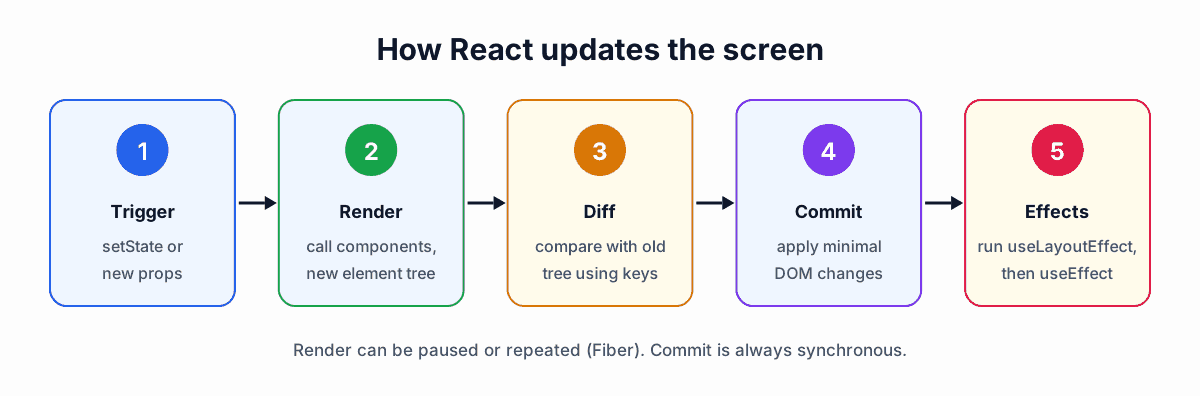
The update pipeline#
Q1. What happens when you call setState?#
Answer: an update goes through three steps:
- Trigger:
setStateschedules an update for that component. It doesn't change the variable immediately. - Render phase: React calls the component (and its children) to get a new tree of React elements, then compares it with the previous tree (reconciliation). This phase is pure and can be paused or thrown away.
- Commit phase: React applies the minimal set of DOM changes, then runs layout effects, lets the browser paint, and runs
useEffectcallbacks.
function Counter() {
  const [count, setCount] = useState(0);
  const handleClick = () => {
    setCount(count + 1);
    console.log(count); // still 0: state updates on the next render
  };
  return <button onClick={handleClick}>{count}</button>;
}
Q2. What is the difference between the render phase and the commit phase?#
| Render phase | Commit phase | |
|---|---|---|
| What happens | Call components, build new tree, diff | Update the DOM, run effects |
| Touches the DOM? | No | Yes |
| Can be interrupted? | Yes (concurrent rendering) | No, it runs synchronously |
| Rule | Must be pure: no side effects | Side effects allowed (in effects) |
That's why you should never fetch data, mutate variables outside the component or touch the DOM directly in the component body. Put side effects in event handlers or effects.
Q3. What is the virtual DOM? Is it "faster than the DOM"?#
Answer: the virtual DOM is a lightweight JavaScript description of the UI: plain objects created by JSX ({ type: "button", props: { children: "Save" } }). React compares the new description with the old one and updates only what changed in the real DOM.
It is not magically faster than careful manual DOM updates; it adds work. Its value is that you describe the UI declaratively for any state, and React computes efficient updates for you, which is fast enough for most apps and far easier to maintain.
// JSX
<button className="primary">Save</button>

// compiles to a function call that returns an element object
jsx("button", { className: "primary", children: "Save" });
// { type: "button", props: { className: "primary", children: "Save" }, ... }
Reconciliation and keys#
Q4. How does React's diffing algorithm work?#
Answer: comparing two arbitrary trees optimally is O(n³). React uses an O(n) heuristic based on two assumptions:
- Different element types produce different trees. If a
<div>becomes a<section>, or<Login>becomes<Signup>, React destroys the old subtree (unmounting components and losing their state) and builds a new one. - Keys identify children across renders. In lists, React matches children by key instead of by position.
If the type is the same, React keeps the DOM node or component instance and only updates the changed attributes or props, then recurses into the children.
Q5. Why do keys matter? What goes wrong with index keys?#
function TodoList() {
  const [todos, setTodos] = useState([
    { id: "a", text: "Learn React" },
    { id: "b", text: "Build a project" },
  ]);

  const addToTop = () =>
    setTodos([{ id: crypto.randomUUID(), text: "New task" }, ...todos]);

  return (
    <ul>
      {todos.map((todo, index) => (
        // key={index}: each <input> keeps the text typed for the
        // item that USED to be at that position
        <li key={todo.id}>
          {todo.text} <input placeholder="notes" />
        </li>
      ))}
    </ul>
  );
}
Answer: with index keys, adding an item to the top gives it key 0, the key the old first item had. React thinks item 0 still exists with new text, so it reuses the old DOM nodes and component state. Uncontrolled inputs, focus and local state end up attached to the wrong item, and every row re-renders. Stable IDs from the data fix both problems.
Q6. How can you use the key prop to reset a component's state?#
Answer: changing a component's key makes React treat it as a new component: it unmounts the old one and mounts a fresh one with initial state.
// The form resets whenever the selected user changes
<EditProfileForm key={selectedUser.id} user={selectedUser} />
This is cleaner than a useEffect that copies props into state and resets fields manually.
Q7. Why does defining a component inside another component cause bugs?#
function Parent() {
  const [text, setText] = useState("");

  // A NEW component type is created on every render
  function Child() {
    return <input value={text} onChange={(e) => setText(e.target.value)} />;
  }

  return <Child />;
}
Answer: each render creates a new Child function, so React sees a different element type, unmounts the old input and mounts a new one. The input loses focus after every keystroke and any state inside Child resets. Define components at the top level of the module.
Fiber and concurrency#
Q8. What is React Fiber?#
Answer: Fiber is the reconciliation engine introduced in React 16. Each component instance is represented by a fiber, a JavaScript object that is a unit of work with links to its parent, child and sibling. Because work is split into small units, React can:
- Pause rendering to let the browser handle input, then resume.
- Prioritise updates (typing is more urgent than rendering a big list).
- Abandon work that's no longer needed.
- Keep two trees: the current tree on screen and a work-in-progress tree, swapped at commit time (double buffering).
The old "stack reconciler" processed the whole tree recursively in one go and couldn't be interrupted, which caused jank on large updates.
Q9. What is concurrent rendering in React 18?#
Answer: concurrent rendering lets React prepare multiple versions of the UI and interrupt a render in progress. It's opt-in per update through features like startTransition, useTransition, useDeferredValue and Suspense. Urgent updates (typing, clicking) interrupt non-urgent ones (filtering a large list), so the app stays responsive. Since render can run more than once before committing, components must stay pure.
Example usage is in React performance interview questions.
Q10. What is automatic batching?#
function handleClick() {
  fetch("/api/data").then(() => {
    setLoading(false);
    setData(newData);
    setError(null);
    // React 18: ONE re-render. React 17: three re-renders here.
  });
}
Answer: batching groups several state updates into a single re-render. React 17 batched only inside React event handlers; React 18 batches everywhere (promises, timeouts, native events). In the rare case you need an immediate DOM update, flushSync opts out.
Other rendering topics#
Q11. Why do components render twice in development?#
Answer: <StrictMode> intentionally calls component bodies, initialisers and reducers twice, and mounts, unmounts and remounts effects once, in development only. It surfaces impure renders and missing effect cleanups, which would break under concurrent rendering. Production builds render once. The fix is to make code pure and add cleanups, not to remove StrictMode.
Q12. What are hydration, portals and Server Components?#
| Concept | What it is | Interview point |
|---|---|---|
| Hydration | React attaches event handlers and state to HTML that was rendered on the server | Server and client output must match; using Date.now(), Math.random() or window during render causes hydration mismatch errors |
| Portal | createPortal(child, domNode) renders children into a different DOM node | Used for modals, tooltips and toasts to escape overflow: hidden and z-index issues; events still bubble through the React tree |
| Server Components | Components that run only on the server and send rendered output, not JavaScript, to the browser | Can fetch data directly and keep secrets server-side; can't use state or effects. Default in the Next.js App Router |
import { createPortal } from "react-dom";

function Modal({ children, onClose }) {
  return createPortal(
    <div className="backdrop" onClick={onClose}>
      <div className="modal" onClick={(e) => e.stopPropagation()}>{children}</div>
    </div>,
    document.body
  );
}
For more on server rendering, see Next.js interview questions.
Quick revision#
| Term | Remember |
|---|---|
| Render phase | Pure, builds and diffs the tree, interruptible |
| Commit phase | Applies DOM changes, runs effects, synchronous |
| Reconciliation | Comparing new and old trees to find changes |
| Different type | Whole subtree is replaced and state is lost |
| Keys | Match list items across renders; changing a key remounts |
| Fiber | Unit-of-work architecture enabling interruptible rendering |
| Batching | Multiple updates, one re-render (everywhere in React 18) |
Key takeaways#
- An update flows trigger → render (diff) → commit → effects; only the commit touches the DOM.
- The diffing heuristic assumes different types mean different trees and uses keys to match list items.
- Stable keys keep state attached to the right item; changing a key is a clean way to reset a component.
- Fiber splits rendering into units of work, enabling concurrent features like transitions.
- Keep renders pure: StrictMode double-invokes them in development to catch side effects.