React Complete Guide: Components, Hooks, State and React 19
Learn React in depth: JSX, components, props, state, the render cycle, hooks, forms, lists, context, performance and the new React 19 features like Actions, useActionState and use(), with examples.

React is a JavaScript library for building user interfaces out of small, reusable components. Instead of changing the DOM by hand, you describe what the UI should look like for the current data, and React updates the page for you. This guide covers the core ideas, the essential hooks, and what is new in React 19.
React is "just JavaScript", so a solid base in closures, array methods, destructuring and modules makes it much easier. Review our JavaScript complete guide if any of those feel shaky.
Setting up a React project#
Create React App is deprecated. For a single-page app, use Vite. For a full website with routing, server rendering and SEO, use a framework like Next.js.
npm create vite@latest my-app -- --template react
cd my-app
npm install
npm run devJSX#
JSX lets you write HTML-like markup inside JavaScript. It compiles to function calls that create React elements.
const name = "Asha";
const element = (
  <div className="card">
    <h2>Hello, {name}</h2>
    <p>2 + 2 = {2 + 2}</p>
  </div>
);- Use
classNameinstead ofclass, andhtmlForinstead offor. - Put any JavaScript expression inside
{ }. - A component must return one root element; use a fragment
<>...</>to group without an extradiv. - Close every tag, including
<img />and<input />.
Components and props#
A component is a JavaScript function that returns JSX. Its name must start with a capital letter. Props are the inputs a parent passes to a child, like arguments to a function.
function ProductCard({ name, price, onAdd }) {
  return (
    <article className="product">
      <h3>{name}</h3>
      <p>Rs. {price}</p>
      <button onClick={onAdd}>Add to cart</button>
    </article>
  );
}

function App() {
  return <ProductCard name="Tee" price={999} onAdd={() => alert("Added")} />;
}
Props are read-only. A component must never change its own props. The special children prop holds whatever you place between a component's opening and closing tags.
One-way data flow#
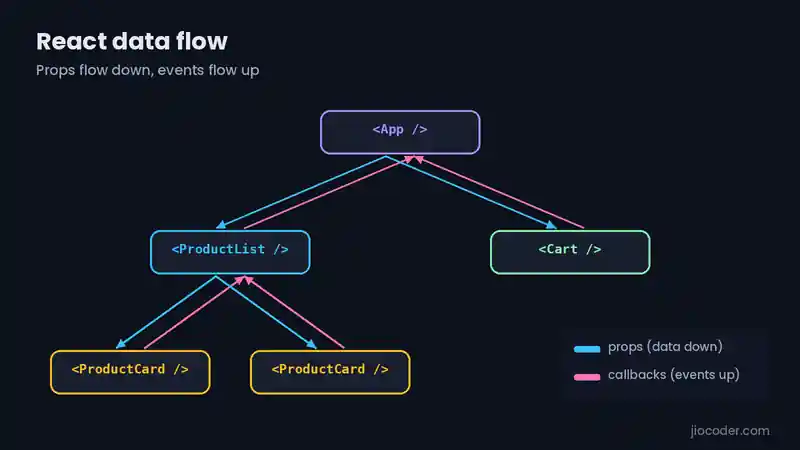
Data flows down from parent to child through props. When a child needs to change something, the parent passes a callback function down, and the child calls it to send the event up. When two siblings need the same data, lift the state up to their closest common parent.
State with useState#
State is data a component remembers between renders. When state changes, React re-renders the component.
import { useState } from "react";

function Counter() {
  const [count, setCount] = useState(0);
  return (
    <button onClick={() => setCount(count + 1)}>
      Clicked {count} times
    </button>
  );
}
Rules for updating state#
- Never mutate state directly. Create a new object or array so React can see the change.
- State updates are batched, and the new value is only available on the next render.
- When the next value depends on the previous one, use an updater function.
// Arrays and objects: always copy
setTodos([...todos, newTodo]);                 // add
setTodos(todos.filter((t) => t.id !== id));    // remove
setUser({ ...user, city: "Pune" });            // update a field

// Updater function: safe when updating several times
setCount((c) => c + 1);
setCount((c) => c + 1); // count goes up by 2
How rendering works#
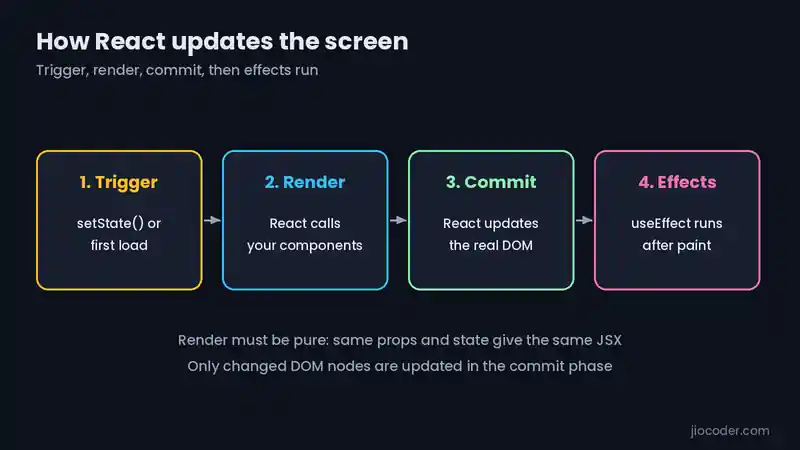
- Trigger: the first render, or a state update in the component or a parent.
- Render: React calls your component functions to get the new JSX. This must be pure: no side effects.
- Commit: React compares the new result with the previous one (reconciliation) and applies only the differences to the real DOM.
- Effects: after the browser paints, React runs your effects.
When a parent re-renders, its children re-render too. React only touches the DOM where something changed, so this is usually fast. Optimise only when you measure a real problem.
Lists and keys#
function TodoList({ todos }) {
  return (
    <ul>
      {todos.map((todo) => (
        <li key={todo.id}>{todo.text}</li>
      ))}
    </ul>
  );
}
A key tells React which item is which between renders. Use a stable, unique ID from your data. Avoid the array index when items can be added, removed or reordered, because React may reuse the wrong component and mix up its state.
Conditional rendering#
{isLoading ? <Spinner /> : <ProductList />}
{error && <p className="error">{error}</p>}
{items.length > 0 && <Cart items={items} />}{items.length && <Cart />} renders a literal 0 when the list is empty. Compare explicitly with items.length > 0.
Handling events and forms#
React passes a synthetic event object to handlers. Pass the function, do not call it: onClick={handleClick}, not onClick={handleClick()}.
In a controlled input, React state is the source of truth: you set value and update it in onChange.
function SignupForm() {
  const [email, setEmail] = useState("");

  function handleSubmit(e) {
    e.preventDefault();
    console.log("Sign up", email);
  }

  return (
    <form onSubmit={handleSubmit}>
      <label htmlFor="email">Email</label>
      <input
        id="email"
        type="email"
        value={email}
        onChange={(e) => setEmail(e.target.value)}
      />
      <button type="submit">Join</button>
    </form>
  );
}
The essential hooks#
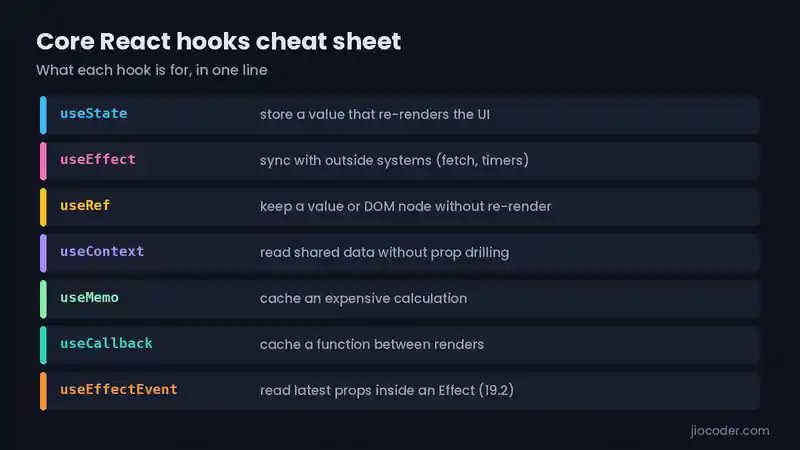
Rules of hooks: call hooks only at the top level of a component or custom hook, never inside conditions, loops or nested functions. React relies on the call order to match each hook with its state.
useEffect: syncing with the outside world#
Use effects to connect to things outside React: subscriptions, timers, browser APIs, or fetching data in a plain client app.
useEffect(() => {
  const id = setInterval(() => setSeconds((s) => s + 1), 1000);
  return () => clearInterval(id); // cleanup
}, []); // empty array: run after the first render only| Dependency array | When the effect runs |
|---|---|
| None | After every render |
[] | Once, after the first render |
[userId] | After the first render and whenever userId changes |
Do not use an effect to compute values from props or state; calculate them during render. Do not use one to respond to a click; put that logic in the event handler.
useRef: values that do not trigger a render#
const inputRef = useRef(null);
// <input ref={inputRef} />
inputRef.current.focus();
A ref holds a mutable .current value that survives renders without causing one. Use it for DOM elements, timer IDs and previous values.
useContext: avoiding prop drilling#
const ThemeContext = createContext("light");

function App() {
  return (
    <ThemeContext value="dark">
      <Toolbar />
    </ThemeContext>
  );
}

function Button() {
  const theme = useContext(ThemeContext);
  return <button className={theme}>Save</button>;
}
In React 19 you can render <ThemeContext> directly as the provider. Context suits app-wide data like the theme, the logged-in user or the language.
useMemo and useCallback#
useMemo caches the result of an expensive calculation; useCallback caches a function so it keeps the same identity between renders. They matter mostly with memo-wrapped children. With the React Compiler (stable since late 2025), much of this memoization is done automatically.
Custom hooks#
A custom hook is a function starting with use that combines other hooks so components can share logic.
function useLocalStorage(key, initial) {
  const [value, setValue] = useState(() => {
    const saved = localStorage.getItem(key);
    return saved ? JSON.parse(saved) : initial;
  });
  useEffect(() => {
    localStorage.setItem(key, JSON.stringify(value));
  }, [key, value]);
  return [value, setValue];
}
What is new in React 19 and 19.2#
| Feature | What it does |
|---|---|
| Actions | Pass an async function to <form action={fn}>; React handles pending state, errors and resets the form. |
useActionState | Returns the action's result, a wrapped action and an isPending flag. |
useFormStatus | Lets a child (like a submit button) read whether its parent form is submitting. |
useOptimistic | Shows an optimistic value instantly while the request finishes. |
use() | Reads a promise or context during render, and can be called conditionally. |
ref as a prop | Function components accept ref directly; forwardRef is no longer needed. |
<Activity> (19.2) | Hides part of the UI while keeping its state, for tabs and back navigation. |
useEffectEvent (19.2) | Reads the latest props and state inside an effect without adding them as dependencies. |
import { useActionState } from "react";

function NewsletterForm() {
  const [message, formAction, isPending] = useActionState(
    async (prev, formData) => {
      const res = await subscribe(formData.get("email"));
      return res.ok ? "Subscribed!" : "Try again";
    },
    null
  );

  return (
    <form action={formAction}>
      <input name="email" type="email" required />
      <button disabled={isPending}>
        {isPending ? "Saving..." : "Subscribe"}
      </button>
      {message && <p>{message}</p>}
    </form>
  );
}
Performance basics#
- Keep state as close as possible to where it is used, so fewer components re-render.
- Wrap expensive pure children in
memo(or let the React Compiler do it). - Split large bundles with
lazy()and<Suspense>. - Virtualise very long lists, and use
useTransitionfor slow, non-urgent updates. - Measure with the React DevTools Profiler before optimising.
Best practices#
- Keep components small and pure: same props and state, same output.
- Use stable keys from your data, not array indexes.
- Never mutate state; copy arrays and objects.
- Avoid unnecessary effects; derive values during render.
- Use a data library (TanStack Query) or a framework (Next.js) for server data instead of hand-written fetch effects.
- Write semantic, accessible JSX: real buttons, labels and alt text still matter.
Test yourself with our React interview questions for freshers, then move on to the Next.js complete guide.
Key takeaways#
- React builds UIs from components: functions that return JSX.
- Props flow down and are read-only; state is owned by a component and triggers re-renders.
- Rendering is trigger, render, commit, then effects run.
- Follow the rules of hooks and use effects only to sync with external systems.
- Use stable keys and never mutate state.
- React 19 adds Actions, useActionState, useOptimistic and use(); 19.2 adds Activity and useEffectEvent.