JavaScript Complete Guide: Core Concepts, Async JavaScript and the DOM
Learn JavaScript in depth: variables, types, functions, scope, closures, this, objects, arrays, the DOM, events, promises, async/await and the event loop, with clear examples.

JavaScript is the programming language of the web. HTML gives a page structure, CSS gives it style, and JavaScript makes it interactive. This guide walks through the core language, how JavaScript runs your code, and how to work with the DOM, events and asynchronous code.
JavaScript changes HTML and CSS on the fly, so make sure you are comfortable with both. Our HTML guide and CSS guide cover what you need.
Variables: var, let and const#
Modern JavaScript uses const by default and let when a value must change. Avoid var in new code.
const name = "Asha";   // cannot be reassigned
let count = 0;         // can be reassigned
count = count + 1;

const user = { age: 21 };
user.age = 22;         // allowed: the object can change,
// only the binding is constant- var is function-scoped and is hoisted with the value
undefined. - let and const are block-scoped (
{ }). They are hoisted too, but sit in the temporal dead zone until their line runs, so using them early throws aReferenceError.
Data types#
JavaScript has seven primitive types and one non-primitive type.
| Type | Example |
|---|---|
| string | "hello" |
| number | 42, 3.14, NaN |
| bigint | 9007199254740993n |
| boolean | true, false |
| undefined | A declared variable with no value |
| null | An intentional "no value" |
| symbol | Symbol("id"), a unique key |
| object | Objects, arrays, functions, dates, maps |
Primitives are copied by value. Objects are copied by reference, so two variables can point to the same object.
const a = { score: 1 };
const b = a;      // same object
b.score = 5;
console.log(a.score); // 5

const c = { ...a };   // shallow copy
c.score = 9;
console.log(a.score); // still 5
Equality: == vs ===#
=== (strict equality) compares value and type. == converts types first, which leads to surprises like 0 == "" being true. Always use ===.
Truthy and falsy#
The falsy values are false, 0, -0, 0n, "", null, undefined and NaN. Everything else is truthy, including [], {} and "0".
Functions#
// Function declaration: hoisted, usable before this line
function add(a, b) {
  return a + b;
}

// Function expression
const multiply = function (a, b) {
  return a * b;
};

// Arrow function: short, and no own "this"
const square = (n) => n * n;

// Default and rest parameters
function greet(name = "friend", ...others) {
  return `Hi ${name} and ${others.length} others`;
}
Functions are first-class values: you can store them in variables, pass them as arguments and return them from other functions. A function that takes or returns another function is a higher-order function; map, filter and setTimeout are examples.
Scope and closures#
Scope decides where a variable can be used. JavaScript has global scope, function scope and block scope. When code looks up a variable, it checks the current scope, then the outer one, and so on up the scope chain.
A closure is a function that remembers the variables of the scope where it was created, even after that outer function has returned.
function makeCounter() {
  let count = 0;            // private variable
  return function () {
    count++;
    return count;
  };
}

const counter = makeCounter();
counter(); // 1
counter(); // 2  (count is remembered)
Closures power data privacy, function factories, event handlers that remember values, and utilities like debounce and memoize.
The this keyword#
this depends on how a function is called, not where it is written.
| Call style | Value of this |
|---|---|
obj.method() | obj |
Plain call fn() | undefined in strict mode (the global object otherwise) |
new Fn() | The new object |
fn.call(x), fn.apply(x), fn.bind(x) | x |
| Arrow function | Inherits this from the surrounding scope |
Objects and arrays#
Destructuring, spread and optional chaining#
const user = { name: "Ravi", city: "Pune", address: null };

const { name, city } = user;          // destructuring
const updated = { ...user, city: "Delhi" }; // spread copy
const pin = user.address?.pin;         // undefined, no error
const label = user.nickname ?? "Guest"; // fallback only for null/undefined
Essential array methods#
const prices = [120, 450, 80, 300];

prices.map((p) => p * 1.18);        // new array with tax
prices.filter((p) => p > 100);      // [120, 450, 300]
prices.reduce((sum, p) => sum + p, 0); // 950
prices.find((p) => p > 400);         // 450
prices.some((p) => p < 100);         // true
prices.toSorted((a, b) => a - b); // sorted copy, original unchangedpush, pop, splice, sort and reverse change the original array. map, filter, slice, toSorted and toReversed return a new one. Frameworks like React rely on new arrays to detect changes.
Classes and prototypes#
Every object has a hidden link to a prototype object. When a property is missing, JavaScript looks it up the prototype chain. The class syntax is a cleaner way to write prototype-based code.
class Animal {
  #sound;                       // private field
  constructor(name, sound) {
    this.name = name;
    this.#sound = sound;
  }
  speak() {
    return `${this.name} says ${this.#sound}`;
  }
}

class Dog extends Animal {
  constructor(name) {
    super(name, "woof");
  }
}

new Dog("Bruno").speak(); // "Bruno says woof"
How JavaScript runs your code#
JavaScript is single-threaded: it runs one piece of code at a time on the call stack. Slow work such as timers and network requests is handed to the browser's Web APIs. When that work finishes, its callback waits in a queue until the stack is empty. The event loop moves callbacks from the queues to the stack.
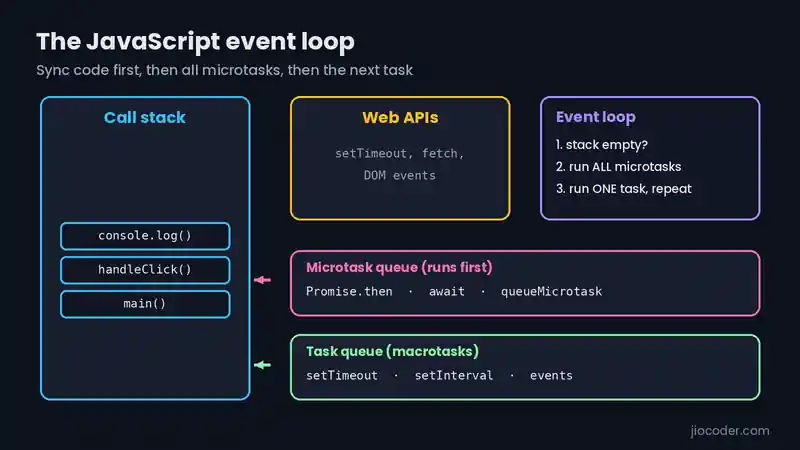
- Microtasks: promise callbacks (
.then, code afterawait) andqueueMicrotask. The whole microtask queue empties after each task. - Tasks (macrotasks):
setTimeout,setInterval, user events. One runs per loop turn.
console.log("1");
setTimeout(() => console.log("2"), 0);
Promise.resolve().then(() => console.log("3"));
console.log("4");

// Output: 1, 4, 3, 2
Synchronous code runs first (1, 4), then microtasks (3), then the next task (2). This is one of the most common interview questions.
Asynchronous JavaScript#
From callbacks to promises#
Callbacks nested inside callbacks quickly become "callback hell". A Promise represents a value that will be available later.
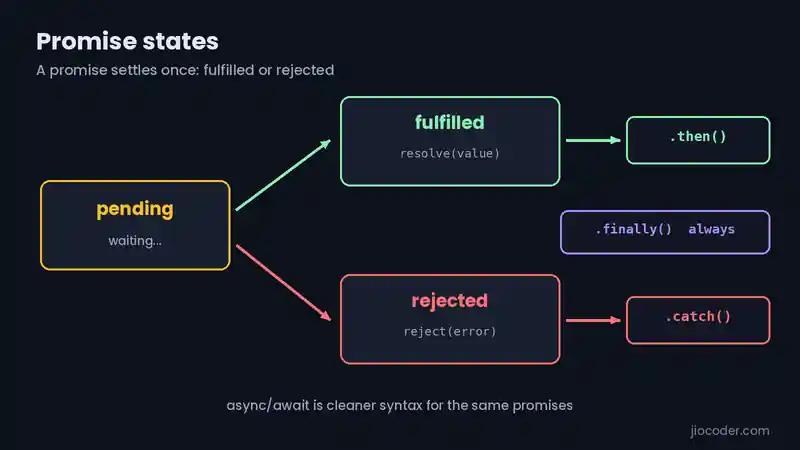
A promise starts pending and settles once, either fulfilled with a value or rejected with an error.
fetch("/api/products")
  .then((res) => res.json())
  .then((data) => console.log(data))
  .catch((err) => console.error(err))
  .finally(() => console.log("done"));
async and await#
async/await is syntax on top of promises that reads like normal code. Use try...catch for errors, and check res.ok, because fetch only rejects on network failure, not on HTTP errors like 404.
async function loadProducts() {
  try {
    const res = await fetch("/api/products");
    if (!res.ok) throw new Error(`HTTP ${res.status}`);
    return await res.json();
  } catch (err) {
    console.error("Could not load products", err);
    return [];
  }
}
Running promises together#
| Method | Resolves when |
|---|---|
Promise.all | All fulfil; rejects as soon as one rejects |
Promise.allSettled | All settle; gives each result or error |
Promise.race | The first one settles |
Promise.any | The first one fulfils |
const [user, orders] = await Promise.all([
  fetch("/api/user").then((r) => r.json()),
  fetch("/api/orders").then((r) => r.json()),
]);
The DOM#
The DOM (Document Object Model) is the browser's tree of objects built from your HTML. JavaScript reads and changes this tree to update the page.
const list = document.querySelector("#todo-list");
const item = document.createElement("li");
item.textContent = "Learn closures";   // safe: treated as text
item.classList.add("todo");
list.append(item);Setting innerHTML with text from users can run injected scripts (an XSS attack). Use textContent for text, and build elements with createElement.
Events#
const button = document.querySelector(".buy");
button.addEventListener("click", (event) => {
  event.preventDefault();
  console.log("Clicked", event.target);
});
Capturing and bubbling#
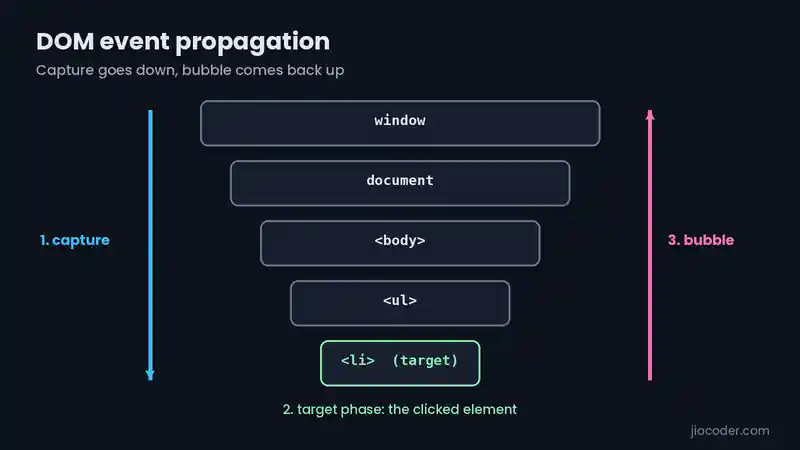
An event travels in three phases: capture (from window down to the target), target, and bubble (back up to window). Listeners run in the bubble phase by default. event.stopPropagation() stops the journey.
Event delegation#
Instead of adding a listener to every item, add one to the parent and check event.target. It uses less memory and works for items added later.
list.addEventListener("click", (event) => {
  const item = event.target.closest("li");
  if (item) item.classList.toggle("done");
});Modules#
ES modules split code into files with export and import. In the browser, load them with <script type="module">, which is deferred automatically.
// math.js
export const add = (a, b) => a + b;
export default function multiply(a, b) { return a * b; }

// app.js
import multiply, { add } from "./math.js";
Error handling and storage#
- Use
try...catch...finallyaround code that can fail, andthrow new Error("message")for your own errors. - Store small data with
localStorage.setItem("theme", "dark"). It only stores strings, so useJSON.stringifyandJSON.parsefor objects.
Best practices#
- Use const by default, let when needed, never var.
- Always use ===.
- Prefer non-mutating array methods and small, pure functions.
- Handle errors in every async function, and check
res.okafterfetch. - Use event delegation for lists, and debounce search inputs and resize handlers.
- Use a linter (ESLint) and a formatter (Prettier). Consider TypeScript for larger projects.
Practise with our JavaScript interview questions for freshers, then move on to the React complete guide.
Key takeaways#
- Use const and let; they are block-scoped and have a temporal dead zone.
- Primitives copy by value; objects copy by reference.
- A closure remembers variables from the scope where it was created.
thisdepends on how a function is called; arrow functions inherit it.- The event loop runs synchronous code, then all microtasks, then the next task.
- Use async/await with
try...catch, and event delegation for lists.