React Interview Questions for Freshers (With Answers)
The React interview questions freshers get asked most, with clear answers and code: virtual DOM, props vs state, hooks, useEffect, keys, controlled components, context, memo and React 19.
Most frontend fresher roles today ask about React. Interviewers want to see that you understand how components, state and rendering work, not just that you can copy code. Here are the 25 React questions freshers are asked most, with answers you can explain in your own words.
Build a small project, like a to-do app or product list, while you revise. Most React questions are easier to answer with "here is how I did it in my project". For the full theory, read our React complete guide.
React basics#
1. What is React and why is it popular?#
React is a JavaScript library for building user interfaces from reusable components. It is declarative: you describe the UI for the current data and React updates the DOM. It is popular for its component model, huge ecosystem, strong job market and frameworks like Next.js built on top of it.
2. What is JSX?#
JSX is a syntax extension that lets you write HTML-like markup in JavaScript. Tools like Babel or SWC compile it into React.createElement-style calls. JSX uses className instead of class, and JavaScript expressions go inside { }.
3. What is the virtual DOM?#
The virtual DOM is a lightweight JavaScript description of the UI. When state changes, React creates a new description, compares it with the previous one (reconciliation or "diffing"), and updates only the real DOM nodes that changed. This avoids rebuilding the whole page.
4. What is the difference between a library and a framework, and which is React?#
A library gives you tools you call; a framework calls your code and decides the structure. React is a library focused on the UI. Frameworks such as Next.js add routing, data fetching and server rendering around it.
5. What are components? Function vs class components?#
Components are reusable pieces of UI. Modern React uses function components with hooks. Class components (with this.state and lifecycle methods) still work, but new code uses functions because they are shorter and hooks make logic easier to share.
Props and state#
6. What is the difference between props and state?#
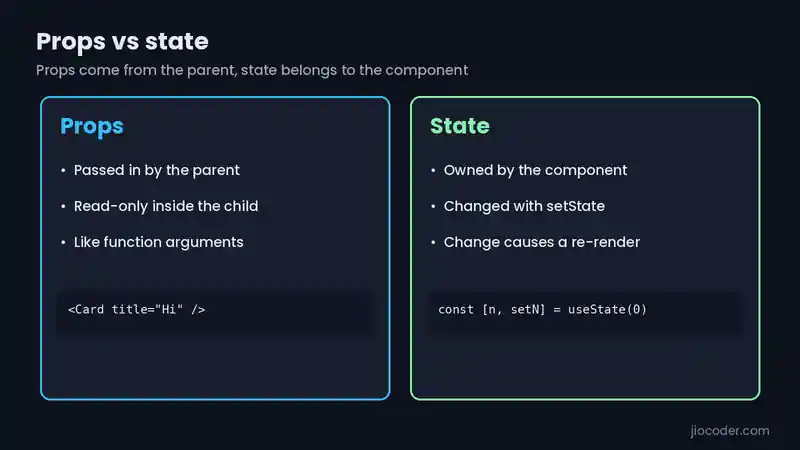
Props are passed from parent to child and are read-only for the child. State is owned by the component itself and changes over time with a setter. Changing state re-renders the component; new props from a parent re-render the child.
7. What is prop drilling and how do you avoid it?#
Prop drilling is passing props through many layers of components that do not use them, just to reach a deep child. Avoid it with Context, component composition (passing children), or a state library like Zustand or Redux Toolkit.
8. What does "lifting state up" mean?#
When two sibling components need the same data, you move the state to their closest common parent and pass it down as props, along with callbacks to update it. This keeps a single source of truth.
9. Why should you not mutate state directly?#
React decides whether to re-render by comparing references. If you change an array with push, the reference stays the same, so React may not re-render. Always create a new array or object.
// Wrong
items.push(newItem);
setItems(items);

// Right
setItems([...items, newItem]);
10. Why does this counter only increase by 1?#
function handleClick() {
  setCount(count + 1);
  setCount(count + 1);
}
Both calls read the same count from the current render, so both set it to count + 1. Updates are batched. Use the updater form, setCount((c) => c + 1), to base each update on the latest value.
Hooks#
11. What are hooks, and what are the rules of hooks?#
Hooks are functions like useState and useEffect that let function components use state and other React features. Rules: call hooks only at the top level (not in loops, conditions or nested functions), and only from React components or custom hooks.
12. Explain useEffect and its dependency array.#
useEffect runs code after render to sync with external systems, such as timers, subscriptions or APIs. With no array it runs after every render; with [] it runs once after mount; with [a, b] it runs when a or b changes. Return a cleanup function to remove listeners or clear timers.
13. How do you replicate componentDidMount and componentWillUnmount?#
useEffect(() => {
  console.log("mounted");
  return () => console.log("unmounted"); // cleanup
}, []);
14. What is the difference between useState and useRef?#
Both keep values between renders. Updating state triggers a re-render. Changing a ref (ref.current) does not. Use refs for DOM access, timer IDs and values that do not affect what is shown.
15. What is the difference between useMemo and useCallback?#
useMemo caches a computed value; useCallback caches a function. Both recompute only when dependencies change. They help when passing values or callbacks to memo-wrapped children or avoiding expensive recalculations. The React Compiler can now add much of this automatically.
16. What is a custom hook?#
A function whose name starts with use and which calls other hooks to share stateful logic between components, for example useFetch, useDebounce or useLocalStorage. Each component that calls it gets its own state.
17. What is the Context API?#
Context passes data deep into the tree without props at every level. Create it with createContext, provide a value high in the tree, and read it with useContext (or use in React 19). Every component that reads a context re-renders when its value changes, so keep frequently changing values separate.
Rendering, lists and forms#
18. Why are keys important in lists?#
Keys let React match list items between renders. With stable, unique keys, React keeps the right state with the right item. Using the array index as a key can cause bugs when items are inserted, removed or reordered, such as input values jumping to the wrong row.
19. What are controlled and uncontrolled components?#
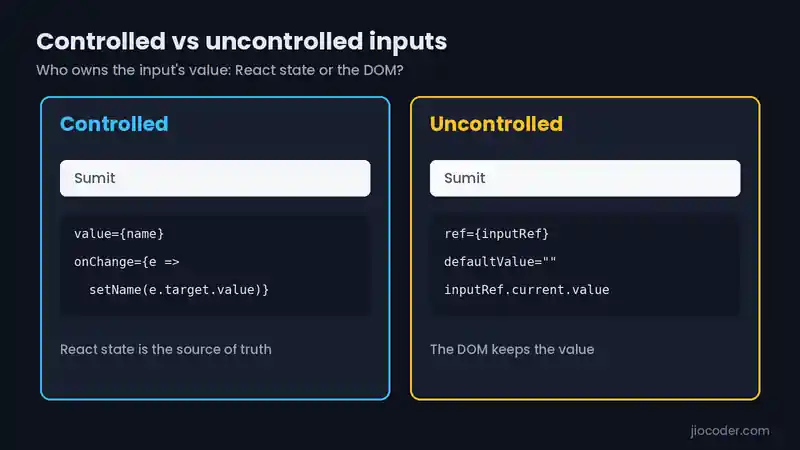
In a controlled input, React state holds the value (value plus onChange), so you can validate or format on every keystroke. In an uncontrolled input, the DOM holds the value; you set defaultValue and read it with a ref or FormData on submit. Controlled is the common choice for forms with validation.
20. What is conditional rendering?#
Showing different UI based on conditions, using if, the ternary operator or &&. Watch out for {count && <List />}, which renders 0 when count is 0.
21. What are fragments?#
Fragments (<>...</>) group several elements without adding an extra node to the DOM, which keeps the HTML clean and avoids breaking layouts like tables or flex containers.
22. When does a component re-render?#
When its state changes, when its parent re-renders, or when a context it uses changes. Re-rendering is not the same as updating the DOM; React only changes the DOM where the output differs.
Performance and modern React#
23. What is React.memo?#
memo wraps a component so it skips re-rendering when its props have not changed (shallow comparison). It is useful for expensive components that often receive the same props. It only helps if the props are stable, which is where useCallback and useMemo come in.
24. What are lazy loading and Suspense?#
lazy() loads a component's code only when it is needed, splitting the bundle. <Suspense fallback={...}> shows a fallback, like a spinner, while that code or data loads.
const Dashboard = lazy(() => import("./Dashboard"));

<Suspense fallback={<p>Loading...</p>}>
  <Dashboard />
</Suspense>
25. What is new in React 19?#
React 19 added Actions (async functions passed to <form action>), useActionState, useFormStatus, useOptimistic, the use() API for reading promises and context, and ref as a normal prop. React 19.2 added <Activity> and useEffectEvent. Mentioning one or two of these shows you keep up to date.
Tips for answering React questions in interviews#
- Explain the "why": why keys matter, why state must not be mutated, why effects need cleanup.
- Be ready for live coding: a counter, a to-do list, a search filter with debounce, or fetching and listing data.
- Talk about your project: which hooks you used, how you managed state and how you handled loading and errors.
- Know the basics of Next.js; many companies use React through it.
Revise JavaScript interview questions for freshers, then continue with Next.js interview questions for freshers.
Key takeaways#
- Props are read-only inputs; state is owned data that triggers re-renders.
- The virtual DOM and reconciliation update only what changed.
- Follow the rules of hooks, and know
useEffectdependencies and cleanup. - Use stable keys and never mutate state; use the updater function for sequential updates.
- Know controlled vs uncontrolled inputs, Context and memo.
- Mention React 19 features like Actions, useActionState and use().