Next.js Interview Questions for Freshers (With Answers)
The Next.js interview questions freshers get asked most, with clear answers: App Router, SSR vs SSG vs ISR, Server and Client Components, data fetching, Server Actions, caching, proxy.ts and SEO.

More and more frontend roles use Next.js, so interviewers often follow React questions with Next.js ones. They want to know whether you understand routing, rendering and the server/client split. Here are the 25 Next.js questions freshers are asked most, with answers you can explain clearly.
Create a small Next.js app, such as a blog with a list page, a detail page and a contact form, and try each idea in it. For the full theory, read our Next.js complete guide.
Basics#
1. What is Next.js and how is it different from React?#
React is a library for building UI components. Next.js is a framework built on React that adds file-based routing, server-side rendering, static generation, data fetching, caching, API endpoints and image and font optimisation. React alone renders in the browser by default; Next.js can render on the server for better SEO and faster first load.
2. What are the main benefits of Next.js?#
- Better SEO and faster first paint thanks to server rendering.
- File-based routing with layouts.
- Server Components that send less JavaScript to the browser.
- Built-in image, font and script optimisation.
- Full stack in one project with Route Handlers and Server Actions.
3. What is the difference between the App Router and the Pages Router?#
The Pages Router (pages/ folder) is the older system using getServerSideProps and getStaticProps. The App Router (app/ folder) is the modern, recommended system built on React Server Components, with nested layouts, streaming, Server Actions and async components for data fetching.
Routing#
4. How does file-based routing work in the App Router?#
Each folder inside app/ is a URL segment, and a page.tsx file makes it a public route. So app/about/page.tsx becomes /about. Folders in parentheses, like (marketing), group routes without changing the URL.
5. How do you create a dynamic route?#
Wrap the folder name in square brackets, like app/blog/[slug]/page.tsx. In Next.js 15 and 16, params is a Promise:
export default async function Post({ params }) {
  const { slug } = await params;
  return <h1>{slug}</h1>;
}
6. What are layout.tsx, loading.tsx, error.tsx and not-found.tsx?#
layout.tsx wraps pages with shared UI and keeps state between navigations. loading.tsx shows instant loading UI using Suspense. error.tsx is an error boundary for the segment and must be a Client Component. not-found.tsx renders when notFound() is called or no route matches.
7. What is the difference between Link and an a tag?#
Link from next/link does client-side navigation: it changes the page without a full reload, keeps layout state and prefetches routes in view. A plain <a> tag reloads the whole page. Use <a> for external links.
8. How do you navigate in code?#
In a Client Component, use the useRouter hook from next/navigation and call router.push("/dashboard"). On the server, in a Server Component or Server Action, call redirect("/login").
Rendering#
9. What is the difference between CSR, SSR, SSG and ISR?#
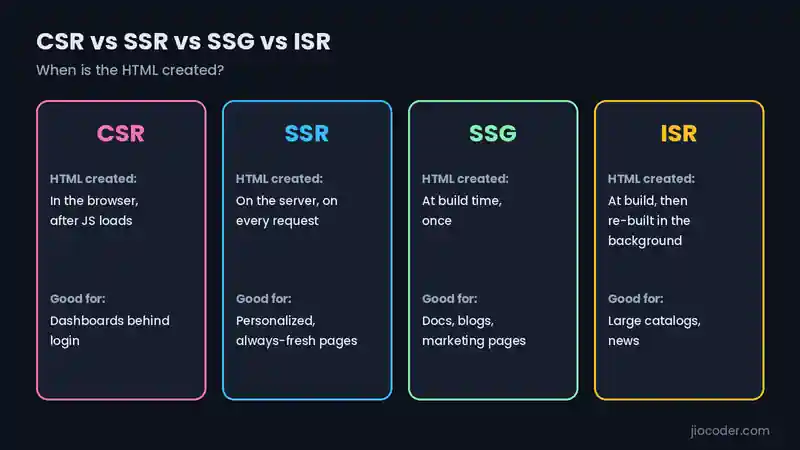
- CSR (Client-Side Rendering): the browser downloads JavaScript and builds the page. Good for dashboards behind a login; weaker for SEO.
- SSR (Server-Side Rendering): HTML is built on the server for each request. Good for personalised or always-fresh pages.
- SSG (Static Site Generation): HTML is built once at build time. Fastest; good for blogs and marketing pages.
- ISR (Incremental Static Regeneration): static pages that are regenerated in the background after a set time or on demand.
10. What is hydration?#
The server sends ready-made HTML so the page appears quickly. Then React loads JavaScript in the browser and attaches event handlers to that HTML so it becomes interactive. That attaching step is hydration. A hydration error happens when the HTML from the server does not match what React renders in the browser, for example when using Date.now() or window during render.
11. What happens when a user requests a page?#
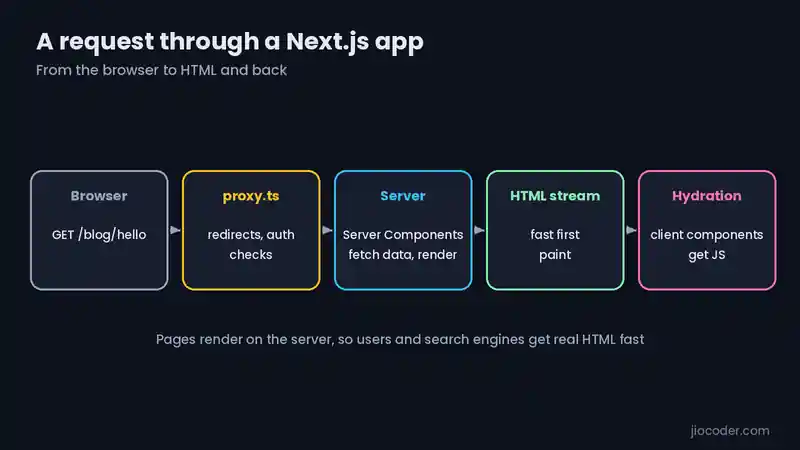
The request first passes through proxy.ts (if present), which can redirect or rewrite it. Next.js then renders the Server Components for the route, using cached results where possible, and streams HTML to the browser. Finally, the JavaScript for Client Components loads and hydrates the interactive parts.
12. What is streaming?#
Instead of waiting for all data before sending anything, Next.js sends the parts of the page that are ready immediately and streams slower parts later. You enable it with loading.tsx or by wrapping slow components in <Suspense>.
Server and Client Components#
13. What are Server Components and Client Components?#
Server Components are the default in the App Router. They run only on the server, can be async, can access databases and secrets, and add no JavaScript to the browser bundle. Client Components start with "use client" and run in the browser too, so they can use state, effects, event handlers and browser APIs.
14. When do you need "use client"?#
When a component uses useState, useEffect or other hooks, event handlers like onClick, browser APIs like localStorage or window, or libraries that depend on them. Keep it as low in the tree as possible so most of the page stays server-rendered.
15. Can a Client Component import a Server Component?#
Not directly. Once a file is marked "use client", everything it imports becomes client code. But you can pass a Server Component to a Client Component as children or another prop, and it will still render on the server.
Data fetching and mutations#
16. How do you fetch data in the App Router?#
Make the Server Component async and await your data directly with fetch, an ORM or an SDK. There is no need for useEffect or getServerSideProps. Run independent requests in parallel with Promise.all.
export default async function Page() {
  const products = await getProducts();
  return <ProductList products={products} />;
}
17. What are Server Actions?#
Async functions marked with "use server" that run on the server but can be called from forms and Client Components. They are used for mutations like creating a post or updating a profile, without writing a separate API route. Because anyone can call them, always validate input and check authorisation inside them.
18. What are Route Handlers?#
Files named route.ts that export HTTP method functions like GET and POST. They create API endpoints, useful for webhooks, public APIs and integrations with other apps.
19. How does caching work in Next.js 16?#
Next.js 16 introduced Cache Components, which make caching explicit. Code is dynamic by default, and you opt in to caching with the "use cache" directive, controlling lifetime with cacheLife and grouping data with cacheTag. After a write, use updateTag in a Server Action to show fresh data immediately, or revalidateTag(tag, "max") to refresh in the background.
Other features#
20. What is proxy.ts (formerly middleware)?#
proxy.ts runs before a request reaches a route. It is used for redirects, rewrites, setting headers and quick authentication checks, for example redirecting logged-out users from /dashboard to /login. Next.js 16 renamed middleware.ts to proxy.ts to make its purpose clearer.
21. How do you handle SEO in Next.js?#
Export a metadata object or a generateMetadata function from a page or layout to set the title, description, canonical URL and Open Graph tags. Add sitemap.ts and robots.ts in the app folder. Server rendering means search engines receive full HTML.
22. Why use next/image instead of an img tag?#
next/image automatically resizes images, serves modern formats like WebP and AVIF, lazy-loads images below the fold and requires width and height to prevent layout shift. Use the priority prop for the main above-the-fold image.
23. How do environment variables work?#
Store them in .env.local. They are available only on the server by default. Variables that start with NEXT_PUBLIC_ are bundled into browser code, so never put secrets in them.
24. What is Turbopack?#
Turbopack is the Rust-based bundler built by the Next.js team. In Next.js 16 it is the default bundler for both development and production builds, giving much faster refreshes and builds than webpack.
25. How do you deploy a Next.js app?#
The simplest option is Vercel: connect a Git repository and every push is built and deployed, with preview URLs for branches. You can also run next build and next start on any Node.js server, use output: "standalone" for Docker, or output: "export" for a fully static site.
Tips for answering Next.js questions in interviews#
- Lead with the "why": SEO, performance and less client JavaScript are the reasons Next.js exists.
- Know the server/client split well; most follow-up questions build on it.
- Mention the version: saying "in Next.js 16, middleware is now proxy.ts and caching is explicit with use cache" shows you are current.
- Show a project deployed on Vercel with a few pages, a form and good metadata.
Revise React interview questions for freshers, and go back to the basics with HTML interview questions for freshers.
Key takeaways#
- Next.js is a React framework that adds routing, server rendering and optimisation.
- In the App Router, folders are routes and special files add layouts, loading and error UI.
- Know CSR, SSR, SSG and ISR, plus hydration and streaming.
- Components are Server Components by default;
"use client"opts into the browser. - Fetch data in async Server Components; mutate with Server Actions.
- Next.js 16:
proxy.ts, explicit caching with"use cache", and Turbopack by default.