HTML Interview Questions for Freshers (With Answers)
The HTML interview questions freshers get asked most, with short, clear answers and examples: semantic tags, block vs inline, forms, head tags, async vs defer and more.
HTML questions open almost every frontend fresher interview. Interviewers use them to check that your basics are solid before moving on to CSS and JavaScript. Here are the 25 HTML questions freshers are asked most, with short answers you can say out loud and examples where they help.
Do not memorise answers word for word. Read the answer, try the example in your browser, then explain it in your own words. Interviewers notice the difference immediately. Want the full theory first? Read our HTML complete guide.
HTML basics#
1. What is HTML?#
HTML (HyperText Markup Language) is the standard markup language for creating web pages. It describes the structure and meaning of content using elements such as headings, paragraphs, links and images. The browser reads HTML and turns it into the DOM.
2. What is the difference between an element, a tag and an attribute?#
A tag is the markup itself, like <p>. An element is the opening tag, its content and the closing tag together. An attribute adds extra information inside the opening tag, like href in a link.
<a href="/about">About us</a>3. What does <!DOCTYPE html> do?#
It tells the browser to render the page in standards mode using modern HTML rules. Without it, browsers switch to "quirks mode", which copies old browser bugs and can break layouts.
4. What are void (self-closing) elements?#
Elements that cannot have content and have no closing tag, such as <img>, <br>, <hr>, <input>, <meta> and <link>.
5. What is the difference between HTML and HTML5?#
HTML5 is the modern version of HTML. It added semantic elements (<header>, <nav>, <article>), native <audio> and <video>, new input types like email and date, <canvas>, and browser APIs such as localStorage and geolocation.
Elements and layout#
6. What is the difference between block and inline elements?#
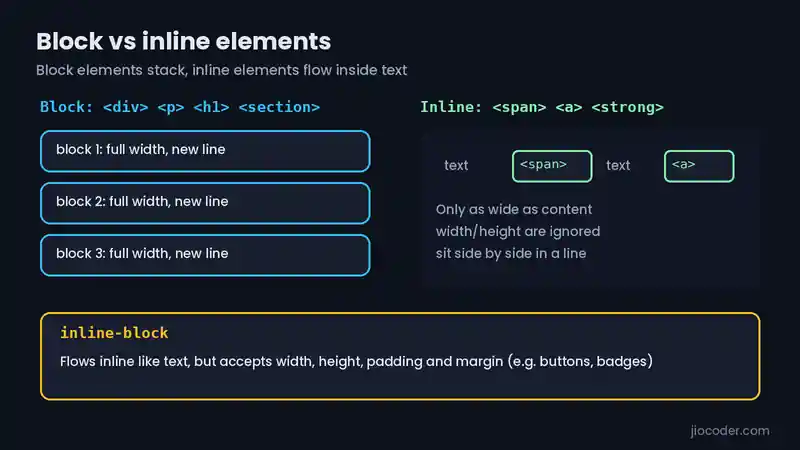
| Block | Inline |
|---|---|
| Starts on a new line | Stays in the same line as text |
| Takes the full available width | Only as wide as its content |
| Width, height, margin and padding all apply | Width and height are ignored; vertical margin has no effect |
<div>, <p>, <h1>, <section> | <span>, <a>, <strong>, <em> |
Bonus point: display: inline-block flows like inline but accepts width and height, which is why buttons and badges often use it.
7. What is the difference between <div> and <span>?#
Both are generic containers with no meaning. <div> is a block element used to group larger sections. <span> is an inline element used to style a part of text.
8. What is semantic HTML and why does it matter?#
Semantic HTML uses elements that describe the meaning of content, like <nav>, <main>, <article> and <footer>, instead of only <div>. It improves accessibility (screen readers can navigate by landmarks), SEO (search engines understand the main content) and code readability.
9. What is the difference between <article> and <section>?#
<article> is self-contained content that would make sense on its own, like a blog post, product card or comment. <section> groups related content under a heading within a page, like a "Features" or "Pricing" section.
10. What is the difference between <strong> and <b>, and <em> and <i>?#
<strong> means important and <em> means stressed emphasis; screen readers can convey this meaning. <b> and <i> only change the visual style without adding importance.
11. How many <h1> tags should a page have?#
Best practice is one <h1> for the main page title, followed by <h2> to <h6> in order. Do not skip levels to change font size; use CSS for that.
Links, images and media#
12. Why should you add rel="noopener" to links with target="_blank"?#
A page opened with target="_blank" could access the original page through window.opener and redirect it (a phishing risk called tabnabbing). rel="noopener" blocks that. Modern browsers apply noopener by default for _blank links, but adding it explicitly is still good practice.
13. Why is the alt attribute important?#
alt describes an image for screen reader users, is shown if the image fails to load, and helps search engines understand the image. Decorative images should have an empty alt="" so screen readers skip them.
14. How do you make images responsive in HTML?#
Use srcset to offer several sizes and sizes to tell the browser how wide the image will display. The browser then downloads the smallest file that looks sharp. Use the <picture> element when you need different crops or formats.
<img src="photo-800.webp"
     srcset="photo-400.webp 400w, photo-800.webp 800w"
     sizes="(min-width: 768px) 50vw, 100vw"
alt="Team meeting">Forms#
15. Why do inputs need a <label>?#
A label tells users and screen readers what the field is for. Connecting it with for and id also makes the label clickable, which focuses the input and enlarges the click area. A placeholder is not a replacement for a label.
<label for="name">Full name</label>
<input id="name" name="name" type="text" required>
16. What is the difference between GET and POST in a form?#
GET sends form data in the URL. It is visible, can be bookmarked and is used for searches and filters. POST sends data in the request body. It is used for creating or changing data, like sign-ups and payments, and for sensitive or large data.
17. Name some HTML5 input types and validation attributes.#
Input types: email, tel, url, number, date, range, color, password, checkbox, radio. Validation attributes: required, minlength, maxlength, min, max, pattern. Always validate on the server too, because browser validation can be bypassed.
18. What is the difference between a <button> and <input type="submit">?#
Both can submit a form. <button> can contain HTML like icons and text, so it is more flexible. Remember that a <button> inside a form defaults to type="submit", so use type="button" for buttons that should not submit.
The head, SEO and performance#
19. What goes inside the <head> tag?#
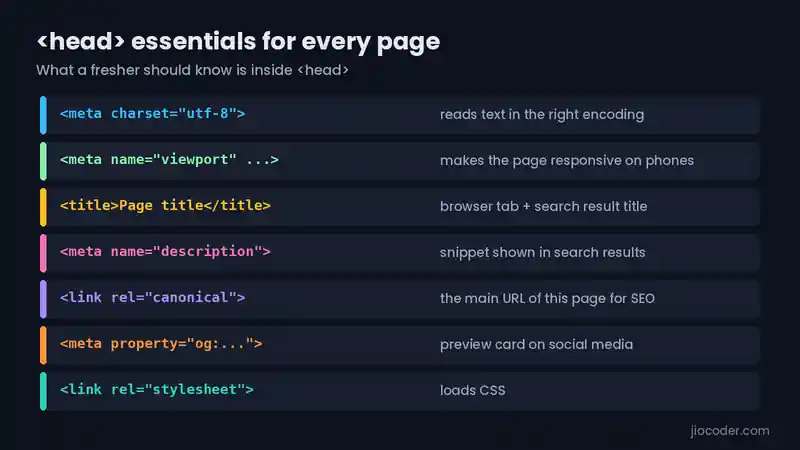
Information about the page that is not displayed: <meta charset>, the viewport meta tag, <title>, meta description, canonical link, Open Graph tags for social sharing, and links to stylesheets, fonts and icons.
20. What does the viewport meta tag do?#
<meta name="viewport" content="width=device-width, initial-scale=1"> tells mobile browsers to use the device's real width. Without it, phones render the page as a zoomed-out desktop page, and responsive CSS does not work properly.
21. What is the difference between async and defer?#
Both download the script without blocking HTML parsing. async runs the script as soon as it downloads, in any order, so it suits independent scripts like analytics. defer runs scripts after the HTML is fully parsed, in order, so it suits app code that uses the DOM.
22. Why are script tags often placed at the end of the body?#
A normal script blocks parsing while it downloads and runs. Placing it at the end lets the page content render first. Today, the better approach is <script defer> in the <head>, which starts the download earlier without blocking.
Accessibility and storage#
23. What is ARIA and when should you use it?#
ARIA (Accessible Rich Internet Applications) attributes like aria-label and aria-expanded give screen readers extra information. Use them only when native HTML cannot express the meaning. The first rule of ARIA is to use a native element, such as <button>, whenever one exists.
24. What are data-* attributes?#
Custom attributes for storing extra data on an element, which JavaScript can read through element.dataset.
<button data-product-id="42">Add to cart</button>
<!-- JS: button.dataset.productId → "42" -->
25. What is the difference between localStorage, sessionStorage and cookies?#
| localStorage | sessionStorage | Cookies | |
|---|---|---|---|
| Lifetime | Until cleared | Until the tab closes | Set by an expiry date |
| Size | About 5 MB | About 5 MB | About 4 KB |
| Sent to server? | No | No | Yes, with every request |
| Typical use | Theme, saved settings | Form progress in one tab | Sessions, authentication |
Tips for answering HTML questions in interviews#
- Give a one-line definition, then an example. "Semantic HTML uses meaningful tags, like nav for navigation" beats a long theory answer.
- Mention accessibility and SEO whenever they apply. It shows you think beyond "it works".
- Be honest if you do not know something, and explain how you would find out (MDN docs, testing in the browser).
- Build small projects like a portfolio page or a sign-up form, and refer to them in your answers.
Continue with CSS interview questions for freshers, or review the more advanced HTML and CSS interview questions.
Key takeaways#
- Know the difference between block and inline elements and give examples of each.
- Explain semantic HTML with its benefits: accessibility, SEO and readability.
- Every input needs a label and every image needs alt text.
- Use GET for reading and POST for changing data.
- defer runs scripts in order after parsing; async runs them as soon as they download.
- Know what the viewport, title and meta description tags do.