Debounce vs Throttle in JavaScript: Differences, Code and Use Cases
Understand debounce and throttle in JavaScript with timelines, from-scratch implementations, leading and trailing options, React hooks and real use cases like search boxes, scrolling and resizing.
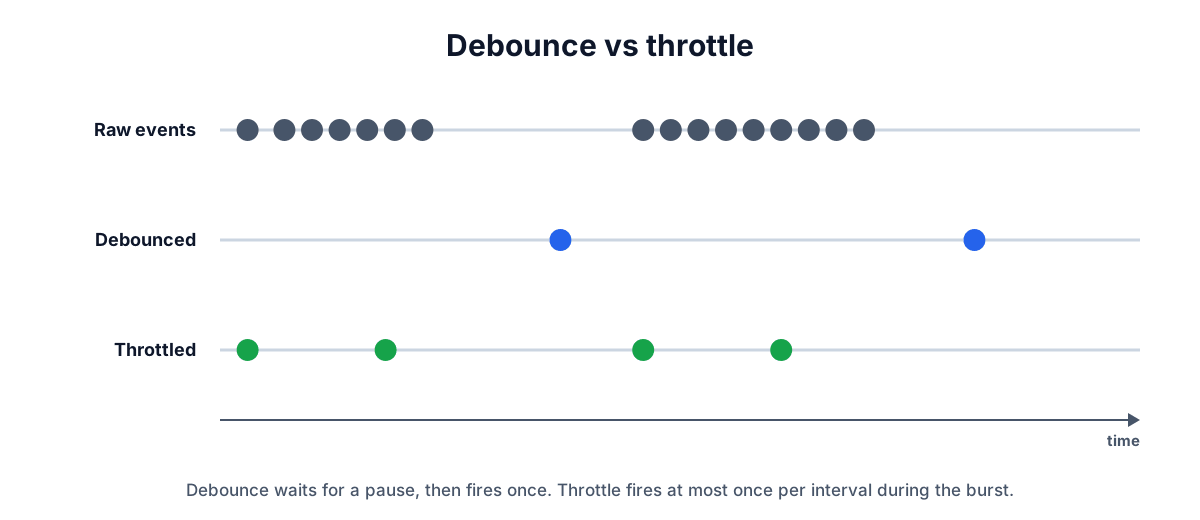
Some browser events fire dozens of times a second: input, scroll, resize, mousemove. If each one triggers an API call or a heavy layout calculation, your app becomes slow and your server gets flooded. Debounce and throttle are two simple techniques that limit how often a function runs.
The difference at a glance#
| Debounce | Throttle | |
|---|---|---|
| Rule | Run only after events stop for N ms | Run at most once every N ms |
| During a continuous burst | Never runs until the burst ends | Runs at a steady rate |
| Typical use | Search-as-you-type, auto-save, form validation | Scroll position, infinite scroll, drag, game input |
| Analogy | A lift that waits until people stop entering | A train that leaves every 10 minutes no matter what |
Debounce from scratch#
function debounce(fn, delay = 300) {
  let timerId;
  return function (...args) {
    clearTimeout(timerId);                       // cancel the previous wait
    timerId = setTimeout(() => fn.apply(this, args), delay);
  };
}
Every call resets the timer. The function only runs once the calls have stopped for delay milliseconds. The closure keeps timerId alive between calls.
Search box example#
const input = document.querySelector("#search");

async function search(query) {
  if (!query.trim()) return;
  const res = await fetch(`/api/search?q=${encodeURIComponent(query)}`);
  renderResults(await res.json());
}

input.addEventListener("input", debounce((e) => search(e.target.value), 400));
Typing "javascript" fires 10 input events, but only one request goes out, 400 ms after the last keystroke.
Throttle from scratch#
function throttle(fn, interval = 200) {
  let lastRun = 0;
  return function (...args) {
    const now = Date.now();
    if (now - lastRun >= interval) {
      lastRun = now;
      fn.apply(this, args);
    }
  };
}
This version runs immediately on the first call, then ignores calls until interval has passed. The catch: the last event in a burst may be dropped, so the final scroll position could be missed.
Throttle with a trailing call#
function throttle(fn, interval = 200) {
  let lastRun = 0;
  let timerId = null;
  let lastArgs;

  return function (...args) {
    lastArgs = args;
    const remaining = interval - (Date.now() - lastRun);

    if (remaining <= 0) {
      clearTimeout(timerId);
      timerId = null;
      lastRun = Date.now();
      fn.apply(this, lastArgs);
    } else if (!timerId) {
      timerId = setTimeout(() => {
        lastRun = Date.now();
        timerId = null;
        fn.apply(this, lastArgs);   // make sure the final event is handled
      }, remaining);
    }
  };
}

window.addEventListener("scroll", throttle(() => {
  progressBar.style.width = `${(scrollY / (document.body.scrollHeight - innerHeight)) * 100}%`;
}, 100));
Leading vs trailing edge#
Both techniques can fire on the leading edge (at the start of a burst), the trailing edge (at the end), or both.
function debounce(fn, delay, { leading = false } = {}) {
  let timerId;
  return function (...args) {
    const callNow = leading && !timerId;
    clearTimeout(timerId);
    timerId = setTimeout(() => {
      timerId = null;
      if (!leading) fn.apply(this, args);
    }, delay);
    if (callNow) fn.apply(this, args);
  };
}

// Leading debounce: stop double-submits on a button
submitBtn.addEventListener("click", debounce(submitForm, 1000, { leading: true }));
Adding cancel#
Real implementations let you cancel a pending call, for example when a component unmounts:
function debounce(fn, delay) {
  let timerId;
  const debounced = function (...args) {
    clearTimeout(timerId);
    timerId = setTimeout(() => fn.apply(this, args), delay);
  };
  debounced.cancel = () => clearTimeout(timerId);
  return debounced;
}
Using them in React#
A common bug is creating a new debounced function on every render, which resets the timer each time. Keep the debounced value in a hook instead:
import { useEffect, useState } from "react";

function useDebouncedValue(value, delay = 400) {
  const [debounced, setDebounced] = useState(value);
  useEffect(() => {
    const id = setTimeout(() => setDebounced(value), delay);
    return () => clearTimeout(id);       // cleanup cancels the pending update
  }, [value, delay]);
  return debounced;
}

function SearchBox() {
  const [query, setQuery] = useState("");
  const debouncedQuery = useDebouncedValue(query);

  useEffect(() => {
    if (debouncedQuery) fetchResults(debouncedQuery);
  }, [debouncedQuery]);

  return <input value={query} onChange={(e) => setQuery(e.target.value)} />;
}
Which one should I use?#
| Event | Use | Why |
|---|---|---|
| Search input / autocomplete | Debounce | Only the final text matters |
| Window resize → recalculate layout | Debounce | Only the final size matters |
| Auto-save a draft | Debounce | Save when the user pauses |
| Scroll progress / sticky header | Throttle | Needs regular updates while scrolling |
| Infinite scroll "load more" | Throttle | Check position regularly |
| Mousemove / drag | Throttle (or requestAnimationFrame) | Smooth, steady updates |
| Button double-click protection | Leading debounce | Run once, ignore repeats |
For anything visual tied to animation frames, requestAnimationFrame is often better than a time-based throttle: it naturally runs at most once per frame. For infinite scroll, IntersectionObserver avoids scroll listeners entirely.
Debouncing a search reduces requests, but responses can still arrive out of order. Pair it with AbortController to cancel stale requests. See Fetch API error handling and AbortController.
Debounce and throttle are classic examples of the decorator pattern from JavaScript design patterns. Forgetting to remove throttled listeners is also a common cause of memory leaks.
Key takeaways#
- Debounce runs a function only after events stop for a set time; throttle runs it at most once per interval.
- Both are higher-order functions built on closures and
setTimeout. - Use debounce for search, resize and auto-save; throttle for scroll, drag and continuous input.
- Leading and trailing options control whether the first or last call fires.
- In React, debounce values in a hook with cleanup, and pair search debouncing with
AbortController.