Java Collections Framework Guide: List, Set, Queue and Map Explained
A practical guide to the Java Collections Framework: when to use ArrayList, LinkedList, HashSet, TreeSet, ArrayDeque, PriorityQueue, HashMap and TreeMap, with time complexities and code.
The Java Collections Framework is a set of interfaces and classes for storing and working with groups of objects. Choosing the right collection is one of the easiest ways to make Java code faster and clearer, and it's a favourite interview topic.
The big picture#
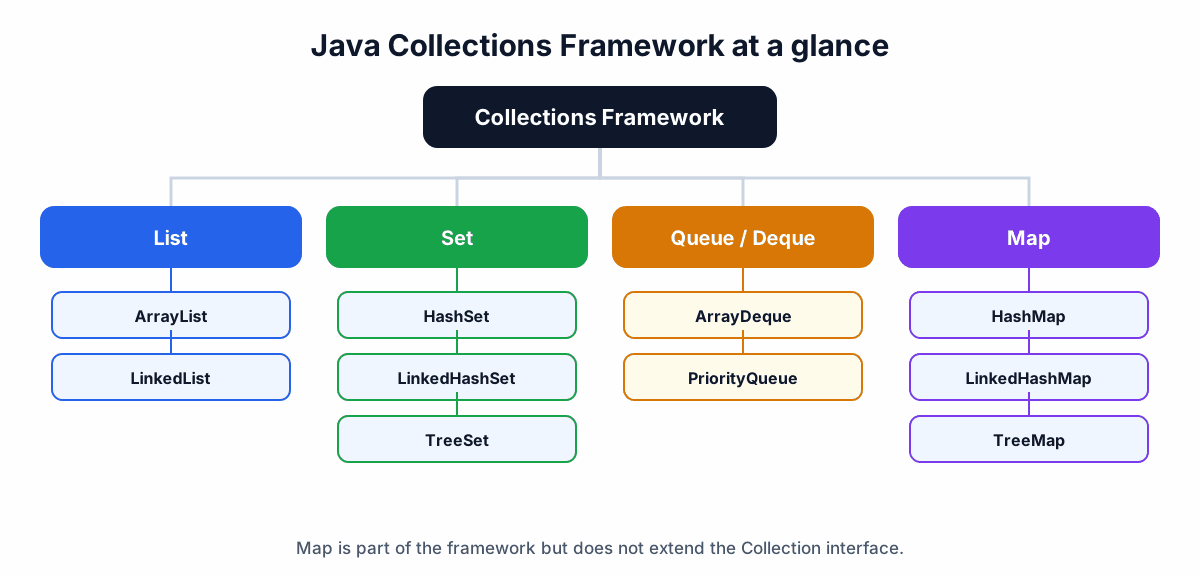
There are four families. Each one is an interface describing what you can do, with several implementations that make different trade-offs. This is abstraction from OOP's four pillars in action: declare variables with the interface type and pick the implementation once.
List<String> names = new ArrayList<>();   // good: depends on the interface
ArrayList<String> names2 = new ArrayList<>(); // works, but harder to swap later
List: ordered, allows duplicates#
A List keeps elements in insertion order and lets you access them by index.
List<String> cities = new ArrayList<>();
cities.add("Delhi");
cities.add("Mumbai");
cities.add("Delhi");          // duplicates allowed
System.out.println(cities.get(1));   // Mumbai
cities.remove("Delhi");       // removes the first match
System.out.println(cities);   // [Mumbai, Delhi]
ArrayList vs LinkedList#
| Operation | ArrayList | LinkedList |
|---|---|---|
get(i) | O(1) | O(n) |
| Add at end | O(1) amortised | O(1) |
| Add/remove in middle | O(n) (shifts elements) | O(n) to find, O(1) to link |
| Memory | Compact array | Extra node objects with two pointers each |
ArrayList is backed by a resizable array. When it fills up, it allocates a bigger array (about 1.5×) and copies elements over. That copy is rare, so adding at the end is O(1) on average.
Use ArrayList by default. Its contiguous memory is cache-friendly, so it usually beats LinkedList even for inserts. If you need fast adds and removes at both ends, use ArrayDeque instead of LinkedList.
Set: no duplicates#
A Set stores unique elements. Adding something that's already there does nothing.
Set<String> tags = new HashSet<>(List.of("java", "spring", "java"));
System.out.println(tags.size());        // 2
System.out.println(tags.contains("spring")); // true, O(1)| Implementation | Order | add / contains | Backed by |
|---|---|---|---|
HashSet | No guaranteed order | O(1) average | Hash table |
LinkedHashSet | Insertion order | O(1) average | Hash table + linked list |
TreeSet | Sorted | O(log n) | Red-black tree |
TreeSet<Integer> scores = new TreeSet<>(List.of(72, 95, 40, 88));
System.out.println(scores);            // [40, 72, 88, 95]
System.out.println(scores.first());    // 40
System.out.println(scores.ceiling(80)); // 88: smallest value >= 80
Queue and Deque: process in order#
A Queue processes elements first-in, first-out. A Deque (double-ended queue) lets you add and remove at both ends, so it works as a queue and a stack.
Deque<String> queue = new ArrayDeque<>();
queue.offer("first");
queue.offer("second");
System.out.println(queue.poll());   // first (FIFO)

Deque<String> stack = new ArrayDeque<>();
stack.push("a");
stack.push("b");
System.out.println(stack.pop());    // b (LIFO)
Use ArrayDeque instead of the old Stack class, which is synchronised and slower.
PriorityQueue: always get the smallest (or largest)#
PriorityQueue<Integer> minHeap = new PriorityQueue<>();
minHeap.addAll(List.of(5, 1, 8, 3));
System.out.println(minHeap.poll());   // 1

PriorityQueue<Integer> maxHeap = new PriorityQueue<>(Comparator.reverseOrder());
maxHeap.addAll(List.of(5, 1, 8, 3));
System.out.println(maxHeap.poll());   // 8
A PriorityQueue is a binary heap: offer and poll are O(log n), and peek is O(1). It's the tool for "top K" problems, task scheduling and Dijkstra's shortest path.
Map: key-value pairs#
A Map stores unique keys, each linked to a value. It doesn't extend Collection, but it is part of the framework and you'll use it constantly.
Map<String, Integer> wordCount = new HashMap<>();
for (String word : "to be or not to be".split(" ")) {
    wordCount.merge(word, 1, Integer::sum);
}
System.out.println(wordCount);        // {not=1, be=2, or=1, to=2}
System.out.println(wordCount.getOrDefault("java", 0)); // 0

for (Map.Entry<String, Integer> e : wordCount.entrySet()) {
    System.out.println(e.getKey() + " -> " + e.getValue());
}| Implementation | Key order | get / put |
|---|---|---|
HashMap | No guaranteed order | O(1) average |
LinkedHashMap | Insertion (or access) order | O(1) average |
TreeMap | Sorted by key | O(log n) |
How HashMap works inside#
- Java calls
key.hashCode()and mixes the bits. - The hash picks a bucket in an internal array.
- If several keys land in the same bucket (a collision), they're stored in a small linked list. Since Java 8, a bucket with more than 8 entries turns into a balanced tree, so the worst case is O(log n) instead of O(n).
- When the map is 75% full (the default load factor), it doubles its array and redistributes entries.
If you use your own class as a HashMap key or put it in a HashSet, override both methods. Equal objects must have equal hash codes, or lookups will silently fail. Java records do this for you automatically.
Choosing the right collection#
| You need | Use |
|---|---|
| An ordered list with index access | ArrayList |
| Fast "have I seen this?" checks | HashSet |
| Unique items kept sorted | TreeSet |
| A queue or stack | ArrayDeque |
| Always take the smallest or largest next | PriorityQueue |
| Lookup by key | HashMap |
| Keys in sorted order or range queries | TreeMap |
| An LRU cache | LinkedHashMap with access order |
Common pitfalls#
- Modifying while iterating. Calling
list.remove()inside a for-each loop throwsConcurrentModificationException. Uselist.removeIf(x -> ...)or an explicitIterator. - Immutable lists.
List.of(...)andMap.of(...)can't be changed;add()throwsUnsupportedOperationException. Wrap them innew ArrayList<>(...)if you need a mutable copy. - Thread safety. None of these classes are thread-safe. Use
ConcurrentHashMaporCopyOnWriteArrayListwhen several threads share a collection. See our Java multithreading guide. - Mutable keys. Changing a field that's used in
hashCode()after putting an object in aHashMapmakes it unfindable.
Collections pair naturally with streams for filtering and transforming data. Continue with our Java Streams API guide.
Key takeaways#
- The framework has four families: List, Set, Queue/Deque and Map.
- Declare variables with the interface type and choose the implementation once.
ArrayList,HashSet,ArrayDequeandHashMapare the right default in most cases.- Use the Tree variants when you need sorted order, and
PriorityQueuewhen you always want the min or max. - Override
equals()andhashCode()together for objects used as keys or set elements.