Java Exception Handling: try-catch, Checked vs Unchecked and Best Practices
Master Java exception handling: the exception hierarchy, checked vs unchecked exceptions, try-catch-finally, try-with-resources, custom exceptions and the best practices senior developers follow.
An exception is an event that interrupts the normal flow of a program: a missing file, a bad input, a lost network connection. Java gives you a structured way to signal these problems and recover from them, and handling them well is the difference between a crash and a helpful error message.
The exception hierarchy#
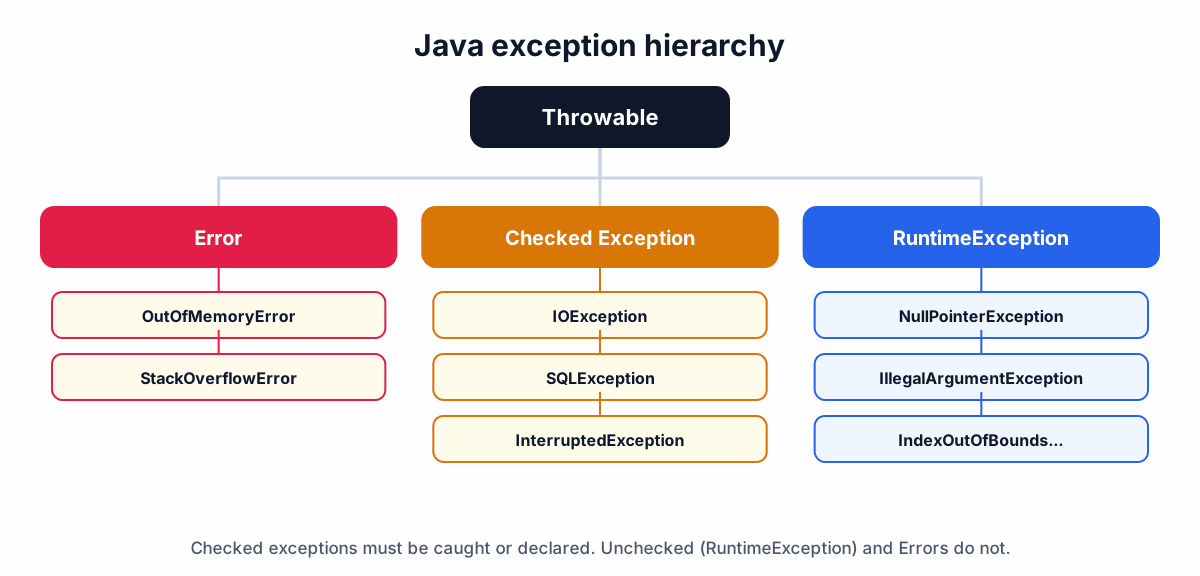
Everything that can be thrown extends Throwable, which has two branches:
Error: serious problems in the JVM itself, likeOutOfMemoryErrororStackOverflowError. Your code normally shouldn't catch these.Exception: problems your application can reasonably handle. These split further into checked and unchecked exceptions.
Checked vs unchecked exceptions#
| Checked | Unchecked | |
|---|---|---|
| Extends | Exception (but not RuntimeException) | RuntimeException |
| Compiler forces handling? | Yes: catch it or declare throws | No |
| Typical cause | Outside world: files, network, database | Programming bugs: null, bad index, invalid argument |
| Examples | IOException, SQLException | NullPointerException, IllegalArgumentException |
// Checked: won't compile unless handled or declared
public String readConfig(Path path) throws IOException {
    return Files.readString(path);
}

// Unchecked: compiles fine, fails at runtime
int[] numbers = new int[3];
numbers[5] = 10;   // ArrayIndexOutOfBoundsException
try, catch and finally#
try {
    int result = divide(10, 0);
    System.out.println(result);
} catch (ArithmeticException e) {
    System.out.println("Cannot divide by zero: " + e.getMessage());
} finally {
    System.out.println("This always runs");
}- The
tryblock holds code that might fail. - Each
catchblock handles one exception type. Java checks them top to bottom, so put more specific types first. - The
finallyblock runs whether an exception happened or not. It's for cleanup.
Catching several types#
try {
    process(file);
} catch (FileNotFoundException e) {
    log.warn("File missing: {}", file);
} catch (IOException | ParseException e) {   // multi-catch
    log.error("Could not process {}", file, e);
}try-with-resources#
Files, database connections and network sockets must be closed even when something fails. Before Java 7 that meant a messy finally block. Now any class that implements AutoCloseable can be closed automatically:
try (BufferedReader reader = Files.newBufferedReader(Path.of("users.csv"));
     Connection conn = dataSource.getConnection()) {

    String line;
    while ((line = reader.readLine()) != null) {
        saveUser(conn, line);
    }
} // reader and conn are closed here, in reverse order, even on errorAlways use try-with-resources for anything you open. It's shorter, and it can't forget to close a resource when an exception is thrown halfway through.
throw and throws#
public void withdraw(double amount) {
    if (amount <= 0) {
        throw new IllegalArgumentException("Amount must be positive: " + amount);
    }
    // ...
}

public byte[] download(String url) throws IOException {   // declares a checked exception
    // ...
}
throw raises an exception right now. throws in a method signature warns callers that a checked exception may come out of the method.
Custom exceptions#
Create your own exception when a domain problem deserves its own name and callers might handle it differently.
public class InsufficientFundsException extends RuntimeException {
    private final double shortBy;

    public InsufficientFundsException(double shortBy) {
        super("Insufficient funds: short by " + shortBy);
        this.shortBy = shortBy;
    }

    public double getShortBy() {
        return shortBy;
    }
}
Extend RuntimeException for most application errors. Modern frameworks like Spring use unchecked exceptions almost everywhere, because checked exceptions spread throws clauses through every layer.
Wrapping exceptions without losing the cause#
try {
    return repository.findUser(id);
} catch (SQLException e) {
    throw new UserLookupException("Could not load user " + id, e);  // keep the cause!
}
Passing the original exception as the cause keeps the full stack trace, so you can still see the real root problem in the logs.
Best practices#
- Never swallow exceptions. An empty
catchblock hides bugs for months. At minimum, log it. - Catch specific types.
catch (Exception e)also catches bugs likeNullPointerExceptionthat you didn't mean to handle. - Don't use exceptions for normal control flow. Check
map.containsKey()instead of catching an exception when a key is missing. Exceptions are slow to create and hard to follow. - Fail fast. Validate inputs at the start of a method and throw
IllegalArgumentExceptionor useObjects.requireNonNull. - Write useful messages. Include the value that caused the failure: "User 42 not found" beats "Not found".
- Log or rethrow, not both. Logging and rethrowing at every layer prints the same stack trace five times.
- Handle exceptions at the right level. Low-level code usually rethrows; a top-level handler (like a Spring
@ControllerAdvice) turns them into user-facing responses.
Anti-patterns to avoid#
// Bad: swallowed exception
try { save(user); } catch (Exception e) { }

// Bad: lost cause
catch (IOException e) { throw new RuntimeException("Failed"); }

// Bad: printStackTrace in production code
catch (IOException e) { e.printStackTrace(); }

// Bad: return inside finally hides the exception
finally { return defaultValue; }
Exceptions also matter a lot in concurrent code, where a failure in one thread can disappear silently. See our Java multithreading guide, and for how this all runs under the hood, read JVM vs JDK vs JRE explained.
Key takeaways#
- All exceptions extend
Throwable;Erroris for JVM problems,Exceptionfor application problems. - Checked exceptions must be caught or declared; unchecked ones (
RuntimeException) usually signal bugs. - Use try-with-resources for anything that needs closing.
- Create custom exceptions for meaningful domain errors and always keep the original cause.
- Never swallow exceptions, catch specific types, and handle them at the right layer.