Java Streams API Guide: filter, map, reduce and collect with Examples
Learn the Java Streams API step by step: creating streams, lazy intermediate operations, terminal operations, Collectors.groupingBy, flatMap, Optional and when not to use streams.
The Streams API, added in Java 8, lets you process collections by describing what you want rather than writing loops that say how to do it. Code becomes shorter, easier to read and easier to parallelise.
Loop vs stream#
Find the names of employees earning more than 50,000, in uppercase, sorted:
// Imperative loop
List<String> result = new ArrayList<>();
for (Employee e : employees) {
    if (e.salary() > 50_000) {
        result.add(e.name().toUpperCase());
    }
}
Collections.sort(result);

// Stream
List<String> result = employees.stream()
        .filter(e -> e.salary() > 50_000)
        .map(e -> e.name().toUpperCase())
        .sorted()
        .toList();
The stream version reads top to bottom like a description of the result. There's no temporary list to manage and no index to get wrong.
How a stream pipeline works#
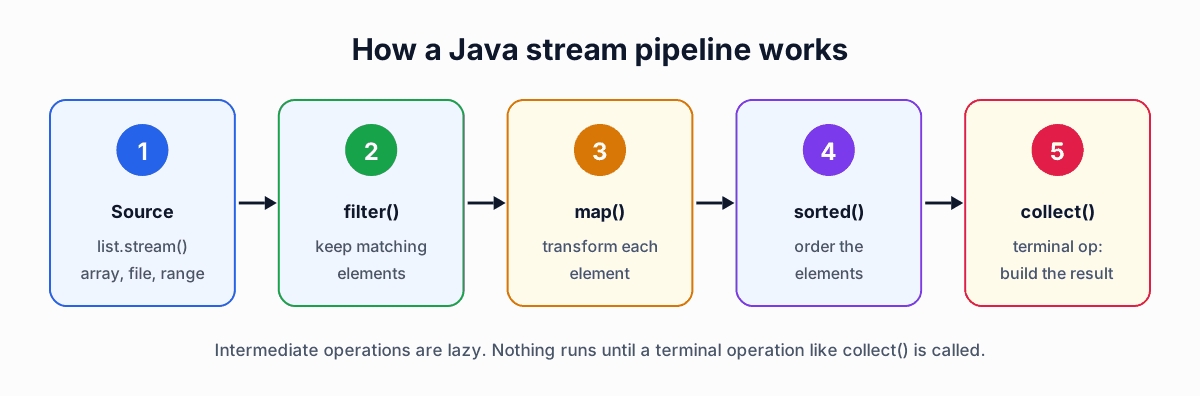
Every pipeline has three parts:
- Source: where elements come from (a collection, an array, a range or a file).
- Intermediate operations:
filter,map,sortedand so on. Each returns a new stream, and they are lazy: nothing happens yet. - Terminal operation:
collect,toList,forEach,count,reduce. This triggers the whole pipeline to run.
Elements flow through the pipeline one at a time. With .filter(...).findFirst(), Java stops as soon as it finds a match, even if the list has a million items. A stream can also be consumed only once; calling a second terminal operation throws IllegalStateException.
Creating streams#
List.of(1, 2, 3).stream();                  // from a collection
Arrays.stream(new int[] {4, 5, 6});         // from an array (IntStream)
Stream.of("a", "b", "c");                   // from values
IntStream.rangeClosed(1, 5);                // 1, 2, 3, 4, 5
Stream.iterate(1, n -> n * 2).limit(10);    // 1, 2, 4, ... 512
Files.lines(Path.of("data.txt"));           // lines of a file (close it!)
Intermediate operations you'll use daily#
| Operation | What it does | Example |
|---|---|---|
filter | Keep elements matching a condition | .filter(n -> n % 2 == 0) |
map | Transform each element | .map(String::length) |
flatMap | Turn each element into a stream and flatten | .flatMap(o -> o.items().stream()) |
distinct | Remove duplicates (uses equals) | .distinct() |
sorted | Sort naturally or with a comparator | .sorted(Comparator.comparing(Employee::salary)) |
limit / skip | Take or drop the first n | .skip(10).limit(10) |
peek | Look at elements, mainly for debugging | .peek(System.out::println) |
flatMap explained#
List<List<String>> nested = List.of(
        List.of("java", "spring"),
        List.of("react", "node"));

List<String> flat = nested.stream()
        .flatMap(List::stream)
        .toList();       // [java, spring, react, node]
Use map when each element becomes one element, and flatMap when each element becomes many.
Terminal operations#
List<Integer> nums = List.of(3, 8, 1, 9, 4);

nums.stream().count();                              // 5
nums.stream().mapToInt(Integer::intValue).sum();    // 25
nums.stream().max(Integer::compare);                // Optional[9]
nums.stream().anyMatch(n -> n > 8);                // true
nums.stream().allMatch(n -> n > 0);                // true
nums.stream().reduce(0, Integer::sum);              // 25
nums.stream().filter(n -> n > 100).findFirst();     // Optional.empty
reduce: combine everything into one value#
int product = IntStream.rangeClosed(1, 5)
        .reduce(1, (acc, n) -> acc * n);   // 120
reduce takes a starting value (the identity) and a function that combines the running result with the next element.
Collectors: building results#
record Employee(String name, String dept, double salary) {}

// Group by department
Map<String, List<Employee>> byDept = employees.stream()
        .collect(Collectors.groupingBy(Employee::dept));

// Count per department
Map<String, Long> countByDept = employees.stream()
        .collect(Collectors.groupingBy(Employee::dept, Collectors.counting()));

// Average salary per department
Map<String, Double> avgSalary = employees.stream()
        .collect(Collectors.groupingBy(Employee::dept,
                 Collectors.averagingDouble(Employee::salary)));

// Split into two groups
Map<Boolean, List<Employee>> highEarners = employees.stream()
        .collect(Collectors.partitioningBy(e -> e.salary() > 80_000));

// Join into a single string
String names = employees.stream()
        .map(Employee::name)
        .collect(Collectors.joining(", ", "[", "]"));

// Build a map by key
Map<String, Double> salaryByName = employees.stream()
.collect(Collectors.toMap(Employee::name, Employee::salary));Collectors.toMap throws IllegalStateException if two elements produce the same key. Pass a merge function as a third argument, like (a, b) -> a, to decide which value wins.
Optional: handling "maybe no result"#
Operations like findFirst, max and min return an Optional, because the stream might be empty.
String topEarner = employees.stream()
        .max(Comparator.comparingDouble(Employee::salary))
        .map(Employee::name)
        .orElse("No employees");
Prefer orElse, orElseGet, orElseThrow and ifPresent over calling get(), which throws if the value is missing.
Primitive streams#
IntStream, LongStream and DoubleStream avoid boxing every number into an object, and add handy methods like sum(), average() and summaryStatistics().
IntSummaryStatistics stats = employees.stream()
        .mapToInt(e -> (int) e.salary())
        .summaryStatistics();
System.out.println(stats.getMax() + " " + stats.getAverage());
Parallel streams: use with care#
Adding .parallel() splits work across CPU cores using the common fork-join pool. It can help for large, CPU-heavy, independent work, but it often makes small or I/O-bound pipelines slower, and it breaks code that mutates shared state. Measure before and after; never assume it's faster.
When not to use streams#
- Side effects. If the body of your lambda modifies external variables, a loop is clearer and safer.
- Complex control flow. Breaking out early with several conditions or handling checked exceptions is awkward inside lambdas.
- Very hot loops. For tight numeric code over arrays, a plain loop can still be faster.
- Readability. A 15-step pipeline isn't better than a well-named loop. Extract steps into methods with meaningful names.
Streams work on the collections covered in our Collections Framework guide. Next, learn how Java signals and handles problems in our Java exception handling guide.
Key takeaways#
- A stream pipeline is a source, lazy intermediate operations and one terminal operation.
- Nothing runs until a terminal operation is called, and a stream can only be consumed once.
- Use
mapfor one-to-one transforms andflatMapfor one-to-many. Collectors.groupingBy,partitioningBy,joiningandtoMapcover most reporting needs.- Prefer loops for side effects, complex control flow and very hot numeric code.