JavaScript Array Methods Interview Questions: map, filter, reduce and More
12 JavaScript array interview questions with answers: map vs forEach, filter, reduce, find vs filter, some and every, sort pitfalls, mutating vs non-mutating methods, flat and flatMap, grouping, slice vs splice and polyfills for map and reduce.

Arrays are the data structure you touch most in frontend code, so interviewers test array methods in both theory and live coding. This post covers 12 questions, from map vs forEach to writing reduce yourself, with answers and runnable examples.
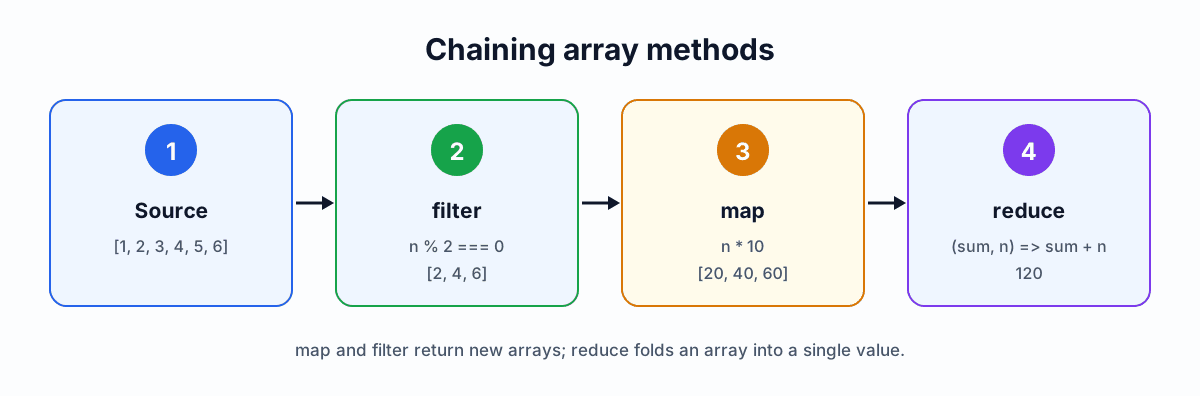
Core iteration methods#
Q1. What is the difference between map and forEach?#
map | forEach | |
|---|---|---|
| Returns | A new array of the same length | undefined |
| Chainable | Yes | No |
| Purpose | Transform each item | Run a side effect for each item |
| Stop early | No (neither can break) | No |
const prices = [100, 250, 400];
const withTax = prices.map((p) => p * 1.18);     // [118, 295, 472]
prices.forEach((p) => console.log(p));            // logs, returns undefined
Using map only for side effects (and ignoring the result) is a code smell; use forEach or for...of. To stop early, use for...of with break, or some/find.
Q2. Explain reduce with a few practical examples.#
Answer: reduce(callback, initialValue) walks the array and carries an accumulator from one step to the next, folding the array into a single value of any type.
const cart = [
  { name: "Pen", price: 20, qty: 3 },
  { name: "Book", price: 300, qty: 1 },
];

// Sum
const total = cart.reduce((sum, item) => sum + item.price * item.qty, 0);   // 360

// Array → object (index by key)
const byName = cart.reduce((acc, item) => ({ ...acc, [item.name]: item }), {});

// Count occurrences
const counts = ["a", "b", "a"].reduce((acc, ch) => {
  acc[ch] = (acc[ch] ?? 0) + 1;
  return acc;
}, {}); // { a: 2, b: 1 }Without one, reduce uses the first element as the accumulator and throws a TypeError on an empty array.
Q3. What is the difference between find, findIndex, filter, some and every?#
| Method | Returns | Stops early? |
|---|---|---|
find | First matching item or undefined | Yes |
findIndex | Index of first match or -1 | Yes |
findLast / findLastIndex | Same, searching from the end | Yes |
filter | New array of all matches | No |
some | true if any item matches | Yes, at the first true |
every | true if all items match (true for empty arrays) | Yes, at the first false |
const users = [{ id: 1, active: true }, { id: 2, active: false }];
users.find((u) => u.id === 2);        // { id: 2, active: false }
users.filter((u) => u.active);        // [{ id: 1, active: true }]
users.some((u) => !u.active);         // true
users.every((u) => u.id > 0);         // true
[1, 2, 3].includes(2);                // true: simple value check
Sorting and mutation#
Q4. Why does [10, 1, 5, 100].sort() return [1, 10, 100, 5]?#
Answer: Without a comparator, sort converts items to strings and sorts them in UTF-16 order, so "100" comes before "5". Always pass a comparator for numbers. Since ES2019 sort is guaranteed to be stable.
[10, 1, 5, 100].sort((a, b) => a - b);   // [1, 5, 10, 100]
[10, 1, 5, 100].sort((a, b) => b - a);   // [100, 10, 5, 1]

// Sort objects by multiple keys
employees.sort((a, b) =>
  a.dept.localeCompare(b.dept) || b.salary - a.salary
);
Q5. Which array methods mutate the original array?#
| Mutating | Non-mutating alternative |
|---|---|
push, pop, shift, unshift | [...arr, x], arr.slice(0, -1) |
sort | toSorted (ES2023) |
reverse | toReversed |
splice | toSpliced |
arr[i] = x | arr.with(i, x) |
fill, copyWithin | map to a new array |
This matters in React and Redux: state updates must produce new arrays so that reference checks detect the change.
const sorted = todos.toSorted((a, b) => a.priority - b.priority);  // original untouched
setTodos((prev) => prev.map((t) => t.id === id ? { ...t, done: true } : t));
Q6. What is the difference between slice and splice?#
const letters = ["a", "b", "c", "d", "e"];

letters.slice(1, 3);        // ["b", "c"]  (end not included), original unchanged
letters.slice(-2);          // ["d", "e"]

const removed = letters.splice(1, 2, "X");  // remove 2 items at index 1, insert "X"
removed;                    // ["b", "c"]
letters;                    // ["a", "X", "d", "e"]  (mutated)
Answer: slice(start, end) returns a shallow copy of a portion and never mutates. splice(start, deleteCount, ...items) removes and/or inserts in place and returns the removed items.
Transforming data#
Q7. How do you flatten a nested array?#
const nested = [1, [2, [3, [4]]]];
nested.flat();              // [1, 2, [3, [4]]]  (depth 1 by default)
nested.flat(Infinity);      // [1, 2, 3, 4]

// flatMap = map + flat(1)
const sentences = ["hello world", "hi there"];
sentences.flatMap((s) => s.split(" "));   // ["hello", "world", "hi", "there"]

// Recursive flatten (a common "no built-ins" interview ask)
function flatten(arr) {
  return arr.reduce(
    (acc, x) => (Array.isArray(x) ? acc.concat(flatten(x)) : acc.concat(x)),
    []
  );
}
Q8. Group an array of objects by a property.#
const orders = [
  { id: 1, status: "paid" },
  { id: 2, status: "pending" },
  { id: 3, status: "paid" },
];

// ES2024
Object.groupBy(orders, (o) => o.status);
// { paid: [{id:1}, {id:3}], pending: [{id:2}] }

// With reduce (works everywhere)
const grouped = orders.reduce((acc, o) => {
  (acc[o.status] ??= []).push(o);
  return acc;
}, {});
Q9. Find the most frequent element and the second largest number.#
function mostFrequent(arr) {
  const freq = new Map();
  let best, bestCount = 0;
  for (const x of arr) {
    const c = (freq.get(x) ?? 0) + 1;
    freq.set(x, c);
    if (c > bestCount) { best = x; bestCount = c; }
  }
  return best;
}
mostFrequent([3, 1, 3, 2, 1, 3]);    // 3

function secondLargest(arr) {
  let first = -Infinity, second = -Infinity;
  for (const n of arr) {
    if (n > first) { second = first; first = n; }
    else if (n > second && n !== first) second = n;
  }
  return second === -Infinity ? null : second;
}
secondLargest([5, 9, 9, 7]);         // 7  (single pass, O(n))
Polyfills and performance#
Q10. Write a polyfill for Array.prototype.map.#
Array.prototype.myMap = function (callback, thisArg) {
  if (typeof callback !== "function") {
    throw new TypeError(callback + " is not a function");
  }
  const result = new Array(this.length);
  for (let i = 0; i < this.length; i++) {
    if (i in this) {                                   // skip holes like the native map
      result[i] = callback.call(thisArg, this[i], i, this);
    }
  }
  return result;
};

[1, 2, 3].myMap((n) => n * 2);   // [2, 4, 6]
Q11. Write a polyfill for Array.prototype.reduce.#
Array.prototype.myReduce = function (callback, ...init) {
  let i = 0;
  let acc;
  if (init.length) {
    acc = init[0];
  } else {
    while (i < this.length && !(i in this)) i++;      // first existing element
    if (i >= this.length) throw new TypeError("Reduce of empty array with no initial value");
    acc = this[i++];
  }
  for (; i < this.length; i++) {
    if (i in this) acc = callback(acc, this[i], i, this);
  }
  return acc;
};

[1, 2, 3].myReduce((a, b) => a + b);      // 6
[].myReduce((a, b) => a + b, 0);          // 0
Note ...init is used so an explicit undefined initial value is still treated as provided.
Q12. Is chaining map, filter and reduce slow?#
Answer: Each method loops once and creates an intermediate array, so arr.filter().map().reduce() walks the data three times. For typical UI data (hundreds or thousands of items) this is negligible and readability wins. For very large arrays or hot paths, combine the steps into one reduce or a plain for loop, or use lazy iterators.
// Three passes, very readable
const total = items.filter((i) => i.inStock).map((i) => i.price).reduce((a, b) => a + b, 0);

// One pass
let total2 = 0;
for (const i of items) if (i.inStock) total2 += i.price;

// ES2025 iterator helpers: lazy, no intermediate arrays
const firstTwo = items.values().filter((i) => i.inStock).take(2).toArray();
Quick revision#
| Need | Method |
|---|---|
| Transform every item | map |
| Keep some items | filter |
| Combine into one value | reduce |
| First match | find |
| Any / all match | some / every |
| Sort without mutating | toSorted |
| Flatten | flat, flatMap |
| Group | Object.groupBy |
More hands-on practice: JavaScript polyfills interview questions and the sliding window technique.
Key takeaways#
mapreturns a new array;forEachreturns nothing and is for side effects.- Always give
reducean initial value, and givesorta comparator for numbers. - Know which methods mutate (sort, reverse, splice, push) and their immutable versions (toSorted, toReversed, toSpliced, with).
- Use
flat,flatMapandObject.groupByfor common data reshaping. - Be ready to write map, filter and reduce polyfills, including the hole and empty-array edge cases.