Frontend + DSA Interview Roadmap: 11 Weeks at 3.5 Hours a Day
A practical 11-week plan for frontend developers with a full-time job: 2 hours of frontend and 1.5 hours of DSA a day, from JavaScript fundamentals to system design and mock interviews.
This guide is a complete, week-by-week plan to prepare for frontend interviews while working full time. It takes 11 weeks at 3.5 hours a day: 2 hours of frontend and 1.5 hours of DSA, starting from zero DSA knowledge.
Every week below explains what each topic means, what to practice, and which interview questions to expect, so you always know what to study next.
Duration: 11 weeks (77 days) · Daily time: 3.5 hours · DSA target: about 125 problems · Start applying: after Week 8
On this page#
- Overview
- Daily setup
- Roadmap summary
- Phase 1: JavaScript foundations (Weeks 1–2)
- Phase 2: Modern React (Weeks 3–5)
- Phase 3: Production skills and design (Weeks 6–8)
- Phase 4: Secondary weeks (Weeks 9–11)
- DSA track
- Resources
- FAQ
1. Overview#
1.1 Who this guide is for#
- Frontend developers with about 1 to 3 years of experience who want to move to a product company.
- Developers who know React at a working level but have gaps in TypeScript, testing, Next.js or system design.
- Anyone who has never done DSA and keeps getting filtered out in the first coding round.
1.2 Prerequisites#
- Working knowledge of HTML, CSS, JavaScript and basic React.
- A GitHub account. Create one repo, such as
frontend-prep, and push all your practice code to it. - A free LeetCode account for DSA practice.
1.3 What you'll have at the end#
- Strong answers to JavaScript, React and browser interview questions.
- About 125 solved DSA problems across the common patterns.
- A deployed Next.js and TypeScript store with tests and an AI feature.
- Practice with 4 frontend system designs and at least one full mock interview.
2. Daily setup#
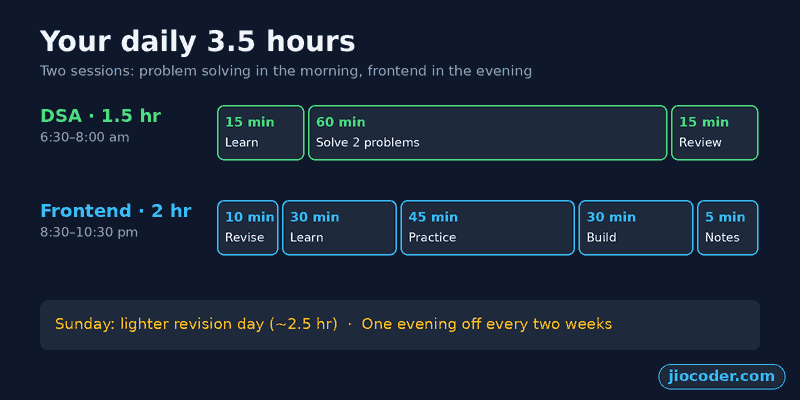
Split each day into two sessions. Solve DSA problems in the morning, when your mind is fresh, and do frontend in the evening after work.
2.1 Morning session: DSA (1.5 hours)#
- Learn (15 min): watch or read one pattern, such as sliding window.
- Solve (60 min): 2 problems on that pattern. Try each for 25 minutes before opening a hint.
- Review (15 min): write the pattern in your notes and re-solve one older problem from memory.
2.2 Evening session: Frontend (2 hours)#
- Revise (10 min): re-read yesterday's notes and explain one concept out loud.
- Learn (30 min): read or watch the day's topic.
- Practice (45 min): code the day's task without copying.
- Build (30 min): extend the task, solve a GreatFrontEnd question, or work on your capstone.
- Notes (5 min): write 3 lines: what you learned, what confused you, and one interview answer.
2.3 Weekly rhythm#
- Monday to Saturday: new topics, following the phases below.
- Sunday: a lighter revision day of about 2.5 hours. Redo the two hardest tasks of the week and re-solve 3 DSA problems without looking.
- Rest: take one evening off every two weeks so you don't burn out.
If mornings don't work for you, do 45 minutes of DSA before work and 45 minutes right after your frontend session. If you miss a day, don't double up. Shift the plan by one day.
3. Roadmap summary#
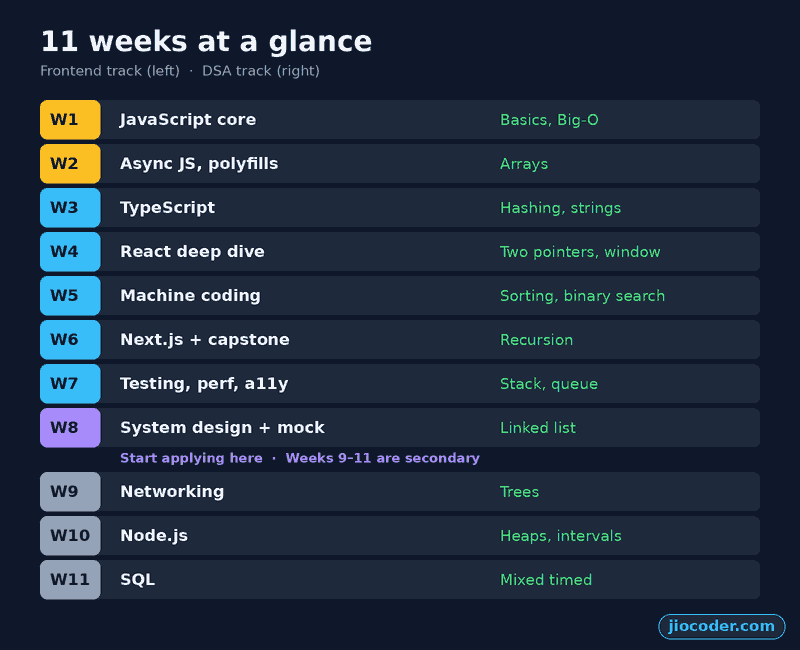
| Phase | Weeks | Frontend focus | DSA focus |
|---|---|---|---|
| 1 | 1–2 | JavaScript core, async JS, DOM | Basics, arrays |
| 2 | 3–5 | TypeScript, React deep dive, machine coding | Hashing, two pointers, binary search |
| 3 | 6–8 | Next.js, testing, performance, system design | Recursion, stacks, linked lists |
| 4 | 9–11 | Networking, Node.js, SQL (secondary) | Trees, heaps, timed practice |
4. Phase 1: JavaScript foundations (Weeks 1–2)#
Goal: answer any "how does JavaScript work" question confidently. This is the round most candidates fail, because they know how to use JavaScript but can't explain what it does underneath.
4.1 Week 1: JavaScript core#
This week covers how JavaScript runs your code and how functions, objects and this behave. Almost every JavaScript interview starts here.
Topics#
- Execution context and call stack: every function call creates an execution context with its own variables. Contexts are pushed onto the call stack and popped off when the function returns.
- Hoisting and the temporal dead zone:
vardeclarations are hoisted and start asundefined.letandconstare hoisted too, but using them before their line throws an error. Function declarations are hoisted completely. - Scope and closures: a closure is a function that remembers the variables of the scope it was created in, even after that scope has finished. Closures power counters, private variables, memoization and module patterns.
- The
thiskeyword: its value depends on how a function is called. A method call sets it to the object,call,applyandbindset it explicitly, andnewsets it to the new object. Arrow functions don't have their ownthis; they use the surrounding one. - Prototypes and classes: when a property isn't found on an object, JavaScript looks up the prototype chain. ES6 classes are cleaner syntax on top of prototypes.
- Copying and equality: a shallow copy (
{ ...obj }) copies only the top level, while a deep copy (structuredClone) copies nested objects too.==converts types before comparing;===doesn't.
Practice#
- Write polyfills for
call,apply,bind,map,filterandreduce. - Write
deepClone()anddeepEqual()that handle nested objects and arrays. - Predict the output of 10 hoisting and closure snippets before running them.
Example: a bind polyfill, one of the most common Week 1 interview questions.
Function.prototype.myBind = function (context, ...boundArgs) {
  const fn = this;
  return function (...args) {
    return fn.apply(context, [...boundArgs, ...args]);
  };
};

const user = { name: "Sumit" };
function greet(greeting) {
  return `${greeting}, ${this.name}`;
}

const sayHi = greet.myBind(user, "Hi");
sayHi(); // "Hi, Sumit"
Common interview questions#
- What is a closure? Give a real use case.
- What is the difference between
call,applyandbind? - Why does a
setTimeoutinside aforloop withvarprint the same number every time?
You can write bind, reduce and deepClone from memory and explain closures in 2 minutes.
4.2 Week 2: Async JavaScript and the DOM#
This week covers how JavaScript handles waiting (timers, network calls, user events) and how events move through the page.
Topics#
- The event loop: JavaScript runs one thing at a time. Slow work like timers and network requests is handed to the browser, and its callbacks wait in queues until the call stack is empty.
- Microtasks vs macrotasks: Promise callbacks are microtasks and run before the next macrotask, such as a
setTimeoutcallback. This is why.then()runs before a 0 ms timeout. - Promises and async/await: a Promise is pending, fulfilled or rejected.
async/awaitis cleaner syntax for Promises, and errors are handled withtry/catch. - Promise combinators:
Promise.allfails if any promise fails,allSettledwaits for every result,racesettles with the first, andanyresolves with the first success. - Debounce and throttle: debounce waits until the user stops (search inputs). Throttle runs at most once per interval (scroll and resize handlers).
- DOM events: events travel down the page (capturing) and back up (bubbling). Event delegation uses bubbling: one listener on a parent handles clicks for all its children.
- Currying and memoization: currying turns
f(a, b)intof(a)(b). Memoization caches results so repeat calls with the same input are instant.
Example: the event loop in four lines. This exact question comes up often.
console.log("1");
setTimeout(() => console.log("2"), 0);
Promise.resolve().then(() => console.log("3"));
console.log("4");

// Output: 1, 4, 3, 2
// Sync code runs first, then microtasks (the Promise), then macrotasks (the timer).Practice#
- Write a
Promise.allpolyfill and aPromise.allSettledpolyfill. - Write debounce and throttle, then connect debounce to a search input that calls a public API.
- Build a todo list that uses one delegated click listener for every item.
function debounce(fn, delay = 300) {
  let timer;
  return function (...args) {
    clearTimeout(timer);
    timer = setTimeout(() => fn.apply(this, args), delay);
  };
}

const onSearch = debounce((query) => fetchResults(query), 400);
input.addEventListener("input", (e) => onSearch(e.target.value));
Common interview questions#
- Explain the event loop. What runs first: a resolved Promise or a 0 ms timeout?
- When would you use debounce instead of throttle?
- Implement
Promise.allfrom scratch.
You can write debounce, throttle and Promise.all in under 15 minutes each and explain the output of any event-loop snippet.
5. Phase 2: Modern React (Weeks 3–5)#
Goal: write typed React code, explain exactly why a component re-renders, and build components quickly under time pressure.
5.1 Week 3: TypeScript#
Most product companies now expect TypeScript for React roles. This week takes you from basic types to typing real React components.
Topics#
- Basic types and inference: TypeScript infers most types for you. Use
unknowninstead ofanywhen you don't know a type, andneverfor cases that should be impossible. - Interfaces vs type aliases: both describe object shapes. Interfaces can be extended and merged; type aliases can also describe unions and other complex types.
- Unions and narrowing: a union like
string | numberallows either type. Checks such astypeoforinnarrow the type inside anifblock. - Discriminated unions: objects that share a field like
statuslet TypeScript know exactly which fields exist in each case. This is ideal for loading, success and error states. - Generics: type parameters like
<T>make functions and hooks reusable for any data type while keeping them type-safe. - Utility types:
Partial,Pick,Omit,RecordandReturnTypebuild new types from existing ones. - TypeScript with React: typing props, children, events,
useStateanduseRef.
Example: a discriminated union for a data-fetching state.
type FetchState<T> =
  | { status: "loading" }
  | { status: "success"; data: T }
  | { status: "error"; error: string };

function describe<T>(state: FetchState<T>) {
  switch (state.status) {
    case "loading":
      return "Loading…";
    case "success":
      return state.data; // TypeScript knows data exists here
    case "error":
      return state.error;
  }
}Practice#
- Convert your Week 2 utilities to TypeScript with
strictmode on. - Type a product, cart and API response model for an e-commerce store.
- Build a typed
useFetch<T>()hook and migrate one old project to TypeScript.
Common interview questions#
- What is the difference between an interface and a type alias?
- When would you use
unknowninstead ofany? - How do you type a component that accepts children and an
onClickhandler?
You can build a React component with strict mode on and no any.
5.2 Week 4: React deep dive#
This week moves you past "I can use hooks" to "I can explain how React works and make it fast".
Topics#
- Rendering and reconciliation: a component re-renders when its state changes, its parent re-renders, or a context it uses changes. React then compares the new output with the old one and updates only what changed.
- Keys: keys tell React which list item is which. Using an index as a key breaks state when items are added, removed or reordered.
useEffectin depth: the dependency array controls when an effect runs, and the cleanup function runs before the next effect and on unmount. UseAbortControllerto cancel outdated requests.- Memoization:
React.memoskips re-rendering when props don't change,useMemocaches a computed value, anduseCallbackcaches a function. Use them when you've measured a real slowdown, not everywhere. useRef,useReducerand custom hooks: refs hold values without causing re-renders, reducers organize complex state, and custom hooks package reusable logic.- State management: keep state local when you can. Use Context for rarely-changing global values, Zustand or Redux Toolkit for shared app state, and TanStack Query for server data with caching.
- Loading and errors:
React.lazyandSuspensesplit code into smaller files, and error boundaries stop one broken component from crashing the whole page.
Example: a reusable useDebounce hook.
import { useEffect, useState } from "react";

export function useDebounce<T>(value: T, delay = 400): T {
  const [debounced, setDebounced] = useState(value);

  useEffect(() => {
    const id = setTimeout(() => setDebounced(value), delay);
    return () => clearTimeout(id); // cancels the old timer on every change
  }, [value, delay]);

  return debounced;
}Practice#
- Use the React DevTools Profiler to find unnecessary re-renders in a list app.
- Write
useDebounce,useLocalStorageanduseOnClickOutside. - Optimize a slow 1,000-item filtered list and measure the result before and after.
- Build a cart with Zustand and fetch products with TanStack Query.
Common interview questions#
- Why does a component re-render, and how do you stop unnecessary re-renders?
- What is the difference between
useMemoanduseCallback? - Why shouldn't you use the array index as a key?
You've written 3 custom hooks and can explain when useMemo helps and when it doesn't.
5.3 Week 5: Machine coding#
In a machine-coding round you build a working component in 60 to 90 minutes. Interviewers judge how you plan, structure state, handle edge cases and keep the code readable.
How to approach every problem#
- Clarify (5 min): ask what must work, which edge cases matter, and whether accessibility or mobile is in scope.
- Plan (5 min): sketch the components and decide what state you need and where it lives.
- Build the core (50 min): get the main feature working end to end first.
- Handle edge cases (15 min): loading, empty and error states, keyboard support, and fast repeated input.
- Review (5 min): clean up names and explain what you would add with more time.
Components to build this week#
| Component | What it tests |
|---|---|
| Autocomplete search | Debounce, race conditions, keyboard navigation, highlighting the match |
| Infinite scroll list | IntersectionObserver, pagination, loading and error states |
| Product filter page | Combining filters and sort, syncing state to the URL |
| Image carousel | Timers, cleanup on unmount, swipe and edge cases |
| OTP input | Refs, auto-focus, paste support, backspace handling |
| Nested comments | Recursive components and updating nested state |
You can build a working product filter page, with URL sync and empty states, in 60 minutes.
6. Phase 3: Production skills and design (Weeks 6–8)#
Goal: ship a real project that proves your skills, and handle a 45-minute frontend system design round.
6.1 Week 6: Next.js and your capstone#
This week you learn Next.js by building your capstone: a mini e-commerce store with a product list, filters, search, a product page and a cart.
Topics#
- App Router basics: folders under
app/become routes.layout.tsxwraps pages, whileloading.tsxanderror.tsxhandle loading and error states automatically. - Server vs client components: components run on the server by default and send no JavaScript to the browser. Add
"use client"only for components that need state, effects or event handlers. - Rendering strategies: choose how and when each page's HTML is built (see the table below).
- Data fetching and caching:
fetchin server components can be cached and revalidated on a schedule. - SEO:
generateMetadatasets page titles and descriptions for each product page. - Server actions and route handlers: handle form submissions and API endpoints without a separate backend.
- Built-in optimizations:
next/imageresizes and lazy-loads images, andnext/fontloads fonts without layout shift.
| Strategy | When the HTML is built | Use it for |
|---|---|---|
| SSG | Once, at build time | Blog posts, docs, marketing pages |
| ISR | At build time, then regenerated in the background after a set time | Product listings, category pages |
| SSR | On every request | Personalized pages, search results |
| CSR | In the browser | Dashboards behind a login |
Example: a product listing page with ISR.
// app/products/page.tsx
export const revalidate = 60; // regenerate this page at most once a minute

export default async function ProductsPage() {
  const res = await fetch("https://dummyjson.com/products");
  const { products } = await res.json();

  return (
    <ul>
      {products.map((p) => (
        <li key={p.id}>{p.title}</li>
      ))}
    </ul>
  );
}Practice#
- Set up the project with Next.js, TypeScript and Tailwind CSS.
- Build the product listing page with ISR and the product detail page with proper metadata.
- Add filters and sort synced to the URL, then a cart and a checkout form.
The store is deployed on Vercel, and you can explain SSR, SSG and ISR using your own pages as examples.
6.2 Week 7: Testing, performance and accessibility#
This week turns your capstone into production-quality work and prepares you for the "how would you make this faster and more reliable" questions.
Topics#
- Testing levels: unit tests check one function, integration tests check components working together, and end-to-end tests check a full user flow in a real browser.
- React Testing Library: test what the user sees. Find elements by role and label instead of class names, and simulate real clicks and typing with
user-event. - Core Web Vitals: Google's three page-experience metrics (targets in the table below). Measure them with Lighthouse and the Chrome DevTools Performance tab.
- Accessibility: use semantic HTML first (
button,nav,label). Make everything work with a keyboard, manage focus in modals, and add ARIA only when HTML can't express something. - Browser internals: the critical rendering path, reflow vs repaint, HTTP caching, and the differences between cookies,
localStorageandsessionStorage. - Web security: XSS (injected scripts), CSRF (forged requests) and Content Security Policy.
| Metric | What it measures | Good score |
|---|---|---|
| LCP | How fast the main content appears | 2.5 s or less |
| INP | How quickly the page responds to taps and clicks | 200 ms or less |
| CLS | How much the layout jumps while loading | 0.1 or less |
Example: a React Testing Library test for the cart.
import { render, screen } from "@testing-library/react";
import userEvent from "@testing-library/user-event";
import Cart from "./Cart";

test("adds an item to the cart", async () => {
  render(<Cart />);
  await userEvent.click(screen.getByRole("button", { name: /add to cart/i }));
  expect(screen.getByText(/1 item/i)).toBeInTheDocument();
});Practice#
- Write 5 tests for the cart and filters, plus one Playwright test for the add-to-cart flow.
- Profile the capstone and fix its biggest LCP and INP problems.
- Make the store fully usable with a keyboard and reach a Lighthouse accessibility score above 95.
The capstone has tests and a Lighthouse performance score above 90, and you can tell your "how I improved INP and LCP" story with real numbers.
6.3 Week 8: System design and mock interviews#
Frontend system design rounds ask you to design a feature, such as a news feed or a product page, in 45 minutes. There's no single right answer; interviewers judge how you structure your thinking.
A framework for every design question#
- Requirements: clarify the features, users, devices and scale.
- Architecture: break the UI into components and decide where rendering happens.
- Data model: define the main entities and where each piece of state lives.
- API: define the endpoints, response shapes and pagination.
- Optimizations: cover performance, caching, accessibility, offline support and error handling.
Topics#
- Pagination: offset pagination (page numbers) is simple, while cursor pagination stays correct when new items are added, so feeds use it.
- Real-time updates: polling is simplest, Server-Sent Events push updates from the server, and WebSockets allow two-way messaging for chat.
- Large lists: virtualization renders only the visible rows, so a list of 10,000 items stays fast.
- Images and media: lazy loading, responsive sizes and placeholders keep feeds fast on mobile.
- Behavioral answers: use STAR (situation, task, action, result) and prepare 5 stories from your own work.
Practice designs#
- Autocomplete: debouncing, caching results, keyboard navigation.
- E-commerce product listing page: filters, URL state, SSR vs ISR, image loading.
- Chat UI: WebSockets, optimistic updates, message ordering.
- News feed: cursor pagination, virtualization, real-time new posts.
You've practiced 4 designs and done one full mock interview. Update your resume and start applying.
In Weeks 6 and 7, use the 30-minute build block to add an AI shopping assistant to your capstone: an LLM API behind your own backend, with a streaming chat UI. It's a strong talking point in interviews.
7. Phase 4: Secondary weeks (Weeks 9–11)#
Goal: cover full-stack-leaning topics while you interview. These weeks are optional for pure frontend roles.
7.1 Week 9: Networking#
Topics#
- What happens when you type a URL: DNS lookup, TCP connection, TLS handshake, the HTTP request and response, then parsing and rendering the page.
- HTTP basics: methods (GET, POST, PUT, DELETE), common status codes, and headers.
- Caching:
Cache-Control,ETagand CDNs decide when the browser can reuse a file instead of downloading it again. - CORS: the browser blocks requests to another domain unless that server allows it with the right headers.
- Cookies:
HttpOnly,SecureandSameSiteflags protect session cookies. - HTTP/2 and HTTP/3: they load many files over one connection, which makes pages faster.
You can explain the URL-to-page flow in 5 minutes and fix a CORS error yourself.
7.2 Week 10: Node.js#
Topics#
- Node basics: the runtime, its event loop phases, modules and npm.
- Core modules:
fs,path,eventsand streams for processing large files. - Express: routing, middleware, error handling and request validation.
- Auth: hashing passwords with bcrypt, JWTs, and storing tokens in
HttpOnlycookies. - Deployment: environment variables and hosting an API on Render or Railway.
You've deployed an Express and TypeScript API with JWT auth and connected your capstone to it.
7.3 Week 11: SQL#
Topics#
- Basics: tables, primary and foreign keys,
SELECT,WHERE,ORDER BY. - Aggregates:
COUNT,SUM,GROUP BYandHAVING. - Joins: inner, left and self joins to combine related tables.
- Advanced queries: subqueries, CTEs and window functions like
ROW_NUMBER. - Design: normalization, indexes and using SQL from Node with Prisma.
You've solved 15 SQL problems and your API reads products from Postgres through Prisma.
8. DSA track#
Frontend roles don't need hard DP or competitive programming. You need easy and medium problems on the common patterns, solved in JavaScript, since that's your interview language.
8.1 Weekly plan#
| Week | Topic | Example problems | Target |
|---|---|---|---|
| 1 | Basics: Big-O, loops, math | Reverse a number, palindrome number, GCD, prime check | 12 |
| 2 | Arrays | Rotate array, move zeroes, best time to buy and sell stock, Kadane | 12 |
| 3 | Hashing and strings | Two sum, valid anagram, group anagrams, longest common prefix | 12 |
| 4 | Two pointers, sliding window | 3sum, container with most water, longest substring without repeating characters | 12 |
| 5 | Sorting, binary search | Merge sort, quick sort, search in rotated sorted array | 12 |
| 6 | Recursion, backtracking | Subsets, permutations, combination sum, flatten a nested array | 10 |
| 7 | Stack and queue | Valid parentheses, min stack, next greater element, daily temperatures | 12 |
| 8 | Linked list | Reverse a list, detect a cycle, merge two sorted lists | 10 |
| 9 | Trees | Traversals, level order (BFS), max depth, invert tree, validate BST | 12 |
| 10 | Heaps, intervals, matrix | Kth largest element, top K frequent, merge intervals, spiral matrix | 10 |
| 11 | Mixed timed practice | 2 random easy or medium problems in 45 minutes, 3 times a week | 12 |
8.2 The patterns, explained#
Most interview problems are variations of a few patterns. Learn to recognize the pattern first, and the solution usually follows.
- Big-O: describes how an algorithm's time or memory grows as the input grows. Aim to explain the complexity of every solution you write.
- Hashing: store values in a
MaporSetfor instant lookups. It turns many slow nested-loop solutions into a single pass. - Two pointers: move two indexes toward each other or in the same direction. It works well on sorted arrays and strings.
- Sliding window: keep a window over part of an array or string and grow or shrink it. It's ideal for "longest" or "shortest" substring problems.
- Binary search: halve the search space at each step on sorted data, giving O(log n) time.
- Recursion and backtracking: solve a problem by solving smaller versions of it. Backtracking tries choices and undoes them to explore every option.
- Stack: last in, first out. Use it for matching brackets and "next greater element" problems.
- Trees (BFS and DFS): BFS visits a tree level by level with a queue, and DFS goes deep first with recursion. The DOM is a tree, so frontend interviewers like these.
- Heaps: quickly find the smallest or largest item. Use them for "top K" problems.
8.3 Practice rules#
- Struggle first. Try each problem for 25 minutes before opening a hint, and open the solution only after the hint.
- Redo your misses. Re-solve every problem you couldn't solve alone after 3 days.
- Think out loud. Say your approach before coding. Interviewers score your thinking, not just the answer.
8.4 Tracker template#
Copy this into a spreadsheet or notes file and add a row for every problem:
Problem                      | Pattern         | Solved alone | Revisit
---------------------------- | --------------- | ------------ | -------
Two Sum                      | Hashing         | Yes          | -
Longest Substring No Repeat  | Sliding window  | No           | Day +3
Valid Parentheses | Stack | Yes | -If you're starting DSA from zero, the first two weeks will feel slow. That's normal. Patterns usually start to click around Week 3, and by Week 4 you'll have covered the topics most frontend DSA rounds ask about.
9. Resources#
| Topic | Where to learn |
|---|---|
| DSA | NeetCode roadmap, Striver A2Z sheet, LeetCode |
| JavaScript | javascript.info |
| TypeScript | TypeScript Handbook, React TypeScript Cheatsheet |
| React and Next.js | react.dev, nextjs.org/learn |
| Machine coding, system design | GreatFrontEnd, BigFrontEnd.dev |
| Performance | web.dev, and our guide Core Web Vitals Explained |
| Testing | Testing Library docs |
| Networking | MDN HTTP guide, High Performance Browser Networking |
| Node.js and SQL | Node.js Learn, SQLBolt, LeetCode SQL 50 |
10. FAQ#
Do I really need DSA for frontend roles?#
For many product companies, yes. They often have one DSA round even for frontend roles, usually at an easy to medium level. Startups and agencies are more likely to skip it and focus on machine coding.
Can I skip Weeks 9 to 11?#
If you're targeting pure frontend roles, you can start interviewing after Week 8 and treat these weeks as a bonus. They matter more for full-stack-leaning roles.
What if I can only give 1.5 hours a day?#
Do only the evening frontend session and stretch the plan to about 16 weeks. Add DSA once you're comfortable with the frontend routine.
What if I miss a day?#
Don't try to do two days at once. Shift the whole plan by one day and keep going. Consistency matters more than speed.
Key takeaways#
- Split your 3.5 hours into 1.5 hours of DSA in the morning and 2 hours of frontend in the evening.
- Put frontend and system design first, and start applying after Week 8.
- Learn each topic deeply enough to explain it out loud, not just use it.
- For frontend roles, about 125 easy and medium DSA problems in JavaScript is enough. Skip hard DP.
- One deployed Next.js and TypeScript capstone with tests and an AI feature fills most resume gaps at once.