Vue.js Interview Questions: Reactivity, Composition API, Components and Pinia
12 Vue.js interview questions with code: Vue 3 reactivity, ref vs reactive, computed vs watch, Options vs Composition API, lifecycle hooks, props and emits, v-model on components, v-if vs v-show, keys in v-for, slots, provide/inject, composables, Pinia and Vue Router.
Vue is known for being approachable, but interviews still go deep into how its reactivity system works and how to structure components. These 12 Vue.js interview questions focus on Vue 3 with the Composition API and <script setup>, and include notes on the Options API where interviewers often compare the two.
Reactivity#
Q1. How does reactivity work in Vue 3?#
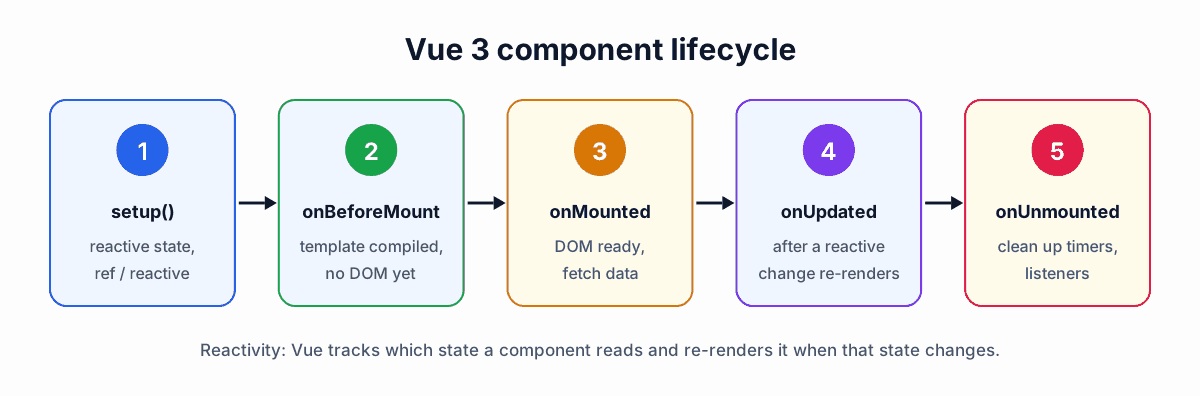
Answer: Vue 3 wraps state in JavaScript Proxies. When a component renders, Vue tracks which reactive properties it reads. When one of them changes, the Proxy's setter triggers the effects that depend on it, and Vue re-renders only the affected components, batching updates into the next tick.
Vue 2 used Object.defineProperty, which couldn't detect added or deleted properties or array index assignments, so you needed Vue.set. Proxies in Vue 3 remove those caveats.
import { reactive, nextTick } from "vue";

const state = reactive({ count: 0 });
state.count++;               // tracked change, DOM updates on the next tick
await nextTick();            // wait for the DOM to reflect the change
Q2. What is the difference between ref and reactive?#
import { ref, reactive } from "vue";

const count = ref(0);                    // any value; access via .value in JS
count.value++;

const form = reactive({ email: "", agree: false }); // objects only, no .value
form.email = "a@b.com";

// Pitfall: destructuring a reactive object loses reactivity
const { email } = form;                  // plain string, not reactive
import { toRefs } from "vue";
const { agree } = toRefs(form);          // stays reactive (agree.value)
ref | reactive | |
|---|---|---|
| Holds | Any type (primitives too) | Objects, arrays, Maps, Sets |
| Access in script | .value | Directly |
| In templates | Auto-unwrapped | Directly |
| Can reassign whole value | Yes (x.value = newObj) | No, replacing loses reactivity |
Many teams default to ref everywhere for consistency.
Q3. What is the difference between computed and watch?#
const firstName = ref("Asha");
const lastName = ref("Rao");

// computed: derived value, cached until dependencies change
const fullName = computed(() => `${firstName.value} ${lastName.value}`);

// watch: run a side effect when a source changes
const query = ref("");
watch(query, async (newQuery, oldQuery) => {
  results.value = await searchApi(newQuery);
}, { immediate: false });

// watchEffect: tracks whatever it reads, runs immediately
watchEffect(() => console.log("Name is", fullName.value));
Answer: use computed for values derived from state (pure, cached, used in templates). Use watch or watchEffect for side effects: API calls, saving to localStorage, logging. A common mistake is using a watcher to keep a second piece of state in sync when a computed would do.
Components#
Q4. Options API vs Composition API: what's the difference?#
<!-- Options API -->
<script>
export default {
  data() { return { count: 0 }; },
  computed: { double() { return this.count * 2; } },
  methods: { increment() { this.count++; } },
  mounted() { console.log("mounted"); },
};
</script>

<!-- Composition API with script setup -->
<script setup>
import { ref, computed, onMounted } from "vue";
const count = ref(0);
const double = computed(() => count.value * 2);
const increment = () => count.value++;
onMounted(() => console.log("mounted"));
</script>
Answer: the Options API organises code by option type (data, methods, computed), which is easy for beginners but scatters one feature across several sections. The Composition API organises code by feature, extracts logic into reusable composables, and has better TypeScript inference. Both are fully supported in Vue 3.
Q5. Explain the Vue 3 lifecycle hooks#
| Composition API | Options API | Use |
|---|---|---|
setup() / <script setup> | beforeCreate, created | Create state; can start data fetching |
onBeforeMount | beforeMount | Rarely needed |
onMounted | mounted | DOM is ready: access refs, init third-party libraries |
onUpdated | updated | After a reactive change re-renders the DOM |
onUnmounted | unmounted (destroyed in Vue 2) | Remove listeners, clear timers |
onMounted(() => window.addEventListener("resize", onResize));
onUnmounted(() => window.removeEventListener("resize", onResize));
Q6. How do components communicate with props and emits? How does v-model work on a component?#
<!-- SearchInput.vue -->
<script setup>
const props = defineProps({ placeholder: { type: String, default: "Search" } });
const model = defineModel();            // Vue 3.4+: two-way binding helper
const emit = defineEmits(["submit"]);
</script>

<template>
  <input v-model="model" :placeholder="props.placeholder"
         @keyup.enter="emit('submit', model)" />
</template>

<!-- Parent -->
<SearchInput v-model="query" placeholder="Find products" @submit="runSearch" />
Answer: data flows down through props (one-way; a child must not mutate a prop) and events flow up through emits. v-model on a component is shorthand for a modelValue prop plus an update:modelValue event; defineModel() wires both for you.
Templates and directives#
Q7. What is the difference between v-if and v-show?#
v-if | v-show | |
|---|---|---|
| How it hides | Removes the element from the DOM | Toggles CSS display: none |
| Initial cost | Low if false (not rendered) | Always rendered |
| Toggle cost | Higher (create/destroy, child state lost) | Cheap |
| Use when | Condition rarely changes | Toggled frequently (tabs, dropdowns) |
Also: don't put v-if and v-for on the same element. In Vue 3, v-if has higher priority, so it can't access the loop variable. Filter with a computed property instead.
Q8. Why do you need a key in v-for?#
<li v-for="todo in todos" :key="todo.id">
  {{ todo.text }} <input placeholder="note" />
</li>
Answer: without unique keys, Vue patches elements in place by position. When items are reordered, inserted or removed, element state (input text, focus, component state) can stay attached to the wrong item. A stable :key lets Vue track each item's identity and move DOM nodes correctly. Avoid the index as a key for lists that change order. (The same idea applies in React; see React reconciliation interview questions.)
Q9. What are slots? Explain named and scoped slots#
<!-- DataTable.vue -->
<template>
  <table>
    <thead><slot name="header" /></thead>
    <tbody>
      <tr v-for="row in rows" :key="row.id">
        <slot name="row" :row="row">{{ row.name }}</slot>  <!-- scoped slot -->
      </tr>
    </tbody>
  </table>
</template>

<!-- Parent -->
<DataTable :rows="users">
  <template #header><th>Name</th><th>Role</th></template>
  <template #row="{ row }">
    <td>{{ row.name }}</td><td>{{ row.role }}</td>
  </template>
</DataTable>
Answer: slots let a parent pass template content into a child. The default slot receives unnamed content, named slots place content in specific spots, and scoped slots let the child pass data back so the parent decides how to render it. They're Vue's equivalent of React's children and render props.
Sharing logic and state#
Q10. What are provide/inject and composables?#
// Composable: reusable stateful logic (like a React custom hook)
// useFetch.js
export function useFetch(url) {
  const data = ref(null);
  const error = ref(null);
  const loading = ref(true);

  watchEffect(async () => {
    loading.value = true;
    try {
      const res = await fetch(toValue(url));
      data.value = await res.json();
    } catch (e) {
      error.value = e;
    } finally {
      loading.value = false;
    }
  });

  return { data, error, loading };
}

// provide/inject: pass values deep without prop drilling
// Ancestor
provide("theme", ref("dark"));
// Any descendant
const theme = inject("theme", ref("light"));  // default value
Answer: a composable is a function using Composition API features to encapsulate reusable logic; each call creates its own state. provide/inject shares a value from an ancestor to any descendant, which is useful for themes, form contexts and plugin APIs.
Q11. What is Pinia and why did it replace Vuex?#
import { defineStore } from "pinia";

export const useCartStore = defineStore("cart", () => {
  const items = ref([]);
  const total = computed(() => items.value.reduce((s, i) => s + i.price, 0));
  function addItem(item) { items.value.push(item); }
  return { items, total, addItem };
});

// In a component
const cart = useCartStore();
cart.addItem({ id: 1, name: "Pen", price: 20 });
const { total } = storeToRefs(cart);     // keep reactivity when destructuring
Answer: Pinia is the official state management library for Vue. Compared with Vuex it has no mutations (actions change state directly), a simpler API, excellent TypeScript support, modular stores by default, and devtools integration. Use it for state shared across many components, such as the logged-in user, cart or app settings.
Q12. How do routing and navigation guards work in Vue Router?#
const routes = [
  { path: "/", component: HomePage },
  { path: "/products/:id", component: () => import("./ProductPage.vue") }, // lazy
  { path: "/admin", component: () => import("./AdminPage.vue"), meta: { requiresAuth: true } },
];

const router = createRouter({ history: createWebHistory(), routes });

router.beforeEach((to) => {
  const auth = useAuthStore();
  if (to.meta.requiresAuth && !auth.isLoggedIn) {
    return { path: "/login", query: { redirect: to.fullPath } };
  }
});

// In a component
const route = useRoute();      // route.params.id
const router = useRouter();    // router.push("/cart")
Answer: Vue Router maps paths to components rendered in <RouterView>. Dynamic imports lazy-load route components. Navigation guards (global beforeEach, per-route beforeEnter, in-component onBeforeRouteLeave) run before navigation to redirect or cancel it, for example to protect authenticated pages or warn about unsaved changes.
Quick revision#
| Topic | Remember |
|---|---|
| Reactivity | Proxies track reads and trigger updates on writes |
ref vs reactive | .value for refs; don't destructure reactive without toRefs |
computed vs watch | Derived value vs side effect |
| Props / emits | Data down, events up; v-model = prop + update event |
v-if vs v-show | Remove from DOM vs CSS toggle |
| Slots | Default, named, scoped (child passes data) |
| Composables | Reusable logic, like React custom hooks |
| Pinia | Official store; no mutations |
Compare with other frameworks: Angular interview questions and React state management interview questions.
Key takeaways#
- Vue 3 reactivity uses Proxies to track dependencies and re-render only what changed.
- Use
reforreactivefor state,computedfor derived values andwatchfor side effects. - The Composition API groups code by feature and enables composables.
- Components talk through props, emits,
v-model, slots and provide/inject. - Pinia handles shared state and Vue Router handles navigation with guards and lazy loading.