VLANs Explained: Segmenting a Network on One Switch
Learn what VLANs are, why networks use them, access vs trunk ports, 802.1Q tagging and how inter-VLAN routing lets separate VLANs communicate.

A VLAN (Virtual LAN) lets you divide a single physical switch – or a whole switched network – into several separate logical networks. Devices in different VLANs behave as if they were plugged into different switches, even when they share the same hardware.
Why use VLANs?#
- Security – keep guest Wi-Fi, IoT devices, servers and staff laptops apart.
- Smaller broadcast domains – broadcasts (ARP, DHCP) stay inside their VLAN, reducing noise.
- Flexibility – group users by department or role, not by where their desk is.
- Cost – one switch can serve many isolated networks.
One switch, many networks#
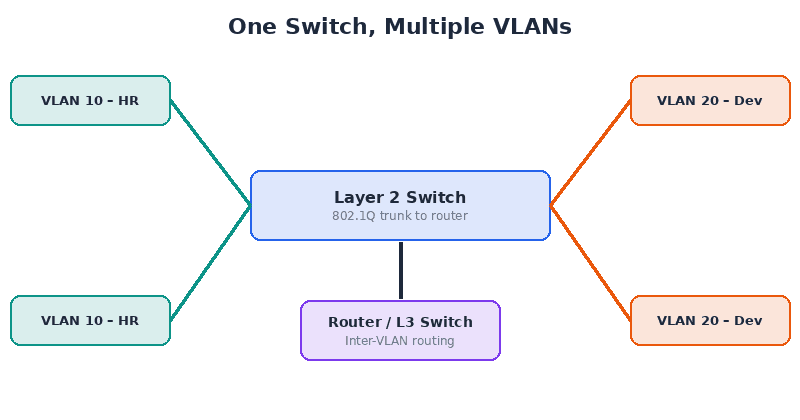
In this example, HR machines sit in VLAN 10 and developer machines in VLAN 20. Even though they're on the same switch, an HR laptop can't reach a dev laptop directly at Layer 2. Each VLAN usually maps to its own IP subnet, e.g. 10.10.10.0/24 and 10.10.20.0/24.
Access ports vs trunk ports#
| Port type | Carries | Connected to |
|---|---|---|
| Access port | One VLAN, untagged frames | End devices: PCs, printers, phones |
| Trunk port | Many VLANs, tagged frames | Other switches, routers, hypervisors, access points |
End devices don't need to know VLANs exist – the switch assigns their traffic to the access port's VLAN. Between switches, a trunk carries all VLANs over a single cable by tagging each frame.
802.1Q tagging#
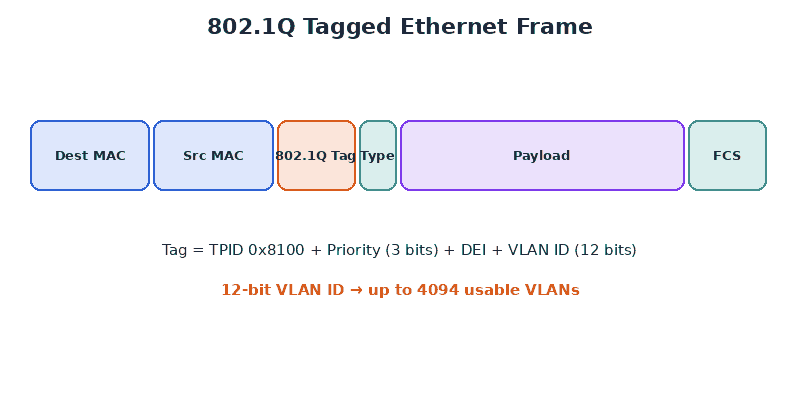
The IEEE 802.1Q standard inserts a 4-byte tag into the Ethernet frame, right after the source MAC:
- TPID (0x8100) – marks the frame as tagged.
- PCP (3 bits) – priority for Quality of Service (e.g. voice traffic first).
- DEI (1 bit) – drop eligible indicator.
- VLAN ID (12 bits) – values 1–4094 are usable.
Untagged frames on a trunk belong to the native VLAN (VLAN 1 by default). Change it to an unused VLAN and avoid putting users on VLAN 1 to prevent VLAN-hopping attacks.
Inter-VLAN routing#
VLANs are isolated at Layer 2, so devices in different VLANs need a Layer 3 device to talk:
- Router-on-a-stick – one router interface with sub-interfaces per VLAN over a trunk.
- Layer 3 switch – creates a virtual interface (SVI) per VLAN and routes in hardware; the common choice in offices and data centers.
Because traffic now passes through a router, you can apply ACLs or firewall rules – for example, allow HR to reach the payroll server but nothing in the dev VLAN.
Example configuration (Cisco-style)#
vlan 10
 name HR
vlan 20
 name DEV

interface Gi0/1
 switchport mode access
 switchport access vlan 10

interface Gi0/24
 switchport mode trunk
 switchport trunk allowed vlan 10,20

interface Vlan10
 ip address 10.10.10.1 255.255.255.0
interface Vlan20
 ip address 10.10.20.1 255.255.255.0
Key takeaways#
- VLANs split one switch into multiple isolated Layer 2 networks.
- Access ports carry one untagged VLAN; trunks carry many tagged VLANs.
- 802.1Q adds a 4-byte tag with a 12-bit VLAN ID (1–4094).
- Traffic between VLANs must be routed by a router or Layer 3 switch.