TCP vs UDP: Differences, Handshakes and When to Use Each
Compare TCP and UDP: the three-way handshake, reliability, ordering, flow control, header size and which real-world apps use each protocol.
TCP and UDP are the two main transport-layer protocols. Both carry data between applications using port numbers, but they make very different trade-offs between reliability and speed.
TCP: Transmission Control Protocol#
TCP provides a reliable, ordered byte stream. Before any data moves, the two sides set up a connection.
The three-way handshake#
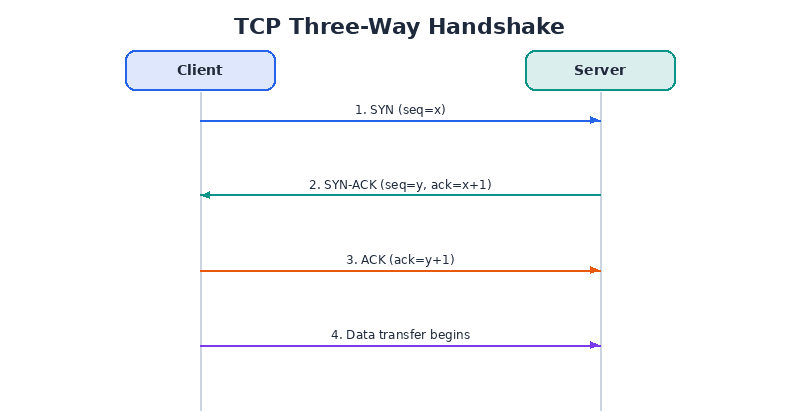
- SYN – the client picks a random initial sequence number x and asks to connect.
- SYN-ACK – the server acknowledges x+1 and sends its own sequence number y.
- ACK – the client acknowledges y+1. The connection is established and data can flow.
Closing uses a four-step exchange (FIN, ACK, FIN, ACK) so each direction can close independently.
What TCP guarantees#
- Reliability – every segment is acknowledged; lost segments are retransmitted.
- Ordering – sequence numbers let the receiver reassemble data in the right order.
- Flow control – the receive window stops a fast sender from overwhelming a slow receiver.
- Congestion control – algorithms like CUBIC and BBR slow down when the network is congested.
- Error detection – a checksum detects corrupted data.
UDP: User Datagram Protocol#
UDP is connectionless. It wraps your data in a tiny 8-byte header (source port, destination port, length, checksum) and sends it. No handshake, no acknowledgements, no retransmissions, no ordering.
That sounds bad, but it's exactly what real-time applications want: a late packet in a video call is useless, so it's better to drop it and move on than to wait for a retransmission.
Side-by-side comparison#
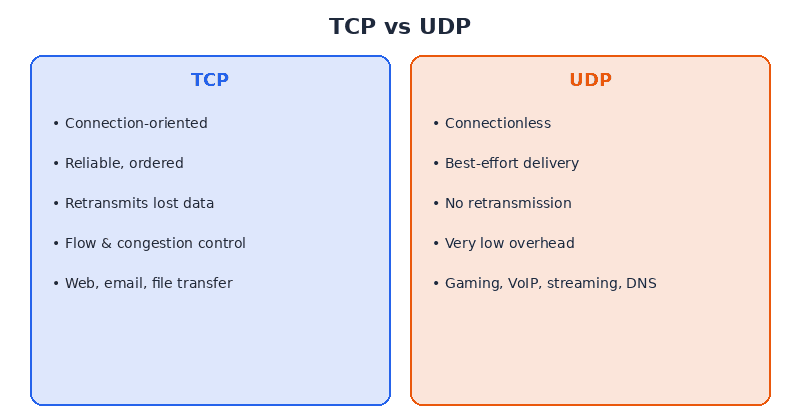
| Feature | TCP | UDP |
|---|---|---|
| Connection | Required (handshake) | None |
| Delivery | Guaranteed, retransmits | Best effort |
| Order | Preserved | Not guaranteed |
| Header size | 20–60 bytes | 8 bytes |
| Data model | Byte stream | Individual datagrams |
| Broadcast / multicast | No | Yes |
| Typical uses | Web, email, SSH, file transfer, databases | DNS, VoIP, video calls, gaming, streaming |
Where QUIC fits#
QUIC, the transport behind HTTP/3, runs on top of UDP but rebuilds reliability, ordering and congestion control in user space, with TLS 1.3 built in. It avoids TCP's head-of-line blocking across streams and can set up a secure connection in fewer round trips.
If losing or reordering data would break your app, use TCP (or QUIC). If freshness matters more than completeness, or you need multicast, use UDP and handle any loss in your application.
See it in code#
import socket

# TCP: connect first, then send a stream
tcp = socket.socket(socket.AF_INET, socket.SOCK_STREAM)
tcp.connect(("example.com", 80))
tcp.sendall(b"GET / HTTP/1.1\r\nHost: example.com\r\n\r\n")

# UDP: no connection, just send a datagram
udp = socket.socket(socket.AF_INET, socket.SOCK_DGRAM)
udp.sendto(b"hello", ("127.0.0.1", 9999))
Key takeaways#
- TCP uses a SYN, SYN-ACK, ACK handshake before sending data.
- TCP is reliable and ordered, with flow and congestion control.
- UDP is connectionless, lightweight and best-effort.
- Use TCP for correctness, UDP for real-time and low-latency traffic.
- QUIC brings TCP-like reliability to UDP for HTTP/3.