The TCP/IP Model: How the Internet Actually Works
Understand the 4-layer TCP/IP model, how it maps to OSI, and which protocols power each layer of the internet.
The TCP/IP model (also called the Internet Protocol Suite) is the practical architecture the internet is built on. Where OSI has seven layers, TCP/IP uses four, grouping related responsibilities together.
OSI vs TCP/IP#
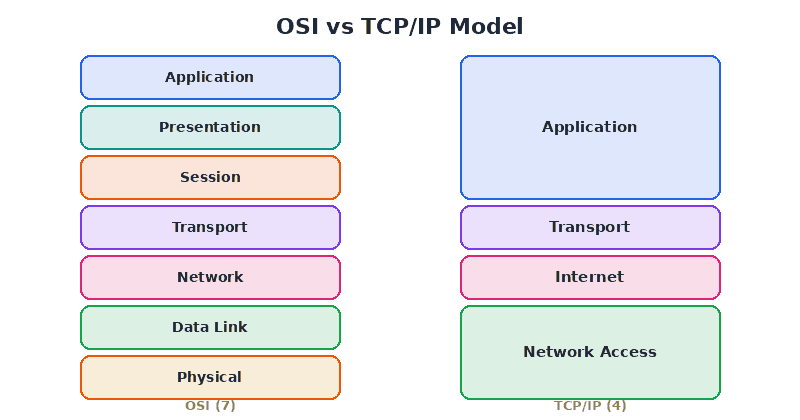
TCP/IP merges OSI's top three layers into a single Application layer and the bottom two into Network Access (sometimes called Link). Transport and Network (called Internet in TCP/IP) map almost one-to-one.
| Aspect | OSI | TCP/IP |
|---|---|---|
| Layers | 7 | 4 |
| Origin | ISO reference model | Built from ARPANET protocols |
| Use | Teaching, troubleshooting vocabulary | Real-world implementation |
| Design approach | Model first, protocols later | Protocols first, model describes them |
The four layers and their protocols#
1. Application layer#
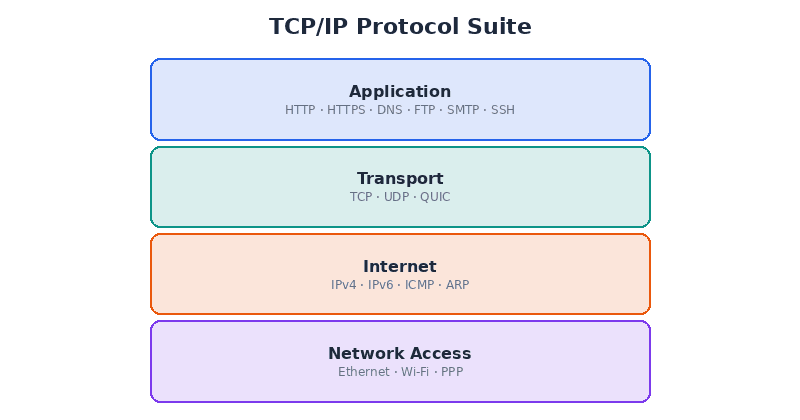
Protocols that applications use directly: HTTP/HTTPS for the web, DNS for name lookup, SMTP/IMAP for email, SSH for remote shells and FTP for file transfer. Encryption (TLS) and data formats (JSON, HTML) are handled here too.
2. Transport layer#
Provides process-to-process delivery using ports. TCP gives reliable, ordered byte streams; UDP gives fast, connectionless datagrams. QUIC, used by HTTP/3, runs over UDP and adds reliability and encryption in user space.
3. Internet layer#
Moves packets across networks using IP addresses (IPv4 and IPv6). ICMP carries error and diagnostic messages – it's what ping uses. ARP resolves IPv4 addresses to MAC addresses on the local link.
4. Network Access layer#
Gets frames onto the physical medium: Ethernet, Wi-Fi, fiber, cellular. It covers MAC addressing, framing and the physical signals.
Following a web request through TCP/IP#
- Application: your browser builds an HTTP request for
https://jiocoder.comafter DNS returns the server's IP. - Transport: TCP (or QUIC) opens a connection to port 443 and splits the data into segments.
- Internet: each segment is wrapped in an IP packet with source and destination IPs.
- Network Access: the packet is framed with MAC addresses and sent over Wi-Fi or Ethernet to your router.
- Routers along the path read only the IP header and forward the packet until it reaches the server, where the layers are unwrapped in reverse.
Want to see this live? Open Wireshark, load any website and expand a packet. You'll see Ethernet → IP → TCP → TLS/HTTP nested exactly like these layers.
Common ports to know#
| Protocol | Transport | Port |
|---|---|---|
| HTTP | TCP | 80 |
| HTTPS | TCP / UDP (HTTP/3) | 443 |
| DNS | UDP / TCP | 53 |
| SSH | TCP | 22 |
| SMTP | TCP | 25 / 587 |
Key takeaways#
- TCP/IP has four layers: Application, Transport, Internet and Network Access.
- It is the model the real internet uses; OSI is mostly a reference.
- TCP and UDP live at the transport layer; IP, ICMP and ARP at the internet layer.
- Routers only need to read up to the internet layer to forward traffic.