Spring Boot Project with MySQL: Build an Uptime Monitor (Part 1 – Setup)
Start a production-ready Spring Boot 3 and MySQL project: Spring Initializr, Docker Compose, dev/prod profiles and validated config. Part 1 of the UpCheck series.

This 8-part series builds UpCheck, a real website uptime monitor with Spring Boot 3 and MySQL, at about 2 hours a day. Part 1 sets up the project, MySQL in Docker and environment profiles.
- Part 1: Project setup with MySQL and Docker (you are here)
- Part 2: Database design with Flyway and JPA
- Part 3: REST API, validation and error handling
- Part 4: Spring Security with JWT
- Part 5: Scheduler with virtual threads
- Part 6: Incidents and email alerts
- Part 7: Uptime stats, pagination and retention
- Part 8: Testing, Docker and deployment
What you will build: UpCheck#
In 8 days (2 hours a day) you will build UpCheck, a real website uptime monitor in Spring Boot 3 and MySQL that you can deploy and actually use. You add a website URL, UpCheck checks it every few minutes, records response time, and emails you when the site goes down and when it comes back.
Most Spring Boot tutorials stop at a CRUD app. UpCheck goes further: it has a background scheduler, concurrent HTTP checks with Java 21 virtual threads, incident tracking, email alerts, and SQL aggregate reports. These are the things interviewers ask about.
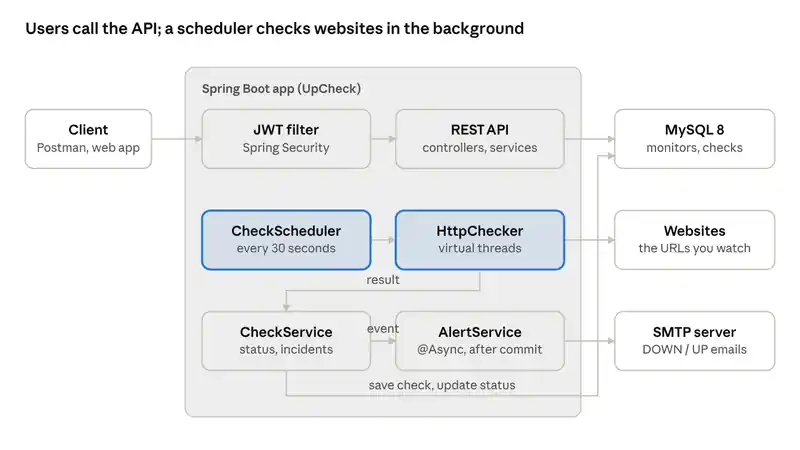
Requests flow left to right through the JWT filter to the API and MySQL. Independently, the scheduler sends checks to websites on virtual threads, and status changes trigger email alerts after the database commit.
Features#
- Register and log in with JWT authentication
- Add, edit, pause and delete monitors (URL + check interval of 1, 5 or 15 minutes)
- Automatic background checks: HTTP status code and response time
- Incidents open when a site goes down and close when it recovers
- Email alert on DOWN and on RECOVERED, with no duplicate spam
- Stats API: uptime % for the last 24 hours and 7 days, average response time
- Paginated check history and automatic cleanup of old data
- Swagger docs, health checks, Docker image, tests
Tech stack#
| Layer | Technology |
|---|---|
| Language | Java 21 (virtual threads, records) |
| Framework | Spring Boot 3.5 (Web, Data JPA, Security, Validation, Mail, Actuator) |
| Database | MySQL 8 with Flyway migrations |
| Auth | JWT (jjwt 0.12) + BCrypt |
| Docs | springdoc-openapi (Swagger UI) |
| Testing | JUnit 5, Mockito, Testcontainers, WireMock |
| DevOps | Docker, Docker Compose, GitHub Actions |
The 8-day plan#
| Day | Topic | You will have at the end |
|---|---|---|
| 1 | Project setup | App running against MySQL in Docker |
| 2 | Database design | Tables created by Flyway, JPA entities |
| 3 | Monitor REST APIs | CRUD endpoints with validation and clean errors |
| 4 | Security + JWT | Register, login, per-user data |
| 5 | Checker engine | Sites checked automatically in the background |
| 6 | Incidents + email alerts | DOWN/UP emails, incident history |
| 7 | Stats + cleanup | Uptime %, avg response time, data retention |
| 8 | Testing + deployment | Tests, Swagger, Docker image, live server |
Prerequisites: JDK 21, Maven 3.9+, Docker Desktop, an IDE (IntelliJ IDEA or VS Code), and Postman or curl.
Spring Boot project setup with MySQL and Docker#
By the end of today the app starts, connects to MySQL running in Docker, and has separate dev and prod settings. Time: about 2 hours.
Step 1: Generate the project#
Open start.spring.io and choose Maven, Java 21, Spring Boot 3.5.x, group com.upcheck, artifact upcheck. Add these dependencies: Spring Web, Spring Data JPA, Validation, Spring Security, Java Mail Sender, Spring Boot Actuator, MySQL Driver, Flyway Migration, Testcontainers.
Then replace the generated pom.xml with this one. It adds JWT (jjwt), Swagger (springdoc) and WireMock for tests.
<?xml version="1.0" encoding="UTF-8"?>
<project xmlns="http://maven.apache.org/POM/4.0.0"
         xmlns:xsi="http://www.w3.org/2001/XMLSchema-instance"
         xsi:schemaLocation="http://maven.apache.org/POM/4.0.0 https://maven.apache.org/xsd/maven-4.0.0.xsd">
    <modelVersion>4.0.0</modelVersion>

    <parent>
        <groupId>org.springframework.boot</groupId>
        <artifactId>spring-boot-starter-parent</artifactId>
        <version>3.5.6</version>
        <relativePath/>
    </parent>

    <groupId>com.upcheck</groupId>
    <artifactId>upcheck</artifactId>
    <version>1.0.0</version>
    <name>UpCheck</name>

    <properties>
        <java.version>21</java.version>
        <jjwt.version>0.12.6</jjwt.version>
        <springdoc.version>2.8.9</springdoc.version>
        <wiremock.version>3.9.1</wiremock.version>
    </properties>

    <dependencies>
        <dependency><groupId>org.springframework.boot</groupId><artifactId>spring-boot-starter-web</artifactId></dependency>
        <dependency><groupId>org.springframework.boot</groupId><artifactId>spring-boot-starter-data-jpa</artifactId></dependency>
        <dependency><groupId>org.springframework.boot</groupId><artifactId>spring-boot-starter-validation</artifactId></dependency>
        <dependency><groupId>org.springframework.boot</groupId><artifactId>spring-boot-starter-security</artifactId></dependency>
        <dependency><groupId>org.springframework.boot</groupId><artifactId>spring-boot-starter-mail</artifactId></dependency>
        <dependency><groupId>org.springframework.boot</groupId><artifactId>spring-boot-starter-actuator</artifactId></dependency>

        <!-- JWT -->
        <dependency><groupId>io.jsonwebtoken</groupId><artifactId>jjwt-api</artifactId><version>${jjwt.version}</version></dependency>
        <dependency><groupId>io.jsonwebtoken</groupId><artifactId>jjwt-impl</artifactId><version>${jjwt.version}</version><scope>runtime</scope></dependency>
        <dependency><groupId>io.jsonwebtoken</groupId><artifactId>jjwt-jackson</artifactId><version>${jjwt.version}</version><scope>runtime</scope></dependency>

        <!-- Swagger UI -->
        <dependency><groupId>org.springdoc</groupId><artifactId>springdoc-openapi-starter-webmvc-ui</artifactId><version>${springdoc.version}</version></dependency>

        <!-- Database -->
        <dependency><groupId>com.mysql</groupId><artifactId>mysql-connector-j</artifactId><scope>runtime</scope></dependency>
        <dependency><groupId>org.flywaydb</groupId><artifactId>flyway-core</artifactId></dependency>
        <dependency><groupId>org.flywaydb</groupId><artifactId>flyway-mysql</artifactId></dependency>

        <!-- Testing -->
        <dependency><groupId>org.springframework.boot</groupId><artifactId>spring-boot-starter-test</artifactId><scope>test</scope></dependency>
        <dependency><groupId>org.springframework.security</groupId><artifactId>spring-security-test</artifactId><scope>test</scope></dependency>
        <dependency><groupId>org.springframework.boot</groupId><artifactId>spring-boot-testcontainers</artifactId><scope>test</scope></dependency>
        <dependency><groupId>org.testcontainers</groupId><artifactId>junit-jupiter</artifactId><scope>test</scope></dependency>
        <dependency><groupId>org.testcontainers</groupId><artifactId>mysql</artifactId><scope>test</scope></dependency>
        <dependency><groupId>org.wiremock</groupId><artifactId>wiremock-standalone</artifactId><version>${wiremock.version}</version><scope>test</scope></dependency>
    </dependencies>

    <build>
        <plugins>
            <plugin>
                <groupId>org.springframework.boot</groupId>
                <artifactId>spring-boot-maven-plugin</artifactId>
            </plugin>
        </plugins>
    </build>
</project>
Step 2: Folder structure (package by feature)#
We group code by feature, not by layer. Everything about monitors lives in monitor/, so the project stays easy to navigate as it grows.
upcheck/
├── docker-compose.yml
├── Dockerfile
├── pom.xml
└── src/main/
    ├── java/com/upcheck/
    │   ├── UpCheckApplication.java
    │   ├── config/      AppProperties, JpaConfig, OpenApiConfig
    │   ├── common/      BaseEntity, PageResponse, exception/
    │   ├── user/        User, UserRepository
    │   ├── auth/        AuthController, AuthService, AuthDtos
    │   ├── security/    JwtService, JwtAuthFilter, SecurityConfig
    │   ├── monitor/     Monitor, MonitorService, MonitorController
    │   ├── check/       HttpChecker, CheckScheduler, CheckService, RetentionJob
    │   ├── incident/    Incident, IncidentService
    │   ├── alert/       AlertService, MonitorStatusChangedEvent
    │   └── stats/       StatsService, MonitorInsightsController
    └── resources/
        ├── application.yml
        ├── application-dev.yml
        ├── application-prod.yml
        └── db/migration/V1__create_tables.sql
Step 3: Run MySQL and a test mail server with Docker Compose#
No need to install MySQL on your laptop. Mailpit is a fake SMTP server: every email the app sends shows up at http://localhost:8025, which is perfect for testing alerts in Part 6.
# docker-compose.yml
services:
  mysql:
    image: mysql:8.4
    container_name: upcheck-mysql
    restart: unless-stopped
    environment:
      MYSQL_DATABASE: upcheck
      MYSQL_USER: upcheck
      MYSQL_PASSWORD: upcheck
      MYSQL_ROOT_PASSWORD: root
    ports:
      - "3306:3306"
    volumes:
      - mysql-data:/var/lib/mysql
    healthcheck:
      test: ["CMD", "mysqladmin", "ping", "-h", "localhost", "-uroot", "-proot"]
      interval: 10s
      timeout: 5s
      retries: 5

  mailpit:
    image: axllent/mailpit:latest
    container_name: upcheck-mailpit
    ports:
      - "1025:1025"   # SMTP
      - "8025:8025"   # web inbox

volumes:
  mysql-data:
Start both with docker compose up -d and check with docker compose ps.
Step 4: Configuration with profiles#
application.yml holds settings shared by every environment. Two choices matter here: ddl-auto: validate (Flyway creates tables, Hibernate only checks them) and open-in-view: false (no hidden database queries while JSON is being written).
# src/main/resources/application.yml
spring:
  application:
    name: upcheck
  profiles:
    active: ${SPRING_PROFILES_ACTIVE:dev}
  threads:
    virtual:
      enabled: true          # @Async, @Scheduled and Tomcat use virtual threads
  jpa:
    open-in-view: false
    hibernate:
      ddl-auto: validate
    properties:
      hibernate:
        jdbc.time_zone: UTC
  flyway:
    enabled: true
    locations: classpath:db/migration
  jackson:
    default-property-inclusion: non_null

server:
  port: 8080
  shutdown: graceful

upcheck:
  jwt:
    secret: ${JWT_SECRET}            # base64, at least 256 bits
    expiration: PT24H
  checker:
    poll-interval: PT30S
    request-timeout: PT10S
    failure-threshold: 2             # consecutive failures before DOWN
    allow-private-hosts: false       # SSRF protection
    max-monitors-per-user: 20
  retention:
    days: 30
    cron: "0 30 2 * * *"
  mail:
    from: alerts@upcheck.dev

management:
  endpoints:
    web:
      exposure:
        include: health,info,metrics
  endpoint:
    health:
      probes:
        enabled: true

springdoc:
  swagger-ui:
    path: /swagger-ui.html
# src/main/resources/application-dev.yml
spring:
  datasource:
    url: jdbc:mysql://localhost:3306/upcheck?serverTimezone=UTC
    username: upcheck
    password: upcheck
  jpa:
    show-sql: true
  mail:
    host: localhost
    port: 1025

upcheck:
  jwt:
    # dev-only key, never use in production
    secret: ZGV2LW9ubHktc2VjcmV0LWtleS1mb3ItdXBjaGVjay1jaGFuZ2UtbWUtMTIzNDU2Nzg=
  checker:
    allow-private-hosts: true

logging:
  level:
    com.upcheck: DEBUG
# src/main/resources/application-prod.yml  (every secret comes from environment variables)
spring:
  datasource:
    url: ${DB_URL}
    username: ${DB_USERNAME}
    password: ${DB_PASSWORD}
    hikari:
      maximum-pool-size: 10
  mail:
    host: ${MAIL_HOST}
    port: ${MAIL_PORT:587}
    username: ${MAIL_USERNAME}
    password: ${MAIL_PASSWORD}
    properties:
      mail.smtp.auth: true
      mail.smtp.starttls.enable: true

upcheck:
  mail:
    from: ${MAIL_FROM}

springdoc:
  swagger-ui:
    enabled: ${SWAGGER_ENABLED:false}
Step 5: Type-safe settings with a validated record#
Instead of scattering @Value everywhere, all custom settings live in one record. With @Validated, a missing JWT secret stops the app at startup instead of failing at the first login.
package com.upcheck.config;

import jakarta.validation.Valid;
import jakarta.validation.constraints.Min;
import jakarta.validation.constraints.NotBlank;
import jakarta.validation.constraints.NotNull;
import org.springframework.boot.context.properties.ConfigurationProperties;
import org.springframework.validation.annotation.Validated;

import java.time.Duration;

@Validated
@ConfigurationProperties(prefix = "upcheck")
public record AppProperties(
        @Valid @NotNull Jwt jwt,
        @Valid @NotNull Checker checker,
        @Valid @NotNull Retention retention,
        @Valid @NotNull Mail mail
) {
    public record Jwt(@NotBlank String secret, @NotNull Duration expiration) {}

    public record Checker(
            @NotNull Duration pollInterval,
            @NotNull Duration requestTimeout,
            @Min(1) int failureThreshold,
            boolean allowPrivateHosts,
            @Min(1) int maxMonitorsPerUser
    ) {}

    public record Retention(@Min(1) int days, @NotBlank String cron) {}

    public record Mail(@NotBlank String from) {}
}
package com.upcheck;

import org.springframework.boot.SpringApplication;
import org.springframework.boot.autoconfigure.SpringBootApplication;
import org.springframework.boot.context.properties.ConfigurationPropertiesScan;
import org.springframework.scheduling.annotation.EnableAsync;
import org.springframework.scheduling.annotation.EnableScheduling;

@SpringBootApplication
@ConfigurationPropertiesScan
@EnableScheduling
@EnableAsync
public class UpCheckApplication {

    public static void main(String[] args) {
        SpringApplication.run(UpCheckApplication.class, args);
    }
}
package com.upcheck.config;

import org.springframework.context.annotation.Bean;
import org.springframework.context.annotation.Configuration;
import org.springframework.data.jpa.repository.config.EnableJpaAuditing;

import java.time.Clock;

@Configuration
@EnableJpaAuditing
public class JpaConfig {

    /** One injectable clock makes time-based logic easy to test. */
    @Bean
    public Clock clock() {
        return Clock.systemUTC();
    }
}
Run ./mvnw spring-boot:run. You should see Started UpCheckApplication and a Hikari log line showing the MySQL connection. Spring Security also prints a generated password for now; we replace it with JWT in Part 4.
Key takeaways#
- Run MySQL and a fake SMTP server with Docker Compose instead of installing them locally.
- Keep shared settings in application.yml and secrets in environment variables for prod.
- A validated @ConfigurationProperties record fails fast when a setting is missing.