Spring Boot REST API for Beginners: Build a CRUD API Step by Step
Build your first Spring Boot REST API: project setup, the controller-service-repository layers, Spring Data JPA, DTOs, validation, global exception handling and testing with curl.
Spring Boot is the most popular way to build backend services in Java. It takes the huge Spring framework and adds sensible defaults, an embedded web server and auto-configuration, so you can go from zero to a working REST API in minutes. In this guide we'll build a small CRUD API for managing books.
Creating the project#
Go to start.spring.io (Spring Initializr) and choose:
- Project: Maven, Language: Java 21, Spring Boot 3.x
- Dependencies: Spring Web, Spring Data JPA, Validation, H2 Database (in-memory, great for learning)
Download, unzip and open the project in your IDE. The entry point looks like this:
@SpringBootApplication
public class BookApiApplication {
    public static void main(String[] args) {
        SpringApplication.run(BookApiApplication.class, args);
    }
}
@SpringBootApplication turns on component scanning and auto-configuration. Run it and Tomcat starts on port 8080.
The layered architecture#
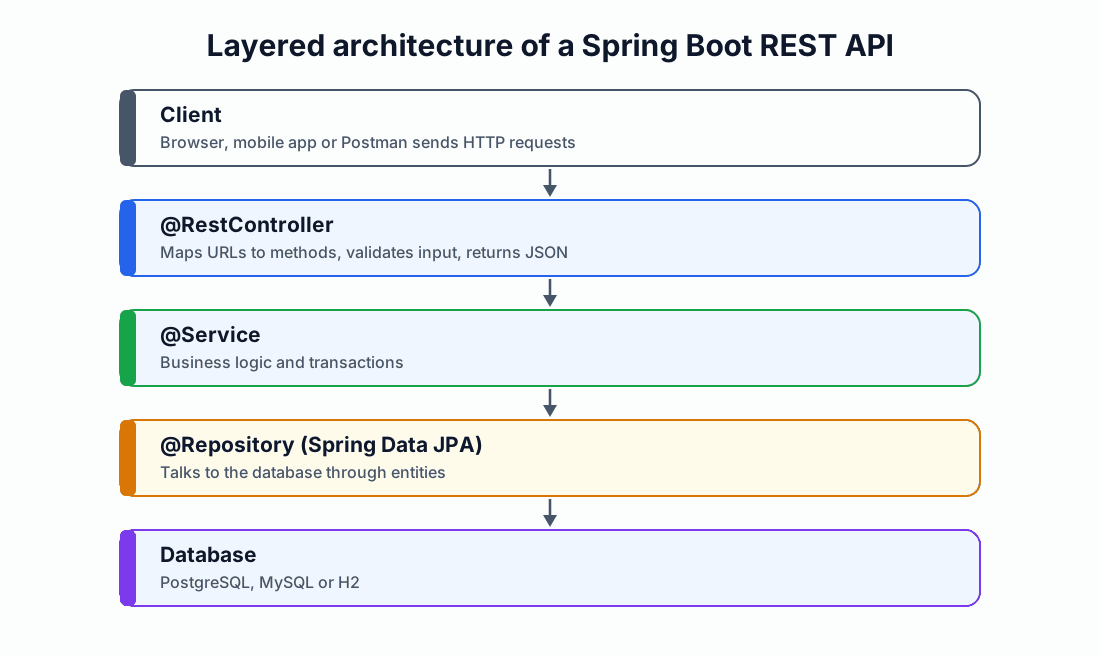
| Layer | Annotation | Responsibility |
|---|---|---|
| Controller | @RestController | Handles HTTP: URLs, request bodies, status codes |
| Service | @Service | Business rules and transactions |
| Repository | extends JpaRepository | Database access |
| Entity | @Entity | Maps a Java class to a table |
Each layer only talks to the one below it. This keeps HTTP details out of your business logic and makes each piece easy to test.
Step 1: the entity#
@Entity
@Table(name = "books")
public class Book {
    @Id
    @GeneratedValue(strategy = GenerationType.IDENTITY)
    private Long id;

    @Column(nullable = false)
    private String title;

    private String author;
    private int publishedYear;

    protected Book() {}   // required by JPA

    public Book(String title, String author, int publishedYear) {
        this.title = title;
        this.author = author;
        this.publishedYear = publishedYear;
    }

    // getters and setters omitted for brevity
}
Step 2: the repository#
public interface BookRepository extends JpaRepository<Book, Long> {
    List<Book> findByAuthorIgnoreCase(String author);   // query derived from the name
}
That's it. Spring Data generates the implementation at runtime, including save, findById, findAll and deleteById. Methods like findByAuthorIgnoreCase are turned into SQL from their names.
Step 3: DTOs and validation#
Don't expose entities directly in your API. Use DTOs (data transfer objects) so you control exactly what goes in and out. Java records are perfect for this:
public record BookRequest(
        @NotBlank String title,
        @NotBlank String author,
        @Min(1450) @Max(2100) int publishedYear) {}

public record BookResponse(Long id, String title, String author, int publishedYear) {
    static BookResponse from(Book b) {
        return new BookResponse(b.getId(), b.getTitle(), b.getAuthor(), b.getPublishedYear());
    }
}
Step 4: the service#
@Service
public class BookService {
    private final BookRepository repository;

    public BookService(BookRepository repository) {   // constructor injection
        this.repository = repository;
    }

    public List<BookResponse> findAll() {
        return repository.findAll().stream().map(BookResponse::from).toList();
    }

    public BookResponse findById(Long id) {
        return repository.findById(id)
                .map(BookResponse::from)
                .orElseThrow(() -> new BookNotFoundException(id));
    }

    @Transactional
    public BookResponse create(BookRequest req) {
        Book saved = repository.save(new Book(req.title(), req.author(), req.publishedYear()));
        return BookResponse.from(saved);
    }

    @Transactional
    public BookResponse update(Long id, BookRequest req) {
        Book book = repository.findById(id).orElseThrow(() -> new BookNotFoundException(id));
        book.setTitle(req.title());
        book.setAuthor(req.author());
        book.setPublishedYear(req.publishedYear());
        return BookResponse.from(book);   // dirty checking saves changes on commit
    }

    public void delete(Long id) {
        if (!repository.existsById(id)) throw new BookNotFoundException(id);
        repository.deleteById(id);
    }
}Spring creates one BookRepository bean and passes it into the constructor for you. Prefer constructor injection over @Autowired on fields: dependencies become final, required and easy to mock in tests.
Step 5: the controller#
@RestController
@RequestMapping("/api/books")
public class BookController {
    private final BookService service;

    public BookController(BookService service) {
        this.service = service;
    }

    @GetMapping
    public List<BookResponse> all() {
        return service.findAll();
    }

    @GetMapping("/{id}")
    public BookResponse one(@PathVariable Long id) {
        return service.findById(id);
    }

    @PostMapping
    @ResponseStatus(HttpStatus.CREATED)
    public BookResponse create(@Valid @RequestBody BookRequest request) {
        return service.create(request);
    }

    @PutMapping("/{id}")
    public BookResponse update(@PathVariable Long id, @Valid @RequestBody BookRequest request) {
        return service.update(id, request);
    }

    @DeleteMapping("/{id}")
    @ResponseStatus(HttpStatus.NO_CONTENT)
    public void delete(@PathVariable Long id) {
        service.delete(id);
    }
}
Step 6: global error handling#
public class BookNotFoundException extends RuntimeException {
    public BookNotFoundException(Long id) {
        super("Book " + id + " not found");
    }
}

@RestControllerAdvice
public class ApiExceptionHandler {

    @ExceptionHandler(BookNotFoundException.class)
    public ProblemDetail notFound(BookNotFoundException ex) {
        return ProblemDetail.forStatusAndDetail(HttpStatus.NOT_FOUND, ex.getMessage());
    }

    @ExceptionHandler(MethodArgumentNotValidException.class)
    public ProblemDetail invalid(MethodArgumentNotValidException ex) {
        ProblemDetail pd = ProblemDetail.forStatus(HttpStatus.BAD_REQUEST);
        pd.setDetail("Validation failed");
        pd.setProperty("errors", ex.getBindingResult().getFieldErrors().stream()
                .map(e -> e.getField() + ": " + e.getDefaultMessage()).toList());
        return pd;
    }
}
ProblemDetail produces standard RFC 9457 error JSON, so clients get consistent error responses.
Step 7: configure and test#
# src/main/resources/application.properties
spring.datasource.url=jdbc:h2:mem:books
spring.jpa.hibernate.ddl-auto=update
spring.jpa.show-sql=true
spring.h2.console.enabled=truecurl -X POST localhost:8080/api/books \
-H "Content-Type: application/json" \
-d '{"title":"Clean Code","author":"Robert Martin","publishedYear":2008}'
curl localhost:8080/api/books/1
curl -X DELETE localhost:8080/api/books/1 -i # HTTP/1.1 204REST conventions to follow#
| Action | Method + URL | Success status |
|---|---|---|
| List | GET /api/books | 200 |
| Read one | GET /api/books/{id} | 200 (404 if missing) |
| Create | POST /api/books | 201 |
| Replace | PUT /api/books/{id} | 200 |
| Delete | DELETE /api/books/{id} | 204 |
Before going live, switch H2 for PostgreSQL or MySQL, set ddl-auto=validate and manage schema with Flyway or Liquibase, add pagination with Pageable, and secure endpoints with Spring Security.
Errors in this API rely on the patterns from our Java exception handling guide. To learn how transactions keep your data consistent, read ACID transactions and isolation levels.
Key takeaways#
- Spring Boot gives you an embedded server, auto-configuration and starter dependencies.
- Split code into controller, service and repository layers, each with one job.
- Spring Data JPA generates repository implementations from interfaces and method names.
- Use DTOs with Bean Validation instead of exposing entities.
- Handle errors centrally with
@RestControllerAdviceandProblemDetail.