Network Topologies: Star, Bus, Ring, Mesh and Hybrid
Compare the main network topologies – star, bus, ring, mesh, tree and hybrid – with their advantages, disadvantages and where each is used today.
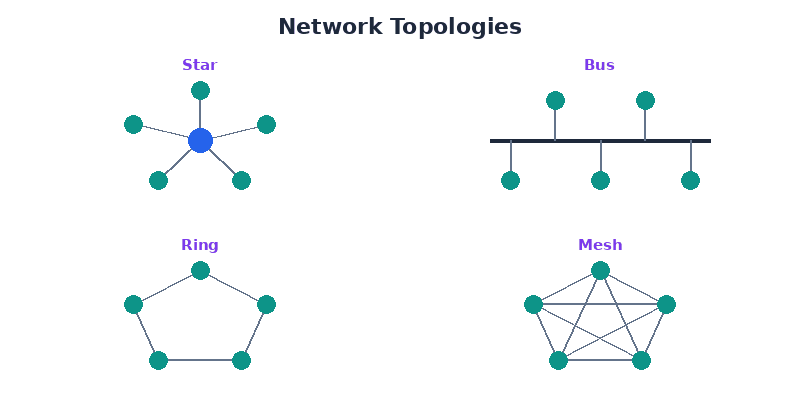
A network topology describes how devices are arranged and connected. The physical topology is how the cables actually run; the logical topology is how data flows. Choosing the right one affects cost, performance, fault tolerance and how easy the network is to grow.
The four classic topologies#
Star#
Every device connects to a central switch or access point. This is how almost every modern LAN and Wi-Fi network works.
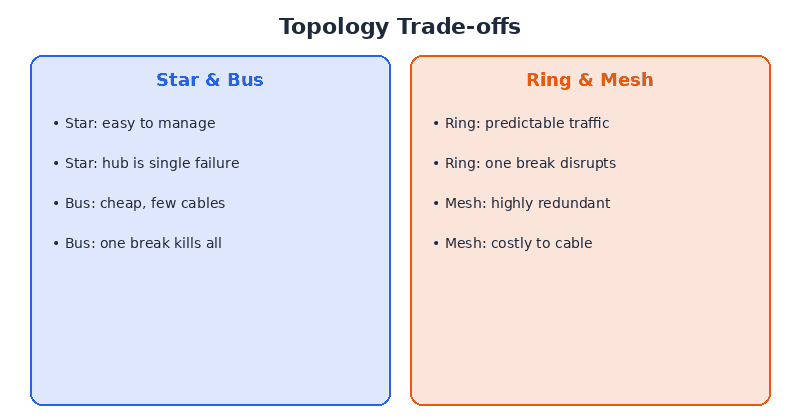
- Pros: easy to install and troubleshoot; one broken cable affects only one device; easy to add devices.
- Cons: the central device is a single point of failure; needs more cable than a bus.
Bus#
All devices share one backbone cable, with terminators at each end. Early Ethernet (10BASE2 coax) used this design.
- Pros: cheap, minimal cabling.
- Cons: a single break takes down the whole segment; collisions grow with more devices; hard to troubleshoot.
Ring#
Each device connects to exactly two neighbours, forming a loop. Data travels around the ring, historically controlled by a token (Token Ring, FDDI). Modern metro fiber networks often use dual rings for resilience.
- Pros: predictable performance; no collisions with token passing.
- Cons: in a single ring, one failure can break communication; adding devices disrupts the ring.
Mesh#
Devices have multiple paths to each other. In a full mesh, every node links to every other node – that's n(n−1)/2 links. A partial mesh connects only the most important nodes redundantly.
- Pros: highly fault tolerant; traffic can reroute around failures.
- Cons: expensive and complex – 10 nodes need 45 links in a full mesh.
Trade-offs at a glance#
| Topology | Cost | Fault tolerance | Scalability | Common today? |
|---|---|---|---|---|
| Star | Medium | Medium (hub is SPOF) | High | Very common |
| Bus | Low | Low | Low | Rare |
| Ring | Medium | Low–Medium (dual ring: high) | Medium | Metro / industrial |
| Mesh | High | Very high | Medium | Backbones, Wi-Fi mesh |
Tree and hybrid topologies#
Real networks combine designs. A tree (hierarchical star) connects several star networks to a backbone – the classic core / distribution / access model used in campus networks. Data centers use spine-leaf, a structured partial mesh where every leaf switch connects to every spine switch, giving predictable, low-latency paths.
Home "mesh Wi-Fi" systems use multiple access points that link wirelessly to each other, so the network can route around a weak connection – a practical small-scale mesh.
How to choose#
- Small office or home: star around a switch or router.
- Campus or large office: tree / hierarchical star with redundant uplinks.
- Data center: spine-leaf.
- Critical WAN or ISP backbone: partial mesh.
Key takeaways#
- Topology is how devices are connected (physical) and how data flows (logical).
- Star is the default for modern LANs; its center is the single point of failure.
- Bus is cheap but fragile; ring is predictable; mesh is resilient but costly.
- Most real networks are hybrids such as tree or spine-leaf.