NAT Explained: How Network Address Translation Works
Learn how NAT lets many private devices share one public IP: the translation table, static NAT, dynamic NAT, PAT, port forwarding and CGNAT.
NAT (Network Address Translation) rewrites IP addresses as packets pass through a router. Its most common job is letting every device in your home or office, each with a private IP, share a single public IP on the internet.
Why NAT exists#
There aren't enough IPv4 addresses for every device on Earth. Private ranges like 192.168.0.0/16 can be reused in millions of networks, but they aren't routable on the internet. NAT bridges the two worlds by swapping private addresses for a public one on the way out – and back again on the way in.
NAT step by step#
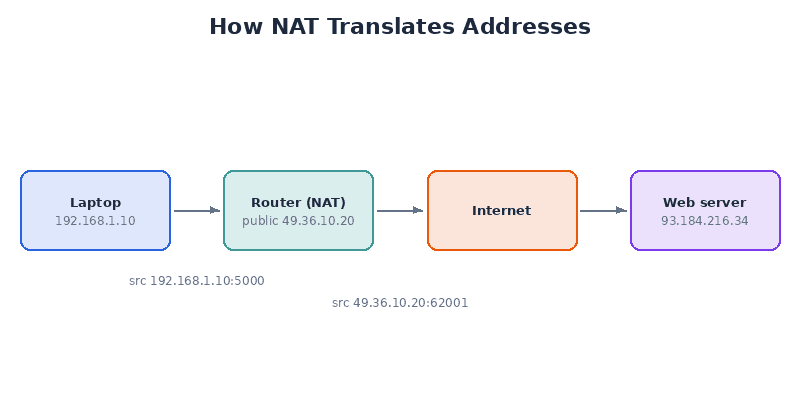
- Your laptop (
192.168.1.10) sends a packet from port5000to a web server at93.184.216.34:443. - The router replaces the source with its public IP and a free port, e.g.
49.36.10.20:62001, and records the mapping in its NAT translation table. - The server replies to
49.36.10.20:62001. - The router looks up port
62001, rewrites the destination back to192.168.1.10:5000and forwards it to your laptop.
Inside local         Inside global          Outside
192.168.1.10:5000 →  49.36.10.20:62001  →  93.184.216.34:443
192.168.1.11:5000 →  49.36.10.20:62002  →  142.250.1.1:443
Types of NAT#
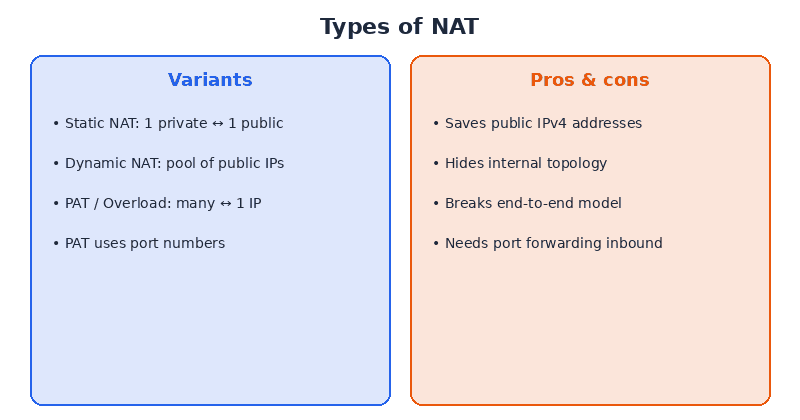
| Type | Mapping | Typical use |
|---|---|---|
| Static NAT | 1 private ↔ 1 public, permanent | Publishing an internal server |
| Dynamic NAT | Private → next free IP from a public pool | Organisations with several public IPs |
| PAT / NAT overload | Many private → 1 public, distinguished by port | Every home router |
PAT (Port Address Translation) is what people usually mean by "NAT". Because it tracks ports, a single public IP can support tens of thousands of simultaneous connections.
Port forwarding: letting traffic in#
NAT naturally blocks unsolicited inbound connections – there's no table entry for them. To host a game server or a web server at home, you create a port forwarding rule, for example "send anything arriving on public port 8080 to 192.168.1.50:80".
NAT is not a firewall, even though it hides internal addresses. Every forwarded port is an open door – keep the service behind it patched, and prefer a VPN for remote access.
CGNAT: NAT at the ISP#
Many ISPs, especially mobile carriers, now apply Carrier-Grade NAT. Your router's "public" IP is actually in 100.64.0.0/10, and the ISP translates it again. The result: you can't port-forward, and some peer-to-peer apps struggle. IPv6 avoids this entirely.
Pros and cons#
- Pros: conserves IPv4 addresses, hides internal topology, simple for home users.
- Cons: breaks true end-to-end connectivity, complicates VoIP and P2P (needing STUN/TURN or hole punching), adds state to routers, makes logging and tracing harder.
# Linux: masquerade (PAT) traffic leaving eth0
sudo iptables -t nat -A POSTROUTING -o eth0 -j MASQUERADE

# Port forward public 8080 to an internal web server
sudo iptables -t nat -A PREROUTING -p tcp --dport 8080 \
  -j DNAT --to-destination 192.168.1.50:80
Key takeaways#
- NAT translates private IPs to public IPs at the network edge.
- PAT lets many devices share one public IP using port numbers.
- Inbound connections need port forwarding or static NAT.
- NAT is not a security boundary on its own; CGNAT adds a second layer at the ISP.