The OSI Model Explained: All 7 Layers in Plain English
A clear walkthrough of the 7 layers of the OSI model, what each layer does, real protocols at every layer, and how encapsulation works.

The OSI (Open Systems Interconnection) model splits network communication into seven layers, each with one clear job. It is the shared vocabulary engineers use when they say "that's a Layer 3 problem" or "use a Layer 7 load balancer".
The seven layers at a glance#
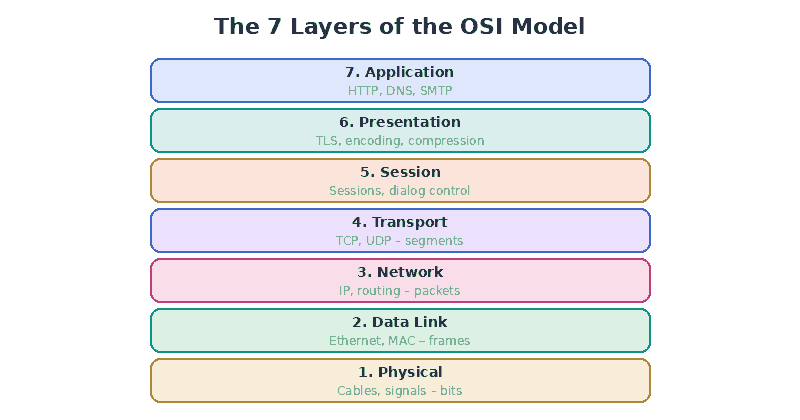
A popular way to remember them from top to bottom: "All People Seem To Need Data Processing".
Layer by layer#
7. Application#
Where network-aware software lives. It defines how applications request and exchange data. Examples: HTTP, DNS, SMTP, FTP, SSH.
6. Presentation#
Makes data understandable to both sides: character encoding, serialization, compression and encryption. TLS is commonly placed here, along with formats like JPEG and UTF-8.
5. Session#
Opens, manages and closes conversations between two applications, including checkpoints and reconnection. In modern stacks this job is often absorbed into the application or transport layers.
4. Transport#
Delivers data end-to-end between processes using port numbers. TCP adds reliability, ordering and flow control; UDP is lightweight and connectionless. The unit here is a segment (or datagram for UDP).
3. Network#
Handles logical addressing and routing between networks. IP lives here and routers operate here. The unit is a packet.
2. Data Link#
Moves frames between devices on the same local link using MAC addresses, and detects transmission errors. Ethernet and Wi-Fi (802.11) work here; switches are Layer 2 devices. The unit is a frame.
1. Physical#
The actual transmission of bits as electrical signals, light pulses or radio waves – cables, connectors, voltages and frequencies.
Encapsulation: how data travels down the stack#
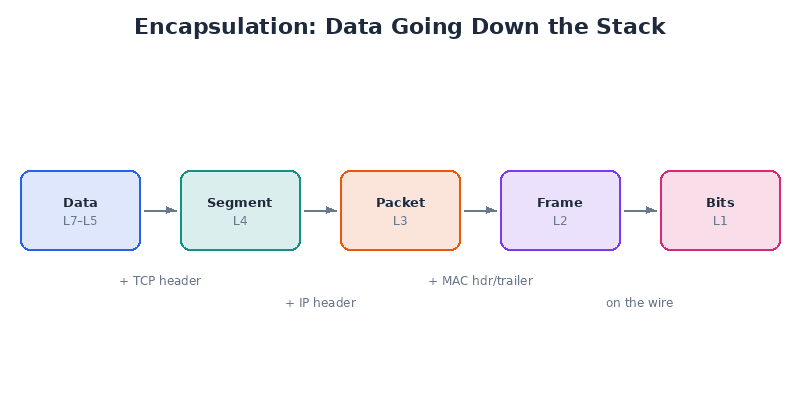
When you send data, each layer wraps it with its own header (and sometimes a trailer). The receiver unwraps it in reverse order – this is decapsulation.
| Layer | Data unit (PDU) | Address used | Typical device |
|---|---|---|---|
| Transport (4) | Segment / Datagram | Port number | Firewall (stateful) |
| Network (3) | Packet | IP address | Router |
| Data Link (2) | Frame | MAC address | Switch |
| Physical (1) | Bits | — | Hub, repeater, cable |
Why the OSI model is useful#
- Troubleshooting – work bottom-up: is the cable connected (L1)? Does the device have a link and MAC (L2)? Can you ping the IP (L3)? Is the port open (L4)? Does the app respond (L7)?
- Communication – "Layer 4 load balancer" instantly tells a teammate it routes on IP and port, not on URLs.
- Design – layers can change independently. HTTP doesn't care whether it runs over Wi-Fi or fiber.
The real internet runs on the simpler TCP/IP model. OSI is mainly a teaching and troubleshooting framework, but its layer numbers are used everywhere.
Key takeaways#
- OSI has 7 layers: Physical, Data Link, Network, Transport, Session, Presentation, Application.
- Each layer adds its own header during encapsulation: segment → packet → frame → bits.
- Switches work at Layer 2 (MAC), routers at Layer 3 (IP).
- Debug network issues bottom-up, one layer at a time.