Tricky JavaScript Output Questions for Interviews (With Explanations)
12 tricky "predict the output" JavaScript interview questions with step-by-step explanations: hoisting, temporal dead zone, type coercion, == vs ===, typeof, object references, this, event loop order, array quirks, floating point and ASI.
Output-based questions are popular in JavaScript interviews because they reveal whether you understand the language's rules or just memorised syntax. For each of the 12 puzzles below, try to predict the output before reading the answer. The explanations show the reasoning interviewers expect you to say out loud.
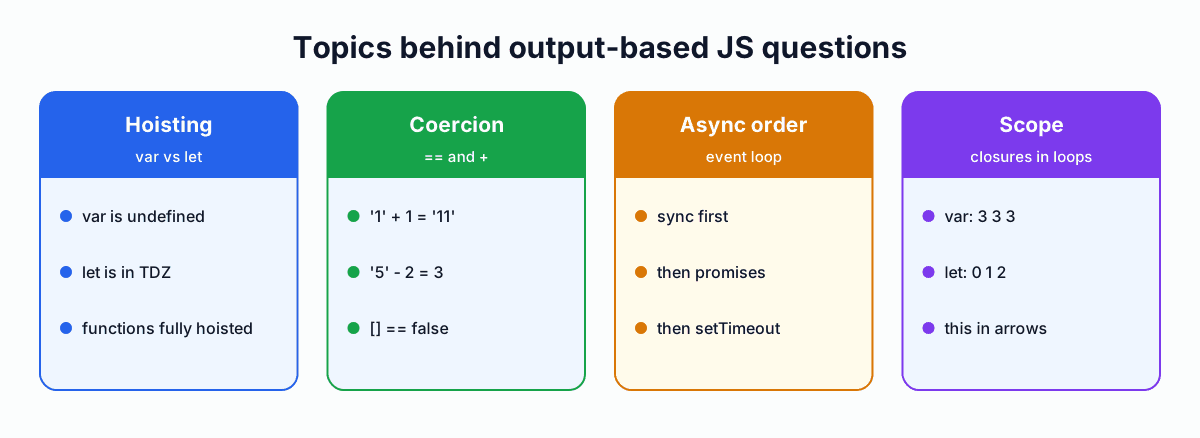
Go line by line. Ask: is anything hoisted? Is there type coercion? What is this? Is anything asynchronous? Write the synchronous output first, then microtasks, then timers.
Hoisting and scope#
Q1. Hoisting with var and functions#
console.log(a);
var a = 5;

greet();
function greet() { console.log("hello"); }

sayHi();
var sayHi = function () { console.log("hi"); };
Output:
undefined
hello
TypeError: sayHi is not a function
var ais hoisted and initialised toundefined; the assignment stays in place.- Function declarations are hoisted completely, so
greet()works. - For a function expression, only the
var sayHideclaration is hoisted, so it isundefinedwhen called.
Q2. The temporal dead zone#
let x = 1;
{
  console.log(x);
  let x = 2;
}
Output: ReferenceError: Cannot access 'x' before initialization
The inner let x is hoisted to the top of the block, so it shadows the outer x. But it is in the temporal dead zone until its declaration line runs, so reading it throws. The outer x is never consulted.
Q3. Shadowing inside a function#
var x = 1;
function test() {
  console.log(x);
  var x = 2;
}
test();
Output: undefined
Inside test, var x is hoisted to the top of the function, creating a local x that is undefined at the time of the log. The global x is shadowed.
Types and coercion#
Q4. The + operator and coercion#
console.log(1 + "2" + 3);
console.log(1 + 2 + "3");
console.log("5" - 2);
console.log("5" * "2");
console.log(true + true);
console.log([] + []);
console.log([] + {});
console.log(+"");
Output:
123
33
3
10
2
(empty string)
[object Object]
0+is evaluated left to right. If either side is a string, it concatenates:1 + "2"is"12", then"123". But1 + 2is3first, then"33".-,*and/only work on numbers, so strings are converted.truebecomes1.- Arrays convert to strings (
[]becomes""), and plain objects become"[object Object]". - Unary
+converts to a number; an empty string is0.
Q5. Loose equality surprises#
console.log(null == undefined);
console.log(null === undefined);
console.log(NaN == NaN);
console.log("0" == false);
console.log(0 == "");
console.log([] == false);
console.log([] == ![]);
Output: true false false true true true true
nullandundefinedare loosely equal only to each other.NaNis not equal to anything, including itself. UseNumber.isNaN.- With
==, booleans become numbers:falseis0;"0"becomes0. [] == false:[]becomes"", then0;falseis0.![]isfalse(an array is truthy), so it becomes the previous case.
Use === by default. The one common exception is value == null, which checks for both null and undefined.
Q6. typeof quirks#
console.log(typeof null);
console.log(typeof NaN);
console.log(typeof []);
console.log(typeof function () {});
console.log(typeof undeclaredVariable);
console.log(typeof typeof 1);
Output: object number object function undefined string
typeof null === "object"is a famous bug from the first version of JavaScript, kept for compatibility.NaNis a numeric value meaning "not a valid number".- Use
Array.isArrayto detect arrays. typeofon an undeclared variable doesn't throw; it returns"undefined".typeof 1is the string"number", andtypeof "number"is"string".
References, this and async#
Q7. Objects are passed by reference value#
const a = { x: 1 };
const b = a;
b.x = 2;
console.log(a.x);

let c = { x: 1 };
let d = c;
d = { x: 3 };
console.log(c.x);

function change(obj) {
  obj.x = 10;
  obj = { x: 20 };
}
const e = { x: 1 };
change(e);
console.log(e.x);
Output: 2, 1, 10
aandbpoint to the same object, so mutating through one is visible through the other.- Reassigning
dmakes it point to a new object;cis untouched. - The function receives a copy of the reference. Mutating
obj.xchanges the original, but reassigningobjonly changes the local parameter.
Q8. this in methods, arrows and callbacks#
const obj = {
  name: "A",
  regular() { return this.name; },
  arrow: () => this?.name,
  nested() { return [1].map(() => this.name); },
};

console.log(obj.regular());
console.log(obj.arrow());
console.log(obj.nested());
Output (in an ES module or Node.js): A, undefined, ["A"]
obj.regular()uses implicit binding:thisisobj.- The arrow property takes
thisfrom the outer (module) scope, not fromobj. - The arrow inside
nestedinheritsthisfromnested, which was called onobj.
More practice: this, call, apply and bind interview questions.
Q9. Sync, promises, async/await and timers#
console.log("A");
setTimeout(() => console.log("B"), 0);
Promise.resolve().then(() => console.log("C"));
(async () => {
  console.log("D");
  await null;
  console.log("E");
})();
console.log("F");
Output: A D F C E B
- Synchronous:
A, then the async function runs synchronously untilawait, loggingD, thenF. - Microtasks in the order they were queued:
C, then the continuation afterawait,E. - Macrotask:
B.
Full explanation in event loop interview questions.
Arrays, numbers and syntax#
Q10. Array quirks#
const arr = [1, 2, 3];
arr[10] = 11;
console.log(arr.length);

console.log([1, 2, 3] + [4, 5]);
console.log([10, 1, 3].sort());
console.log(["1", "2", "3"].map(parseInt));
Output:
11
1,2,34,5
[1, 10, 3]
[1, NaN, NaN]- Assigning index 10 creates empty slots;
lengthbecomes 11. - Arrays become strings (
"1,2,3"and"4,5") and are concatenated. - Default
sortcompares strings, so"10"comes before"3". mappasses(value, index), so the calls areparseInt("1", 0)(radix 0 means default: 1),parseInt("2", 1)(invalid radix: NaN) andparseInt("3", 2)("3" isn't a binary digit: NaN). Use.map(Number).
Q11. Floating point and Math edge cases#
console.log(0.1 + 0.2 === 0.3);
console.log(0.1 + 0.2);
console.log(Math.max());
console.log(Math.min());
console.log(9007199254740992 === 9007199254740993);
Output:
false
0.30000000000000004
-Infinity
Infinity
true- Numbers are 64-bit binary floating point, so 0.1 and 0.2 can't be stored exactly. Compare with a tolerance:
Math.abs(a - b) < Number.EPSILON, or work in integer paise/cents. Math.max()with no arguments returns the identity value for "maximum":-Infinity.- Integers above
Number.MAX_SAFE_INTEGER(253 − 1) lose precision; useBigInt.
Q12. Automatic semicolon insertion and object keys#
function getConfig() {
  return
  {
    debug: true
  };
}
console.log(getConfig());

const store = {};
store[{ a: 1 }] = "first";
store[{ b: 2 }] = "second";
console.log(store);
Output:
undefined
{ "[object Object]": "second" }- JavaScript inserts a semicolon after a bare
returnat the end of a line, so the function returnsundefined. Keep the opening brace on the same line asreturn. - Plain object keys must be strings or Symbols. Both objects convert to the same key,
"[object Object]", so the second assignment overwrites the first. Use aMapfor object keys.
Quick revision#
| Rule | Remember |
|---|---|
var hoisting | Declared as undefined |
let/const hoisting | Temporal dead zone until declared |
+ with a string | Concatenation |
NaN == NaN | false |
typeof null | "object" |
| Async order | Sync → microtasks → timers |
0.1 + 0.2 | Not exactly 0.3 |
Keep practising with closures and scope interview questions and JavaScript interview questions for freshers.
Key takeaways#
- Function declarations hoist fully;
varhoists asundefined;letandconstsit in the temporal dead zone. +concatenates if either side is a string; other arithmetic operators convert to numbers.- Use
===; rememberNaNnever equals itself andtypeof nullis "object". - Objects are shared by reference, but reassigning a variable or parameter doesn't affect the original.
- Default
sortis string-based, floats are imprecise, and a line break afterreturnreturnsundefined.