Hub vs Switch vs Router: Network Devices Explained
Understand the difference between hubs, switches, routers and other network devices, which OSI layer each works at, and how switches learn MAC addresses.
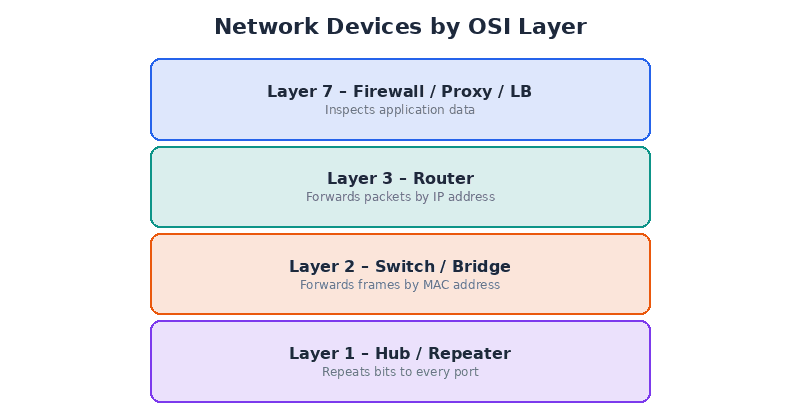
Hubs, switches and routers all move data, but they make very different decisions about where that data goes. The easiest way to understand them is by the OSI layer they operate at.
Devices by OSI layer#
Hub (Layer 1)#
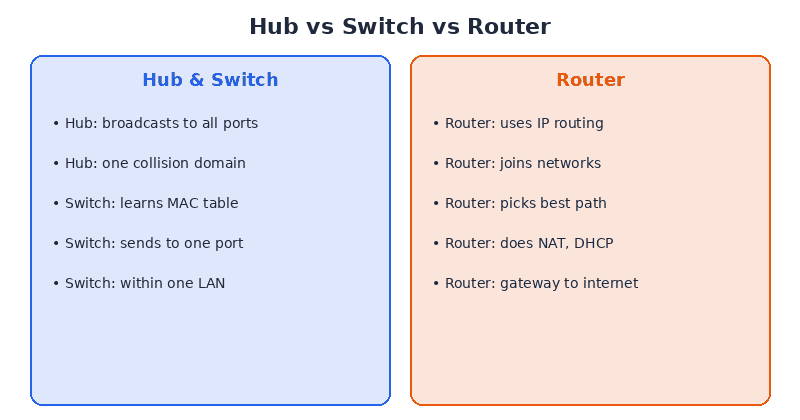
A hub is a simple repeater with many ports. Whatever signal arrives on one port is copied to every other port. It has no idea what a MAC or IP address is.
- All devices share one collision domain – only one can transmit at a time.
- Every device sees every frame, which is inefficient and insecure.
- Hubs are essentially obsolete; you'll mostly meet them in textbooks and interviews.
Switch (Layer 2)#
A switch forwards Ethernet frames based on MAC addresses. It learns which device is on which port and sends frames only where they need to go.
How a switch learns#
- A frame arrives on port 3 from MAC
AA:AA. The switch records "AA:AA is on port 3" in its MAC address table (CAM table). - If the destination MAC is already in the table, the frame goes out only that port.
- If the destination is unknown (or it's a broadcast), the switch floods it to all ports except the source. The reply teaches it the missing entry.
Each switch port is its own collision domain, and full-duplex links remove collisions entirely. All ports are still in one broadcast domain unless you use VLANs.
Layer 3 switches can also route between VLANs at hardware speed. In data centers, the line between "switch" and "router" is often blurry.
Router (Layer 3)#
A router connects different networks and forwards packets based on IP addresses. It looks up the destination in its routing table and picks the best next hop.
- Each router interface is a separate broadcast domain – routers don't forward broadcasts.
- Home routers usually combine a router, switch, Wi-Fi access point, DHCP server, NAT and firewall in one box.
- Routers decrement the IP TTL at each hop, which is how
traceroutediscovers the path.
Comparison#
| Feature | Hub | Switch | Router |
|---|---|---|---|
| OSI layer | 1 | 2 | 3 |
| Forwards by | Nothing – repeats | MAC address | IP address |
| Collision domains | One shared | One per port | One per port |
| Broadcast domains | One | One (per VLAN) | One per interface |
| Typical use | Legacy | Connect devices in a LAN | Connect LANs and the internet |
Other devices you'll meet#
- Access point – bridges Wi-Fi clients onto a wired LAN.
- Modem / ONT – converts between your network and the ISP's cable, DSL or fiber line.
- Firewall – filters traffic by rules, from simple port blocks to deep application inspection.
- Load balancer – spreads requests across multiple servers.
- Bridge – an older two-port Layer 2 device; a switch is essentially a multi-port bridge.
# See your machine's routing table
ip route            # Linux
route print         # Windows
netstat -rn         # macOS

# See IP-to-MAC mappings learned via ARP
ip neigh            # Linux
arp -a              # Windows / macOS
Key takeaways#
- Hubs repeat bits to every port (Layer 1).
- Switches forward frames by MAC address and learn a MAC table (Layer 2).
- Routers forward packets by IP address between networks (Layer 3).
- Switches split collision domains; routers split broadcast domains.