HTTP vs HTTPS: How the Web Talks and How TLS Keeps It Safe
Learn how HTTP requests and responses work, common methods and status codes, the evolution to HTTP/2 and HTTP/3, and how HTTPS uses TLS to secure traffic.

HTTP (HyperText Transfer Protocol) is the application-layer protocol of the web. HTTPS is the same protocol wrapped in TLS encryption so nobody in the middle can read or modify the traffic.
The request/response cycle#
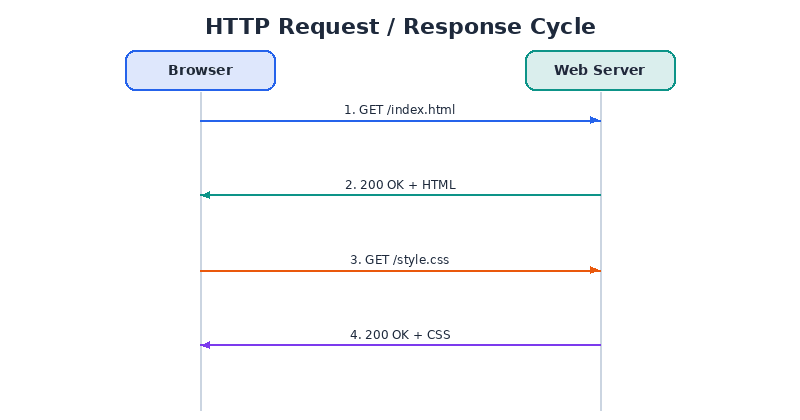
HTTP is a stateless request/response protocol. The client sends a request; the server sends back a response. Loading a page usually triggers many requests – one for HTML, then more for CSS, JavaScript, images and API data.
GET /articles/tcp-vs-udp HTTP/1.1
Host: jiocoder.com
User-Agent: Mozilla/5.0
Accept: text/html

HTTP/1.1 200 OK
Content-Type: text/html; charset=utf-8
Cache-Control: max-age=600
Content-Length: 18342

<!doctype html>...
Common methods#
| Method | Purpose | Idempotent? |
|---|---|---|
| GET | Read a resource | Yes |
| POST | Create or submit data | No |
| PUT | Replace a resource | Yes |
| PATCH | Partially update a resource | Not necessarily |
| DELETE | Remove a resource | Yes |
Status code families#
- 1xx – informational (e.g. 101 Switching Protocols for WebSockets)
- 2xx – success (200 OK, 201 Created, 204 No Content)
- 3xx – redirection (301 Moved Permanently, 304 Not Modified)
- 4xx – client errors (400, 401, 403, 404, 429)
- 5xx – server errors (500, 502 Bad Gateway, 503, 504)
HTTP/1.1 → HTTP/2 → HTTP/3#
| Version | Transport | Key feature |
|---|---|---|
| HTTP/1.1 | TCP | Text-based, persistent connections, one request at a time per connection |
| HTTP/2 | TCP + TLS | Binary framing, multiplexing many streams on one connection, header compression |
| HTTP/3 | QUIC over UDP | No TCP head-of-line blocking, faster setup, better on lossy mobile networks |
What HTTPS adds#
Plain HTTP travels as readable text. Anyone on the same Wi-Fi, an ISP or a compromised router could read passwords or inject content. HTTPS provides three guarantees:
- Confidentiality – data is encrypted.
- Integrity – tampering is detected.
- Authentication – the server proves its identity with a certificate signed by a trusted Certificate Authority.
The TLS 1.3 handshake (simplified)#
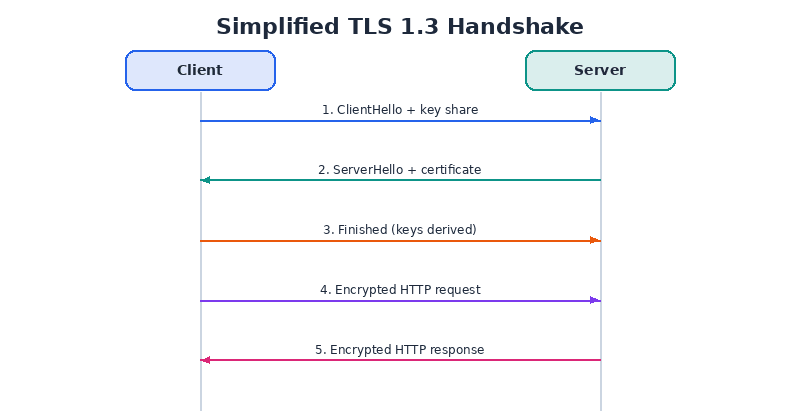
- ClientHello – the client lists supported cipher suites and sends its key share for a Diffie-Hellman exchange.
- ServerHello – the server picks a cipher, sends its own key share and its certificate.
- Both sides derive the same session keys. The client verifies the certificate chain and hostname.
- Finished messages confirm the handshake; encrypted HTTP traffic begins after just one round trip.
Use curl -v https://example.com to see the TLS version, cipher and certificate details, plus every request and response header.
HTTPS best practices#
- Redirect all HTTP traffic to HTTPS with a 301.
- Enable HSTS so browsers never try plain HTTP again.
- Disable old protocols (SSL, TLS 1.0, 1.1) and weak ciphers.
- Automate certificate renewal (for example with Let's Encrypt and ACME).
Key takeaways#
- HTTP is a stateless request/response protocol with methods and status codes.
- HTTP/2 adds multiplexing; HTTP/3 moves to QUIC over UDP.
- HTTPS = HTTP + TLS: confidentiality, integrity and authentication.
- TLS 1.3 sets up encryption in a single round trip.