IPv4 Addressing Explained: Octets, Classes, Public and Private IPs
Learn how IPv4 addresses work: the 32-bit structure, network vs host portions, address classes, private ranges and special addresses.
An IP address is the address of a device on a network, just like a postal address for a house. IPv4 is the original and still most widely used version, and understanding it is the foundation for subnetting, routing and cloud networking.
The structure of an IPv4 address#
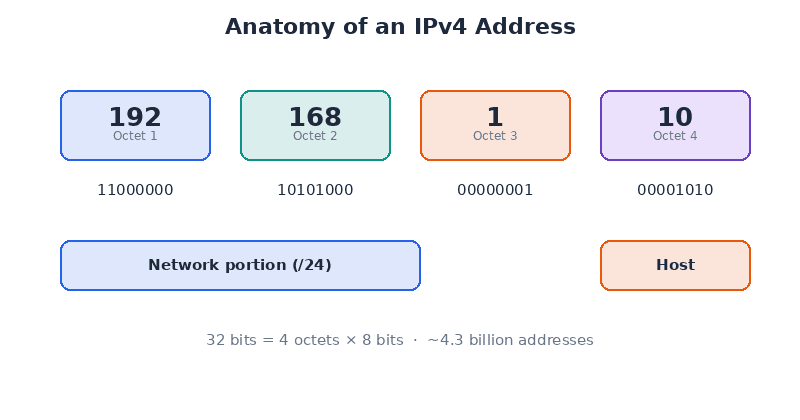
An IPv4 address is 32 bits long. For readability it is written as four decimal numbers called octets, separated by dots. Each octet is 8 bits, so it ranges from 0 to 255.
192      .168      .1        .10
11000000 .10101000 .00000001 .00001010
32 bits give 232 ≈ 4.3 billion possible addresses – which sounded huge in the 1980s and is now nowhere near enough.
Network portion and host portion#
Every IPv4 address has two parts:
- Network portion – identifies which network the device is on. All devices on the same LAN share it.
- Host portion – identifies the specific device within that network.
The subnet mask tells you where the split is. In 192.168.1.10/24, the /24 means the first 24 bits (three octets) are the network, and the last 8 bits are for hosts. The same mask written in dotted form is 255.255.255.0.
Address classes (historical)#
Originally, IPv4 used fixed classes. They have been replaced by CIDR (classless addressing), but you'll still hear about them in interviews.
| Class | First octet | Default mask | Use |
|---|---|---|---|
| A | 1–126 | /8 | Very large networks |
| B | 128–191 | /16 | Medium networks |
| C | 192–223 | /24 | Small networks |
| D | 224–239 | — | Multicast |
| E | 240–255 | — | Reserved / experimental |
Public vs private addresses#
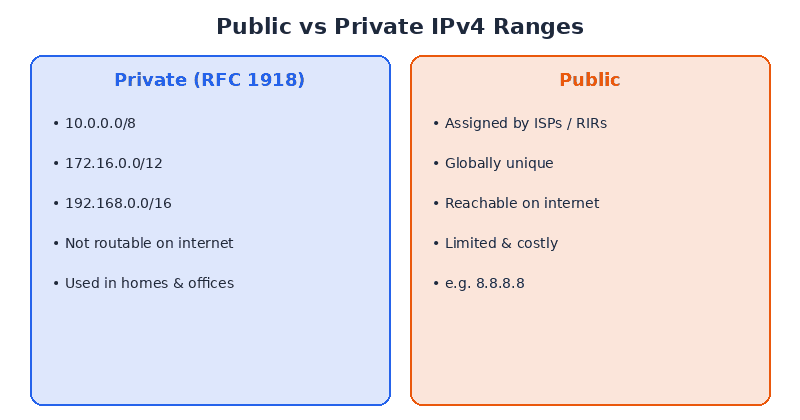
To slow down address exhaustion, RFC 1918 reserved three ranges for private use. These can be reused in every home and office, but they are not routed on the public internet. Your router uses NAT to share one public IP among all private devices.
10.0.0.0/8– 10.0.0.0 to 10.255.255.255172.16.0.0/12– 172.16.0.0 to 172.31.255.255192.168.0.0/16– 192.168.0.0 to 192.168.255.255
Special addresses worth knowing#
| Address | Meaning |
|---|---|
127.0.0.1 | Loopback – "this machine" (localhost) |
0.0.0.0 | "Any address" when binding a server; unknown source |
255.255.255.255 | Limited broadcast to the local network |
169.254.x.x | Link-local – assigned when DHCP fails |
100.64.0.0/10 | Carrier-grade NAT space used by ISPs |
If your laptop shows a 169.254.x.x address, it couldn't reach a DHCP server. Check the cable, Wi-Fi connection or router before debugging anything else.
Find your own IP#
# Private (local) IP
ip -4 addr          # Linux
ipconfig            # Windows
ipconfig getifaddr en0   # macOS

# Public IP as seen by the internet
curl ifconfig.me
Key takeaways#
- IPv4 addresses are 32 bits, written as four octets from 0–255.
- The subnet mask splits an address into network and host portions.
- 10/8, 172.16/12 and 192.168/16 are private ranges reused everywhere behind NAT.
- 127.0.0.1 is loopback; 169.254.x.x usually means DHCP failed.