How VPNs Work: Tunnels, Encryption and Protocols
Understand how a VPN creates an encrypted tunnel, the difference between remote-access and site-to-site VPNs, split tunneling, and protocols like WireGuard, OpenVPN and IPsec.
A VPN (Virtual Private Network) creates an encrypted tunnel across an untrusted network – usually the internet – so that your traffic behaves as if you were directly connected to a private network.
The encrypted tunnel#
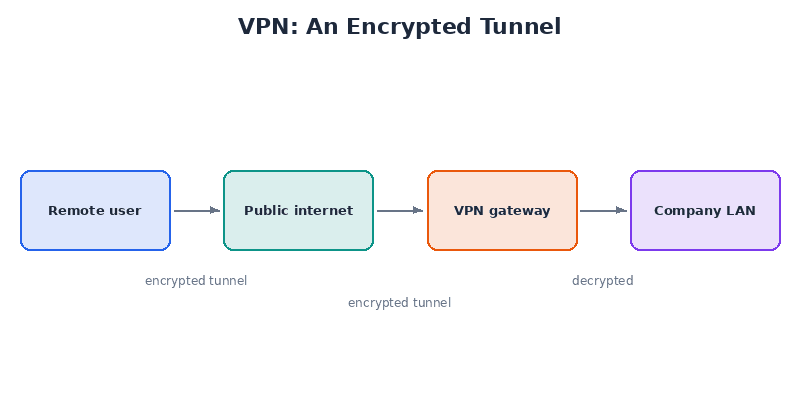
- The VPN client on your laptop takes each packet destined for the private network.
- It encrypts the packet and wraps it inside a new outer packet addressed to the VPN gateway – this is encapsulation (tunneling).
- The outer packet crosses the public internet. Anyone watching sees only encrypted data going to the VPN server.
- The gateway decrypts it and forwards the original packet into the company LAN. Replies follow the same path back.
Your device also receives a virtual network interface and an IP address from the private network, so internal apps see you as a local user.
Types of VPN#
Remote-access VPN#
Individual users connect from home, a café or a hotel to the company network. This is what most employees use.
Site-to-site VPN#
Two routers or firewalls build a permanent tunnel between two offices (or between an office and a cloud VPC). Users don't run any client – the network does it for them.
Consumer VPN#
Commercial services route all your internet traffic through their servers, hiding your browsing from the local network and your ISP, and changing the IP address websites see.
VPN protocols#
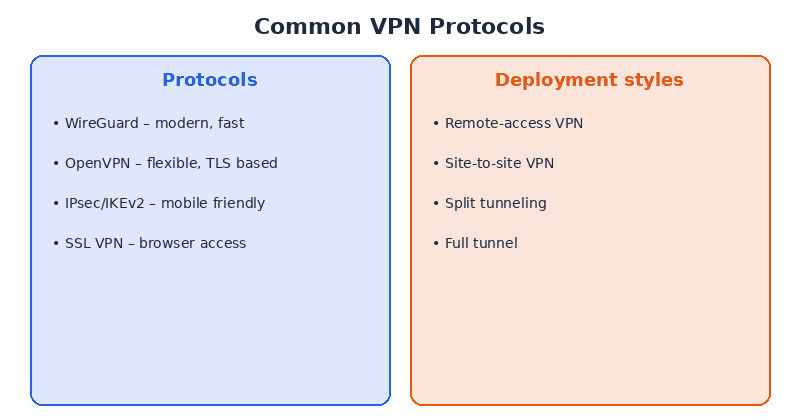
| Protocol | Transport | Strengths |
|---|---|---|
| WireGuard | UDP | Tiny codebase, modern cryptography, very fast, easy to configure |
| OpenVPN | UDP or TCP | Mature, flexible, uses TLS, works through most firewalls |
| IPsec / IKEv2 | UDP (ESP) | Industry standard for site-to-site; IKEv2 reconnects quickly on mobile |
| SSL/TLS VPN | TCP 443 | Browser or lightweight client; blends in with HTTPS |
PPTP and L2TP without IPsec are outdated and insecure. Don't use them for anything sensitive.
Full tunnel vs split tunnel#
- Full tunnel – all traffic, including normal web browsing, goes through the VPN. More control and inspection, but more load on the VPN.
- Split tunnel – only traffic for company networks uses the VPN; everything else goes straight to the internet. Faster, but company security tools can't see that other traffic.
What a VPN does and doesn't do#
- ✅ Encrypts traffic on untrusted networks such as public Wi-Fi.
- ✅ Gives remote users secure access to private resources.
- ✅ Hides your traffic from the local network and ISP.
- ❌ Doesn't make you anonymous – the VPN provider can see your traffic.
- ❌ Doesn't protect against malware, phishing or weak passwords.
A minimal WireGuard config#
[Interface]
PrivateKey = <client-private-key>
Address = 10.8.0.2/24
DNS = 10.8.0.1

[Peer]
PublicKey = <server-public-key>
Endpoint = vpn.example.com:51820
AllowedIPs = 10.0.0.0/8          # split tunnel: only company ranges
PersistentKeepalive = 25
Set AllowedIPs = 0.0.0.0/0, ::/0 instead to send all traffic through the tunnel.
Many companies are moving to Zero Trust Network Access (ZTNA), which grants access per application after verifying the user and device, instead of putting users on the whole network.
Key takeaways#
- A VPN encrypts and encapsulates packets in a tunnel across the internet.
- Remote-access VPNs connect users; site-to-site VPNs connect networks.
- WireGuard, OpenVPN and IPsec/IKEv2 are the main modern protocols.
- Split tunneling sends only private traffic through the VPN.
- A VPN improves privacy on untrusted networks but isn't full anonymity or security.