Wi-Fi Explained: Standards, Frequency Bands and Security
Learn how Wi-Fi works: 802.11 standards from Wi-Fi 4 to Wi-Fi 7, 2.4 vs 5 vs 6 GHz bands, channels, WPA3 security and practical tips for faster Wi-Fi.
Wi-Fi is the family of wireless LAN technologies based on the IEEE 802.11 standards. It carries Ethernet-style frames over radio waves between devices and an access point (AP), which bridges them onto the wired network.
How Wi-Fi works in brief#
- An access point broadcasts a network name (SSID) in periodic beacon frames.
- Your device associates with the AP, authenticates (e.g. with a password), and receives an IP via DHCP.
- Because radio is a shared medium, devices take turns using CSMA/CA – listen first, then transmit – to avoid collisions.
- Modern Wi-Fi uses techniques like MIMO (multiple antennas), OFDMA (sharing a channel among many clients) and wider channels to increase speed.
Wi-Fi generations#
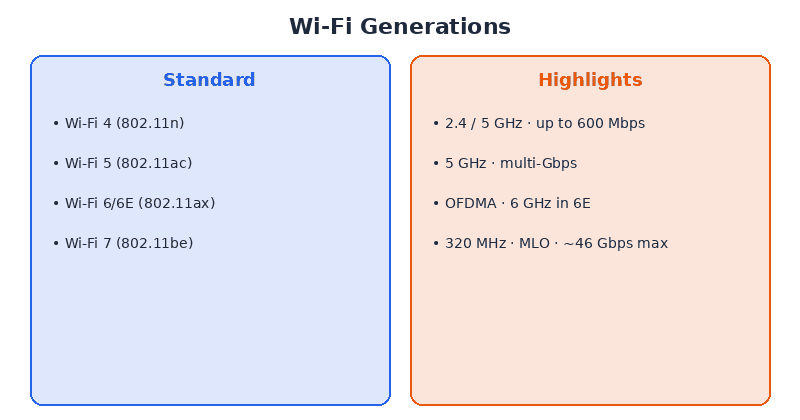
| Name | Standard | Bands | Key improvements |
|---|---|---|---|
| Wi-Fi 4 | 802.11n | 2.4 / 5 GHz | MIMO, 40 MHz channels |
| Wi-Fi 5 | 802.11ac | 5 GHz | 80/160 MHz channels, MU-MIMO downlink |
| Wi-Fi 6 | 802.11ax | 2.4 / 5 GHz | OFDMA, better performance in crowded spaces, Target Wake Time for battery life |
| Wi-Fi 6E | 802.11ax | + 6 GHz | Lots of clean new spectrum |
| Wi-Fi 7 | 802.11be | 2.4 / 5 / 6 GHz | 320 MHz channels, Multi-Link Operation (MLO), 4096-QAM, lower latency |
Advertised maximum speeds are theoretical totals across all streams and bands. Real-world throughput for a single device is usually far lower and depends on distance, walls and interference.
Frequency bands: range vs speed#
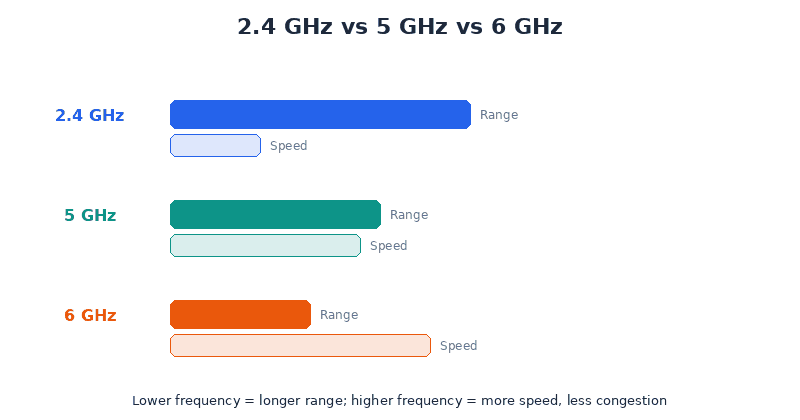
- 2.4 GHz – longest range and best wall penetration, but slower and crowded (only three non-overlapping channels: 1, 6 and 11). Also shared with Bluetooth and microwaves.
- 5 GHz – much faster with many more channels, but shorter range.
- 6 GHz – Wi-Fi 6E/7 only; very wide, clean channels and low interference, but the shortest range.
Tip
Use 2.4 GHz for smart-home devices far from the router, and 5 or 6 GHz for laptops, phones and TVs that need speed. Many routers do this automatically with band steering.
Wi-Fi security#
| Protocol | Status |
|---|---|
| Open / WEP | Insecure – never use |
| WPA / WPA2-TKIP | Deprecated |
| WPA2-AES (PSK) | Acceptable minimum with a strong passphrase |
| WPA3-Personal (SAE) | Recommended – resists offline password guessing |
| WPA2/WPA3-Enterprise (802.1X) | Per-user credentials or certificates for organisations |
- Disable WPS, which has known weaknesses.
- Put guests and IoT devices on a separate SSID / VLAN.
- Keep router firmware updated and change the default admin password.
Getting faster, more reliable Wi-Fi#
- Placement – put the router high, central and away from thick walls, mirrors and microwaves.
- Channels – use a Wi-Fi analyzer app to find less congested channels.
- Mesh or wired backhaul – for large homes, add mesh nodes or access points connected by Ethernet.
- Wire what you can – desktops, consoles and TVs are often better on Ethernet.
- Upgrade old clients – one old Wi-Fi 4 device can slow airtime for everyone.
Bash
# Linux: show Wi-Fi link details (signal, bitrate, channel)
iw dev wlan0 link

# macOS: detailed Wi-Fi info
system_profiler SPAirPortDataType

# Windows: current connection details
netsh wlan show interfaces
Key takeaways#
- Wi-Fi is IEEE 802.11 – a shared radio medium coordinated with CSMA/CA.
- Wi-Fi 6 adds OFDMA; 6E adds the 6 GHz band; Wi-Fi 7 adds 320 MHz channels and MLO.
- 2.4 GHz has more range; 5 and 6 GHz have more speed and less interference.
- Use WPA3 (or at least WPA2-AES) and separate guest/IoT networks.