How to Start Frontend Development in the AI Era (and Why Performance Still Matters)
A practical roadmap to learn frontend development in the AI era: what to learn first, how to use AI tools without hurting your learning, how to add AI features safely, and why performance matters more than ever.

AI tools can now write a React component, a CSS layout or a form validator in seconds. So beginners ask: is frontend still worth learning? Yes. AI writes code, but someone still has to decide what to build, check that the code is correct, make it accessible and keep it fast. This guide shows you what to learn, how to learn it with AI, how to add AI features to your own apps, and why performance matters more than ever.
What changed for frontend developers#
AI has made typing code cheap. It has not made understanding code cheap. Today a frontend developer is valued for:
- Judgement: spotting when AI-generated code is wrong, insecure or slow.
- Fundamentals: knowing how the browser, the DOM, CSS layout and JavaScript actually work.
- User experience: loading states, errors, accessibility and speed, the things users feel.
- Building with AI: chat interfaces, smart search and assistants are now normal product features.
If you only know how to ask AI for code, you compete with everyone who can do the same. If you understand what it gives you, you are the person who can ship it.
The roadmap#
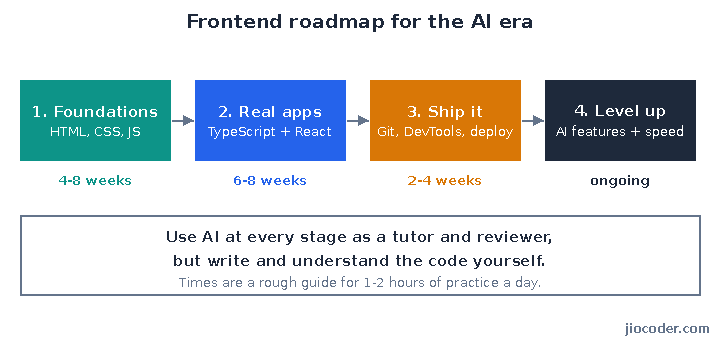
| Stage | Learn | Build |
|---|---|---|
| 1. Foundations | Semantic HTML, CSS (Flexbox, Grid, responsive design), JavaScript (DOM, events, fetch, async/await) | A personal portfolio page, a to-do list in plain JS |
| 2. Real apps | TypeScript basics, one framework (React is the most common), state, forms, routing | A weather or movie app that calls a public API |
| 3. Ship it | Git and GitHub, browser DevTools, a build tool like Vite, deploying to a host | Put every project online with a live link |
| 4. Level up | AI features, accessibility, Core Web Vitals and performance | A chat UI with streaming answers, a speed audit of your own site |
Many beginners jump straight to React because AI can generate it. Then every bug feels like magic. Plain HTML, CSS and JavaScript make everything else understandable, including the code AI writes for you.
How to learn with AI (without learning nothing)#
AI is the best tutor you have ever had, if you use it as a tutor. Used as a copy-paste machine, it skips the part where you actually learn.
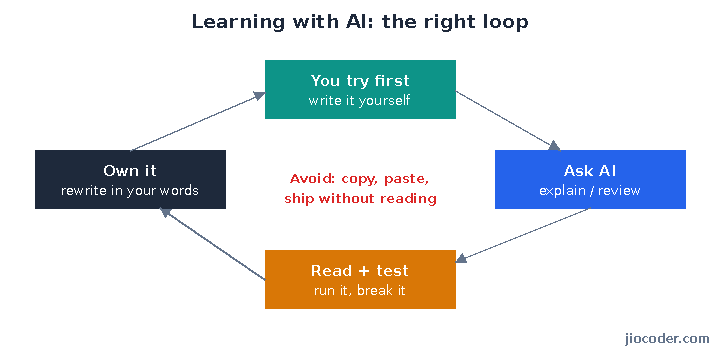
- Try first. Spend 15–20 minutes on the problem yourself, even if your code is messy.
- Ask AI to explain or review, not just to solve. Ask "why does this fail?" before "write it for me".
- Read and test the answer. Run it, change it, break it on purpose and see what happens.
- Own it. Close the chat and rewrite the solution from memory in your own words.
Prompts that help you learn#
Explain this code line by line like I'm a beginner:
[paste code]

Here is my solution. Don't rewrite it. Point out bugs,
accessibility problems and performance issues, and tell me why.

Give me 3 small exercises to practise CSS Grid,
from easy to hard. Don't give the answers yet.

What would break if a user is on a slow 3G connection
or uses only a keyboard on this page?Always ask AI why. "Why is useEffect running twice?" teaches you React. "Fix my useEffect" only fixes today's bug.
Learn to build AI features#
You don't need to train models to work with AI as a frontend developer. Most AI features are a normal web app that sends text to an AI provider's API and shows the reply well. Your job is the experience around it.
Rule 1: never put the API key in the frontend#
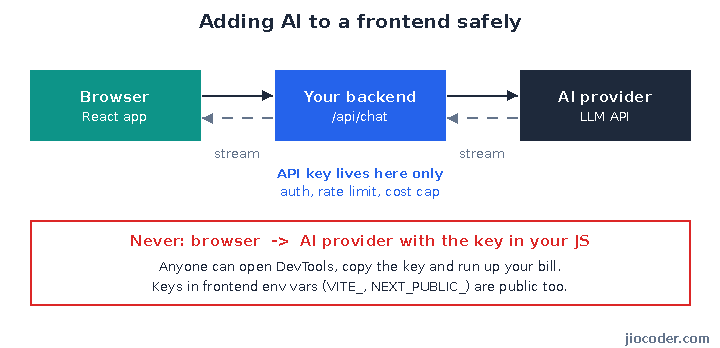
Anything in your JavaScript bundle is public, including environment variables that start with VITE_ or NEXT_PUBLIC_. Anyone can open DevTools, copy the key and run up your bill. Always call your own backend, which keeps the key secret, checks the user is logged in, limits how many requests they can make, and then calls the AI provider.
// server (Express) — the key never leaves the server
app.post("/api/chat", requireAuth, rateLimit, async (req, res) => {
  const { message } = req.body;
  if (!message || message.length > 2000) {
    return res.status(400).json({ error: "Message is empty or too long" });
  }
  res.setHeader("Content-Type", "text/plain; charset=utf-8");

  // Use your AI provider's official SDK here with process.env.AI_API_KEY,
  // and write each piece of the reply as it arrives:
  for await (const chunk of streamReplyFromProvider(message)) {
    res.write(chunk);
  }
  res.end();
});
Rule 2: stream the answer#
AI replies can take several seconds. Showing text as it arrives feels much faster than a spinner followed by a wall of text. The browser can read a streamed response with fetch:
async function askAI(message, onText, signal) {
  const res = await fetch("/api/chat", {
    method: "POST",
    headers: { "Content-Type": "application/json" },
    body: JSON.stringify({ message }),
    signal, // lets the user stop the answer
  });
  if (!res.ok) throw new Error("Request failed: " + res.status);

  const reader = res.body.getReader();
  const decoder = new TextDecoder();
  while (true) {
    const { done, value } = await reader.read();
    if (done) break;
    onText(decoder.decode(value, { stream: true }));
  }
}

// usage
const controller = new AbortController();
stopButton.onclick = () => controller.abort();
askAI("Explain CSS Grid", (text) => {
  output.textContent += text;
}, controller.signal);
Rule 3: design for the AI being slow, wrong or down#
- Show a clear "thinking" state and a Stop button.
- Handle errors with a friendly message and a retry, not a blank box.
- Tell users the answer may be wrong, and let them copy, edit or regenerate it.
- Render AI output as text or sanitised markdown. Never inject it with
innerHTMLunchecked, or you open the door to XSS. - Keep the page usable while the answer streams: don't block scrolling or typing.
Performance matters more in the AI era#
AI tools make it very easy to add code: one prompt and you have a new library, a chart package, a markdown renderer and an animation library. Each one adds JavaScript that every visitor must download, parse and run. On a mid-range phone, that is the difference between a page that feels instant and one that feels broken.
Speed is also measurable and it affects search: Google's Core Web Vitals (LCP, INP and CLS) measure how fast your main content appears, how quickly the page responds to taps, and whether the layout jumps. We explain them in detail in Core Web Vitals Explained.
Load AI features only when they are needed#
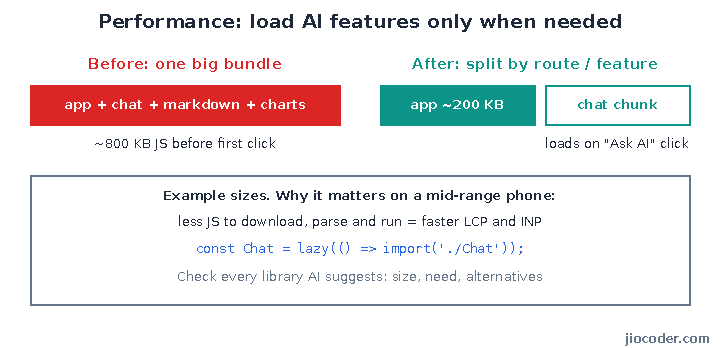
Most visitors never open the chat. Don't make all of them pay for it. With React, lazy and Suspense split the chat into its own file that loads on demand:
import { lazy, Suspense, useState } from "react";

const ChatPanel = lazy(() => import("./ChatPanel"));

export default function App() {
  const [open, setOpen] = useState(false);
  return (
    <>
      <button onClick={() => setOpen(true)}>Ask AI</button>
      {open && (
        <Suspense fallback={<p>Loading chat…</p>}>
          <ChatPanel />
        </Suspense>
      )}
    </>
  );
}
A performance checklist for AI-written code#
- Question every new dependency. Ask AI "can this be done without a library?" and check the package size before installing.
- Optimise images: correct sizes, modern formats like WebP or AVIF,
widthandheightset, lazy-load images below the fold. - Split code by route and feature, as shown above.
- Keep interactions light: update the UI first, do heavy work after, so taps feel instant.
- Measure, don't guess: run Lighthouse in Chrome DevTools and test with CPU throttling or on a real low-cost phone.
AI often writes code that works on your fast laptop. Your job is to make it work for a user on a cheap phone and a slow network. That skill is hard to replace.
A 4-project portfolio that stands out#
- Responsive portfolio site in plain HTML, CSS and JS, scoring well in Lighthouse.
- API app in React + TypeScript with loading, error and empty states done properly.
- AI chat or "explain this" tool with a backend proxy, streaming, a stop button and rate limiting.
- A performance case study: take one of your projects, measure it, improve it, and write a short before/after post.
Each project shows a different skill, and the last one shows something many AI-generated portfolios lack: proof that you understand what you built.
Key takeaways#
- Frontend is still worth learning; AI makes typing code cheap, not understanding it.
- Learn HTML, CSS and JavaScript first, then TypeScript and one framework, then shipping.
- Use AI as a tutor and reviewer: try first, ask why, test the answer and rewrite it yourself.
- Build AI features through your own backend, stream responses and design for slow or wrong answers.
- Performance matters more now: question new dependencies, lazy-load heavy features and measure on real devices.