Python Basics for Beginners: Variables, Loops, Functions and More
Learn Python from scratch: installing Python, variables and data types, strings and f-strings, input, operators, if/elif/else, for and while loops, functions, modules, error handling and a small project.
Python is one of the best first programming languages. Its syntax reads almost like English, it runs everywhere, and the same language powers websites, automation scripts, data science and AI. This guide takes you from zero to writing your first complete program.
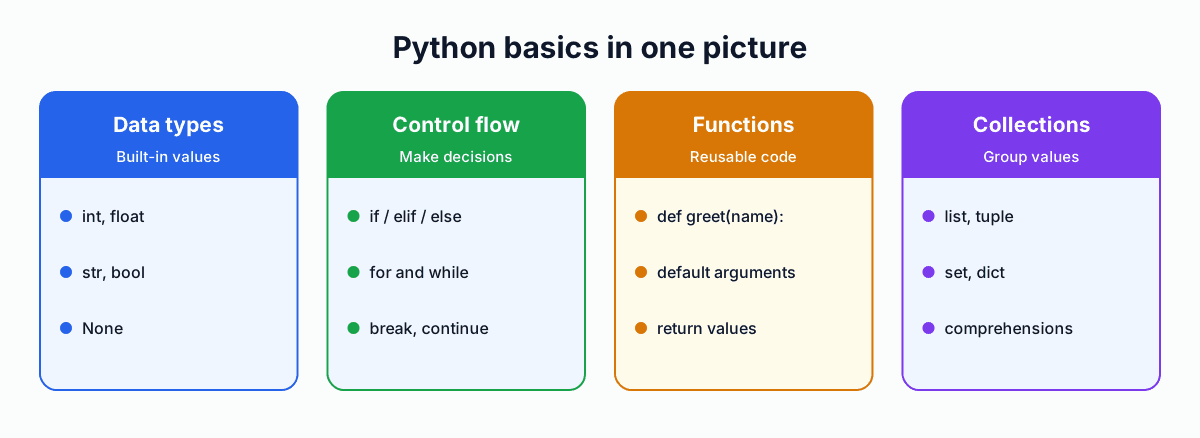
Your learning roadmap#
Setting up#
- Download Python 3 from python.org. On Windows, tick "Add Python to PATH" during install.
- Check it works: open a terminal and run
python --version(orpython3 --versionon macOS/Linux). - Install an editor such as VS Code with the Python extension.
# hello.py
print("Hello, JioCoder!")python hello.pyVariables and data types#
A variable is a name that points to a value. Python figures out the type for you, so there's no need to declare it.
name = "Asha"          # str
age = 21               # int
height = 5.4           # float
is_student = True      # bool
nothing = None         # NoneType

print(type(age)) # <class 'int'>| Type | Example | Use for |
|---|---|---|
int | 42, -7 | Whole numbers (any size) |
float | 3.14 | Decimal numbers |
str | "hello" | Text |
bool | True, False | Yes/no values |
list, tuple, dict, set | [1, 2], {"a": 1} | Collections (see our collections guide) |
Use snake_case for variables and functions (total_price), start names with a letter or underscore, and avoid Python keywords like list or str as names, because they hide the built-ins.
Strings and f-strings#
first = "Asha"
last = "Rao"

full = first + " " + last              # concatenation
print(f"Hi {first}, you are {21} years old")   # f-string (best way)
print(full.upper())                    # ASHA RAO
print(full.lower(), len(full))         # asha rao 8
print(full[0], full[-1])               # A o   (indexing)
print(full[0:4])                       # Asha  (slicing)
print("  padded  ".strip())            # "padded"
print("a,b,c".split(","))              # ['a', 'b', 'c']
Strings are immutable: methods like upper() return a new string instead of changing the original.
Getting input#
name = input("What's your name? ")
age = int(input("How old are you? "))   # input() always returns a str
print(f"In 5 years, {name} will be {age + 5}.")Operators#
print(7 + 2, 7 - 2, 7 * 2)   # 9 5 14
print(7 / 2)                  # 3.5   true division
print(7 // 2)                 # 3     floor division
print(7 % 2)                  # 1     remainder
print(2 ** 10)                # 1024  power

print(5 > 3 and 2 > 1)        # True
print(not True)               # False
print("py" in "python")       # True
Conditions: if, elif, else#
Python uses indentation (4 spaces) instead of curly braces to group code.
marks = 78

if marks >= 90:
    grade = "A"
elif marks >= 75:
    grade = "B"
elif marks >= 50:
    grade = "C"
else:
    grade = "F"

print(f"Grade: {grade}")       # Grade: B

status = "pass" if marks >= 50 else "fail" # one-line conditionalLoops#
for loops#
for i in range(5):            # 0, 1, 2, 3, 4
    print(i)

for i in range(2, 11, 2):     # 2, 4, 6, 8, 10
    print(i)

fruits = ["apple", "mango", "banana"]
for fruit in fruits:
    print(fruit)

for index, fruit in enumerate(fruits, start=1):
    print(index, fruit)       # 1 apple, 2 mango, 3 banana
while loops#
count = 3
while count > 0:
    print(count)
    count -= 1
print("Lift off!")
break and continue#
for n in range(1, 20):
    if n % 2 == 0:
        continue      # skip even numbers
    if n > 9:
        break         # stop the loop
print(n) # 1 3 5 7 9Functions#
def greet(name, greeting="Hello"):
    """Return a friendly greeting."""
    return f"{greeting}, {name}!"

print(greet("Asha"))                 # Hello, Asha!
print(greet("Ravi", greeting="Hi"))  # Hi, Ravi!

def stats(*numbers):
    return min(numbers), max(numbers), sum(numbers) / len(numbers)

low, high, avg = stats(4, 8, 15, 16) # tuple unpackingdefdefines a function;returnsends back a value (orNoneif omitted).- Default arguments make parameters optional.
*argscollects extra positional arguments;**kwargscollects keyword arguments.- The string under
defis a docstring that documents the function.
Lambda functions#
square = lambda x: x * x
students = [("Asha", 82), ("Ravi", 91), ("Meera", 77)]
students.sort(key=lambda s: s[1], reverse=True)   # sort by marks
Modules and imports#
import math
from random import randint
from datetime import date

print(math.sqrt(16))       # 4.0
print(randint(1, 6))       # a random dice roll
print(date.today())
Python's standard library is huge. For third-party packages, use pip inside a virtual environment; see Python virtual environments and pip.
Handling errors#
try:
    age = int(input("Age: "))
    print(100 / age)
except ValueError:
    print("Please enter a number.")
except ZeroDivisionError:
    print("Age can't be zero.")
else:
    print("All good!")
finally:
    print("Done.")
Mini project: number guessing game#
from random import randint

def play(max_number=100, max_tries=7):
    secret = randint(1, max_number)
    print(f"I'm thinking of a number between 1 and {max_number}.")

    for attempt in range(1, max_tries + 1):
        try:
            guess = int(input(f"Attempt {attempt}/{max_tries}: "))
        except ValueError:
            print("That's not a number.")
            continue

        if guess == secret:
            print(f"🎉 Correct! You got it in {attempt} tries.")
            return
        print("Too high!" if guess > secret else "Too low!")

    print(f"Out of tries. The number was {secret}.")

if __name__ == "__main__":
play()With 100 numbers, a smart player halves the range every guess, and 2⁷ = 128 ≥ 100. That strategy is binary search, one of the most important algorithms you'll learn.
Key takeaways#
- Python is dynamically typed: variables don't need type declarations.
- Use f-strings for formatting and remember that
input()always returns a string. - Indentation defines code blocks for
if, loops and functions. - Use
forwithrange()andenumerate(), andwhilewhen you don't know how many iterations you need. - Organise code into functions and modules, and handle bad input with
try/except.