Binary Search Algorithm: Explained with Code, Variations and Interview Problems
Master binary search: how it works, iterative and recursive code in Python, Java and JavaScript, O(log n) complexity, first/last occurrence, lower bound, rotated arrays and binary search on the answer.

Binary search finds a target in a sorted array by repeatedly cutting the search range in half. Instead of checking a million items one by one, it needs at most 20 comparisons. It's simple to describe, famously easy to get subtly wrong, and one of the most common patterns in coding interviews.
How it works#
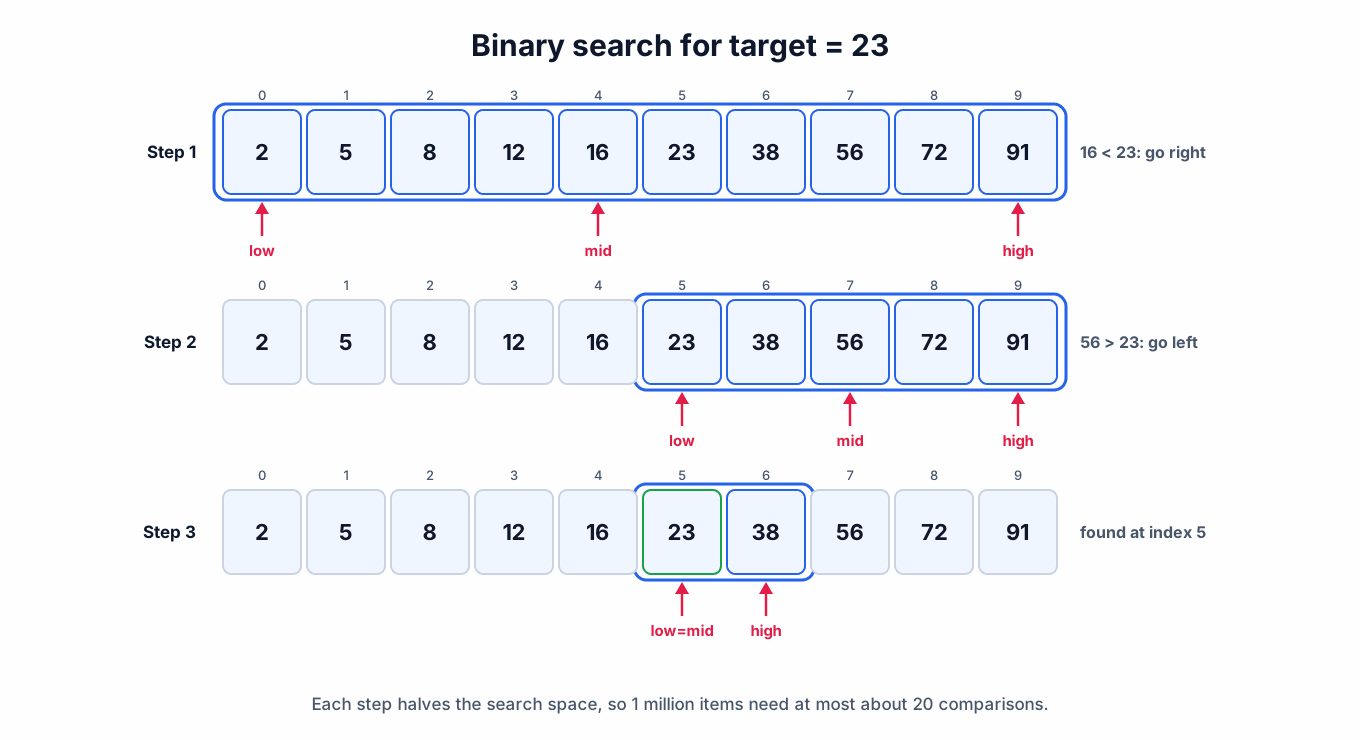
- Set
lowto the first index andhighto the last. - Look at the middle element,
mid. - If it equals the target, you're done.
- If the target is larger, it must be to the right: move
lowtomid + 1. - If the target is smaller, move
hightomid - 1. - Repeat until
low > high, which means the target isn't there.
The data must be sorted (or, more generally, have a property that tells you which half to discard). Sorting first costs O(n log n), so binary search pays off when you search the same data many times.
Iterative implementation#
def binary_search(nums: list[int], target: int) -> int:
    low, high = 0, len(nums) - 1
    while low <= high:
        mid = low + (high - low) // 2
        if nums[mid] == target:
            return mid
        if nums[mid] < target:
            low = mid + 1
        else:
            high = mid - 1
    return -1

print(binary_search([2, 5, 8, 12, 16, 23, 38, 56, 72, 91], 23)) # 5public static int binarySearch(int[] nums, int target) {
int low = 0, high = nums.length - 1;
while (low <= high) {
int mid = low + (high - low) / 2; // avoids int overflow
if (nums[mid] == target) return mid;
if (nums[mid] < target) low = mid + 1;
else high = mid - 1;
}
return -1;
}function binarySearch(nums, target) {
let low = 0, high = nums.length - 1;
while (low <= high) {
const mid = low + Math.floor((high - low) / 2);
if (nums[mid] === target) return mid;
if (nums[mid] < target) low = mid + 1;
else high = mid - 1;
}
return -1;
}(low + high) / 2 can overflow in Java and C++ when both are large. This bug sat in Java's own Arrays.binarySearch for years. Always write low + (high - low) / 2.
Recursive implementation#
def binary_search_rec(nums, target, low=0, high=None):
    if high is None:
        high = len(nums) - 1
    if low > high:
        return -1
    mid = (low + high) // 2
    if nums[mid] == target:
        return mid
    if nums[mid] < target:
        return binary_search_rec(nums, target, mid + 1, high)
    return binary_search_rec(nums, target, low, mid - 1)
The recursive version is elegant but uses O(log n) stack space. Prefer the iterative one in practice.
Complexity#
| Linear search | Binary search | |
|---|---|---|
| Time | O(n) | O(log n) |
| Space | O(1) | O(1) iterative, O(log n) recursive |
| 1,000 items | up to 1,000 checks | at most 10 |
| 1,000,000,000 items | up to 1 billion checks | at most 30 |
Each step halves the range, so after k steps there are n / 2k items left. That reaches 1 when k = log₂ n. More on this in Big O notation explained.
Variation 1: first and last occurrence#
With duplicates, plain binary search returns any matching index. To find the first one, keep searching left after a match:
def first_occurrence(nums, target):
    low, high, result = 0, len(nums) - 1, -1
    while low <= high:
        mid = (low + high) // 2
        if nums[mid] == target:
            result = mid
            high = mid - 1          # keep looking left
        elif nums[mid] < target:
            low = mid + 1
        else:
            high = mid - 1
    return result

def last_occurrence(nums, target):
    low, high, result = 0, len(nums) - 1, -1
    while low <= high:
        mid = (low + high) // 2
        if nums[mid] == target:
            result = mid
            low = mid + 1           # keep looking right
        elif nums[mid] < target:
            low = mid + 1
        else:
            high = mid - 1
    return result

nums = [1, 2, 2, 2, 3, 5]
print(first_occurrence(nums, 2), last_occurrence(nums, 2))   # 1 3
# count of 2s = last - first + 1 = 3
Variation 2: lower bound (insert position)#
"Find the first index where nums[i] >= target" is the most reusable form of binary search. It also answers "where would I insert this to keep the array sorted?"
def lower_bound(nums, target):
    low, high = 0, len(nums)        # note: high = len, not len - 1
    while low < high:               # note: <, not <=
        mid = (low + high) // 2
        if nums[mid] < target:
            low = mid + 1
        else:
            high = mid
    return low

print(lower_bound([1, 3, 5, 6], 5))   # 2
print(lower_bound([1, 3, 5, 6], 2))   # 1
print(lower_bound([1, 3, 5, 6], 7))   # 4
Python's bisect.bisect_left, Java's Collections.binarySearch and C++'s std::lower_bound all implement this.
Variation 3: search in a rotated sorted array#
[4, 5, 6, 7, 0, 1, 2] is a sorted array rotated at some pivot. At every step, one half is still sorted, so check which half and whether the target lies in it:
def search_rotated(nums, target):
    low, high = 0, len(nums) - 1
    while low <= high:
        mid = (low + high) // 2
        if nums[mid] == target:
            return mid
        if nums[low] <= nums[mid]:                    # left half sorted
            if nums[low] <= target < nums[mid]:
                high = mid - 1
            else:
                low = mid + 1
        else:                                         # right half sorted
            if nums[mid] < target <= nums[high]:
                low = mid + 1
            else:
                high = mid - 1
    return -1
Variation 4: binary search on the answer#
Many problems don't search an array at all. Instead, you binary search over possible answers, using a check function that's "false, false, …, true, true".
Example: Koko eating bananas. Given piles and h hours, find the minimum eating speed k so all bananas are eaten in time.
import math

def min_eating_speed(piles: list[int], h: int) -> int:
    def can_finish(k):
        return sum(math.ceil(p / k) for p in piles) <= h

    low, high = 1, max(piles)
    while low < high:
        mid = (low + high) // 2
        if can_finish(mid):
            high = mid        # mid works; try smaller
        else:
            low = mid + 1     # too slow
    return low

print(min_eating_speed([3, 6, 7, 11], 8))   # 4
The same idea solves "minimum capacity to ship packages", "split array largest sum" and "square root of x".
Avoiding off-by-one bugs#
| Template | Loop condition | Range updates | Use for |
|---|---|---|---|
| Exact match | low <= high | low = mid + 1, high = mid - 1 | Find a specific value |
| Boundary | low < high | low = mid + 1, high = mid | First index meeting a condition |
Always test with an empty array, a single element, the target at the very first and last positions, and a target that's missing. If your loop ever doesn't shrink the range, it will run forever.
Practice problems#
- Binary Search (LeetCode 704)
- Search Insert Position (35)
- Find First and Last Position of Element (34)
- Search in Rotated Sorted Array (33)
- Find Minimum in Rotated Sorted Array (153)
- Koko Eating Bananas (875)
- Median of Two Sorted Arrays (4), for a challenge
Next, learn another core array pattern: the sliding window technique.
Key takeaways#
- Binary search halves a sorted search space each step, giving O(log n) time.
- Compute the midpoint as
low + (high - low) / 2to avoid overflow. - Use the exact-match template for finding values and the boundary template for first/last positions.
- Rotated arrays work because one half is always sorted.
- "Binary search on the answer" solves optimisation problems with a monotonic check function.